Configure block widgets
This topic describes how to view and configure widget styles within a block.
Prerequisites
You have created a block.
Procedure
Access the DataV console.
On the Workbench page, in the Widget Development module, click Block to open the Block Management page.
Click the target block to open its editor page.
In the block editor, add the desired widgets to the block.
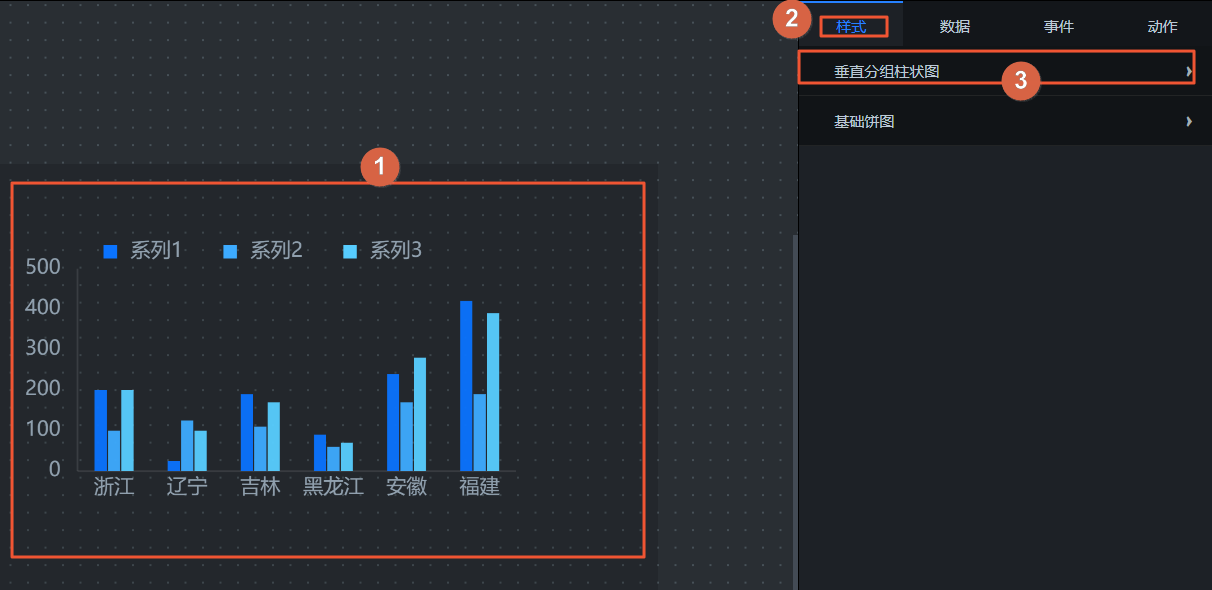
Click an added widget. All style configuration settings for the widget appear on the right side of the editor, as shown in the following figure.
NoteYou can adjust widget styles in the block in the same way that you configure widget styles in the canvas editor.
In the upper-right corner of the block editor page, click the
 icon to preview the block.
On the preview page, click the style panel to view all widget style settings in the block. On this panel, you can also view the configuration details for Style, Data, Event, and Action.
 Note
NoteWidgets added to a block do not currently support style regrouping. The style panel displays the styles for all widgets within the block.