Data source configuration
A data source registers connection details of an external data system (database, storage, or message queue) in DataWorks for data read/write across modules. Standard-mode workspaces support environment isolation — separate data sources for development and production prevent test operations from affecting production data.
Features
Data source usage
Data sources in DataWorks are centrally managed in the section of a workspace. After you create and test a connection, you can use it across DataWorks modules.
Module | Use case | Supported types |
Data Integration | Run data synchronization tasks to migrate data between data sources, such as from MySQL to MaxCompute. Supports various types of synchronization, including single-table, full-database, batch, and real-time. | |
Data Studio | Develop, debug, and periodically schedule nodes. In standard mode, tasks automatically use the designated data source for the development or production environment. | |
Data Map | Collect metadata from data sources. You can view table structures and lineage information. | |
Data Analysis | Connect to databases for data processing, analysis, transformation, and visualization. | |
Data Service | Generate API services based on data source table structures to provide data query interfaces. |
Data source environment isolation
Standard-mode workspaces support data source environment isolation — separate data sources for development and production prevent test operations from affecting production data. For more information, see Data source environment description.
Data source types
DataWorks supports two data source types:
Comparison | Standard type | Metadata type |
Primary purpose | Stores connection details for physical data access, used for reading, writing, and computing. | Stores connection details for data lake metadata centers. It is used only for metadata collection and governance. |
Target object | Physical data itself. | Descriptive information about data (metadata), such as database, table, and column structures. |
Available for task execution | Yes. The reader and writer of synchronization tasks must reference this type of data source. | No. Cannot be used as a task input or output. |
Typical examples | MySQL, MaxCompute, Hologres, DLF, OSS, and more. | Paimon Catalog. |
Summary: Use standard data sources for data reading, writing, or computing. Use metadata data sources to bring Paimon and other data lake table structures into DataWorks for governance and viewing.
Prerequisites
Before you configure a data source, ensure the following:
Permission requirements: You must have the Workspace Administrator or Operator role in the target workspace, or be a RAM user with the
AliyunDataWorksFullAccessorAdministratorAccesspolicy. Authorization: Grant permissions to a RAM user and Manage workspace roles and members.Connection details: Prepare the connection information: instance or endpoint (Endpoint/JDBC URL), port, database name, username, and password.
Network connectivity: Ensure the DataWorks resource group can access your data source. If your data source is accessible over the Internet and you use a serverless resource group, you must configure an Internet NAT Gateway and an EIP for the VPC associated with the resource group.
Notes
Usage limits: Data sources created with cross-region, cross-account, or AccessKey methods can only be used for data synchronization, not for data development or task scheduling.
Module creation differences: In standard mode, data sources created in Administration include both development and production environment information. Data sources created in Data Integration include only production environment information. Create and maintain all data sources in Administration.
Creation methods: Automatic and manual
Creation method | Description | Applicable scenario |
Automatic creation | When you associate a compute resource (such as MaxCompute or Hologres) with a workspace, the system automatically creates and manages the corresponding data source. Its lifecycle and permissions are inherited from the compute resource. | Recommended: When the data source is used for data development, you must use this method. Otherwise, tasks cannot run. |
Manual creation | Manually specify connection details, authentication credentials, and other parameters for the data source. You can control the lifecycle and permission assignment of the data source. | Applicable to all data source types, especially for Data Integration, Data Service, or scenarios that require fine-grained permission control. |
Entry point
Log on to the DataWorks console. In the target region, click in the left-side navigation pane. Select a workspace from the drop-down list and click Go to Management Center.
In the left-side navigation pane, click Data Sources to go to the Data Sources page.
Click Add Connection in the upper-left corner of the page.
Create a data source
Step 1: Select a connection mode
DataWorks supports the Instance Mode and User-created Data Store with Public IP Addresses modes for configuring data source connections.
Scenario 1: Instance mode (current Alibaba Cloud account)
If your data source is an Alibaba Cloud service (such as ApsaraDB RDS or PolarDB) under the current account, select Instance Mode. Specify the Region and Instance. The system automatically obtains the connection details.
If purchasing a new instance, use the same VPC as the DataWorks resource group to minimize network configuration.
If you already have a data source instance and its VPC is different from the VPC used by the DataWorks resource group, make sure to configure network connectivity to ensure proper data source access.
Scenario 2: Instance mode (another Alibaba Cloud account)
When you add a data source in instance mode, if you need to access an instance under Another Alibaba Cloud Account, you can configure the ID of Another Alibaba Cloud Account and Name of Role Assigned to RAM User to create a cross-account data source.
When creating a cross-account data source, make sure that:
The RAM role you use has access to the target data source. For cross-account authorization, see Cross-account authorization for data sources and Cross-account authorization for instances.
Network connectivity is established between the resource group of the consumer account (current account) and the data source of the resource owner account (another account).
Scenario 3: Connection string mode
For self-managed data sources on ECS instances, in on-premises data centers, or on the public network, use connection string mode. Manually configure the network address (Endpoint/JDBC URL), port, database name, and credentials (username/password/AccessKey).
When using connection string mode, ensure the IP address and port are accessible from the DataWorks resource group network. Determine whether to enable public network access and configure security groups and allowlists as needed. Configure network connectivity.
If your data source IP address changes frequently or uses domain-based access, resolve this by binding a host to an exclusive resource group for Data Integration or configuring PrivateZone DNS resolution for the serverless resource group.
When you use connection string mode, DataWorks automatically parses the JDBC URL. If the URL contains unsupported parameters, the system automatically removes those parameters. To retain special parameters, submit a ticket to contact technical support.
Step 2: Enter connection details
In standard mode, you must configure connection details separately for the development environment and the production environment. You can choose to use the same or different configurations for the two environments.
Data source name: Must be unique within the workspace. We recommend that you use a name that clearly identifies the business and environment, such as
rds_mysql_order_dev.Data source description: Briefly describe the purpose of the data source.
Connection details: Based on the connection mode described above, enter the instance or URL address, port, and other information for the data source.
Step 3: Set authentication credentials
DataWorks supports multiple authentication methods. Set credentials based on the data source type and configuration page. Ensure the credentials have the required database permissions.
Authentication method | Use case |
Username and password | Applicable to most database types (such as ApsaraDB RDS and StarRocks). DataWorks accesses the data source through username and password authentication. |
RAM account | Multiple methods are supported as described below. Applicable to Alibaba Cloud services that support RAM account authentication, such as MaxCompute and Hologres. You can set the account based on the required permissions.
|
Kerberos authentication | A third-party authentication mechanism. Applicable to big data components such as Hive, HDFS, and HBase. Kerberos authentication requires uploading Keytab, krb5.conf, and other authentication files. Configuration guide: Configure Kerberos authentication. |
AccessKey | An AccessKey pair is a permanent access credential consisting of an AccessKey ID and an AccessKey Secret. Applicable to data sources such as OSS and Tablestore. AccessKey pairs have a lower security level — use RAM role-based authentication when available. |
KMS generic secret | Host data source access credentials in Alibaba Cloud Key Management Service (KMS). When you create a data source, set Access identity to Key Management Service, select the Kms Region where the KMS generic secret resides, and select the target generic secret from the KMS List. After the secret is rotated, DataWorks automatically uses the latest credential, and no reconfiguration in DataWorks is required. You must first create a generic secret in KMS. For more information, see Manage and use generic secrets. The content of a KMS generic secret supports the following two JSON formats: Data source types that currently support KMS generic secrets: DB2, FTP, MongoDB, MySQL, Oracle, PolarDB, PolarDB-O, PostgreSQL, PolarDB-X 2.0, SQL Server. Note After the content of a KMS generic secret is changed, DataWorks caches the secret for up to 5 minutes. The new secret takes effect within 5 minutes at the latest. |
If your database has SSL authentication enabled, also enable SSL when creating the data source. Enable SSL authentication for a PostgreSQL data source.
Step 4: Test connectivity
At the bottom of the page, click Test Connectivity for each resource group associated with the workspace.
If Connectable is displayed, the configuration is correct.
If Cannot Connect is displayed, the system provides a diagnostic tool to help troubleshoot. Common causes include incorrect credentials, network issues (IP allowlist not configured), or a missing NAT gateway.
In standard mode, make sure that both the development environment and the production environment show Connectable. Otherwise, errors will occur during subsequent use.
You can configure the network based on the data source configuration mode, region, instance ownership, and deployment location:
Scenario | Instructions |
The data source is an Alibaba Cloud service and belongs to the same Alibaba Cloud account and is in the same region as the DataWorks workspace. | |
The data source is an Alibaba Cloud service and belongs to the same Alibaba Cloud account as the DataWorks workspace, but is in a different region. | Connect data sources under the same Alibaba Cloud account across different regions |
The data source is an Alibaba Cloud service, but belongs to a different Alibaba Cloud account than the DataWorks workspace. | |
The data source is deployed on an Alibaba Cloud ECS instance. | |
The data source is deployed in an on-premises data center. | |
The data source has a public endpoint. |
Manage data sources
On the data source management page, filter data sources by Data Source Type and Data Source Name. You can also perform the following operations on a data source: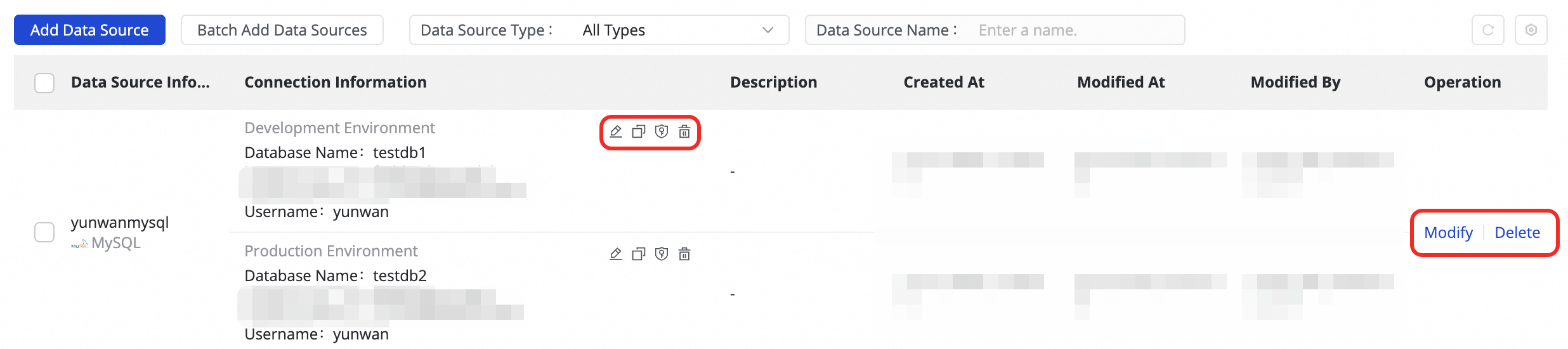
Edit, clone, and manage permissions
Edit: Modify the configuration of a data source as needed. The data source name and applicable environment cannot be changed.
Data sources that are automatically created when you associate a compute resource in Administration cannot be directly edited. To modify them, edit them on the compute resource management page.
Cloning: Clone a data source to quickly create a new one with the same configuration.
Manage Permissions: You can click the
 icon to manage cross-workspace usage permissions for the data source. Data source permission management allows you to grant access to the current data source for other workspaces or specific users in other workspaces. After you grant Allowed permission, the user can view and use the data source but cannot edit it.
Other data source permission issues: Data source permission FAQ.
Delete a data source and the impacts
In the data source list, click the delete button to delete a data source. However, data sources automatically created when you associate a compute resource in Administration cannot be directly deleted. In Administration, click Computing Resources in the left-side navigation pane of Administration, find the compute resource, and click Disassociate. After disassociation, the corresponding data source is also deleted.
The impacts of deleting a data source on the Data Integration module are as follows:
Pre-check: Before you delete a data source, verify whether the data source is associated with any synchronization tasks in the production environment.
Solution: If associated tasks exist, use batch editing to change the data source of the tasks, and then resubmit and deploy them.
Deletion scenario | Impact |
Delete both the development and production environments | • Production tasks will completely fail and cannot run. • The data source will not be visible when you configure new tasks in the development environment. |
Delete only the development environment | • Production tasks can run normally. • However, when you edit a task, metadata (such as table structures) cannot be retrieved. • The data source will not be visible when you configure new tasks in the development environment. |
Delete only the production environment | • Production tasks will completely fail and cannot run. • Tasks that use this data source in the development environment cannot be submitted and deployed to the production environment. |
The impacts on other modules are as follows:
Module | Risk level | Key impacts and solutions |
Operation Center | High | Impact: All periodic computing and Data Integration tasks that depend on this data source will fail. Solution: Use batch editing to change the data source of the tasks, and then redeploy them. |
Data Service API | High | Impact: All generated APIs and API orchestrations based on this data source will fail to be called. Solution: Replace the data source for the affected APIs. |
Data Analysis | Medium | Impact: In the DataAnalysis module, query tasks that target this data source will fail. Solution: Switch to another available data source when running SQL queries. |
Data Quality | Medium | Impact: Tasks with configured data quality monitoring rules will report check exceptions. Solution: Go to Operation Center and disassociate the tasks from the DQC rules, or modify the rules. |
If the data source has been granted for cross-workspace use, deleting the data source will also cause tasks that use this data source in other workspaces to fail.
Advanced topics
Data source environment description
Workspace modes: Basic vs. standard
DataWorks provides basic mode and standard mode workspaces. Basic mode and standard mode.
Basic mode: Single environment. All development operations directly affect production. Suitable for quick verification or personal testing.
Standard mode: Recommended for enterprise use. Built-in development and production environments. You can configure different data sources (such as test and production databases) or different access permissions for each environment to achieve data isolation.
Data source environment isolation
Workspaces in standard mode support data source environment isolation. A data source with the same name can have two configurations — one for development and one for production — connecting to different databases or instances. This isolates data accessed during testing and production scheduling, preventing production data from being contaminated by debugging operations.

In the Data Integration module, only single-table batch synchronization tasks in standard mode workspaces support data source isolation between development and production environments. Other types of synchronization tasks use the production environment data source.
A data source with only the production environment configured and no development environment information cannot be selected when you configure nodes in Data Studio.
If you upgrade a workspace from basic mode to standard mode, the original data source is split into two data sources for the production and development environments. Upgrade a workspace from basic mode to standard mode.
Relationship with Data Integration data sources
Basic mode:
When the workspace is in basic mode, there is only one environment. Data sources created in Data Integration and those created in Administration are identical.
Standard mode:
When you create a data source in Administration, a data source with the same name is automatically created in Data Integration. Both share the production environment configuration of the data source.
When you create a data source in Data Integration, a data source with the same name is also automatically created in Administration. However, this data source only has production environment information, and the development environment will show missing information. You must complete the development environment information before the data source can be used in Data Studio.
To ensure data source information integrity, we recommend that you always create and manage all data sources in Administration.
FAQ
Q: A task configured with a data source in a standard mode workspace succeeds in the development environment but fails during production scheduling. Why?
A:
Check whether the connectivity test succeeds for both the development environment and the production environment of the data source.
Check whether the data in the databases of the development environment and the production environment is consistent and meets the business requirements.
What are development environment and production environment data sources used for?
You can configure separate data sources for the development environment and the production environment. Development environment data sources are used only for node development and debugging, while production environment data sources handle periodic scheduling for deployed nodes. This strict separation prevents test operations from affecting production data.
Q: Why does the data source connectivity test fail?
A: This is usually caused by the following reasons. Check them one by one. For network connectivity configuration, see Configure network connectivity.
Incorrect credentials: Check whether the username and password you entered are correct.
Incorrect access target: Check whether the database, bucket, or other connection target name you entered is correct, and whether the account and password have the required access permissions.
Incorrect address or port: Check whether the data source connection address and port number are correct. If a host domain name is specified as the address, make sure that the domain name can be properly resolved. See PrivateZone DNS resolution.
Network issues: Check whether the data source and the resource group are connected. If the data source has allowlist controls, check whether the vSwitch CIDR block associated with the resource group has been added to the allowlist. If you use a serverless resource group to connect to a public network data source, check whether a NAT gateway has been configured.
Q: What is the difference between a compute resource and a data source?
A:
A compute resource is a resource instance in DataWorks that can execute data processing and analysis tasks and has computing capabilities. It typically refers to the underlying compute engine, such as MaxCompute, Hologres, or AnalyticDB, and is primarily used for data development and scheduling tasks.
A data source in DataWorks is used to connect to various data storage services and provides data storage and management capabilities. Data sources provide interfaces for reading and writing data, and are primarily used for synchronization and integration tasks. Additionally, data sources also support features such as database nodes, Data Service APIs, and query analysis.
Q: What is the difference between a DLF data source and a Paimon Catalog data source?
A: A DLF data source is a standard data source type that can be used for Data Integration and Data Analysis. It also supports metadata management for Paimon, Iceberg, and other table types that use DLF-registered metadata. A Paimon Catalog data source is used only for metadata collection of Paimon lake formats from non-DLF sources, supporting governance features such as metadata retrieval, viewing, and quality monitoring. It currently does not support data synchronization.