DataWorks security capabilities
To align with core data security governance principles, DataWorks provides a comprehensive suite of capabilities to inventory assets and establish technical and operational systems. Based on the Identify, Protect, Detect, and Respond (IPDR) framework, DataWorks helps you systematically build a complete and efficient data security system that covers asset identification, security protection, behavior detection, and risk event response.
DataWorks security landscape
DataWorks is available in multiple editions, including Basic, Standard, Professional, and Enterprise. The features offered vary by edition. For more information, see Feature details of each DataWorks edition.
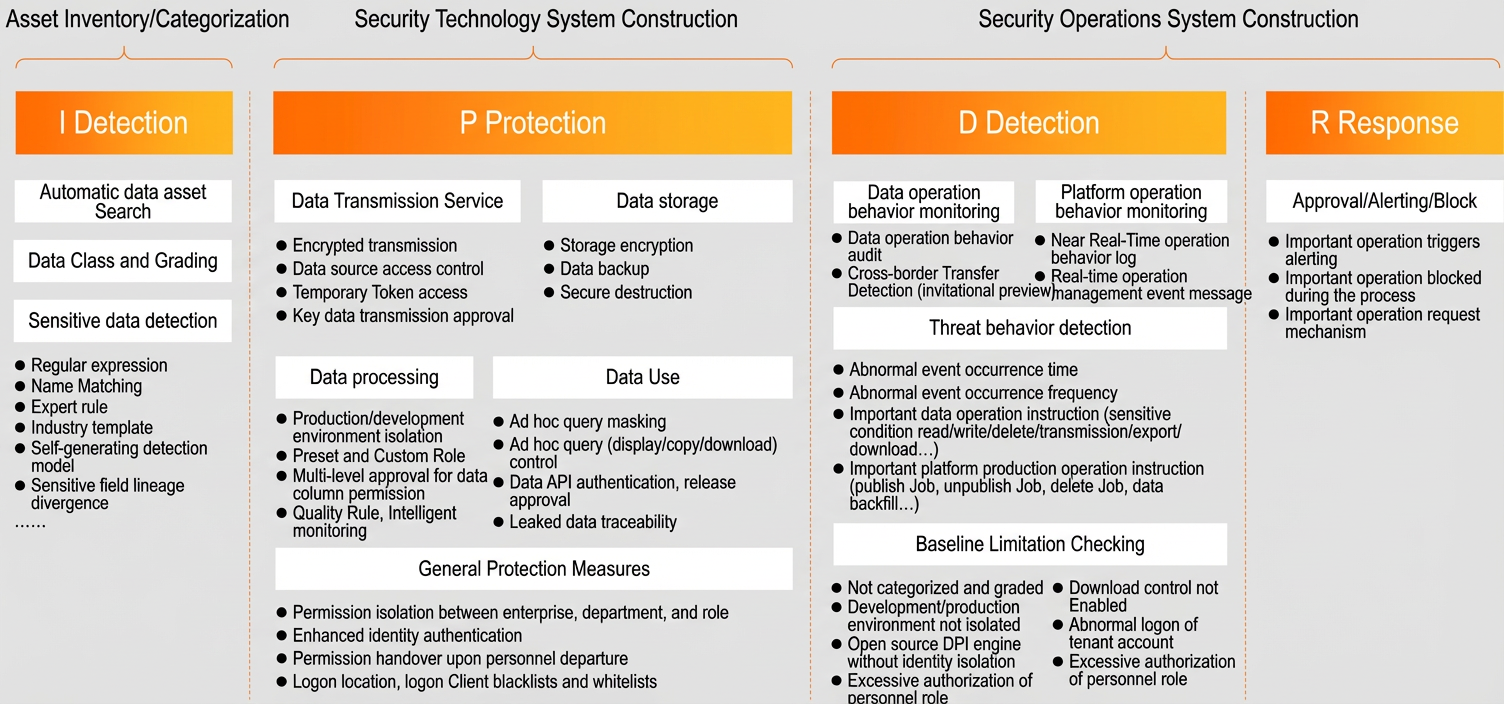
Asset identification I (Identify)
Enterprises must inventory their systems and business data to identify all types of sensitive assets. This helps determine which systems, assets, and data could pose security threats to the nation, organizations, or individuals.
DataWorks helps you identify assets in the following ways:
-
Supports automatic metadata detection and allows administrators to collect metadata by configuring data sources. For more information, see Metadata Collection.
The Data Map Data Overview page in DataWorks displays aggregated metadata statistics for each data source. These statistics include the total number of projects, tables, storage size, APIs, and storage trends for MaxCompute, as well as the total number of databases, tables, and APIs for data sources such as AnalyticDB for MySQL 3.0, MySQL, E-MapReduce, and Hologres.
-
Enables administrators to quickly identify sensitive information by configuring keywords, regular expressions, or using built-in expert templates, semantic feature templates, and content identification templates.
NoteThis feature is available only in DataWorks Enterprise Edition.
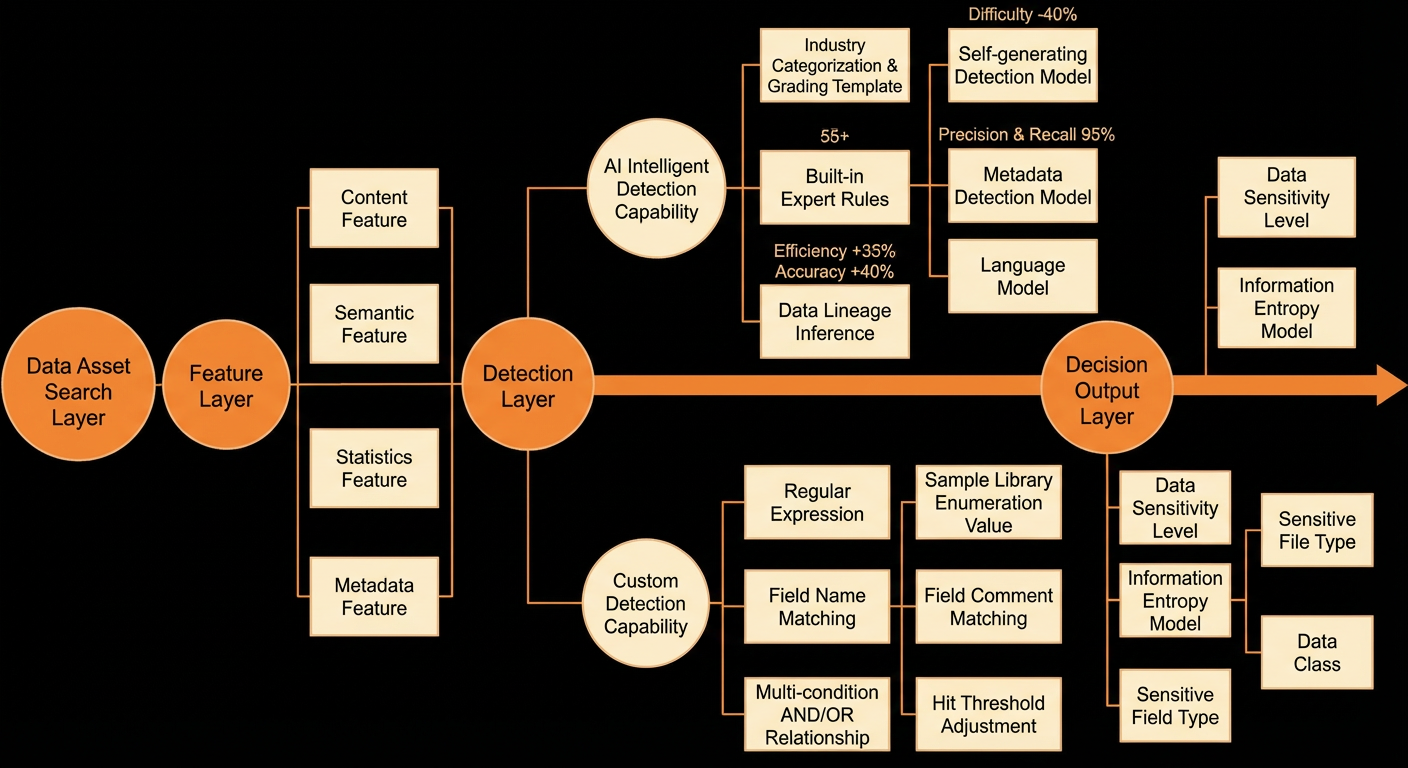
After the identification is complete, you can select Data Discovery from the left navigation pane to view an overview of the results. The page provides filtering options at the top, including engine type, project, classification, level, and sensitive field type. Click Query to apply the filters. The main section displays the Overall Distribution (total number of identified fields and tables) and the distribution by Level & Project. There are nine sensitivity levels: Non-sensitive, Internal, Sensitive, Confidential, and L5 to L9.
-
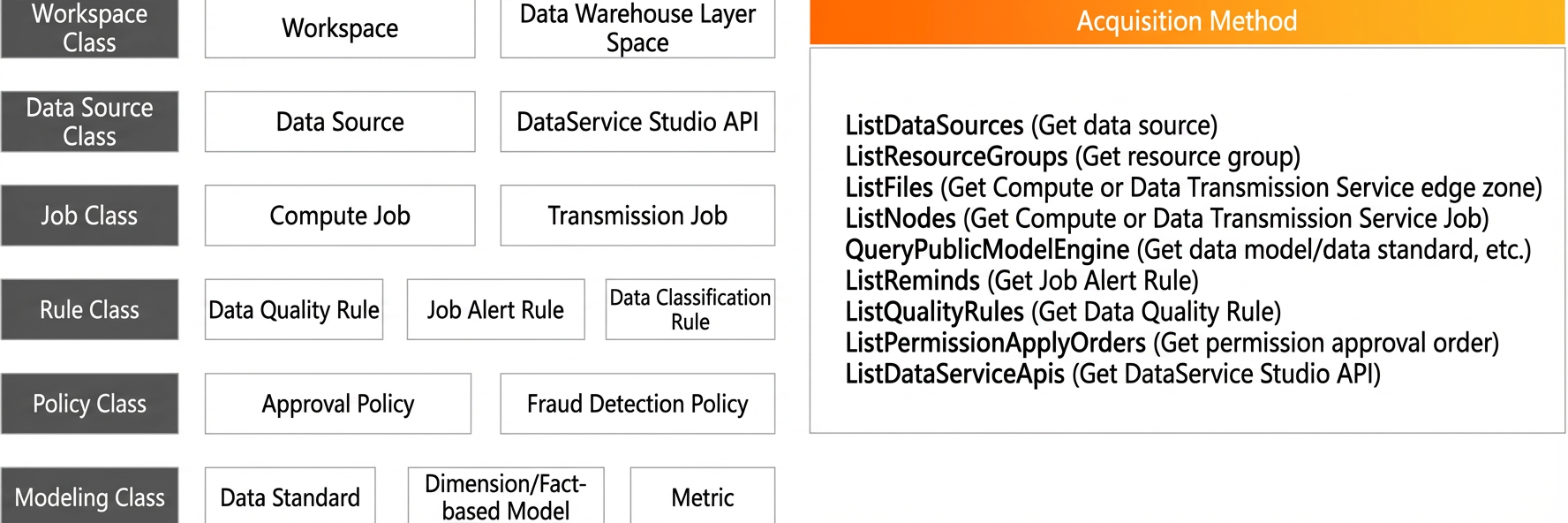
For non-data entities, improper operations can also introduce risks. You can use OpenAPI to get a complete overview of these entities, allowing you to define their importance based on their business attributes. For more information about OpenAPI, see DataWorks OpenAPI overview.
Security protection P (Protect)
For the assets classified in the previous step, you can define and implement the most appropriate protective measures for each asset. For example, you can decide which systems require multi-factor authentication, which databases need row-level authorization, and which tables and fields should be restricted from download.
DataWorks and MaxCompute provide a wide range of basic and advanced data protection capabilities, as described below.
Data transfer
-
Transfer encryption: You can enable SSL channel encryption for a data source when you create a data synchronization task.
-
Temporary identity: You can use a temporary token as the access identity for a data source to eliminate the risk of credential leakage. For more information, see Configure a data source by using a RAM role for authorization.
-
Data Tracking: This feature allows you to control data flows. You can use it to save and approve data integration tasks.
NoteThe Data Tracking feature is available only in DataWorks Enterprise Edition.
Data storage
-
Storage encryption: MaxCompute provides native support for transparent encryption and column-level encryption.
-
Local backup: The cloud-native underlying storage natively supports three-replica backup. Additionally, MaxCompute provides data backup and recovery features. You can quickly restore data within the retention period to avoid data loss due to incorrect operations.
-
Data written to disks on Alibaba Cloud cannot be recovered after deletion. You can also manually set a table partition lifecycle to define a deletion schedule.
Data processing
-
Production/development environment isolation: DataWorks supports a collaborative work mode with isolated production and development environments. This enables a standardized workflow: "."
-
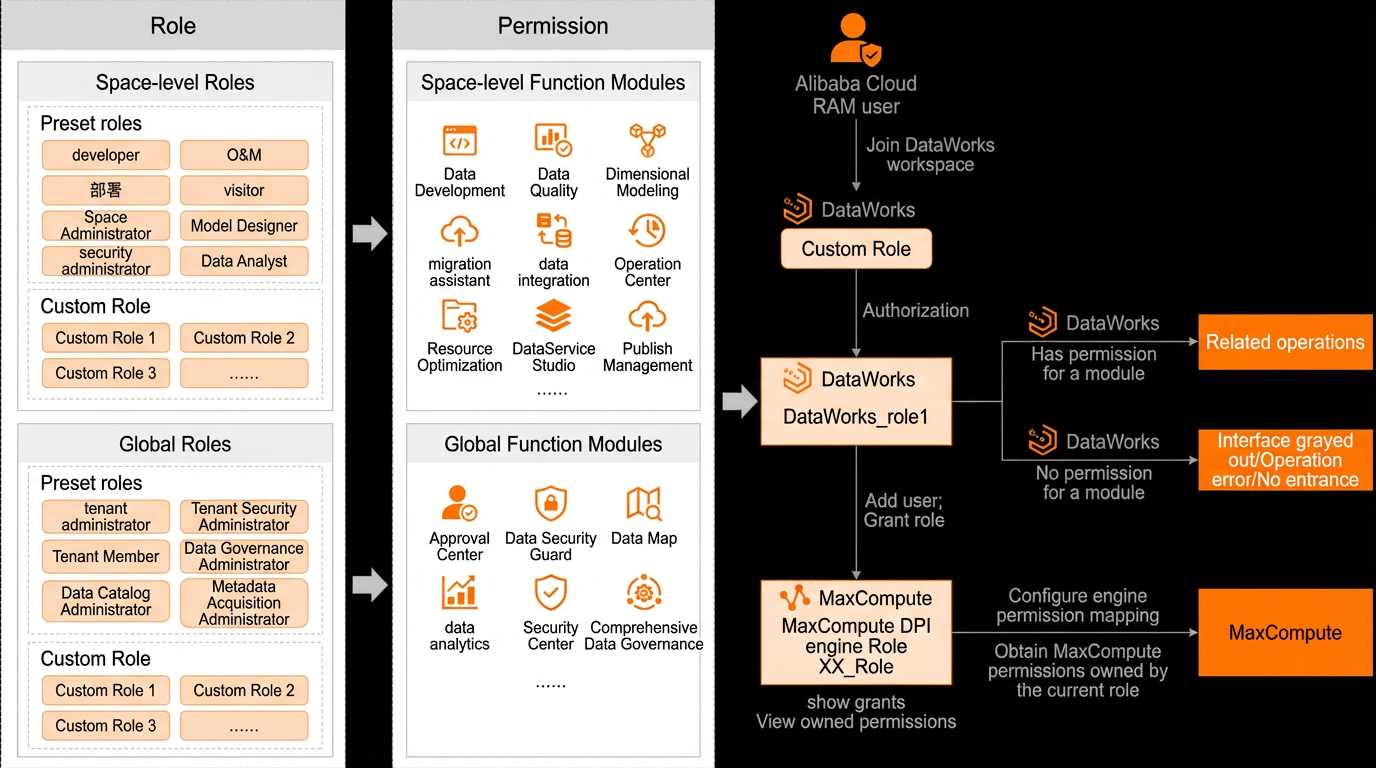
Preset and custom roles: Administrators can assign preset DataWorks roles to users to standardize development and production workflows. You can also create custom roles and configure their permissions as needed, such as mapping a custom role to a MaxCompute engine role.
NoteThis feature is available only in DataWorks Enterprise Edition.
-
Multi-level approval for column-level data: Based on the access control lists and data classification of the underlying big data engine, DataWorks allows you to define permission request and approval policies for data columns by project and data classification level.
NoteThis feature is available only in DataWorks Enterprise Edition.
-
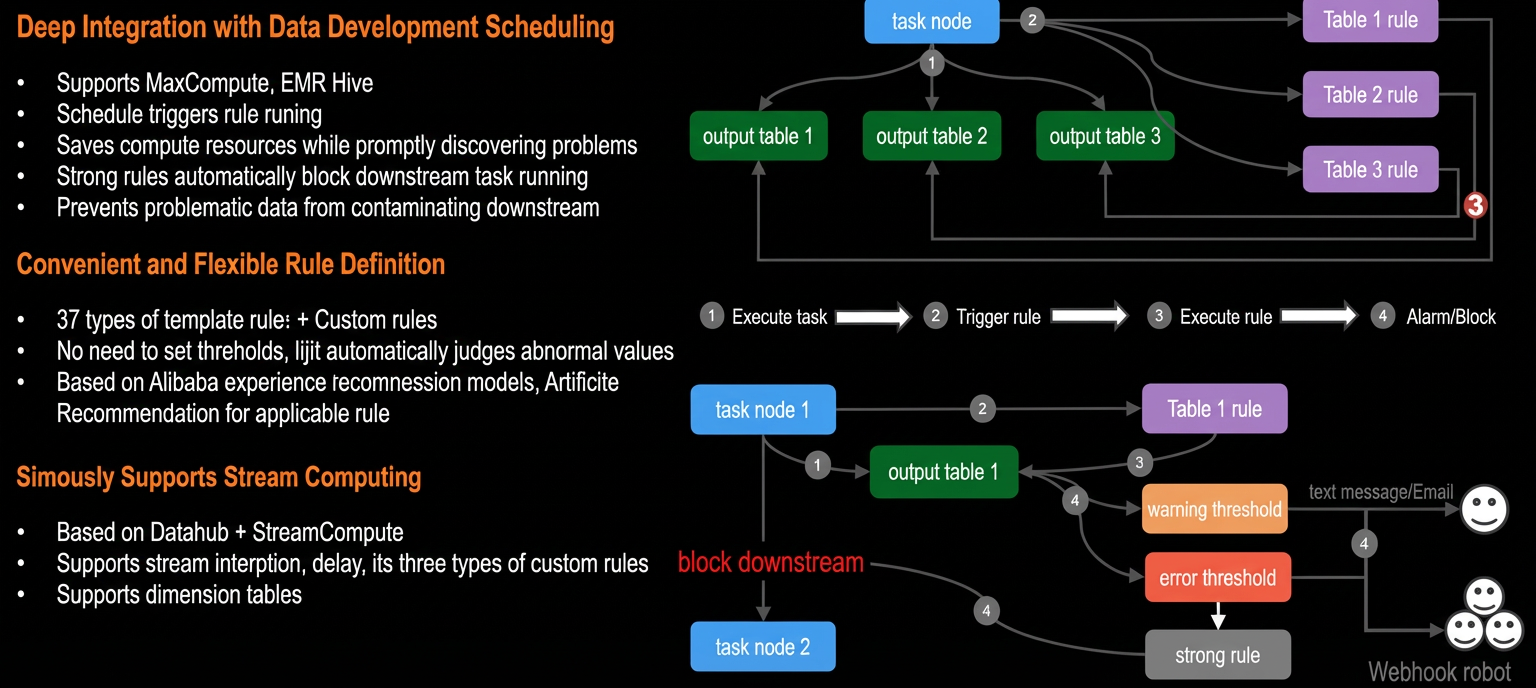
Data quality rules: Administrators can configure data quality rules and associate them with production tasks to ensure that daily output data is complete, clean, accurate, and ready for business decision-making. This safeguards data integrity and availability.
-
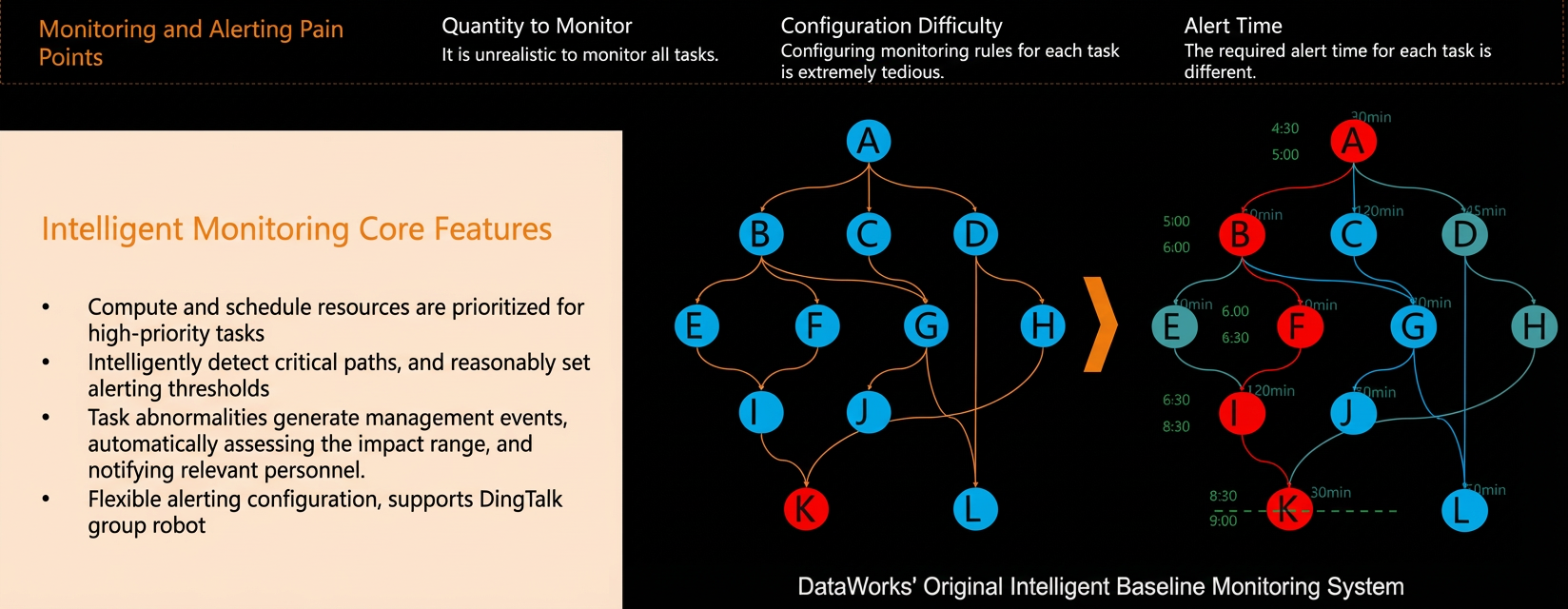
Intelligent monitoring rules: Administrators can allocate more computing or scheduling resources to critical tasks and implement end-to-end output monitoring. This ensures timely data delivery and maintains data availability.

Data usage
-
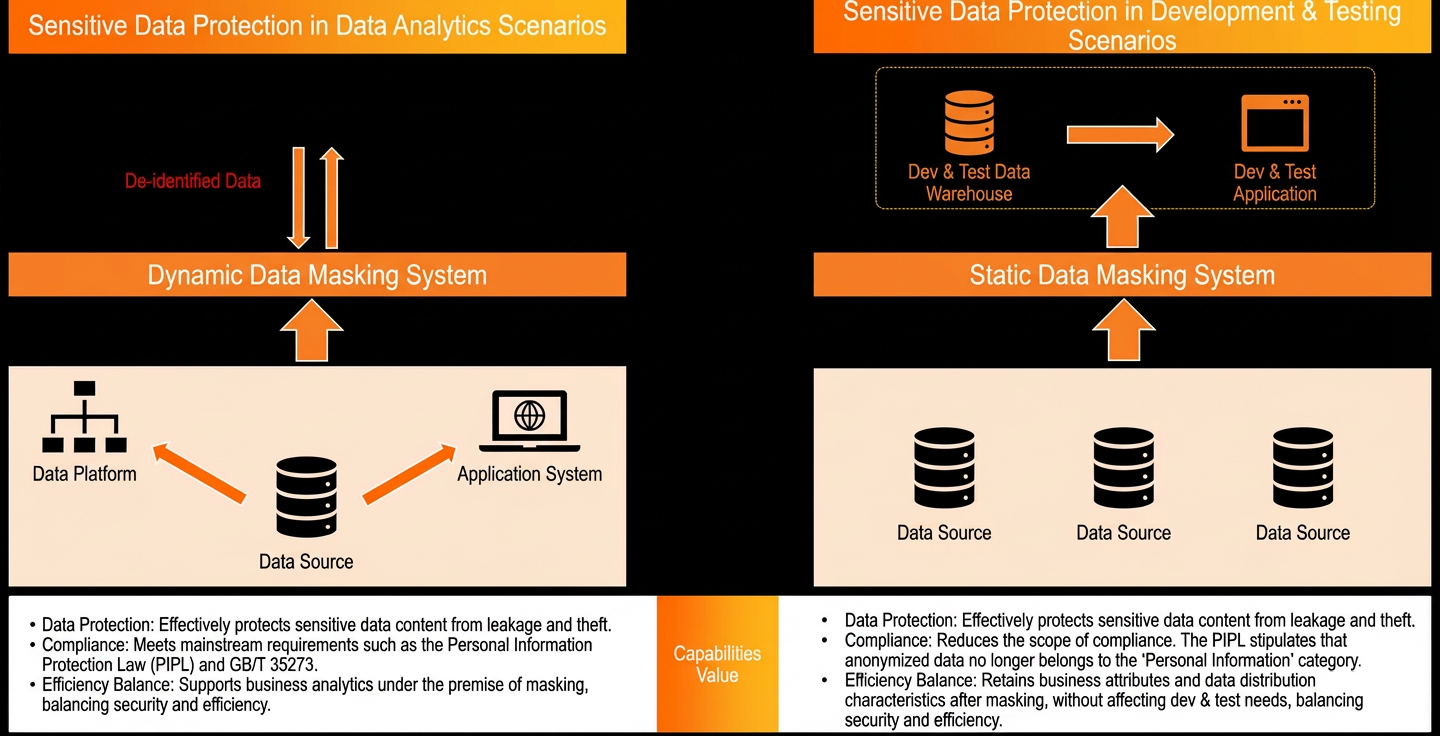
Dynamic and static data masking: Administrators can enable dynamic and static data masking for identified sensitive data to ensure data confidentiality during development and analysis.
Note-
Dynamic data masking is available only in DataWorks Professional Edition and later.
-
Static data masking scenarios, such as engine-level masking for Hologres and MaxCompute and static masking for data integration, are available only in DataWorks Enterprise Edition.
-
-
Data API authentication & release approval: You can configure authentication methods and policies for Data Service APIs, and set approval policies for API releases.
NotePublishing and approving Data Service APIs is supported only in DataWorks Enterprise Edition.
-
Leaked data tracing: You can extract watermark information from files containing leaked data to help administrators identify the individuals responsible for the leak.
NoteLeaked data tracing is available only in DataWorks Enterprise Edition.
General protective measures
-
Permission isolation: DataWorks supports tenant isolation for enterprises and workspace isolation for teams.
-
Enhanced identity authentication: Supports multi-factor authentication and role-based SSO.
-
Permission transfer for departing employees: Administrators can configure transfer policies or perform manual transfers. This process transfers ownership of entities such as resources and functions within a workspace when the responsible person is removed from the workspace or their account is deleted.
-
Logon location blacklist/logon entry blacklist: Administrators can restrict logins to a defined list of allowed IP addresses and can disable access from the DataWorks web login interface or through OpenAPI calls.
Behavior detection D (Detect)
Implementing protection measures is a crucial first step, but it is not sufficient. You must also establish baselines and rules to continuously monitor for issues like unexpected changes to security configurations or asset misuse. This allows for the rapid detection and prediction of risk events.
DataWorks provides the following risk detection capabilities:
Offline operation logs
-
DataWorks operation auditing: DataWorks is integrated with ActionTrail, where you can view and search DataWorks behavior event logs from the last 90 days. More than 200 types of DataWorks operation events and their key messages are recorded.
-
MaxCompute Information Schema: All operations within MaxCompute are recorded in Information Schema, the offline metadata repository, which you can query at any time.
Real-time operation logs
You can use OpenEvent to send messages about key operational changes in DataWorks. This allows users to subscribe to these messages and implement custom responses. Currently, 13 types of key operations support real-time event notifications. For more information, see Entity Operation Logs (Event Messages).
This feature is available only in DataWorks Enterprise Edition.
Offline risk rules
You can configure offline risk rules to detect abnormal data access or operations in MaxCompute, which in turn enables T+1 alerts. For more information, see Offline risk rules.
This feature is available only in DataWorks Enterprise Edition.
Real-time risk rules
You can use custom extensions to identify risks in high-risk DataWorks operations in real time. This allows you to deploy a risk identification program on-premises and leverage your own or third-party risk control capabilities to identify, block, warn, or approve cloud operations in real time. This breaks the boundary between cloud and on-premises data security governance. For more information, see Real-time risk rules.
This feature is available only in DataWorks Enterprise Edition.
Baseline configuration checks
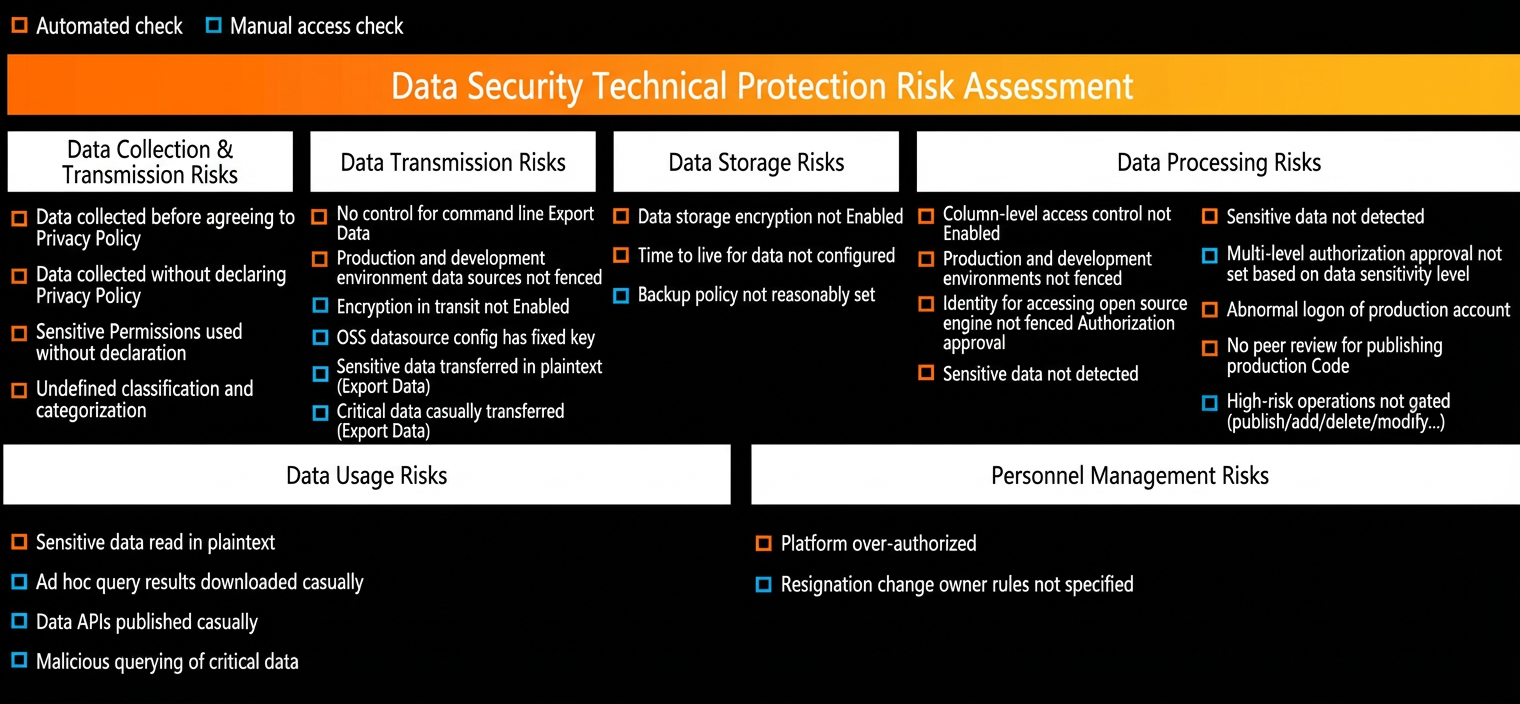
DataWorks provides configuration check capabilities related to identity authentication, access control, and development modes for workspaces and their bound data sources during data transfer, storage, and processing. This helps you promptly discover security vulnerabilities in the platform and establish a basic security framework before starting your work. For more information, see Baseline configuration check.
Risk event response R (Respond)
This phase involves establishing and implementing appropriate management mechanisms to handle detected incidents. When abnormal behavior is detected, you can take immediate action to restore or freeze the affected functions or services to minimize the event's impact. This can include using SOAR playbooks, executing automated response actions, analyzing risk events, and implementing recovery and continuous improvement processes.
Configuring real-time and offline risk identification rules and responding to detected risk events are features available only in DataWorks Enterprise Edition.
DataWorks provides basic capabilities for offline and real-time risk response to help you identify and handle risk events.
-
Offline risk response: This involves receiving T+1 alerts for abnormal data access or operations, which are triggered by the offline risk rules you configured.
-
Real-time risk response: You can use a custom extension for high-risk DataWorks operations to identify risks and then configure real-time approvals, blocks, or message alerts for these risky behaviors.