Customize the navigation bar for HTML5 pages
The Nebula HTML5 container supports two levels of navigation bar customization: a global default style applied to all HTML5 pages, and a per-page style applied before the page loads or after it opens.
Prerequisites
Before you begin, ensure that you have completed:
Set the default style for all HTML5 page navigation bars
To apply a uniform navigation bar style across all HTML5 pages based on the application theme, use the event listener mechanism provided by the Nebula container.
-
For the full list of supported events, see the
NebulaSDK/NBDefine.hheader file: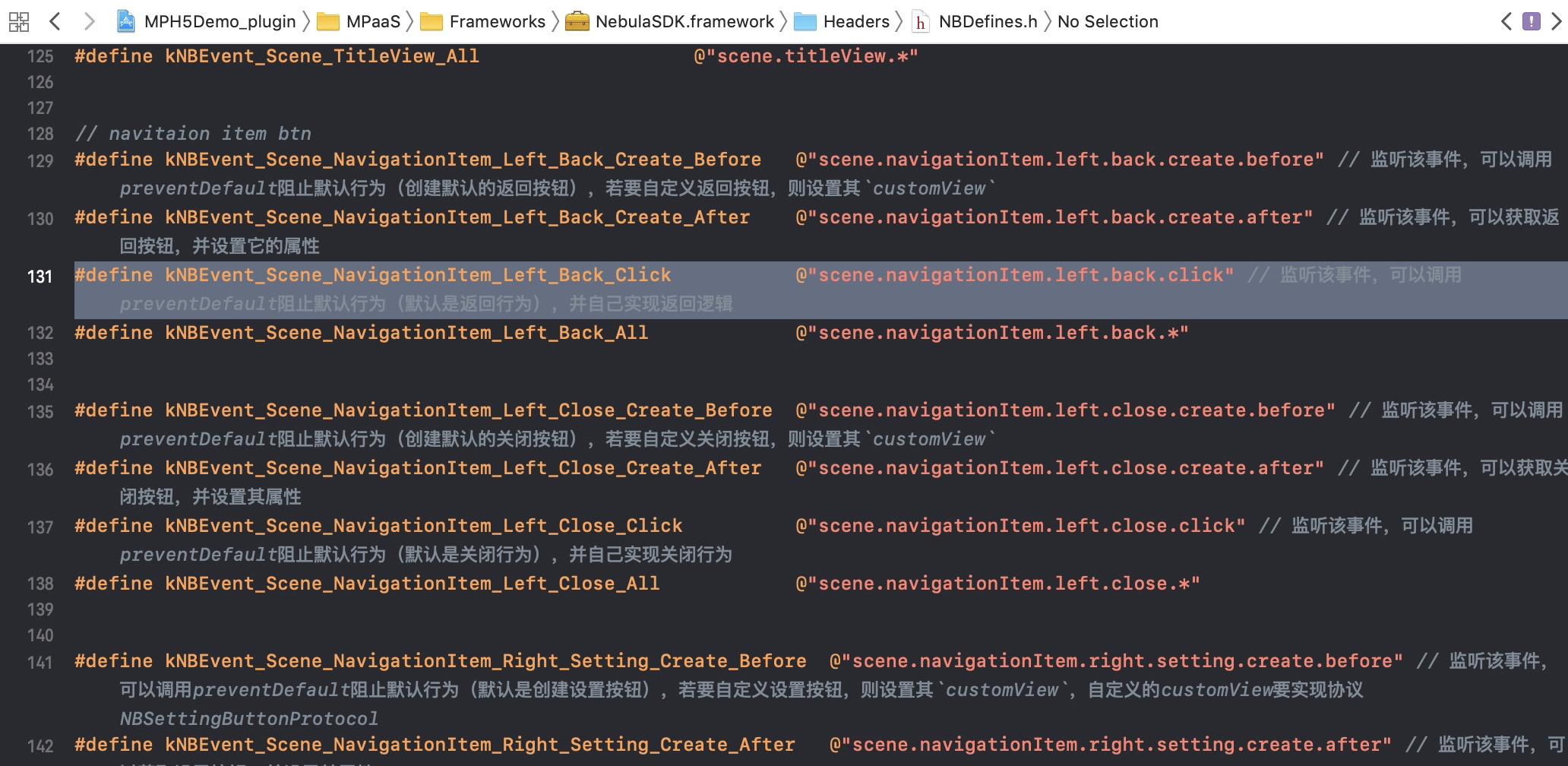
-
Register event listeners in your custom plugins. The following example registers listeners for all navigation bar areas: the Back button, title, OptionMenu control, and progress bar.
@implementation MPPlugin4TitleView - (void)pluginDidLoad { self.scope = kPSDScope_Scene; // -- Back area [self.target addEventListener:kNBEvent_Scene_NavigationItem_Left_Back_Create_Before withListener:self useCapture:NO]; [self.target addEventListener:kNBEvent_Scene_NavigationItem_Left_Back_Create_After withListener:self useCapture:NO]; [self.target addEventListener:kNBEvent_Scene_NavigationItem_Left_Close_Create_Before withListener:self useCapture:NO]; [self.target addEventListener:kNBEvent_Scene_NavigationItem_Left_Close_Create_After withListener:self useCapture:NO]; // -- Title area [self.target addEventListener:kNBEvent_Scene_TitleView_Create_Before withListener:self useCapture:NO]; [self.target addEventListener:kNBEvent_Scene_TitleView_Create_After withListener:self useCapture:NO]; // -- Control button area [self.target addEventListener:kNBEvent_Scene_NavigationItem_Right_Setting_Create_Before withListener:self useCapture:NO]; [self.target addEventListener:kNBEvent_Scene_NavigationItem_Right_Setting_Create_After withListener:self useCapture:NO]; [self.target addEventListener:kNBEvent_Scene_NavigationItem_Right_SubSetting_Create_After withListener:self useCapture:NO]; [self.target addEventListener:kNBEvent_Scene_NavigationItem_Right_Setting_Change withListener:self useCapture:NO]; // -- Progress bar [self.target addEventListener:kNBEvent_Scene_ProgressView_Create_Before withListener:self useCapture:NO]; [self.target addEventListener:kNBEvent_Scene_ProgressView_Create_After withListener:self useCapture:NO]; [super pluginDidLoad]; } -
In the
handleEvent:method, implement style changes for each area. The following sections show examples for each navigation bar area.Back area — Back button and Close button
Set the style for the Back button and Close button:
- (void)handleEvent:(PSDEvent *)event { [super handleEvent:event]; if ([kNBEvent_Scene_NavigationItem_Left_Back_Create_Before isEqualToString:event.eventType]) { [event preventDefault]; event.context.currentViewController.navigationItem.leftBarButtonItem = [[UIBarButtonItem alloc] initWithTitle:@"Cancel" style:UIBarButtonItemStylePlain target:self action:@selector(onClickBack)]; }else if ([kNBEvent_Scene_NavigationItem_Left_Back_Create_After isEqualToString:event.eventType]){ // Modify the style of the Back button. NSArray *leftBarButtonItems = event.context.currentViewController.navigationItem.leftBarButtonItems; if ([leftBarButtonItems count] == 1) { if (leftBarButtonItems[0] && [leftBarButtonItems[0] isKindOfClass:[AUBarButtonItem class]]) { // Based on the default Back button, modify the color of the back arrow and text. AUBarButtonItem *backItem = leftBarButtonItems[0]; backItem.backButtonColor = [UIColor greenColor]; backItem.titleColor = [UIColor colorFromHexString:@"#00ff00"]; // Hide the back arrow. // backItem.hideBackButtonImage = YES; // Hide the back text: Set the text color to transparent, but keep the tappable area of the Back button. // backItem.titleColor = [UIColor clearColor]; } } }else if ([kNBEvent_Scene_NavigationItem_Left_Close_Create_Before isEqualToString:event.eventType]){ // // Hide the Close button. // [event preventDefault]; // NBNavigationItemLeftCloseEvent *itemEvent = (NBNavigationItemLeftCloseEvent *)event; // UIButton *button = [UIButton buttonWithType:UIButtonTypeCustom]; // button.frame = CGRectMake(0, 0, 44, 44); // button.backgroundColor = [UIColor greenColor]; // [button setTitle:@"Close" forState:UIControlStateNormal]; // itemEvent.customView = button; }else if ([kNBEvent_Scene_NavigationItem_Left_Close_Create_After isEqualToString:event.eventType]){ // // Modify the style of the Close button. // [event preventDefault]; // NBNavigationItemLeftCloseEvent *itemEvent = (NBNavigationItemLeftCloseEvent *)event; // UIButton *closeButton = (UIButton *)itemEvent.customView; // [closeButton setTitle:@"Close" forState:UIControlStateNormal]; // [closeButton setTitleColor:[UIColor greenColor] forState:UIControlStateNormal]; } } -
Title area
Set the title style for the HTML5 page:
if ([kNBEvent_Scene_TitleView_Create_Before isEqualToString:event.eventType]) { // Rewrite the style of the TitleView. NBNavigationTitleViewEvent *e = (id)event; [e preventDefault]; }else if ([kNBEvent_Scene_TitleView_Create_After isEqualToString:event.eventType]) { // Change the style of the created TitleView. NBNavigationTitleViewEvent *e = (id)event; [[e.titleView mainTitleLabel] setFont:[UIFont systemFontOfSize:16]]; [[e.titleView mainTitleLabel] setTextColor:[UIColor greenColor]]; [e.titleView mainTitleLabel].lineBreakMode = NSLineBreakByTruncatingMiddle; } -
OptionMenu control button
Set the style for the OptionMenu control button:
if ([kNBEvent_Scene_NavigationItem_Right_Setting_Create_After isEqualToString:event.eventType] || [kNBEvent_Scene_NavigationItem_Right_SubSetting_Create_After isEqualToString:event.eventType]) { // Change the style of the created RightBarItem. NBNavigationItemRightSettingEvent *settingEvent = (id)event; settingEvent.adjustsWidthToFitText = YES; settingEvent.maxWidth = [UIScreen mainScreen].bounds.size.width / 3.0f; UIButton *button = settingEvent.customView; button.titleLabel.font = [UIFont systemFontOfSize:14.0f]; CGRect frame = CGRectMake(0, 0, 22, 22); button.frame = frame; [button setTitleColor:[UIColor blackColor] forState:UIControlStateNormal]; if (!CGSizeEqualToSize(button.bounds.size, frame.size)) { button.frame = frame; } }-
Progress bar
Set the style for the progress bar that appears when the HTML5 page loads:
if([kNBEvent_Scene_ProgressView_Create_After isEqualToString:event.eventType]){
      NBProgressViewEvent *progressEvent = (NBProgressViewEvent *)event;
      id<NBProgressViewProtocol> progressView = progressEvent.progressView;
      [progressView setProgressTintColor:[UIColor greenColor]];
  }
-
Customize the navigation bar style for a specific HTML5 page
Apply page-specific navigation bar styles either before the page loads (via startup parameters) or after the page opens (via JSAPI). The approach depends on when the change must take effect.
|
When |
Approach |
|
Before the page loads |
Pass startup parameters when launching the HTML5 page, then process them in the base class |
|
After the page opens |
Implement a JSAPI that calls native navigation bar APIs in response to user interaction |
-
Before the page loads
Pass startup parameters when launching the page, then handle them in the base class to customize the navigation bar.
-
Pass startup parameters when launching the HTML5 page. The following table lists the supported navigation bar parameters:
Parameter
Type
Description
showTitleBarBoolean
Whether to show the navigation bar. The navigation bar is shown by default. If set to
NO, the WebView is displayed full screen.transparentTitleString
Navigation bar transparency. Set to
"auto"or"always"to make the navigation bar transparent and display the WebView full screen.titleBarColorString
Navigation bar background color. Specify as a decimal color value.
backButtonColorString
Text color of the default Back button. Specify as a hex color value (e.g.,
"ff0000").titleColorString
Title text color. Specify as a hex color value (e.g.,
"ff0000").The following examples cover common navigation bar startup parameter configurations:
To pass startup parameters when navigating from one HTML5 page to another, see Open a new page with pushWindow and Start another application with startApp.
-
To pass startup parameters when navigating from a native page to an HTML5 page, use
startH5ViewControllerWithParams::#pragma mark Modify on page entry. HTML5 needs to be set through startup parameters. - (void)gotoHideNavigator { // Open the HTML5 page and hide the navigation bar. [[MPNebulaAdapterInterface shareInstance] startH5ViewControllerWithParams:@{@"url": @"https://tech.antfin.com", @"showTitleBar":@NO,@"transparentTitle":@"auto"}]; } - (void)gotoShowNavigator { // Open the HTML5 page and show the navigation bar. [[MPNebulaAdapterInterface shareInstance] startH5ViewControllerWithParams:@{@"url": @"https://tech.antfin.com", @"showTitleBar":@YES}]; } - (void)gotoTransparency { // Open the HTML5 page and set a transparent navigation bar. [[MPNebulaAdapterInterface shareInstance] startH5ViewControllerWithParams:@{@"url": @"https://tech.antfin.com", @"transparentTitle":@"auto"}]; } - (void)gotoUpdateBackgroundColor { // Modify the navigation bar background color. [[MPNebulaAdapterInterface shareInstance] startH5ViewControllerWithParams:@{@"url": @"https://tech.antfin.com", @"titleBarColor":@"16775138"}]; } - (void)gotoUpdateStatusBarStyle { // Modify the status bar color. [[UIApplication sharedApplication] setStatusBarStyle:UIStatusBarStyleLightContent]; } - (void)gotoUpdateBackTitleColor { // Modify the text color of the default Back button. [[MPNebulaAdapterInterface shareInstance] startH5ViewControllerWithParams:@{@"url": @"https://tech.antfin.com", @"backButtonColor":@"ff0000"}]; } - (void)gotoUpdateTitleColor { // Modify the title color. [[MPNebulaAdapterInterface shareInstance] startH5ViewControllerWithParams:@{@"url": @"https://tech.antfin.com", @"titleColor":@"ff0000"}]; }
-
Process the startup parameters in the base class. In the
viewWillAppearmethod, read the startup parameters and apply the corresponding navigation bar styles:- (void)viewWillAppear:(BOOL)animated { [super viewWillAppear:animated]; // The WebView of the current page. UIWebView *currentWebView = (UIWebView *)self.psdContentView; NSLog(@"[mpaas] webView: %@", currentWebView); // The startup parameters of the current page. NSDictionary *expandParams = self.psdScene.createParam.expandParams; NSLog(@"[mpaas] expandParams: %@", expandParams); if ([expandParams count] > 0) { [self customNavigationBarWithParams:expandParams]; } WKWebView *webView = (WKWebView *)[self psdContentView]; if (@available(iOS 11.0, *)) { webView.scrollView.contentInsetAdjustmentBehavior = UIScrollViewContentInsetAdjustmentNever; } else { self.automaticallyAdjustsScrollViewInsets = NO; } webView.scrollView.contentInset = UIEdgeInsetsMake(200, 0, 0, 0); webView.scrollView.scrollIndicatorInsets = webView.scrollView.contentInset; } - (void)customNavigationBarWithParams:(NSDictionary *)expandParams { // Customize the navigation bar background. NSString *titleBarColorString = expandParams[@"titleBarColor"]; if ([titleBarColorString isKindOfClass:[NSString class]] && [titleBarColorString length] > 0) { UIColor *titleBarColor = [UIColor colorFromHexString:titleBarColorString]; [self.navigationController.navigationBar setNavigationBarStyleWithColor:titleBarColor translucent:NO]; [self.navigationController.navigationBar setNavigationBarBottomLineColor:titleBarColor]; } // Whether the navigation bar is hidden. It is not hidden by default. If hidden, the webview must be full screen. NSString *showTitleBar = expandParams[@"showTitleBar"]; if (showTitleBar && ![showTitleBar boolValue]) { self.options.showTitleBar = NO; [self.navigationController setNavigationBarHidden:YES]; // Adjust the position of the webview. UIWebView *webView = (UIWebView *)[self psdContentView]; CGRect frame = webView.frame; frame.origin.y = [[UIApplication sharedApplication] statusBarFrame].size.height; frame.size.height -= [[UIApplication sharedApplication] statusBarFrame].size.height; webView.frame = frame; self.automaticallyAdjustsScrollViewInsets = NO; } // Whether the navigation bar is transparent. It is not transparent by default. If set to transparent, the webview must be full screen. NSString *transparentTitle = expandParams[@"transparentTitle"]; if ([transparentTitle isEqualToString:@"always"] || [transparentTitle isEqualToString:@"auto"]) { // Make the navigation bar and the bottom line transparent. UIColor *clearColor = [UIColor clearColor] ; [self.navigationController.navigationBar setNavigationBarTranslucentStyle]; [self.navigationController.navigationBar setNavigationBarStyleWithColor:clearColor translucent:YES]; // Adjust the position of the webview. self.edgesForExtendedLayout = UIRectEdgeAll; if (@available(iOS 11.0, *)) { UIWebView *wb = (UIWebView *)[self psdContentView]; wb.scrollView.contentInsetAdjustmentBehavior = UIScrollViewContentInsetAdjustmentNever; }else{ self.automaticallyAdjustsScrollViewInsets = NO; } } // Modify the text color of the default Back button. NSString *backButtonColorString = expandParams[@"backButtonColor"]; if ([backButtonColorString isKindOfClass:[NSString class]] && [backButtonColorString length] > 0) { UIColor *backButtonColor = [UIColor colorFromHexString:backButtonColorString]; NSArray *leftBarButtonItems = self.navigationItem.leftBarButtonItems; if ([leftBarButtonItems count] == 1) { if (leftBarButtonItems[0] && [leftBarButtonItems[0] isKindOfClass:[AUBarButtonItem class]]) { AUBarButtonItem *backItem = leftBarButtonItems[0]; backItem.titleColor = backButtonColor; backItem.backButtonColor = backButtonColor; } } } // Set the title color. NSString *titleColorString = expandParams[@"titleColor"]; if ([titleColorString isKindOfClass:[NSString class]] && [titleColorString length] > 0) { UIColor *titleColor = [UIColor colorFromHexString:titleColorString]; id<NBNavigationTitleViewProtocol> titleView = self.navigationItem.titleView; [[titleView mainTitleLabel] setFont:[UIFont systemFontOfSize:16]]; [[titleView mainTitleLabel] setTextColor:titleColor]; } }
-
-
After the page opens
To modify the navigation bar dynamically during user interaction, implement a JSAPI that calls native navigation bar APIs.
Customize a JSAPI to handle the navigation bar style of the current page.
-
In the JSAPI handler, use the API from Customize the navigation bar style for a specific page to update the native navigation bar:
- (void)handler:(NSDictionary *)data context:(PSDContext *)context callback:(PSDJsApiResponseCallbackBlock)callback
{
    [super handler:data context:context callback:callback];

    UIViewController *currentVC = context.currentViewController;
    currentVC.navigationItem.titleView = [[AUDoubleTitleView alloc] initWithTitle:@"Main Title" detailTitle:@"Subtitle"];
    callback(@{@"success":@YES});
}