Automated instrumentation for H5 containers
The mPaaS Nebula container provides automated instrumentation for HTML5 (H5) pages. When you load an H5 page, the container automatically collects data on page behavior, loading performance, and errors to help you track the loading process. This topic describes how to integrate this feature and view the collected data.
Prerequisites
To integrate the H5 container automatic instrumentation feature from mPaaS, the following two requirements must be met:
You have created an app in the mPaaS console.
You have completed the steps in Add the SDK and integrated
NebulaLogging.frameworkinto your client project.
Procedure
Initialize the configuration
To integrate automated instrumentation, enable H5 monitoring when the container initializes:
// Monitoring delegate to add automated instrumentation for H5 pages.
 NBLogConfigurationGet().shouldInjectSPMJS=YES;
 #ifdef DEBUG
 NBLogConfigurationGet().enableConsoleLog = YES;
 #endif
 [NBLogServiceGet() start];
 [[NBMonitor defaultMonitor] setDelegate:NBLogServiceGet()];
After you enable H5 monitoring, the Nebula container automatically collects data on page loading behavior, performance, and errors when it loads an H5 page. You can view the collected data in two ways, depending on your scenario:
View client logs: View local data to troubleshoot issues during development. For more information, see View client logs.
View server-side logs: View data from online users to troubleshoot issues after your application is published. For more information, see View server-side logs.
View client logs
After the H5 page loads, search for the keyword `[h5log]` in the Xcode console to view key information about the page load. The following figure shows an example.
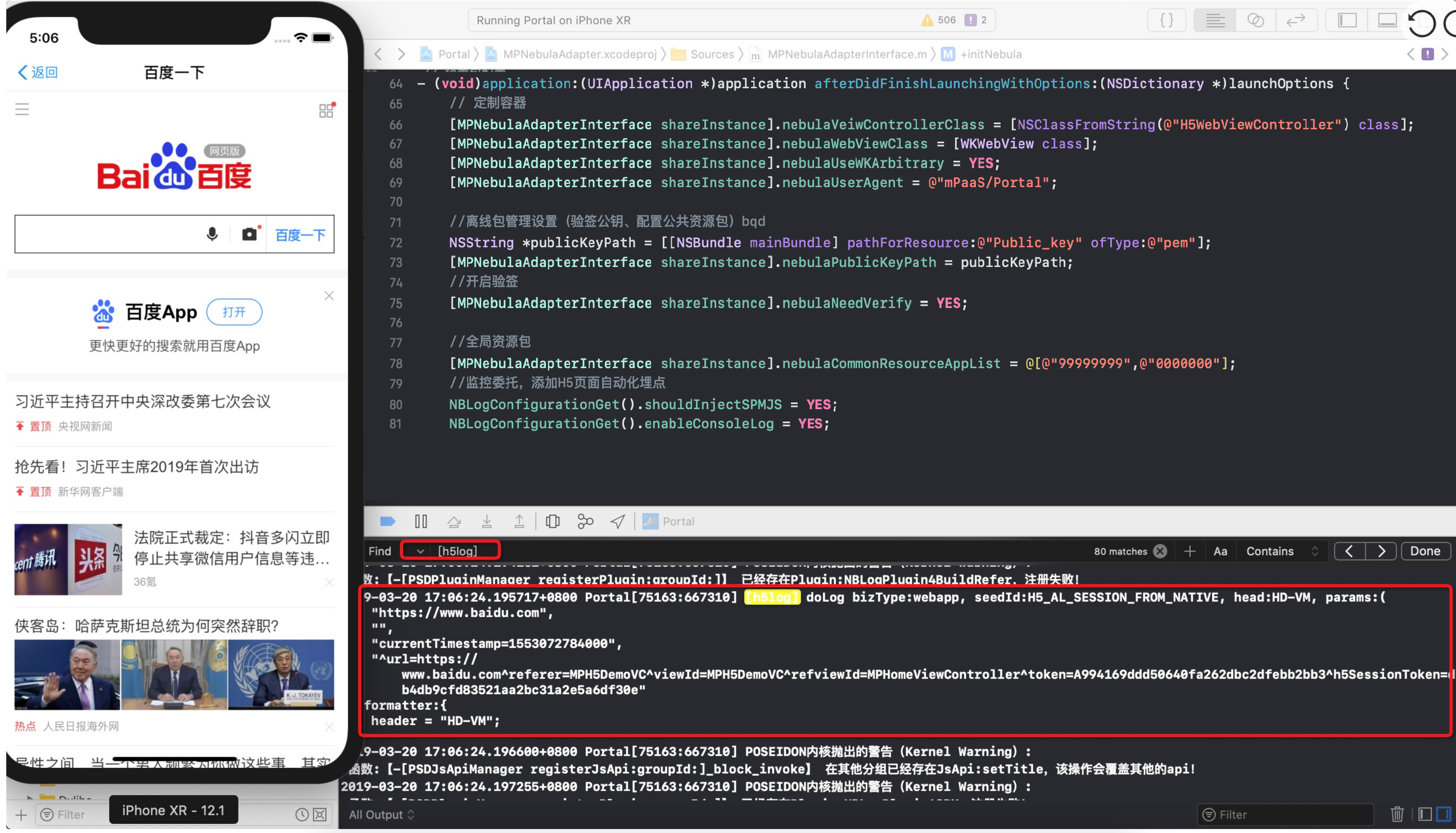
The instrumentation data for the H5 container in the Xcode console includes only the following key information:
SeedId |
Example |
Description |
bizType |
webapp |
Log type. This is the filename of the local log file. |
seedId |
H5_AL_SESSION_FROM_NATIVE |
A unique identifier for the instrumentation. For more information, see H5 container instrumentation set. |
head |
HD-VM |
The log model. For more information, see Performance instrumentation. |
params |
https://www.baidu.com |
The URL of the current page. |
currentTimestamp=1553072784000 |
Custom parameters, such as a timestamp or page load status. |
|
- |
Custom parameters, such as the position of a page element. |
|
^url=https://www.baidu.com^referer=MPH5DemoVC^viewId=MPH5DemoVC^refviewId=MPHomeViewController^token=A994169ddd50640fa262dbc2dfebb2bb3^h5SessionToken=db4db9cfd83521aa2bc31a2e5a6df30e |
Instrumentation information. This includes the offline package AppID, offline package version number, the URL of the current H5 page, the name of the view controller (VC) class, and the page token. |
|
formatter |
header = "HD-VM" |
Same as the `head` field. |
To view the full content of a log entry from the Xcode console, find the file in the sandbox under Library/log. The filename starts with the bizType. Then, search within that file for the corresponding `seedId`.
View server-side logs
To view instrumentation data from online users, query the data in the mPaaS console. For more information, see Query historical logs.
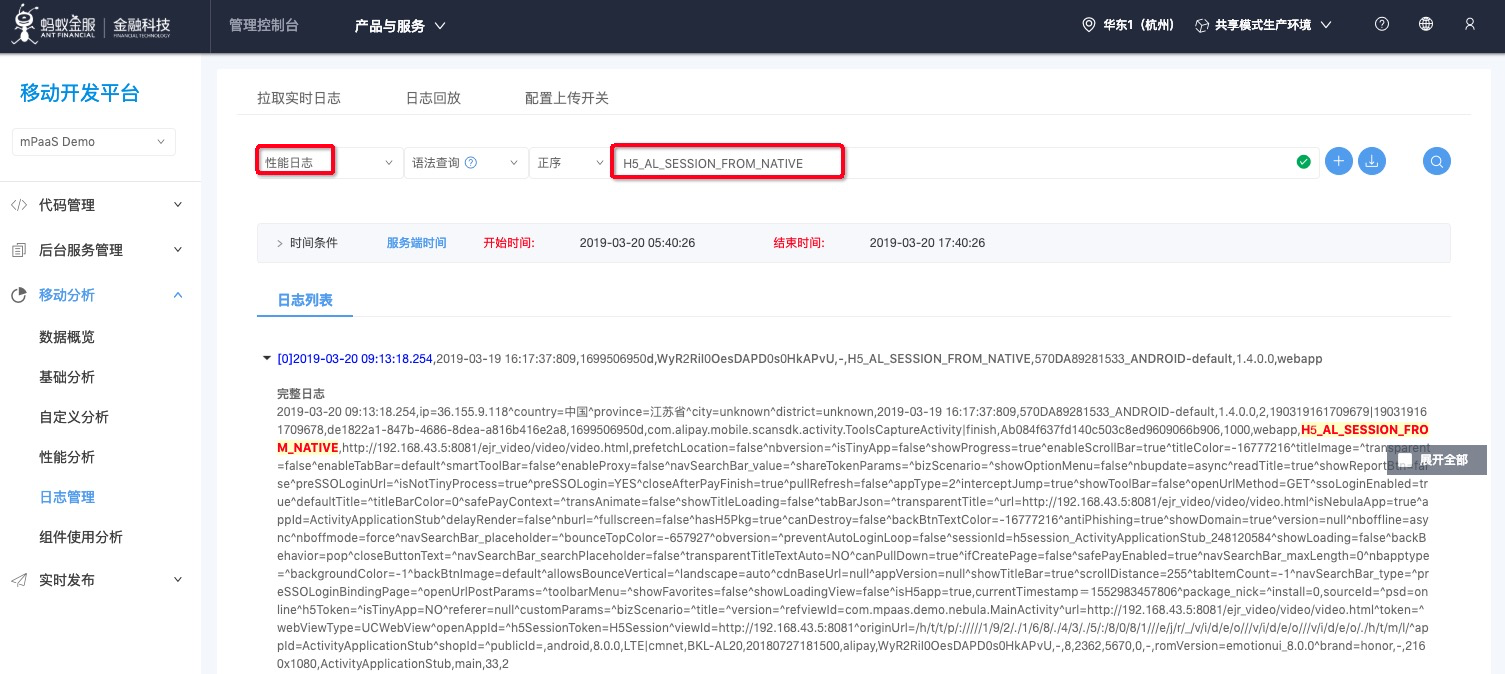
H5 container instrumentation set
The automated instrumentation data collected by the H5 container is uniquely identified by a `seedId`. The data is grouped into three main categories based on how the H5 page is loaded:
Instrumentation set for opening online URLs:
SeedId |
Description |
H5_AL_SESSION_FROM_NATIVE |
The container has started. |
H5_AL_PAGE_START |
Page loading has started. |
H5_AL_NETWORK_START |
The page has started to make a network request. |
H5_OPEN_PAGE_FINISH |
Page loading is complete. |
H5_AL_PAGE_APPEAR |
The page has appeared for the first time. |
H5_AL_JSAPI_SENDEVENT |
The page calls a JSAPI. |
H5_AL_JSAPI_NOTFOUND |
The page failed to call a JSAPI. |
H5_TITLEBAR_BACK_BT |
The back button in the navigation bar was clicked. |
H5_PAGE_PERFORMANCE |
Page loading performance data. |
Instrumentation set for opening offline package pages:
SeedId |
Description |
H5_APP_REQUEST |
Request for offline package information. |
H5_APP_LOAD_DATASOURCE |
Loading offline package information. |
H5_AL_SESSION_FROM_NATIVE |
The container has started. |
H5_APP_DOWNLOAD |
Offline package download. |
H5_APP_UNZIP |
Offline package decompression. |
H5_APP_POOL |
Package management pool operation. This includes adding, deleting, and modifying information in the pool. |
H5_APP_VERIFY |
Offline package signature verification. |
H5_AL_SESSION_VERIFYTAR_FAIL |
Offline package signature verification failed. |
H5_AL_PAGE_START |
Page loading has started. |
H5_AL_SESSION_MAP_SUCCESS |
Successfully loaded the local offline package. |
H5_AL_SESSION_FALLBACK |
Failed to load the local offline package. Falling back to request the online page. |
H5_OPEN_PAGE_FINISH |
Page loading is complete. |
H5_AL_PAGE_APPEAR |
The page has appeared for the first time. |
Exception instrumentation:
seedId |
Description |
H5_AL_NETWORK_PERFORMANCE_ERROR |
Resource request error. |
H5_PAGE_ABNORMAL |
Page error. |
H5_AL_PAGE_JSERROR |
JS error. |
H5_AL_JSAPI_RESULT_ERROR |
JSAPI error. |