Use the SDK (version = 10.1.32)
This topic describes how to use the H5 container SDK for baseline 10.1.32.
Important mPaaS stopped maintaining baseline 10.1.32 on June 28, 2020. We recommend using baseline 10.1.60 or 10.1.68. For more information, see Use the SDK (version 10.1.60 or later). |
Initialize the container
Start the container
To use the Nebula container, you must call the SDK interface to initialize the container after the program starts. You can perform the initialization in the
- (void)application:(UIApplication *)application beforeDidFinishLaunchingWithOptions:(NSDictionary *)launchOptionsmethod ofDTFrameworkInterface.- (void)application:(UIApplication *)application beforeDidFinishLaunchingWithOptions:(NSDictionary *)launchOptions { // Initialize the container [MPNebulaAdapterInterface initNebula]; }If you use features such as preset offline packages, custom JSAPIs, and Plugins, you must store the information for these features in the following default bundles. Otherwise, the features will not work.
Name
Description
MPCustomPlugins.bundle
Path for custom JSAPIs and Plugins.
MPCustomPresetApps.bundle
Path for preset offline packages and package information.
Customize the container
You can set the property values of
MPNebulaAdapterInterfaceto customize the container configuration. Set the properties in the- (void)application:(UIApplication *)application afterDidFinishLaunchingWithOptions:(NSDictionary *)launchOptionsmethod ofDTFrameworkInterface. Otherwise, the default container configurations will overwrite your settings.- (void)application:(UIApplication *)application afterDidFinishLaunchingWithOptions:(NSDictionary *)launchOptions { // Initialize the container [MPNebulaAdapterInterface initNebula]; // Customize the container [MPNebulaAdapterInterface shareInstance].nebulaVeiwControllerClass = [MPH5WebViewController class]; [MPNebulaAdapterInterface shareInstance].nebulaNeedVerify = NO; [MPNebulaAdapterInterface shareInstance].nebulaUserAgent = @"mPaaS/Portal"; [MPNebulaAdapterInterface shareInstance].nebulaCommonResourceAppList = @[@"77777777"]; }The following describes the properties:
Name
Description
Notes
nebulaViewControllerClass
The base class for H5 pages.
The default value is UIViewController. To specify a base class for all H5 pages, set this property.
nebulaUserAgent
The User-Agent of the application.
The specified User-Agent is appended to the default User-Agent of the container.
nebulaNeedVerify
Specifies whether to perform signature verification. The default value is YES.
If you did not upload a private key file when you configured the offline package, set this value to NO. Otherwise, the offline package fails to load.
nebulaPublicKeyPath
The public key path for offline package signature verification.
The path to the public key that corresponds to the private key you uploaded when you configured the offline package.
nebulaCommonResourceAppList
The list of app IDs for public resource packages.
-
errorHtmlPath
The path of the HTML error page that is displayed when an H5 page fails to load.
By default, the container reads
MPNebulaAdapter.bundle/error.html.
Update offline packages
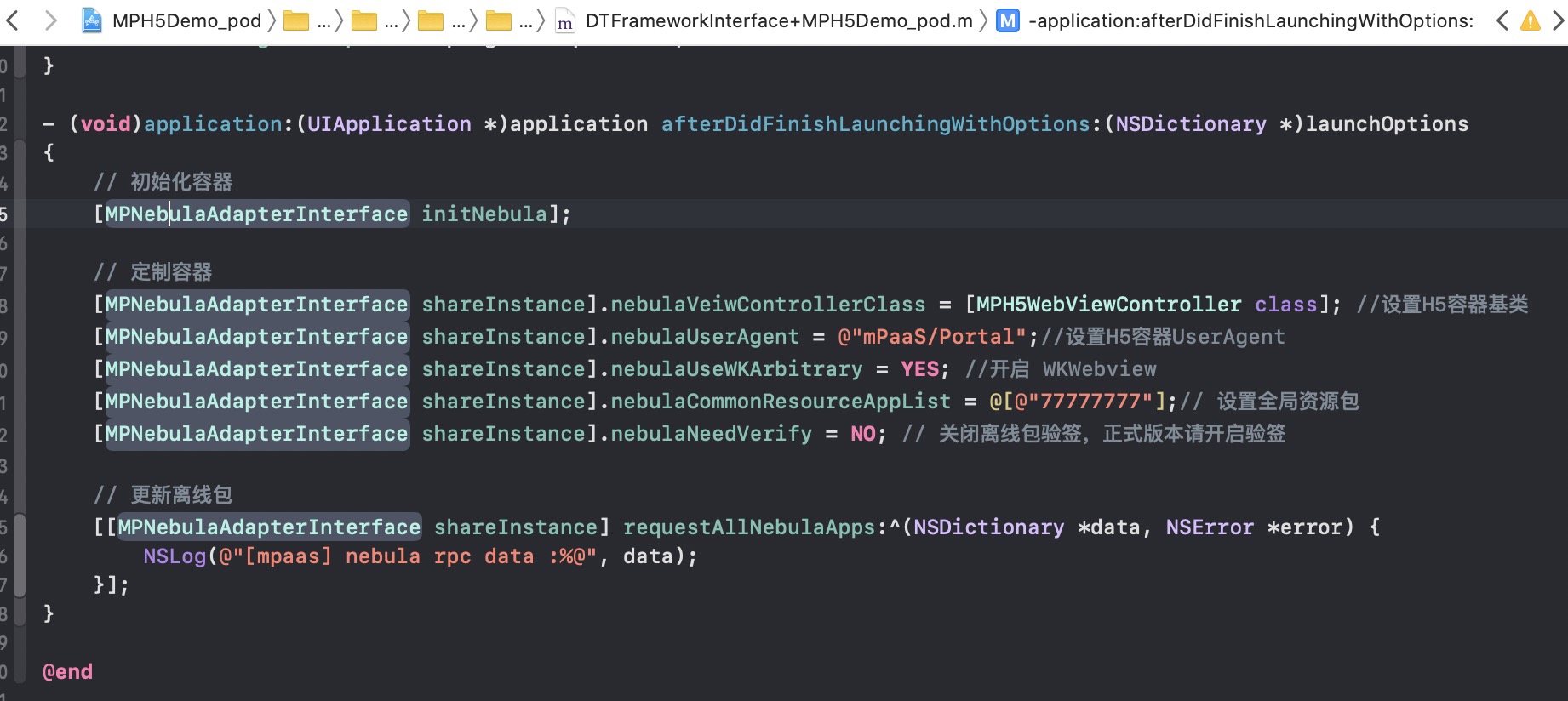
After the application starts, you can send a request for all offline package information to check for updates on the server. To avoid slowing down the application startup, call this method after the (void)application:(UIApplication \*)application afterDidFinishLaunchingWithOptions:(NSDictionary \*)launchOptions method is executed.
- (void)application:(UIApplication *)application afterDidFinishLaunchingWithOptions:(NSDictionary *)launchOptions
{
    // Initialize the container
    [MPNebulaAdapterInterface initNebula];

    // Customize the container
    [MPNebulaAdapterInterface shareInstance].nebulaVeiwControllerClass = [MPH5WebViewController class];
    [MPNebulaAdapterInterface shareInstance].nebulaNeedVerify = NO;
    [MPNebulaAdapterInterface shareInstance].nebulaUserAgent = @"mPaaS/Portal";
    [MPNebulaAdapterInterface shareInstance].nebulaCommonResourceAppList = @[@"77777777"];

    // Request all offline packages for updates
    [[MPNebulaAdapterInterface shareInstance] requestAllNebulaApps:^(NSDictionary *data, NSError *error) {
        NSLog(@"");
    }];
}
The result after initialization is shown in the following figure:
Launch the container
After the container is initialized, you can launch an H5 container in one of the following three ways:
Create an H5 container from an online URL or a local HTML file. The following code provides an example:
// Open an online URL
[[MPNebulaAdapterInterface shareInstance] startH5ViewControllerWithParams:@{@"url": @"https://tech.antfin.com/products/MPAAS"}];
// Open a local HTML page
NSString *path = [[NSBundle mainBundle].bundlePath stringByAppendingFormat:@"/%@/%@", @"MPH5Demo.bundle", @"H52Native.html"];
if ([path length] > 0) {
[[MPNebulaAdapterInterface shareInstance] startH5ViewControllerWithParams:@{@"url": path}];
}
Create and open an H5 container based on the provided offline package information. The container opens automatically with a push transition. The following code provides an example:
[[MPNebulaAdapterInterface shareInstance] startH5ViewControllerWithNebulaApp:@{@"appId":@"90000000"}];Create an H5 container based on the provided offline package information and return the container instance. This method is typically used for tab pages on a home page. The following code provides an example:
[[MPNebulaAdapterInterface shareInstance] createH5ViewControllerWithNebulaApp:@{@"appId":@"90000000"}];
Implement bidirectional communication between H5 and Native
You can implement bidirectional communication between H5 and Native by calling JSAPIs and listening for specific events.
Call Native features from an H5 page
You can call JSAPIs to communicate from H5 to Native.
For more information about the JSAPIs that the Nebula container supports and their parameters, see Built-in JSAPIs.
Example
For example, to load a new page when a user clicks a button in an H5 page, call the pushWindow JSAPI:
AlipayJSBridge.call('pushWindow', {
    url: 'https://tech.antfin.com',
    param: {
    readTitle: true,
    defaultTitle: true,
    // ...
    }
}, function(data) {alert('Call result: '+JSON.stringify(data)); });
AlipayJSBridge description
AlipayJSBridge is a JSBridge that the Nebula container injects automatically. After Window.onload, the container generates a global variable named AlipayJSBridge and then triggers the AlipayJSBridgeReady event. The injection of AlipayJSBridge is an asynchronous process. Therefore, you must listen for the AlipayJSBridgeReady event before you call the interface.
The following code provides an example:
<h1>How to use the bridge</h1>

<script>
function ready(callback) {
  if (window.AlipayJSBridge) {
    callback && callback();
  } else {
    document.addEventListener('AlipayJSBridgeReady', callback, false);
  }
}

ready(function(){
  alert('Bridge is ready');
});
</script>
Call H5 features from a Native page
You can listen for specific events to communicate from Native to H5. For a list of events that the Nebula container supports, see Event extensions.
document.addEventListener('back', function (e) {
    if(confirm('The back event was intercepted. Are you sure you want to go back?')) {
        // do something;
    }
}, false);
In addition to the default events, you can define custom events in the Native code for the frontend to listen for:
// self: The view controller of the current H5 page
// data: The parameters passed from Native to the frontend
// callBack: The callback after the frontend receives the event
[self callHandler:@"customEvent" data:@{@"key":@"value"} responseCallback:^(id responseData) {
        NSLog(@"Callback after the frontend receives the event: %@", responseData);
    }];
Extend Nebula container capabilities
If the basic bidirectional communication capabilities of the Nebula container do not meet your needs, you can extend the container:
JSAPI: To call a Native feature from an H5 page, such as displaying an ActionSheet or a contacts dialog box, you can extend the JSAPI. You can use handler methods to easily add Native function calls to H5 pages. For more information, see Custom JSAPIs.
Plugin: To perform actions at specific moments, such as when a page is entered or a request is received, you can develop a plugin. Actions can include recording instrumentation data or modifying response data. In the plugin, you can subscribe to the relevant events. Then, you can process the event data in the handler. For more information, see Custom plugins.
Load offline packages
Traditional online H5 technology is susceptible to network conditions, which can affect the performance of H5 pages. To minimize the impact of network conditions on H5 page loading, you can package different services into offline packages. You can then deliver these packages to the client through the release platform to update client-side resources. For more information, see Offline package overview and Use offline packages.
H5 container instrumentation
When an H5 page loads, the Nebula container automatically monitors loading performance. It also captures related behavioral data and error data. For more information, see H5 container instrumentation.