Configure the app
In the smart life realm, consumers interact with physical devices using an app or voice commands. Products within the Tmall Genie ecosystem use the Tmall Genie app for device control. You can configure the human-device interaction with a few simple configurations.
Procedure
- Click Next to go to the product's Human-Computer Interaction page.
- In the navigation pane on the left, select Product Display to configure the icon and product name that appear in the Tmall Genie app.
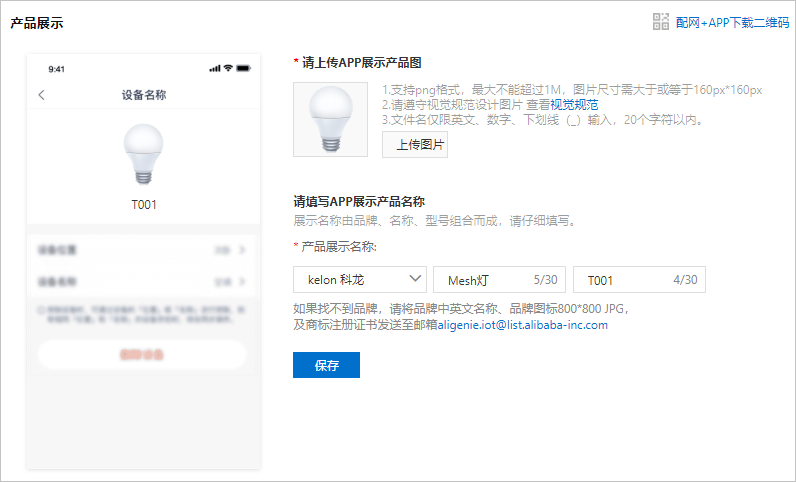
- Click Upload Image to select an icon for the product.
The uploaded image must meet specific visual standards. For more information, see Product display image specifications.
- Configure the product name that is displayed in the app.
The product is displayed in the public app in the Brand + Name + Model format. The rules for configuring the product name are as follows.
- Supports Chinese characters, English letters, numbers, hyphens (-), at signs (@), and parentheses ().
- The content cannot contain the word "test".
- Cannot exceed 30 characters. A Chinese character counts as one character.
Note The product name on this page automatically synchronizes with the Chinese tab on the App Multilingual - Click Save.
- (Optional) Click Network Configuration + App Download QR Code in the upper-right corner of the page and scan the QR code to download the Tmall Genie app.
This is a two-in-one QR code. You can use it to download the Tmall Genie app. You can also scan it using the Tmall Genie app to configure the network for your device.
- Click Upload Image to select an icon for the product.
- In the navigation pane on the left, select Device Panel to configure the appearance of the product panel in the Tmall Genie app.
The platform supports two types of panels: the default control panel and a custom-developed control panel, which requires you to develop the panel interface. This example uses the default control panel. Select Default Control Panel and click OK.
- In the navigation pane on the left, select Network Configuration Guide to configure the network configuration guide in the Tmall Genie app.
Products in the Tmall Genie ecosystem support only the one-click network configuration method. You only need to configure the product's network configuration guide image and related text prompts as shown in the figure.
- (Optional) Configure the remaining app parameters.
This example covers only the required parameters for the public version of the app. For descriptions of the other parameters and their configuration methods, see Configure human-computer interaction.