Service circuit breaking
Unstable server-side service interfaces can cause frequent timeouts or errors, which can lead to cascading service failures. To prevent this, you can enable service circuit breaking for your application. This feature allows a faulty service to fail fast by immediately returning an error. This process frees up system resources and improves both user experience and system performance.
Feature overview
You can control faults in the following ways:
Use monitoring or the service topology to identify services that have high latency or error rates.
Select the abnormal service and configure automatic circuit breaking. You can customize the conditions. For example, you can trigger circuit breaking if the number of requests reaches a specific value within a time window, such as 10 s, and the error rate or latency also reaches a specific value.
When these conditions are met, circuit breaking is triggered. After a circuit is opened, the service can be tested periodically for automatic recovery. The publishing flow for a circuit breaker rule is as follows: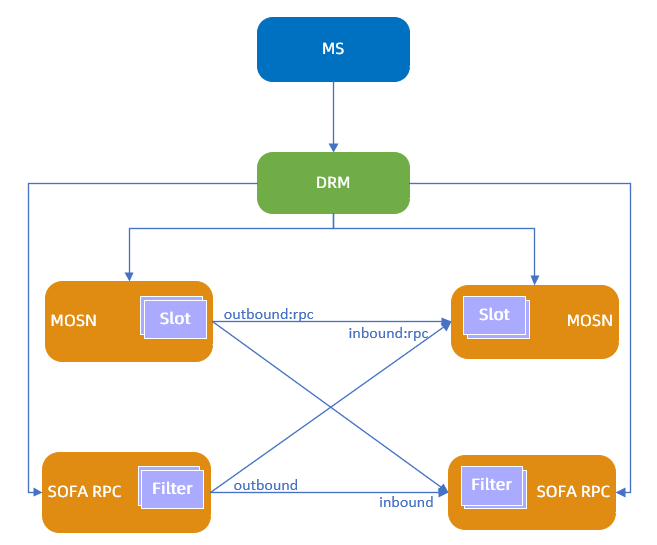
The Microservice console (MS) sends the dynamic circuit breaker configuration to Distributed Configuration Management (DRM).
DRM provides the dynamic circuit breaking configuration to MOSN.
MOSN triggers circuit breaking based on the average response time (RT) and error rate.
Circuit breaking can take effect on the client-side or the server-side.
Add a circuit breaker rule
Log on to the Service Mesh console.
In the navigation pane on the left, click Service Administration, and then click the Service Circuit Breaking tab.
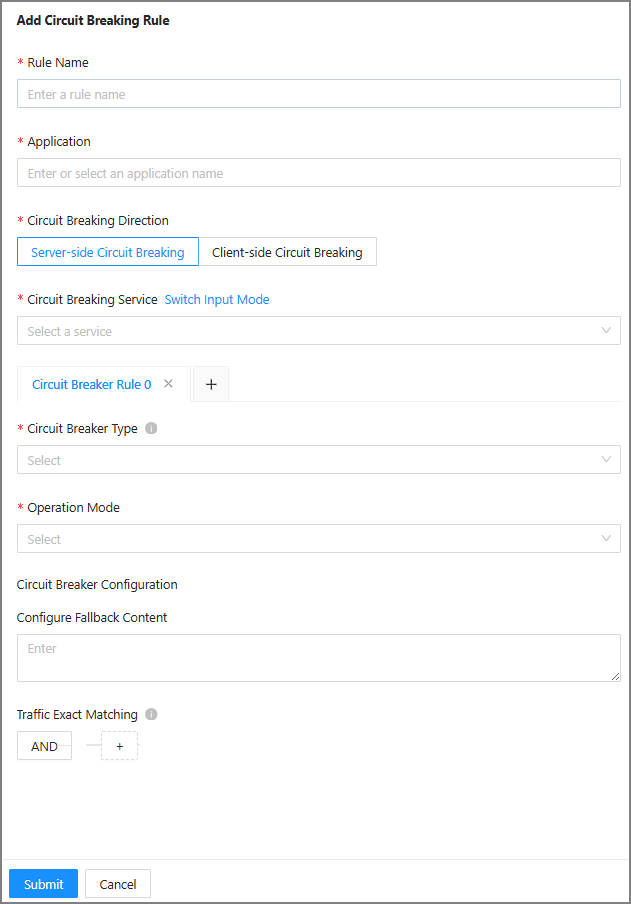
Click Add Circuit Breaker Group Rule and configure the following parameters:
Parameter
Description
Rule Name
Enter a name for the circuit breaker rule.
Chinese characters, letters, digits, and underscores (_) are supported.
Application
Specify the target application to detect.
You can enter the name manually or select it from the drop-down list.
Circuit Breaking Direction
Specify where the circuit breaker rule takes effect. Valid values:
Client-side circuit breaking: The rule takes effect on the client. The client collects metrics for requests sent to the server. For Application, specify the client application. For Service and Method, specify the service and method of the referenced server.
Server-side circuit breaking: The rule takes effect on the server. Each server collects request metrics independently. For Application, specify the server application. For Service and Method, specify the service and method of the server.
Circuit Breaking Service
Specify the service for circuit breaking. Click Switch Input Mode to switch between manual entry and selection from a drop-down list.
Method
Specify the method name of the service for circuit breaking.
Circuit Breaker Type
Specify the type of circuit breaker. Valid values:
Error Rate: Circuit breaking is triggered when the request error rate within the time window exceeds the error rate threshold.
Average RT: Circuit breaking is triggered when the average RT of requests exceeds the average RT threshold.
Execution Mode
Specify the execution mode for circuit breaking. Valid values:
Block Mode: Requests that meet the conditions trigger the circuit breaker rule.
Observer Mode: The rule is not triggered. MOSN only prints logs for observation.
Circuit Breaker Settings
Configure the parameters to trigger circuit breaking:
Metric Window: Used with Request Count Threshold. If the number of requests within this window reaches the threshold, the requests are included in the circuit breaker metrics. Unit: seconds.
Request Count Threshold: Used with Metric Window. Unit: requests.
Error Rate Threshold: Circuit breaking is triggered when the average error rate of requests reaches this threshold. This parameter is required when Circuit Breaker Type is set to Error Rate.
Average RT Threshold: Circuit breaking is triggered when the request response time exceeds this threshold. Unit: milliseconds. This parameter is required when Circuit Breaker Type is set to Average RT.
Circuit Breaking Period: The duration for which the circuit remains open after being triggered. Requests sent during this period fail immediately. After this period, the system attempts to invoke the server again. If the invocation fails, the circuit is opened again.
RPC Timeout: Used in classic microservice scenarios. RPC stands for Remote Procedure Call. Unit: milliseconds. This parameter is required when Circuit Breaker Type is set to Error Rate.
Exact Traffic Match (Optional)
Only traffic that meets these conditions uses the rule. Leave this empty to match all traffic.
You can add multiple conditions. The conditions are combined with an AND operator and are matched in order. The parameters are as follows:
Field: You can select System Field or Request Header.
Field Name: The value varies based on the field type.
System Field: Includes traffic type, caller application name, caller IP, and provider application name.
Request Header: Refers to the request header of the protocol. For example, for the Dubbo protocol, it is the attachment. For the HTTP protocol, it is the Request Header. You can customize request header parameters and values in your application.
Logic: Includes Equals, Not Equals, In, Not In, and Regex.
Field Value: The value that corresponds to the field name.
Click Submit, and then click OK.
In the list of circuit breaker rules, set the status of the rule that you just created to On.
Edit a circuit breaker rule
You can edit a circuit breaker rule at any time. The changes take effect immediately.
On the Service Circuit Breaking tab, click Edit next to the circuit breaker rule that you want to edit.
Edit the rule as needed, and then click Submit.
Delete a circuit breaker rule
You can delete a circuit breaker rule. The deletion takes effect immediately and cannot be undone.
On the Service Circuit Breaking tab, click Delete next to the circuit breaker rule that you want to delete.
Click OK.