Service degradation occurs when request volumes and server loads increase sharply. This puts pressure on server-side nodes, which can cause response delays or faults. You can degrade non-essential services based on your business needs. This frees up server resources and ensures that your core services continue to run.
Add a service degradation rule
Log on to the Service Mesh console.
In the navigation pane on the left, click Service Administration, and then click the Service Degradation tab.
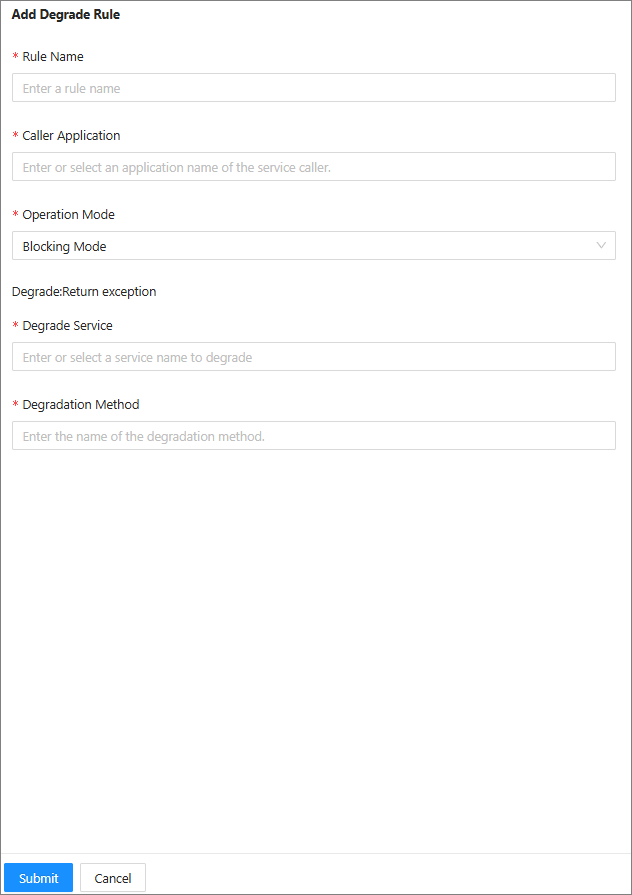
Click Add Degradation Group Rule and configure the following parameters:
Parameter
Description
Rule Name
The name of the degradation rule.
Caller Application
Degradation takes effect on the client. Enter or select the client application.
Running Mode
The running mode of the degradation rule. Valid values:
Block Mode: The degradation rule takes effect.
Observer Mode: The degradation rule does not take effect. It only enables log printing in MOSN.
Degraded Service
Select or enter the name of the server-side service that the client references. An asterisk (*) indicates all services.
Downgrade methods
Enter the name of the method to be degraded. An asterisk (*) indicates all methods.
Click Submit, and then click OK.
In the list of degradation rules, set the status of the rule that you created to On.
Edit a service degradation rule
You can edit an existing service degradation rule at any time. The changes take effect in real time after you submit them.
On the Service Degradation tab, click Edit to the right of the target service degradation rule.
Edit the service degradation rule as needed, and then click Submit.
Delete a service degradation rule
You can delete an existing service degradation rule. The deletion takes effect in real time. Proceed with caution.
On the Service Degradation tab, click Delete to the right of the target service degradation rule.
Click OK.