Incident data management
Define incident severity levels, set up monitoring coverage, and configure service groups, on-call schedules, and notification subscriptions for effective incident management.
Incident severity level definitions
An incident is any event that disrupts a service, lowers service quality, or degrades the user experience, excluding problems caused by a user's own environment or actions. Incident severity levels classify the impact of an incident.
Define incident severity levels to establish reliability standards for each line-of-business and improve overall stability. For example, the monitoring detection rate based on these severity levels evaluates a team's incident detection capabilities. Consider four dimensions when defining severity levels: feature classification, business volume, business attributes, and quantified impact. The following table provides a general template.
|
Business volume |
Feature classification |
Impact |
P1 |
P2 |
P3 |
P4 |
|
Large volume |
Core feature |
Success rate drops by 30% or more |
P1 |
|||
|
Success rate drops by 20% to 30% |
P2 |
|||||
|
Success rate drops by less than 20% |
P3 |
|||||
|
Non-core feature |
Success rate drops by 30% or more |
P2 |
||||
|
Success rate drops by 20% to 30% |
P3 |
|||||
|
Success rate drops by less than 20% |
P4 |
|||||
|
Small volume |
Core feature |
Overall success rate drops by 45% or more within 10 minutes |
P1 |
|||
|
Overall success rate drops by 30% to 45% within 10 minutes |
P2 |
|||||
|
Overall success rate drops by less than 30% within 10 minutes |
P3 |
|||||
|
Non-core feature |
Overall success rate drops by 45% or more within 10 minutes |
P2 |
||||
|
Overall success rate drops by 30% to 45% within 10 minutes |
P3 |
|||||
|
Overall success rate drops by less than 30% within 10 minutes |
P4 |
Incident scenario monitoring coverage
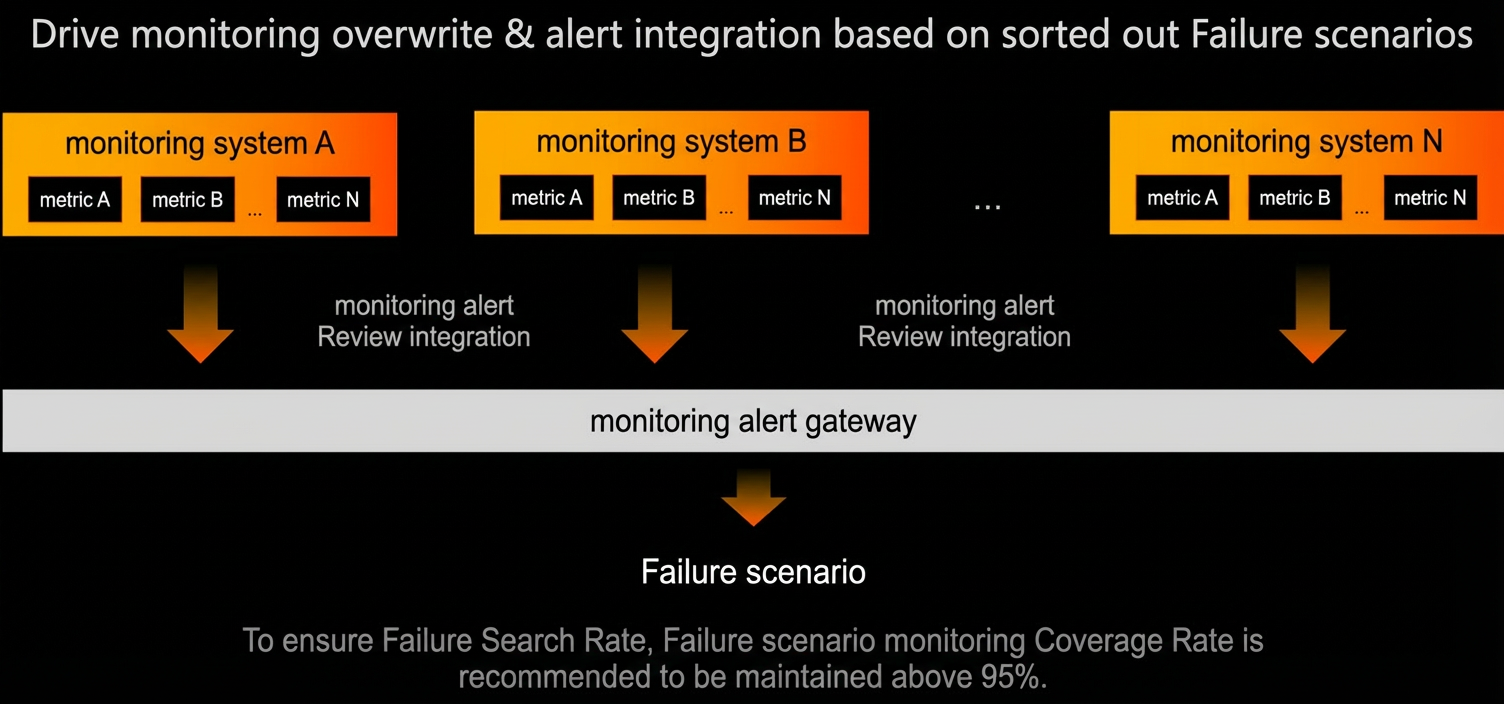
Configure monitoring metrics for defined incident scenarios to enable 24/7 coverage. Use the monitoring data for algorithm-based intelligent alerting or threat warnings that development teams can resolve independently. This helps achieve a high detection rate, reduce incident duration, and lower overall impact.
Maintain monitoring coverage for incident scenarios at 95% or higher to ensure a high detection rate.
Service group & on-call schedule management
Associate incident response personnel as stakeholders with predefined incident scenarios to enable service groups and on-call schedules. When an incident occurs, the system automatically and promptly notifies the responsible owner.
When you design a management plan, consider the following:
-
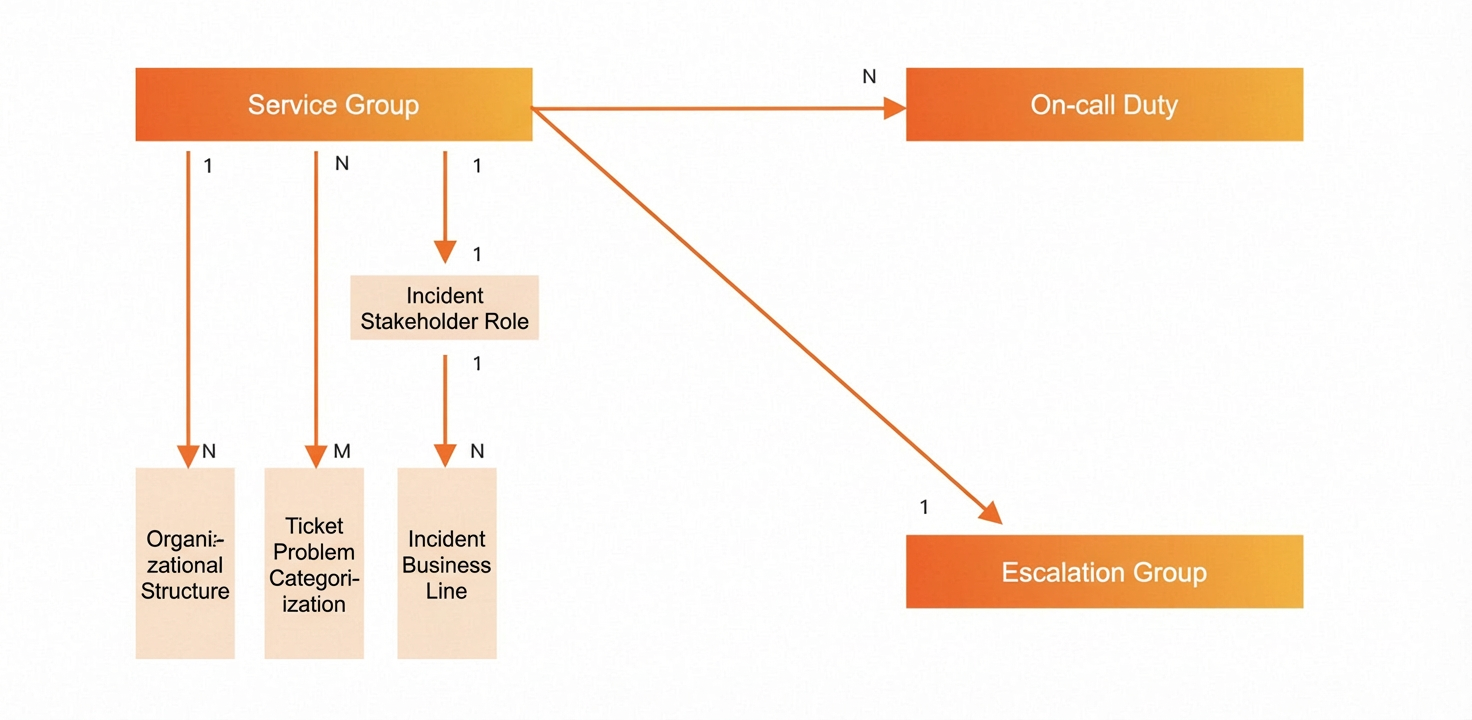
Service group: A group of people who provide services, such as incident handling and ticket processing.
-
On-call schedule: A feature that lets you create a shift schedule for service group members. This makes incident response more organized and helps prevent missed duties.
-
Escalation group: A type of service group. You can use service groups and escalation groups to define escalation paths between groups.
-
Relationship between service groups and incident lines-of-business: A service group corresponds to a single role during an incident but can serve multiple incident lines-of-business.
-
Relationship between service groups and ticket issue classifications: A service group can serve multiple ticket issue classifications.
-
Relationship between service groups and organizational structure: A service group can serve multiple organizations, and an organization can be divided into multiple service groups.
Incident subscription management
Use incident notification subscriptions to control who receives alerts and through which channels based on specific conditions. Subscriptions support three recipient types: individuals, stakeholder roles, and DingTalk groups or other notification channels. Configure subscriptions to ensure that stakeholders receive alerts promptly.