Centralized multi-account log aggregation and auditing
Solution overview
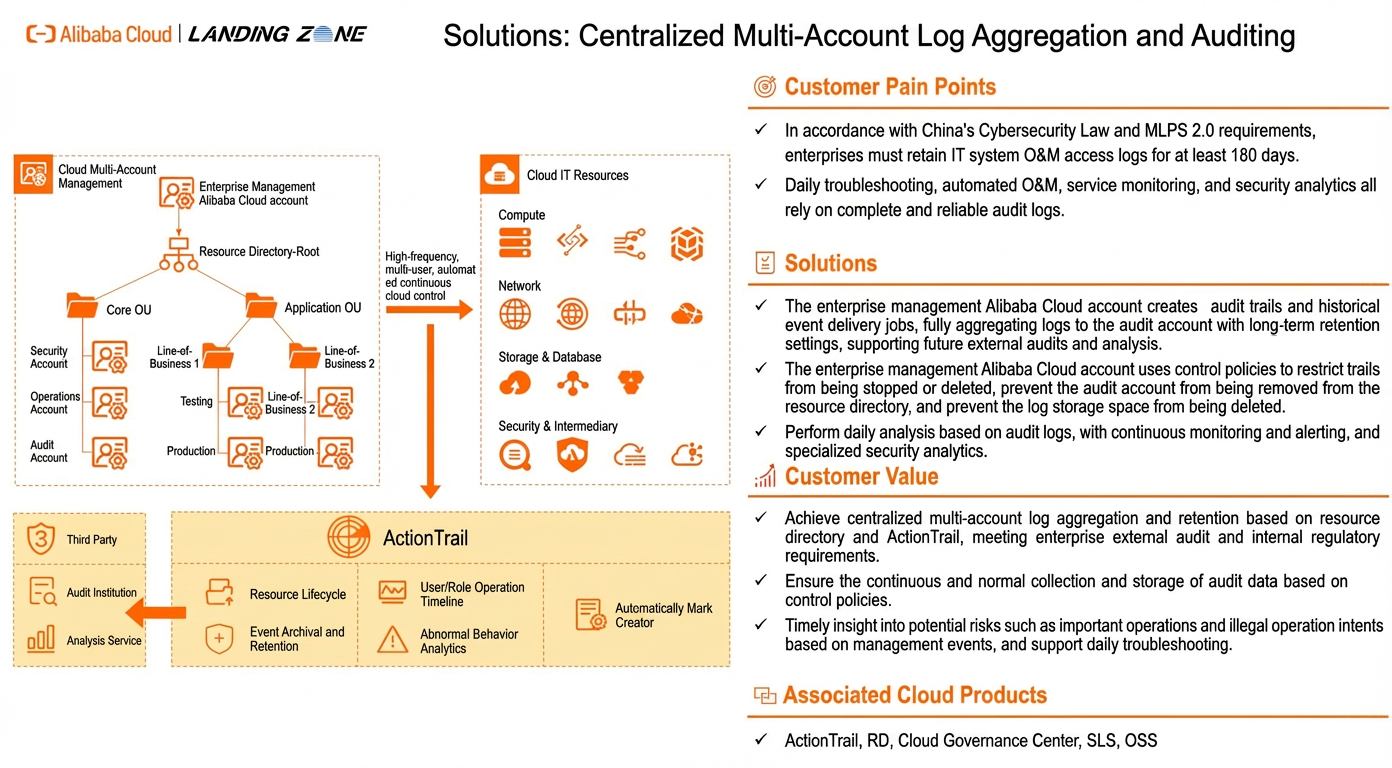
This solution shows enterprise customers how to securely aggregate and retain operation audit logs in a multi-account cloud IT architecture. This process ensures continuous and stable log aggregation. It also provides a method for security monitoring and analysis that is based on operation logs. This solution uses Alibaba Cloud services, such as Resource Directory, ActionTrail, Cloud Governance Center, SLS, and OSS, to help enterprise customers build a cloud audit center.
Solution advantages
Convenient, centralized collection of multi-account logs
After you use Resource Directory for multi-account management, you can use ActionTrail to easily centralize the aggregation of multi-account operation logs. ActionTrail also supports the long-term retention of audit logs to meet enterprise requirements for external audits and internal supervision.
Secure and guaranteed audit trails
The management account uses control policies to prevent audit trails from being stopped or deleted. These policies also prevent log archive accounts from being removed from the resource directory and prevent log storage from being deleted. This ensures that audit data collection and storage operate as expected.
Log analysis and high-risk operation detection
Based on audit logs, you can implement continuous monitoring, alerting, and security analysis. This lets you promptly detect potential risks, such as high-risk or illegal operations. This feature also supports daily troubleshooting.
Customer scenarios
Meeting external audit requirements
Scenario description
External audit institutions require enterprises to retain audit logs for at least 180 days. Enterprises must be able to provide these audit logs during evaluations.
Applicable customers
Enterprise customers who need to support external audit and regulatory requirements.
Internal O&M issues
Scenario description
Enterprises often need to investigate internal O&M issues. These issues can include suspected AccessKey (AK) leakage, abnormal downtime, unplanned resource changes, illegal employee operations, resource lifecycle tracking, unusual logons, and high-risk operations. Enterprises must rely on audit logs for investigation and analysis.
Applicable customers
Enterprise customers who need to identify anomalies, perform security analysis, and troubleshoot internal O&M issues.
Customer use cases
Customer background
A conglomerate company creates Alibaba Cloud accounts for its subsidiaries based on their business needs. In each Alibaba Cloud account, users perform operations on resources, which generates operation logs.
Customer requirements
According to China's Cybersecurity Law and MLPS 2.0 requirements, enterprises must retain IT system O&M access logs for at least 180 days. Daily troubleshooting, automated O&M, service monitoring, and security detection all depend on complete and reliable audit logs. The conglomerate's information security team needs to perform unified log auditing. The customer's requirements are as follows:
The conglomerate's information security team wants to view the operation logs of each subsidiary's account.
Pull audit logs from the cloud to an on-premises data center for secondary processing and analysis.
Implementation plan
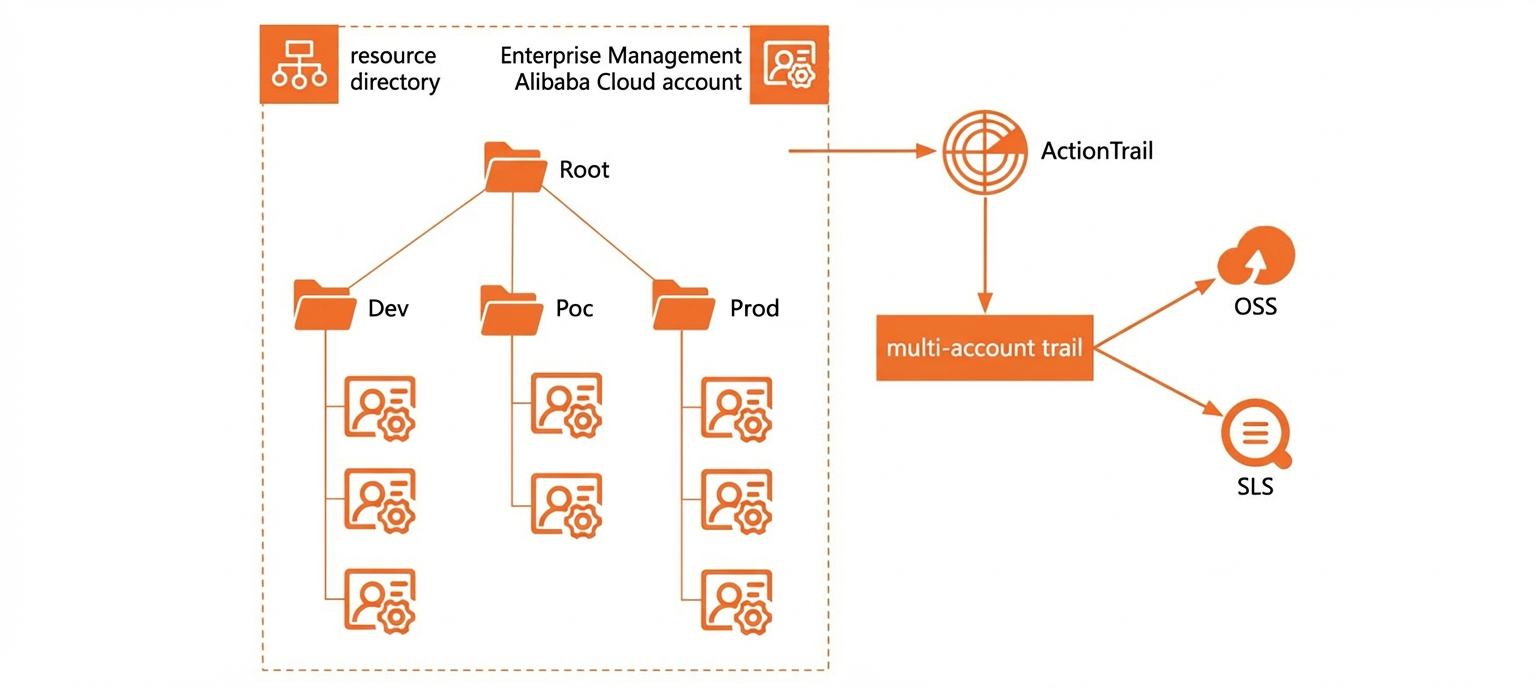
The preceding figure shows a diagram of the implementation architecture. The implementation details are as follows:
Use Resource Directory in the management account for multi-account management. A single ActionTrail configuration applies to all accounts.
Operation logs in each cloud account are retained for 180 days.
Enable enforced log delivery.
After audit logs are delivered to OSS, pull the standard logs to a self-built data center for analysis.
Customer benefits
The operation logs in each cloud account are archived, which meets MLPS 2.0 requirements.
The conglomerate's O&M engineers can view the operation logs of each subsidiary's Alibaba Cloud account in a centralized log center.
Solution architecture
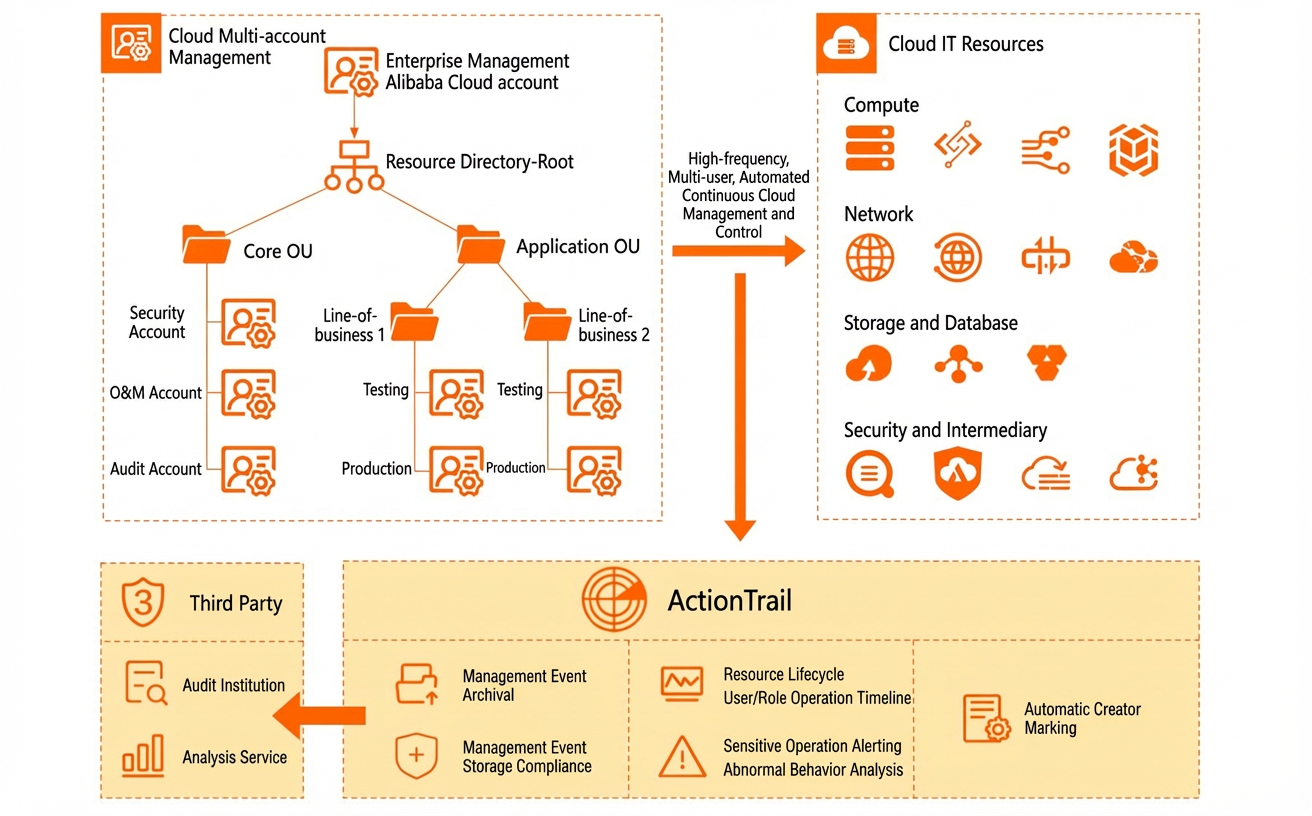
You can use Resource Directory in the management account for multi-account management and configure ActionTrail to uniformly collect operation logs from all accounts. ActionTrail supports delivering logs to Simple Log Service (SLS) and Object Storage Service (OSS) for storage. You can configure log retention periods in SLS and OSS to meet external audit and internal regulatory compliance requirements. ActionTrail supports event query and event alerting, which lets you easily view user operation timelines and monitor abnormal and high-risk operations on the cloud.
Product billing and terms
Product billing
Product Name |
Description |
Pricing |
Resource Directory (RD) |
Resource Directory (RD) is an Alibaba Cloud service that allows enterprise customers to manage multi-level account and resource relationships. |
Free. For more information, see Pricing. |
ActionTrail |
ActionTrail helps you monitor and record the activities of your Alibaba Cloud account. These activities include accessing and using cloud products and services through the Alibaba Cloud Management Console, OpenAPI, and developer tools. You can download these events or save them to Simple Log Service or an OSS bucket. Then, you can perform operations such as behavior analysis, security analytics, resource change tracking, and compliance auditing. |
This service is free to enable. For more information, see Billing. |
Cloud Governance Center |
Cloud Governance Center is a platform that allows enterprises to perform centralized IT administration across multiple accounts on Alibaba Cloud. It uses step-by-step wizards and automated processes to help enterprises quickly set up a landing zone, establish a secure and compliant multi-account environment, and perform continuous governance on the enterprise's multi-account cloud environment. |
Free. For more information, see Billing. |
Simple Log Service (SLS) |
Simple Log Service (SLS) is a cloud-native observability platform that provides large-scale, low-cost, and real-time platform services for data, such as logs, metrics, and traces. SLS provides one-stop services, such as data ingestion, processing, query and analysis, visualization, alerting, consumption, and delivery. It comprehensively enhances your digital capabilities in scenarios such as R&D, O&M, operations, and security. |
Paid. For more information, see Billing. |
Object Storage Service (OSS) |
Object Storage Service (OSS) is a secure, low-cost, and highly durable cloud storage service provided by Alibaba Cloud that offers massive storage capacity. OSS is suitable for storing any type of file. It offers scalable capacity and processing power, a variety of storage classes, and comprehensive storage cost optimization. |
Paid. For more information, see Billing. |
Glossary
Name |
Description |
Management account |
When an enterprise has multiple Alibaba Cloud accounts, this refers to the administrator account that has permission to manage the resources of other accounts. It is used to manage multiple accounts, uniformly configure identity and permissions for multiple accounts, view bills for each Alibaba Cloud account, and uniformly configure and apply audit rules to each member account. |
Log Audit Account |
It is recommended to have a log archive account in the Core folder of the resource directory. This account is dedicated to storing various logs collected on the cloud. Only roles used by audit administrators have control permissions over this log account. This isolates O&M control permissions from audit supervision permissions. It prevents situations where malicious O&M can be followed by deleting audit logs to evade legal accountability. This account is only responsible for audit log collection, retention, and analysis. It does not hold other computing and database resources and is independent of business accounts. This account can be generated through the Cloud Governance Center during initialization. |
Security
CloudConfig service-linked role
This is a RAM role that is provided to obtain access permissions to other Alibaba Cloud services to complete a CloudConfig function. For more information, see Service-linked role for CloudConfig. When you use the automatic remediation feature of CloudConfig to correct non-compliant resources, you must obtain access permissions for the non-compliant resources. For more information, see Service-linked role for the auto-remediation feature.
OSS security
For more information about OSS data security, see Data security.
SLS security
For more information about SLS security and compliance, see Security and compliance.
Notes
Key notes
ActionTrail is being updated to cover all Alibaba Cloud products and events, but the supported products and event types are currently limited.
It supports management events for many Alibaba Cloud products. Management events are typically generated when the O&M team makes control changes to the cloud IT infrastructure, such as creating or deleting ECS instances. For an updated list, see the list of supported products.
Data events are not currently supported. Only some products generate data events, such as events that trigger function invocations in Function Compute or events for uploading and downloading files in an OSS bucket. Data events are typically generated by business applications that are developed by the business team during business operations. The volume of these events is large and they are highly repetitive.
The business R&D team is responsible for business application development and O&M and can focus on data events. The O&M team is responsible for infrastructure setup and O&M and should focus on management events. The O&M team can also monitor data events to supervise the operation of business applications.
Operation events from Alibaba Cloud services that are not yet supported by ActionTrail cannot be centrally collected.
By default, ActionTrail records and retains operation events for only 90 days. Enterprises must create a trail as described in this solution to ensure longer-term log retention.
The historical event delivery task feature mentioned in this solution is currently available only to users on the whitelist. To apply for this feature, contact your service manager or submit a ticket.
This solution provides suggestions for monitoring and analysis based on operation events. Enterprises must expand on these suggestions based on their actual business needs. These examples are not guaranteed to meet all the audit and monitoring needs of every enterprise.
Enterprises must pay for the SLS and OSS products that are used to store operation events. Enterprises can create a storage combination based on their log retention requirements. We recommend that you save logs in SLS for 180 days and use OSS for permanent retention.
We recommend that you use a RAM user to log on to Resource Directory. If you do not, you cannot log on to other member accounts from the Resource Directory console.
ActionTrail provides 90 days of free online queries, but this feature has limitations. For example, you can query in only a single region and the query conditions are limited. These limitations are mainly due to cost considerations.
Storage cost design
If you are sensitive to storage costs and believe it is unnecessary to deliver a copy of an operation event to both SLS and OSS, we recommend that you deliver it only to SLS. You can then use the SLS tiered storage solution. Tiered storage has a limitation: the log TTL must be more than 60 days. If it is not, tiered storage cannot be enabled. For more information, see Intelligent tiered storage.
CloudConfig limits
For more information about CloudConfig limits, see Limits.
OSS limits
For more information about some limits and performance metrics of Object Storage Service (OSS), see Limits.
SLS limits
For more information about SLS-related limits, see Limits.
Implementation steps
Preparations
Identify the log audit account in the resource directory
We recommend that you create a log archive account in the Core folder of the resource directory. This account is dedicated to storing the various logs that are collected on the cloud. Only roles that are used by audit administrators have control permissions over this log account. This practice isolates O&M control permissions from audit supervision permissions. It prevents situations where a malicious O&M user can delete audit logs to evade legal accountability. This account is responsible for only audit log collection, retention, and analysis. It does not contain other computing and database resources and is independent of business accounts.
Note: The recommended financial model for the log archive account is finance trusteeship. The account is managed uniformly by the management account or a designated billing account.
Ensure storage products are enabled for the log archive account
Ensure that Simple Log Service (SLS) and Object Storage Service (OSS) are enabled for the log archive account.
If your enterprise needs to permanently save operation logs, you must enable OSS.
Ensure the resource structure is created
The account UIDs and their purposes in this solution are as follows:
Account UID |
Account Purpose |
195121xxxx354857 |
Management account, which is the account that enabled Resource Directory. |
173042xxxx627905 |
Log archive account. This account is used for audit log collection, retention, and analysis, and is independent of business accounts. |
Implementation time
After the preparations are complete, the estimated implementation time for this solution is 15 minutes.
Procedure
Configure audit log delivery
Use the management account to log on to the Cloud Governance Center console.
In the navigation pane on the left, choose Landing Zone > Landing Zone Setup.
Select a blueprint and then click Setup. This topic uses the standard blueprint as an example.
On the Configure Blueprint page, in the Added Items area, click Centralized Audit Log Delivery. If the target item is not in the Added Items area, you can click Add Item to add it.
From the Account Selection drop-down list, select the destination account for log delivery. By default, audit logs are delivered to the log archive account that was created during the landing zone setup.
Turn on the switch for the target delivery method and then configure the delivery parameters.
Delivery Method
Delivery Parameters
Deliver to Simple Log Service (SLS)
Region: The region where the SLS Logstore resides.
Logstore Name: The name must be globally unique. We recommend that you use your company name as a prefix. For example, landingzone-actiontrail-xxxx.
Deliver to Object Storage Service (OSS)
Region: The region where the OSS bucket resides.
Bucket Name: The name must be globally unique. We recommend that you use your company name as a prefix. For example, landingzone-actiontrail-xxxx.
After the resources are created, you can view the SLS Project and OSS bucket in the specified log archive account. In the trail list of the management account's ActionTrail console, you can also see that multi-account trail is enabled.
Build an analytics dashboard
Analyze operation events based on SLS and build an analytics dashboard.
Note: The following operations are performed in the log archive account.
Log on to the Simple Log Service console.
On the All Projects tab, click the Project that you created and then click the Logstore that was automatically generated when the trail was created.
Then, click 15 Minutes (Relative) to set the query time range.
Enter the query in the search box and then click Search & Analyze to query events. The example query searches for a specified cloud service and a specified event. For example, set <TargetServiceName> and <TargetEventName> to OSS and GetBucketLocation, respectively, to query for events that retrieve the location of an OSS bucket.
and event.serviceName: <TargetServiceName> and event.eventName: <TargetEventName>Click the Chart tab and then click the
 icon to generate a data dashboard. This action displays a trend chart of the call frequency of the OSS GetBucketLocation API.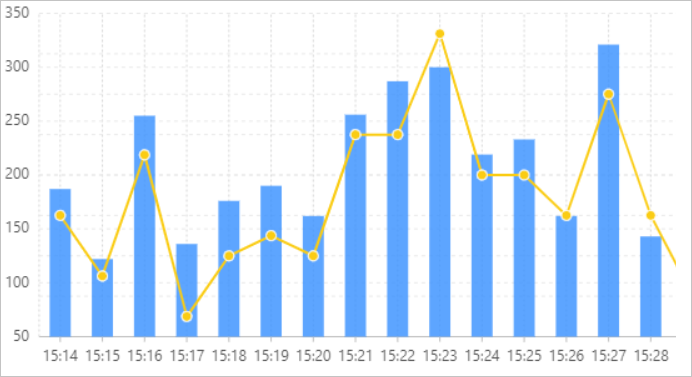
More analysis examples are as follows:
Example 1: Query the usage timeline of a role. The query includes who assumed the role and the operations that were performed by the user during the role assumption period.
# First, query who assumed the role. Replace [RoleName] with the role you want to analyze.
* and event.eventName: AssumeRole and [RoleName] | SELECT "event.userIdentity.accountId" as accountId, "event.userIdentity.type" as type, "event.userIdentity.principalId" as principalId, "event.userIdentity.username" as username, "event.resourcename" as stsAk
# Then, query again after the role assumption to find out what operations the assumer performed. Replace [StsAk] with the stsAk obtained from the above query.
*  and event.userIdentity.accessKeyId : [StsAk] | SELECT "event.serviceName" as serviceName, "event.eventName" as eventName
Example 2: Query the usage timeline of a RAM user. The query includes operation events performed as the RAM user, events of assuming other roles, and operation events performed after assuming other roles.
# Query recently accessed RAM users.
* and event.userIdentity.type : ram-user | SELECT DISTINCT "event.userIdentity.username" as username
# Query the invocation events of a specified RAM user. Replace [RamUserName] with the name of the RAM user you want to analyze.
* and event.userIdentity.type : ram-user and event.userIdentity.username: [RamUserName] | SELECT "event.serviceName" as serviceName, "event.eventName" as eventName
# Query the role assumption records of a specified RAM user. Replace [RamUserName] with the name of the RAM user you want to analyze.
* and event.userIdentity.type : ram-user and event.userIdentity.username: [RamUserName] and AssumeRole | SELECT "event.resourceName" as stsAk
# Query what operations the specified RAM user performed after assuming a role. Replace [StsAk] with the stsAk obtained from the above query.
*  and event.userIdentity.accessKeyId : [StsAk] | SELECT "event.serviceName" as serviceName, "event.eventName" as eventName
Example 3: Query the usage timeline of an AK.
# Query all AKs that are being called.
* and event.userIdentity.accessKeyId : * | SELECT DISTINCT "event.userIdentity.accessKeyId" as ak where "event.userIdentity.accessKeyId" not like 'STS%' and "event.userIdentity.accessKeyId" != '-'
# Query the operation events of a specified AK.
* and event.userIdentity.accessKeyId : [AccessKey] | SELECT "event.serviceName" as serviceName, "event.eventName" as eventName
Example 4: Query IP addresses that performed access operations and view statistics of their operation events.
# Count all accessing IPs.
* not event.sourceIpAddress:Internal  | SELECT DISTINCT "event.sourceIpAddress" as ip
# Analyze the city and call volume of accessing IPs.
* not event.sourceIpAddress:Internal  | SELECT count(1) as pv, city, ip FROM (SELECT "event.sourceIpAddress" AS ip, ip_to_city("event.sourceIpAddress") as city FROM log)  GROUP BY city, ip ORDER BY pv DESC
Example 5: Query multiple events of a specified cloud service. For example, set <TargetServiceName> to ECS and <TargetEventName> to RunInstances and CreateInstance to retrieve the operation events for creating ECS instances.
* and event.serviceName: <TargetServiceName> and (event.eventName: <TargetEventName1> or event.eventName: <TargetEventName2> )
Troubleshooting
Should events be delivered to SLS or OSS?
Object Storage Service (OSS) is mainly used to archive events. If you want to store events for more than 90 days and do not need to query or analyze them for the time being, we recommend that you deliver the events to OSS.
Simple Log Service (SLS) is mainly used to query or analyze events. If you want to query or analyze events, or use ActionTrail features such as advanced search, event alerting, and insight events, we recommend that you deliver the events to SLS. SLS is slightly more expensive than OSS, but it can meet more of your requirements. Therefore, we recommend that you deliver events to SLS.
For more information about choosing a storage service, see Continuously deliver operation events to a specified service.
How to query ActionTrail events in SLS using SQL statements
ActionTrail helps you monitor the activities of your Alibaba Cloud account and records events from the last 90 days. To analyze events over a longer period, you can create a trail in ActionTrail to deliver events to Simple Log Service (SLS). You can then use SQL statements to query and analyze the events. For more information, see How to query ActionTrail events in SLS using SQL statements.