Alibaba Mail AD synchronization and authentication
Enterprises that use a self-hosted Microsoft Exchange email system often use Active Directory (AD) as the authentication platform. As the information hub of the office environment, AD accounts are linked to many applications, making them critical to system-wide operations. You can sync AD accounts to create a corresponding organizational structure in Alibaba Mail. This process enables a smooth migration of your email system and allows users to log on to Alibaba Mail with their AD credentials, which unifies account management.
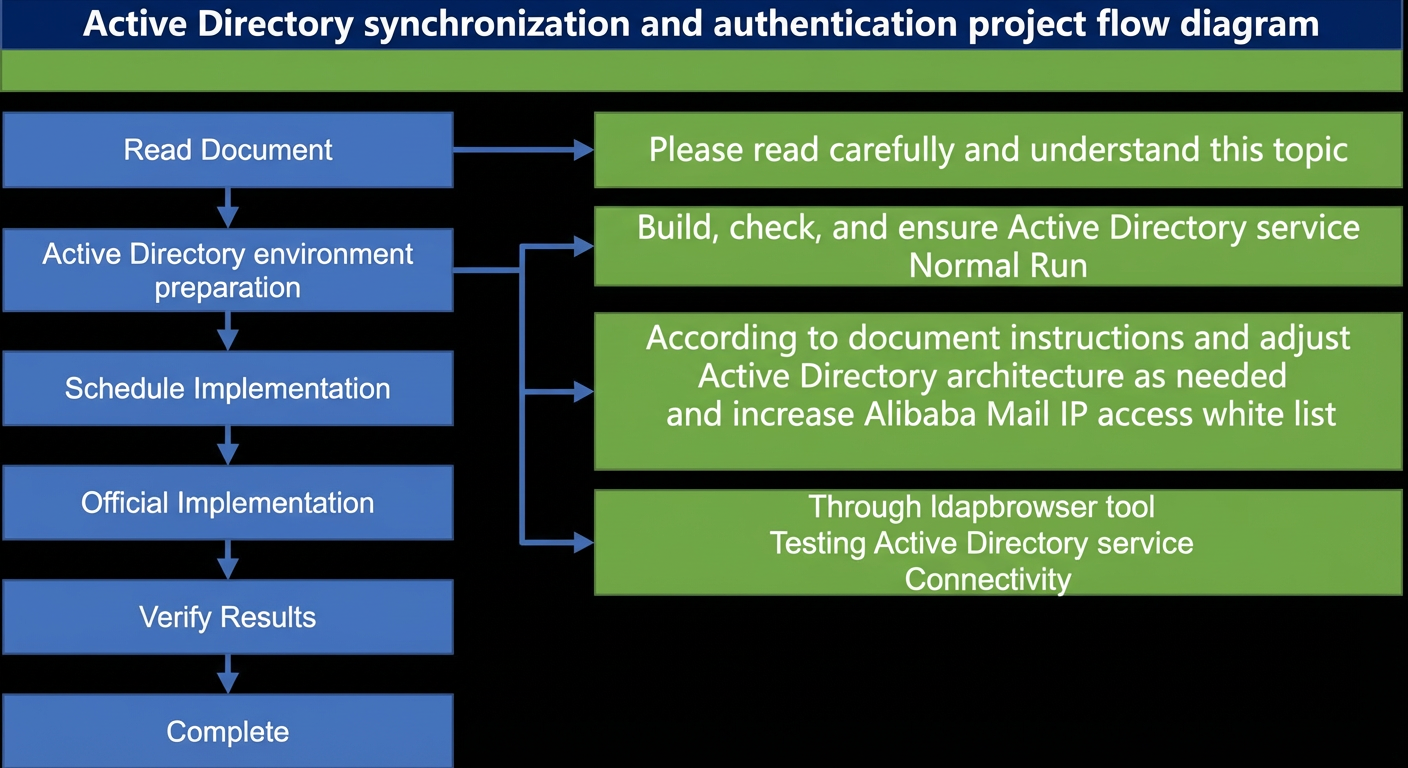
1. Synchronization rules and notes
1. The synchronization objects include organizational units (OUs) for departments, user accounts, distribution groups, and members of mail groups.
2. Synchronization can be configured for an entire domain controller (DC) or a specific OU. If you sync only a specific root OU, do not place objects that you want to exclude under that OU. Alternatively, you can exclude objects by adding the `nombx` string to the OU's URL, the AD user's `WWWHomePage` property, or the security group's `WWWHomePage` property. All distribution groups within a synced OU are synchronized. You cannot exclude individual distribution groups.
3. Synchronization only performs add, disable, and update operations. It does not delete mailbox accounts, mail groups, or departments. For example, changing the `sAMAccountName` value breaks the synchronization relationship with the original mailbox account and creates a new mailbox account based on the new `sAMAccountName` value.
4. In Alibaba Mail, the `cn` attribute is used for the internal "default nickname". When a user sends an email to a recipient in the same domain, the sender's display name appears as "Full Name (Default Nickname)". The `displayname` attribute is used for the external "custom nickname". When a user sends an email to an external recipient, the sender's display name appears as the configured "Custom Nickname".
If the domain administrator needs to add more than two account aliases, do not sync the `mail` attribute. After you sync the AD `mail` attribute, AD becomes the source of truth. Any aliases added directly in the mailbox will be overwritten and deleted, leaving only the alias address that is synced from the AD `mail` attribute.
To use multiple independent domains for your mailboxes, you must first add the other subdomains in the domain administration console. Then, create the multi-domain accounts before you set up AD synchronization. If you add subdomains after setting up AD synchronization, any deleted accounts cannot be recovered. To back up historical data, you can use the mail transfer feature. For more information, see the account recycle bin.
The synchronization epoch is typically a few minutes, with a maximum of one hour per sync. Synchronizing 1,000 accounts takes about five minutes. Ensure that the time on your AD server is accurate. If you have multiple AD servers that sync with each other, ensure the effective time on the AD server that directly syncs with Alibaba Mail is correct. This ensures that incremental synchronization to Alibaba Mail occurs in a timely manner.
To promptly freeze the mailboxes of former employees, we recommend that you maintain a dedicated OU for them and disable their AD accounts.
This ensures that their mailbox accounts are frozen immediately. Even if a former employee is still logged on to a mail application, their ability to send and receive emails is disabled. You can perform deletion maintenance at a later time.
If an account is deleted from Active Directory (AD) and a new account with the same name is created, mailbox sync first checks for the original mailbox to prevent duplicates.
if the mailbox exists, the account is renamed to `account_backup`, and then the mailbox for the new AD account is synchronized.
For example, if you delete the AD account user@a.com and then create a new one with the same name in AD, the mailbox first generates a
The user@a.com mailbox is then generated by syncing the user_backup@a.com mailbox.
Supported synchronization fields 1. The following fields are supported for synchronization by default. Except for the account name, other fields are customizable. You can select any AD attribute field for synchronization. 2. These customizable fields can also be excluded from synchronization. If you do not need to sync them, provide advance notice. |
|
AD side |
Mailbox side |
cn |
Full name |
sAMAccountName |
Account name, the prefix of the default mailbox address before the at sign (@) |
title |
Position |
telephoneNumber |
Work phone |
mobile |
Mobile phone |
Domain alias/Account alias/Independent multi-domain account |
|
displayname |
Custom nickname (When you send an email to an external recipient, the sender's name is displayed as the custom nickname) |
No default corresponding attribute field |
Default nickname (Visible between accounts within the enterprise) |
No default corresponding attribute field |
Employee ID |
Special notes for group synchronization |
|
Distribution group |
Security group |
The `sAMAccountName` must match the mailbox account name format. |
The `sAMAccountName` must match the mailbox account name format. |
The `Name` property supports Chinese characters. |
The `Name` property supports Chinese characters. |
The `Mail` property must be in the email address format. |
The `Mail` property must be in the email address format. |
The scope of a group can be global or communication. |
The group scope can be Global or Universal. |
Group members can be synchronized. |
Group members can be synchronized. |
For members from external domains, the `mail` value must be specified. |
For members from external domains, the `mail` value must be specified. |
2. Authentication rules and notes
After you set up AD authentication, the authentication source switches from Alibaba Mail to your AD system. When a user enters their account and password on a client or a webpage, Alibaba Mail queries your enterprise's AD service using the standard LDAP protocol. The AD system then verifies the account and password. If the credentials are correct, AD notifies Alibaba Mail that the user can log on.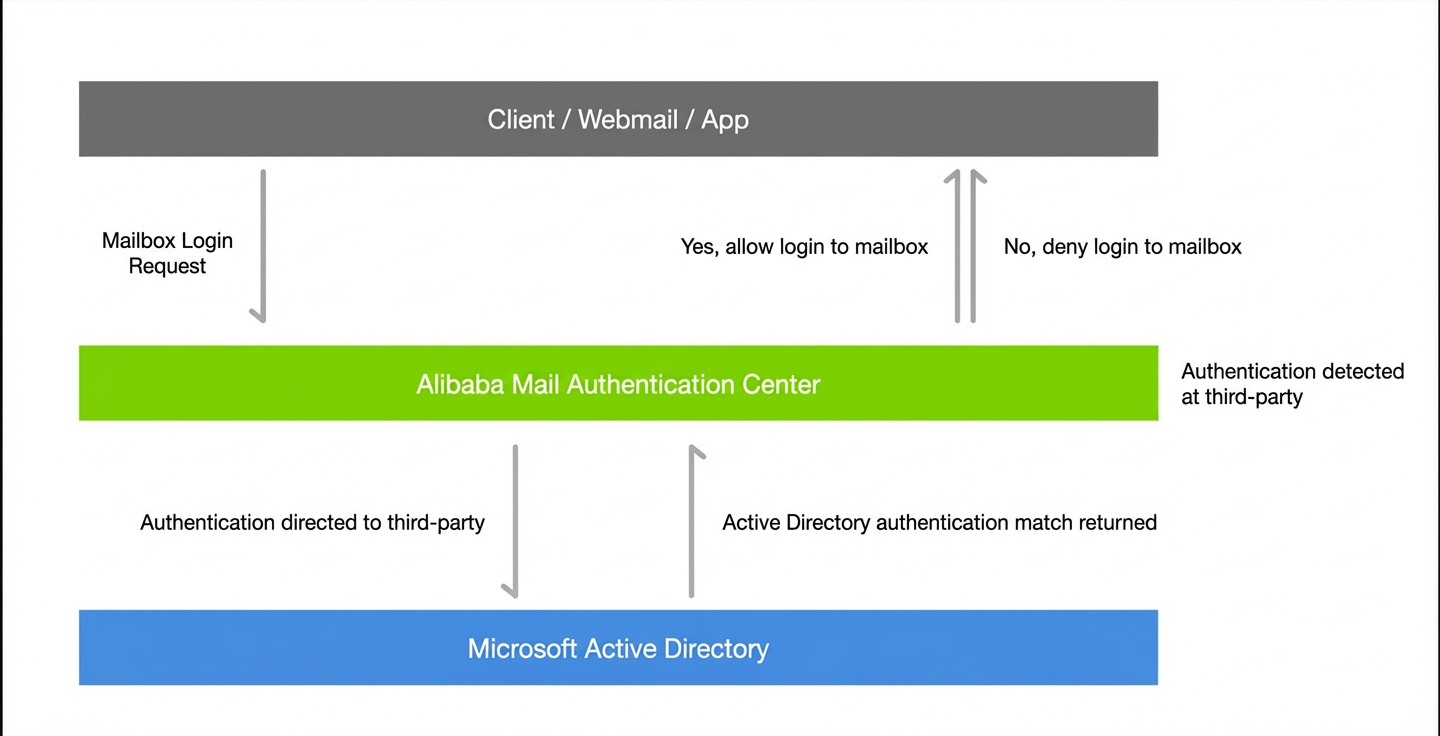
1. Create a postmaster account in AD. The `userPrincipalName` attribute value for this account must be the same as the postmaster address in Alibaba Mail. Otherwise, you cannot log on to the domain administrator mailbox after you enable authentication.
2. The AD server address and port must be accessible from the public network so that Alibaba Mail can connect to it. To ensure the security of your AD service, you can configure an access control list (ACL) to allow access only from the Alibaba Mail source IP addresses: `115.124.XX.XX` and `59.82.XX.XX`.
After you enable AD authentication for Alibaba Mail, all logon and password modification operations are handled by your AD server. If your AD system is down, users cannot log on to their mailboxes. To prevent logon failures, Alibaba Mail supports authentication with primary and secondary AD servers.
3. Scenario comparison
Three scenarios are supported: synchronization only, authentication only, and both synchronization and authentication. Each scenario has specific differences and considerations.
Scenario |
Difference |
Synchronization only |
1. The user's `userPrincipalname` can be different from the logon email address. 2. Passwords cannot be synchronized. After synchronization, the mailbox accounts do not have passwords. You must set passwords in the mailbox domain administration console before users can log on to Alibaba Mail.
Important
Be careful when switching scenarios. For example, if you previously used both AD synchronization and authentication and want to switch to synchronization only, prepare in advance. |
Authentication only |
1. For all users in AD that require authentication, the `userPrincipalname` field (if it exists) must contain an email address value, and this value must be the same as the logon email address.
Important
Be careful when switching scenarios. For example, if you previously used both AD synchronization and authentication and want to switch to authentication only, prepare in advance. 2. Users must log on to their mailboxes using their AD account passwords. Passwords set in the mailbox cannot be used to log on. |
Both synchronization and authentication |
1. Except for the postmaster account, the `userPrincipalname` of other users can be different from the logon email address. 2. Users must log on to their mailboxes using their AD account passwords. Passwords set in the mailbox cannot be used to log on. |
4. Getting attributes
Open "Active Directory Users and Computers". In the View menu, select "Advanced Features". Otherwise, you cannot see the attributes of AD objects.
Right-click a department, user, or mail group object, select Properties, and then click the Attribute Editor tab to find the required attributes.
Tip: To quickly find an attribute, click any attribute in the list and then type the first letter of the desired attribute's name on your keyboard.
5. Tips
If you experience a significant synchronization delay, such as department accounts or mail groups not appearing in Alibaba Mail, you can trigger a sync by refreshing a non-critical attribute value of the AD object. The attribute should not be related to synchronization or authentication. If many objects are involved, you can perform a batch operation using the following instructions.
Method 1: Open the command prompt window
csvde -f C:\Users\Administrator\Desktop\20210908.csv -r "(objectClass=user)" -d "OU=SmallOU,OU=LargeOU,DC=xxx,DC=com" -l "SamAccountName,Mail"
Note: Some special values, such as `wWWHomePage`, cannot be directly exported. To modify them, refer to the `import-Csv` command in Method 2.
Method 2: Use the Active Directory module for PowerShell
Open the Active Directory Module for Windows PowerShell from Administrative Tools. Alternatively, open a command prompt window, type `PowerShell` and press Enter, and then type `import-module activedirectory` to import the AD module.
To batch modify the attributes of accounts, use the exported CSV file:
Import-Csv -Path C:\Users\Administrator\Desktop\20210908.csv | foreach {Get-ADUser -Identity $_.SamAccountName |Set-ADUser -email $_.mail -HomePage $_.wWWHomePage }