Identity verification for domain names
According to regulations in the Chinese mainland, all domain names must complete identity verification before they can be resolved and used. If verification is not completed, the registry locks the domain name, which changes the domain status to serverHold and makes the website inaccessible. This document guides you through the process of completing identity verification for your domain names on Alibaba Cloud. This service is free of charge.
Identity verification for domain names involves two key steps: creating and verifying a registrant profile, and then associating the verified profile with a domain name.
Create and verify a registrant profile: Create and submit a registrant profile that contains the registrant's identity information for review.
Associate the profile with a domain name: Associate the verified registrant profile with one or more domain names.
Checklist of required materials
Before you begin, prepare the required documents based on your identity and domain name type. This preparation can significantly speed up the verification process.
1. Basic materials checklist
Enterprise/Organization
Region | Accepted documents | Description |
The Chinese mainland |
| Must contain a valid 18-digit Unified Social Credit Code. |
Outside the Chinese mainland | Official registration documents for organizations outside the Chinese mainland, such as:
| The image must be of a certificate issued by an authoritative body. Website screenshots are not valid. |
Personal
Identity | Preferred document | Alternative documents |
Resident of the Chinese mainland | ID card (side with photo) Note Provide both the front and back sides only if the system explicitly requests it or if the review fails. |
|
Resident of Hong Kong (China) or Macao (China) | Residence Permit for Hong Kong and Macao Residents | Mainland Travel Permit for Hong Kong and Macao Residents |
Resident of Taiwan (China) | Residence Permit for Taiwan Residents | Mainland Travel Permit for Taiwan Residents |
Foreign nationals | Passport | Foreign Permanent Resident ID Card |
For a Passport, upload only the page that shows the photo and signature. Unlike an ID card, a passport does not have a front and back side, so you do not need to combine two images into one.
General requirements for uploaded materials
Requirement | Description |
Image format | JPG, JPEG, PNG, BMP, HEIC, and WebP are supported. |
Image size | 55 KB to 5 MB. |
Clarity | Must be a color photo or scan of the original document. All text, seals, and photos must be clear and legible, without reflections or blurs. |
Completeness | All four corners of the document must be fully visible in the image, without any parts missing or obstructed (for example, by fingers or watermarks). |
Authenticity | Do not use tools such as Photoshop to modify the document in any way. If the image format is incorrect, use an image editing tool to save it in a supported format. Do not just change the file extension. |
2. Checklist of additional qualifications for special domain names
If your domain name has one of the suffixes listed in the following sections, you must prepare additional qualification documents in addition to the basic materials.
".gov.cn" domain names
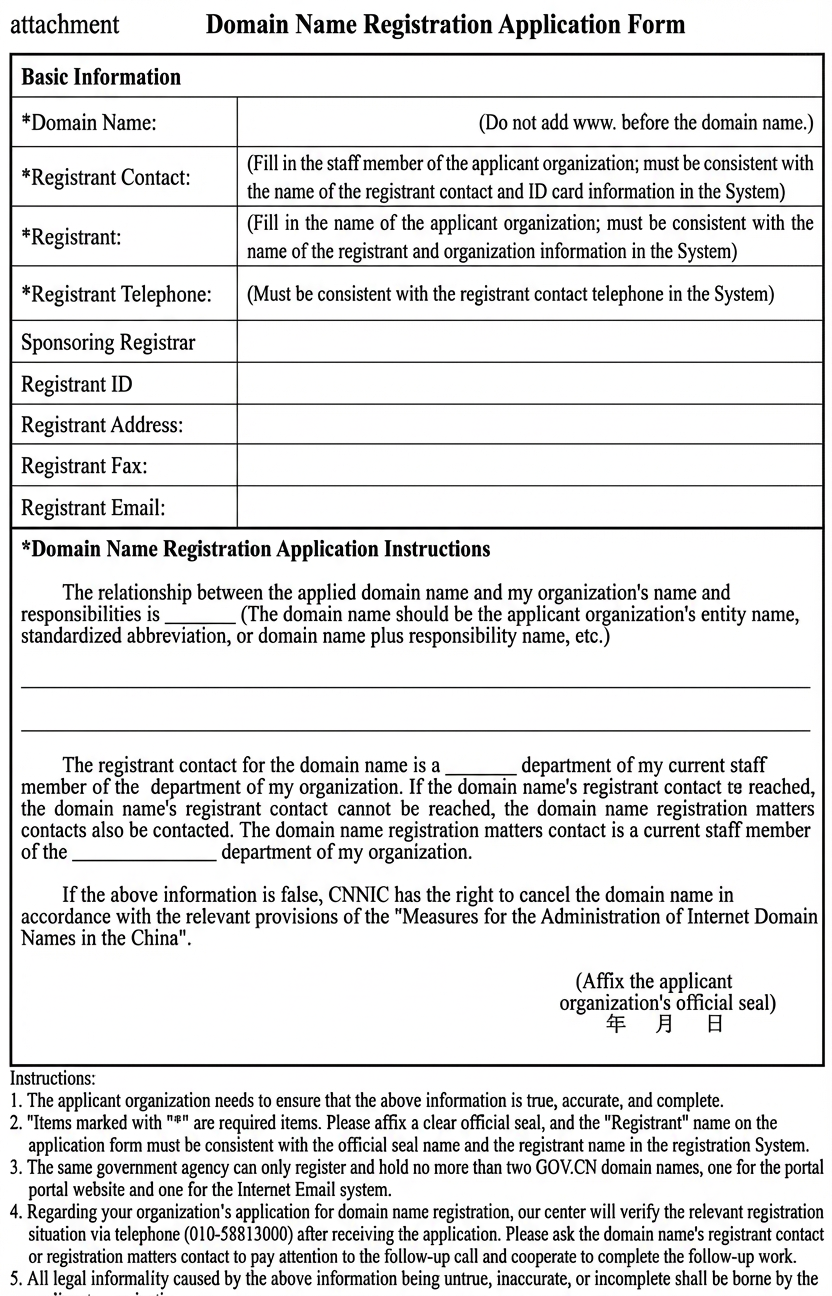
Domain Name Registration Application Form stamped with the official seal of the applicant organization: The application form is generated for you to download during the identity verification process in the Alibaba Cloud Domain Names console. You must download, print, fill out, and stamp the application form for ".gov.cn" domain names. The following table provides a sample and instructions.
Instructions:
The applicant organization must ensure that the information provided is true, accurate, and complete.
Items marked with an asterisk (*) are required. Apply a clear official seal and ensure that the "Registrant" name on the application form is consistent with the name on the official seal and the registrant name in the registration system.
A single government agency can register and hold no more than two ".gov.cn" domain names: one for its portal website and one for its Internet email system.
After receiving your application, CNNIC will call you to verify the registration details. The registration contact or the person responsible for registration matters should be available for this follow-up call and cooperate to complete the verification.
ImportantThe domain name, registrant contact, registrant, registrant phone number, registrar, and registrant ID fields in the "Domain Name Registration Application Form" are automatically generated based on the information you provide during domain name registration. Fill in the domain name registration information according to the requirements in the application form.
The applicant organization is solely responsible for any legal liabilities arising from information in the application form that is untrue, inaccurate, or incomplete.
Documents proving the applicant is a government agency: A copy of a valid Organization Code Certificate, where the organization type is 'government agency legal person'.
A copy of the registration contact's ID card
".trademark" domain names
".restaurant" domain names
Step 1: Create an information template
A registrant profile is an identity record used to manage registrant information. It is designed to be created once and reused multiple times. You can associate all domain names under your account with this profile for unified management.
Prerequisite: Before you register a domain name, make sure that you have completed the identity verification for your Alibaba Cloud account. The identity verification for an Alibaba Cloud account is separate from the identity verification for a domain name. For more information, see Account identity verification.
Log on to the Alibaba Cloud Domain Names console. On the Registrant Profiles page, click Create Registrant Profile.
Follow the prompts on the page to enter the registrant information. Refer to the following tables for guidance on specific parameters:
Enterprise/Organization
Specify parameters
Metric description
Use account information
If you select this option, the system automatically fills in the registrant information based on the identity verification information of your Alibaba Cloud account. The system also automatically fills in the Domain Name Contact field with the name of your company's legal representative. If you clear this option, you can enter the contact information manually. If you log on with a RAM user account, this option is not displayed, and you must enter all information manually.
Unified Social Credit Code
The certificate number must be exactly the same as on the Business License.
If you are registering the domain name holder as an overseas organization, follow these steps to fill in the Enterprise/Organization template:
Select the Enterprise/Organization tab.
Certificate Type: In the cascading drop-down menu, choose Overseas Organization > Overseas Organization Certificate.
Certificate Number: Enter the certificate number on the overseas organization certificate. After you select Overseas Organization Certificate, the field label changes from Unified Social Credit Code to Certificate Number.
If the certificate has a number, enter the number as shown in the following figure.
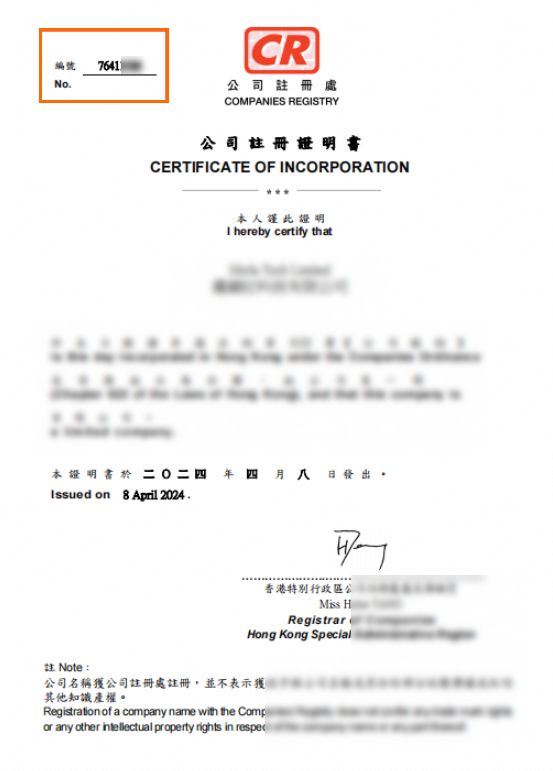
If the certificate does not have a number, enter the digit "0".
Registrant Organization Name: Enter the name exactly as shown on the certificate, keeping the simplified and traditional Chinese character format consistent with the certificate.
Region: You must change Region to a country or region outside the Chinese mainland, such as China (Hong Kong), China (Macao), or Taiwan (China). If you keep Region set to China, the validation error "Passports or overseas organization certificates cannot be used with a contact address in mainland China" occurs when you submit the template.
Fill in the required domain name contact, mailing address, postal code, mobile number, and email address.
Upload an image of the holder's certificate.
Click Submit to complete the creation.
Registrant Organization Name
Must be exactly the same as the name on the uploaded certificate, including simplified/traditional Chinese characters, punctuation marks (such as full-width and half-width brackets), and special characters. If the name contains "·" or "《》", keep these symbols in the Chinese name but remove them from the English name.
If the system's automatic recognition produces errors—for example, misidentifying rare characters or using the wrong bracket format—ignore the error prompt, manually correct the name to exactly match your certificate, and resubmit.
Domain Name Contact
We recommend that a technical staff member of the company serves in this role. The domain name contact does not need to undergo identity verification.
The domain name contact is not required to be the company's legal representative. Any valid company contact, such as a technical or administrative staff member, is acceptable.
NoteEnterprise identity verification is based on the company's business license, not any individual. Verification is not affected by changes in legal representative or personnel departures.
Region
Must be consistent with the registered address on the certificate.
Mailing Address
This must be consistent with your business license.
Postal Code
The postal code of the company's location.
Mobile Number
Used to receive the verification code. The country code defaults to 86 and cannot be changed.
Email
Enter a real and valid email address and complete the Email Verification below the input field.
NoteRecommendation: Avoid using email addresses with new top-level domain (TLD) suffixes (such as test@test.club) to prevent issues with domain name order processing.
Upload an image of the Business License. The system automatically recognizes the information on the certificate. Check that the recognized values match the certificate, and correct them manually if needed.
Select the I have read and agree to the Instructions for Filling in Domain Registrant Organization Information checkbox.
Click Submit.
The information for the English profile is automatically filled based on the Chinese content. You can also modify it manually.
Individual
Specify parameters
Metric description
Registrant Name
Must be exactly the same as the name on the uploaded identity document. If the domain name requires ICP filing later, this name must also be consistent with the ICP filing entity name. If the OCR recognition of your uploaded identity document produces a name that differs from your manually entered name, verify that your manually entered name is correct and click Submit. This warning does not prevent submission. The final review result is subject to the registry.
Region
Must be consistent with the address on your ID card. If you hold a passport or another ID document that is not issued in the Chinese mainland, select the country or region that issued your ID document.
Mailing Address
Enter a real and valid mailing address. The address must be 2 to 128 characters long (Chinese and English characters are counted separately). If the address exceeds this limit, you can shorten or abbreviate it while keeping key details such as the province, city, district, street name, and house number. If you hold a passport or another ID document that is not issued in the Chinese mainland, enter the address registered on your ID document. After you set Region to a country or region outside China, the province and city drop-down list disappears automatically, and you are not required to enter an address in the Chinese mainland.
Postal Code
The postal code of the mailing address.
Mobile Phone Number
Country Code: After you select Country/Region, the system automatically fills in the corresponding mobile phone country code.
Mobile Number/Area Code + Landline: Enter the company's landline number or the domain contact's mobile phone number.
Extension (Optional): Enter the extension for the landline number. If there is no extension, leave this field empty. Do not enter any other information.
Email
Enter a real and valid email address and complete the Email Verification below the input field.
NoteRecommendation: Avoid using email addresses with new TLD suffixes (such as test@test.club) to prevent issues with domain name order processing.
The information for the English profile is automatically filled based on the Chinese content. You can also modify it manually.
After you confirm that the information is correct, click Submit.
Review time: The review of a registrant profile usually takes 1 business day but may take 3 to 5 business days in some cases.
Check review status: On the Registrant Profiles page, check whether the Profile Status is Identity Verification Successful. If the status is Identity Verification Failed, modify the information as prompted and resubmit.
Step 2: Associate the registrant profile with a domain name
After the status of the registrant profile changes to Identity Verification Successful, you must associate it with your domain name to complete the verification process.
Scenario 1: For a newly registered domain name
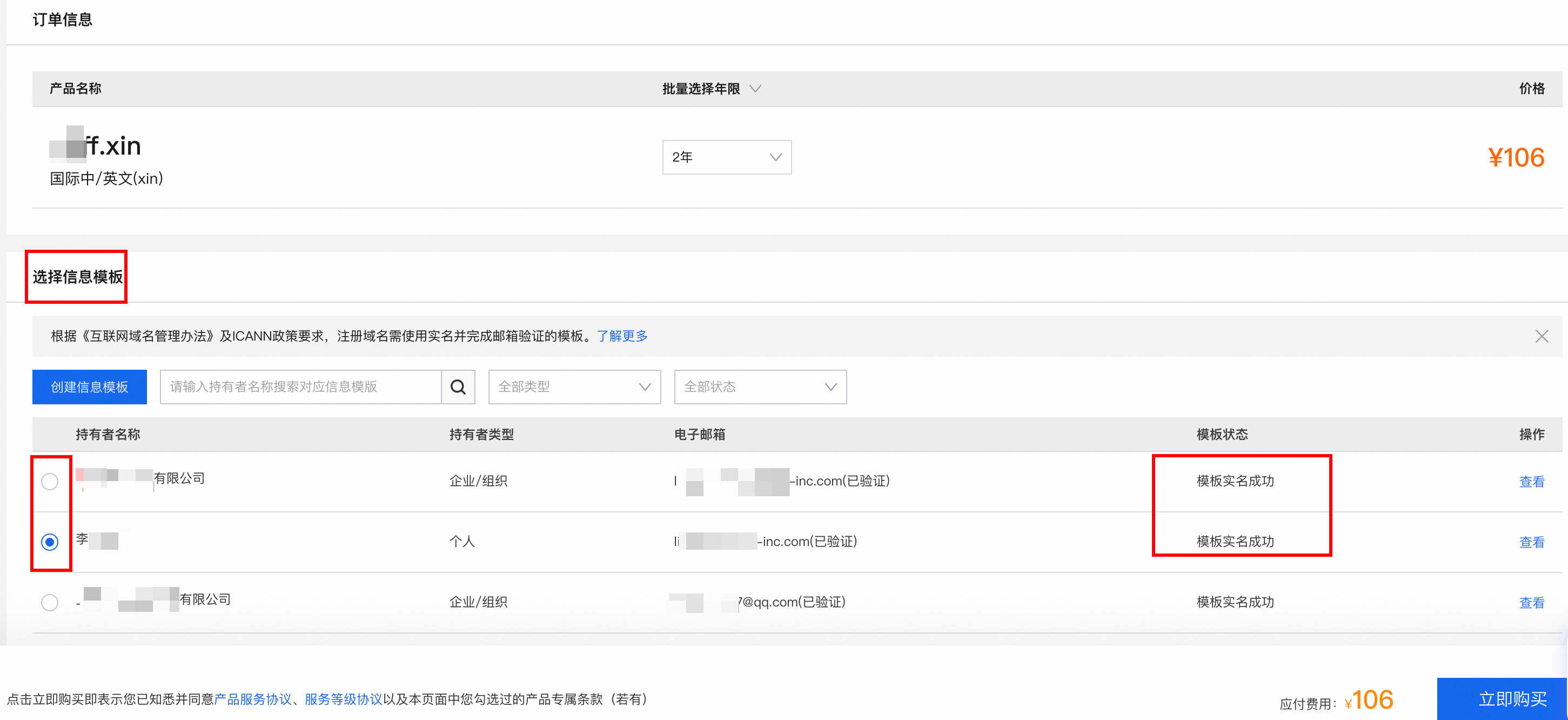
On the order confirmation page for the domain name purchase, select the profile that has passed identity verification. After you complete the payment, the system automatically submits the verification request.
Scenario 2: For an existing domain name
On the Domain Names page, find the domain name whose status is Identity Verification Not Completed.
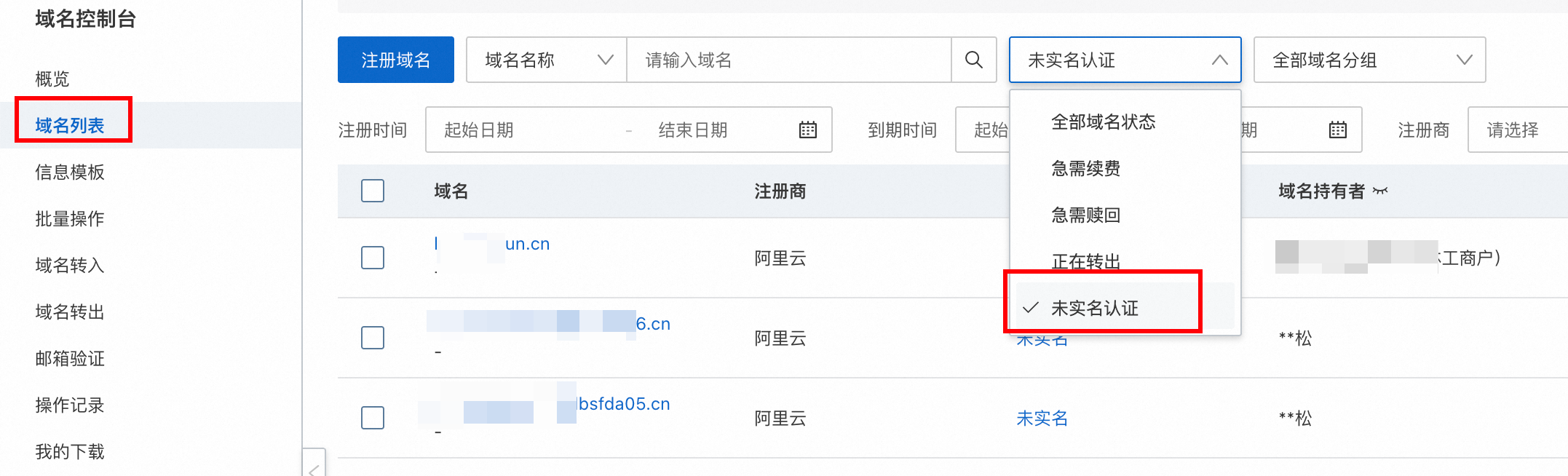
Click the target domain name. On the page, select the verified profile to associate with the domain name.
Scenario 3: For multiple domain names at a time
If you need to complete identity verification for multiple domain names at once, use the Modify Domain Information page to associate them with a verified registrant profile in a single operation.
Prerequisite: You must have a registrant profile whose Profile Status is Identity Verification Successful. If you do not have a verified profile, follow Step 1 above to create and verify one first.
In the left-side navigation pane of the Domain Names console, choose Batch Operations > Modify Domain Information. Enter the domain names for which you want to complete identity verification, select the verified registrant profile, select the service agreement checkbox, and then click Submit.
As required by ICANN policies, only a registrant profile that has passed identity verification can be selected. A single batch supports up to 1,000 domain names.
Scenario 4: Replace a registrant profile that cannot be modified
If your domain name is associated with a registrant profile that has passed identity verification but cannot be modified, replace the old profile with a new one to update the registrant information.
On the Registrant Profiles page, click Create Registrant Profile and select Enterprise/Organization. Set Certificate Type to Business License, enter the new Unified Social Credit Code and Registrant Organization Name, upload the new business license image, and then click Submit.
Wait for the new profile to pass identity verification. On the Registrant Profiles page, confirm that Profile Status is Identity Verification Successful.
Delete the old profile, and then click Set as Default in the Actions column of the new profile. Before you delete the old profile, make sure that it is not associated with other domain names.
In the left-side navigation pane, choose Batch Operations > Modify Domain Information. Enter the domain names that you want to update, select the newly verified profile, select Registrant information in the Select Fields to Modify section, and then click Submit.
Step 3: Check the identity verification status of the domain name
Identity verification and registry review: After the registrant profile passes identity verification, the domain name enters the registry review stage. The two are different steps in the same domain name registration process:
Identity verification of the registrant profile: A review of the identity information of the registrant, such as an ID card or a business license. The review is usually completed within 1 to 3 business days after you submit the profile. To check the status, view the Template Status of the profile, or go to the Registrant Identity Verification tab on the domain name details page.
Registry review: A review by the registry of the registration information of the domain name. A domain name whose Domain Name Status is Pending Approval is in this stage. After the review passes, the Domain Name Status automatically changes to Normal.
Pending Approval is a normal intermediate state, not a verification failure. No further action is required. Wait for the review to complete.
After you submit the association request, the system immediately syncs the information with the registry.
Review time: The identity verification review after you associate the profile with the domain name is usually completed within 1 day but may take 3 to 5 business days in some cases.
Verification method: Go to the Domain Names page and check the Status of the target domain name.
If the Status is Normal, the identity verification for the domain name is successful. You can now proceed with ICP filing and DNS configuration.
Domain status descriptions
Domain status | Meaning | Common causes and solutions |
clientHold | Registrar lock | Usually set by Alibaba Cloud. This may be because the domain name is involved in a violation or dispute. Solution: Check your internal messages or email notifications from Alibaba Cloud and follow the instructions. |
serverHold | Registry lock | The most common cause is failed identity verification. It can also be caused by the domain name pointing to an illegal website or a requirement for enhanced identity verification.
|
For more information about domain statuses, see WHOIS lookup details.
Troubleshooting
Page shows no response after clicking Submit
If the page becomes unresponsive or shows no feedback after you click Submit during identity verification, try the following steps in order:
Check browser compatibility: Use a modern browser such as Google Chrome, Firefox, or Microsoft Edge (latest version). Internet Explorer is not supported.
Check your network connectivity: Ensure that your internet connection is stable and that you can access other Alibaba Cloud pages normally.
Clear browser cache and cookies: Clear the cache and cookies in your browser settings, then reopen the Registrant Profiles page and try again.
Try a different browser or device: If the issue persists, switch to a different browser or device and resubmit the form.
Verify your uploaded documents: Check that the uploaded images meet all the requirements listed at the beginning of this page: supported formats include JPG, JPEG, PNG, BMP, HEIC, and WebP; file size must be between 55 KB and 5 MB; images must be clear, complete, and authentic, with all four corners fully visible.
Check for hidden validation errors: Scroll to the top of the page to check whether any form validation error messages are present. Error messages may not be immediately visible if the page has scrolled down after you clicked Submit.
After completing the above steps, go to the Registrant Profiles page to check whether your submission was recorded. If the profile appears in the list with a pending or in-review status, the submission was received and is being processed. If the profile is not listed, resubmit the form.
FAQ
Why is my domain status Unverified?
Check the following items:
Has the information template been verified?
Go to the Registrant Profiles page and check whether the Profile Status is 'Identity Verification Successful'. If it failed, you must resubmit it.
Is the domain name associated with this template?
Go to the Domain Names page and click the target domain name. On the page, select the verified profile to associate with the domain name.
Why does my domain name still show as Unverified instead of Under review while its registrant profile is under review?
When a registrant profile is under review by the registry, any domain name that is not yet associated with this profile displays as Unverified instead of Under review. This is expected behavior, not an error. The registry review of a registrant profile is usually completed within 1 to 3 business days.
After the profile passes review, complete identity verification for the domain name as follows:
Log on to the Domain Names console and go to the Domain Names page.
Click Manage next to the target domain name.
On the domain details page, in the left-side navigation pane, click Registrant Identity Verification.
On the Quick Verification page, select the registrant profile whose Profile Status is Identity Verification Successful.
Complete phone number verification, and then click Submit.
Passing the registrant profile review does not mean the domain name has passed identity verification. The domain name displays as Identity Verification Successful only after you associate the verified profile with it through this operation.
How long does the identity verification review take?
The review for a registrant profile is usually completed within 1 business day but may take 3 to 5 business days in some cases. The review for a domain name after it is associated with a profile is usually completed within 1 day but may take 3 to 5 business days in some cases.
What do I do if the identity verification for my registrant profile fails? Where can I find the reason for the failure?
On the Registrant Profiles page, click View to the right of the profile. Review the reason for the failure, correct your materials, and upload them again. After the profile is approved, submit the domain name for verification again.
How do I resolve an identity verification failure caused by incorrect information in the registrant profile?
If identity verification fails because of incorrect registrant identity information, inconsistent contact details, or mismatched uploaded documents, see Identity verification FAQ for solutions.
Does it affect domain name ownership if I do not select the registrant profile ID when submitting for identity verification?
No. It does not affect domain name ownership. If the registrant profile ID was not selected when the request was submitted to the registry, it only means that the domain name is not yet associated with a verified registrant profile. The ownership of the domain name does not change. You can resubmit the association by using Batch Modify Domain Name Information:
Log on to the Domain Names console. In the left-side navigation pane, choose Batch Operations > Batch Modify Domain Name Information.
In the Domain Names field, enter the domain names that you want to associate with the registrant profile. You can enter them manually, import a file, or select a domain name group. A single batch supports up to 1,000 domain names.
For Registrant Profile, select a profile whose identity verification has passed.
Select the fields that you want to modify, such as Registrant Information.
Click Submit.
After the review passes, identity verification for the domain name is complete. This operation does not change domain name ownership.
Why is my website still inaccessible or unresolvable after the domain name has passed identity verification?
The domain name has not completed ICP filing or had its DNS settings configured. First, you must complete the ICP filing and DNS settings for the domain name.
DNS settings are already configured: Check the domain name status and verify that the DNS server settings are correct. For more information, see Quickly troubleshoot DNS resolution failures.
What should I do if identity verification fails because the organization name contains a simplified/traditional Chinese character mismatch?
The Registrant Organization Name must exactly match the name on your certificate, including whether each character is in simplified or traditional form. Manually correct the name to match your certificate and resubmit.
What should I do if the system misrecognizes a rare character in my organization name?
Ignore the error prompt. Manually correct the name to exactly match the name on your certificate and resubmit. Do not rely on the system's automatic recognition result for rare or variant characters.
Does the domain name contact have to be the company's legal representative?
No. The domain name contact can be any valid company contact, such as a technical or administrative staff member. Enterprise identity verification is based on the company's business license, not any individual, so verification is not affected by a change of legal representative or personnel departures.
What should I do if the bracket format (full-width or half-width) in my organization name does not match the certificate?
The Registrant Organization Name must exactly match the name on your certificate, including the bracket format. Manually correct the brackets to match your certificate and resubmit.
My Alibaba Cloud account has already passed identity verification. Why does my domain name still show as unverified?
Identity verification for an Alibaba Cloud account and identity verification for a domain name are two independent processes. Account identity verification confirms the identity of the Alibaba Cloud account holder, while domain name identity verification confirms the identity of the domain name registrant. Completing account identity verification does not mean that the domain name has passed identity verification. A domain name that has not passed identity verification cannot be renewed, and its resolution will be suspended.
To troubleshoot, follow these steps:
Log on to the Alibaba Cloud Domain Names console and go to the Domain Names page to check the Status column of the domain name.
If the Status is Unverified or the domain name is in the
serverHoldstate, the domain name has not passed identity verification.Create a registrant profile, complete its verification, and associate the profile with the domain name.
What should I do if I withdrew my identity verification application and now get "There is an operation in progress" when I resubmit it?
If you withdraw an identity verification application and then resubmit it, the system may show the message "There is an operation in progress" because the previous operation has not finished processing yet. In this case, you can complete identity verification through an alternative path: use the Modify Domain Information page to associate a verified registrant profile with the domain name.
Log on to the Alibaba Cloud Domain Names console.
In the left-side navigation pane, choose Domain Management > Batch Operations > Modify Domain Information.
Enter the domain name that requires identity verification.
Select a registrant profile whose Profile Status is Identity Verification Successful.
Select Registrant information, then read and agree to the Domain Name Registration Service Agreement.
Click Submit.
What should I do if I forgot to select a registrant profile when submitting domain name identity verification, and now I cannot find the submission record?
If you submit domain name identity verification without selecting a registrant profile, the submission record may not appear on the Domain Names page. You can resolve this by using batch operations to associate a verified registrant profile with the domain name:
Log on to the Alibaba Cloud Domain Names console. In the left-side navigation pane, choose Domain Management > Batch Operations > Modify Domain Information.
In the Domain List field, enter the domain names that you want to resubmit for verification. You can separate multiple domain names with commas, spaces, or line breaks. Up to 1,000 domain names are supported.
In the Select Registrant Profile field, select a registrant profile whose Profile Status is Identity Verification Successful.
In the Select Fields to Modify section, select Registrant information, read and agree to the Domain Name Registration Service Agreement, and then click Submit.
Forgetting to select a registrant profile does not affect the ownership of the domain name. After you submit, the system syncs the information with the registry. After the review passes, the identity verification status of the domain name changes to Normal.
What do I do if the certificate type and certificate number are not displayed for my domain name, and my ICP filing information is lost?
If your domain name has passed identity verification, but the certificate type and certificate number fields are not displayed in the Domain Names list, the identity verification information for the domain name is missing, which may cause the existing ICP filing information for the domain name to be lost. In this case, use Modify Registrant Information (Transfer) to complete identity verification again, and then resubmit the ICP filing.
Log on to the Alibaba Cloud Domain Names console.
In the left-side navigation pane, choose Domain Management > Batch Operations > Modify Domain Information.
Select the target domain name and a registrant profile that has passed identity verification, and complete the transfer to re-complete identity verification for the domain name.
After the domain name passes identity verification, resubmit the ICP filing to avoid issues with accessing your website caused by lost filing information.