Mitigate business risks from SystemMaintenance.Reboot events
Subscribe to event notifications and configure automatic or manual responses to SystemMaintenance.Reboot events before scheduled restarts.
Event cause
Alibaba Cloud may detect a potential hardware or software fault on the host where your ECS instance runs. The fault does not cause an immediate failure but requires an instance restart to resolve. If a hot migration is not possible, Alibaba Cloud sends a SystemMaintenance.Reboot system event 24–48 hours before the scheduled maintenance. During this period, you can restart the instance yourself or change the scheduled time. If you take no action, Alibaba Cloud automatically restarts the instance at the scheduled time. See Summary of ECS system events.
Fault risk types:
-
Type 1: Potential risk on the host.
-
Type 2: The GPU device of the instance is unavailable.
Risks
The SystemMaintenance.Reboot event poses the following risks:
-
Unfamiliarity with the proactive O&M event process can delay your response. If your architecture lacks high availability (HA) or fault tolerance, an instance restart can cause business disruptions.
-
If the fault causes a failure before you restart, the pending
SystemMaintenance.Rebootevent is closed and aSystemFailure.Rebootevent triggers a forced restart. A forced restart during peak hours can significantly impact system stability.
Mitigation plan
Subscribe to event notifications
Step 1: Subscribe to event notifications. Alibaba Cloud provides multiple notification channels that you can configure based on your requirements.
|
Notification method |
Effective scope |
Description |
|
All instances |
Subscribe to product O&M notifications in Message Center and send them to specified contacts. Methods include text messages, internal messages, and email. |
|
|
Use CloudMonitor to subscribe to ECS system event notifications |
Custom scope |
Supports email, Lark, WeCom, and Slack, text messages, phone calls, and DingTalk. See: |
Implement mitigation measures
Step 2: Implement manual or automatic mitigation measures. Choose the method that best fits your stability requirements.
|
Mitigation measure |
Scope |
Description |
Scenarios |
|
Manually restart the instance in the console |
Per-instance, per-event |
Manually restart the instance before the maintenance window or change the scheduled restart time. |
|
|
Disable or enable automatic restart for an instance |
Per-instance; applies to subsequent events automatically |
By default, the system automatically restarts the instance. To disable this, modify the instance maintenance properties or call ModifyInstanceMaintenanceAttributes. |
Stateful applications with existing disaster recovery mechanisms such as failover and node failover. Disabling automatic restarts prevents conflicts from multiple nodes serving simultaneously. |
|
Set a maintenance window for an instance |
Per-instance; applies to subsequent events automatically |
Set a maintenance window in the console or by calling ModifyInstanceMaintenanceAttributes. Maintenance occurs only within this window. |
|
|
Create a scheduled maintenance window |
Scoped instances; applies to subsequent events automatically |
Select target instances by scope (all instances, resource group, or instance tags) and set a scheduled maintenance window. See Scheduled maintenance windows for ECS. |
|
|
Monitor and respond to system events via OS logs |
Instances with the plugin installed; events trigger automated business migration |
Install the Cloud Assistant plugin ecs-tool-event. It converts system events into OS logs that your business can monitor to automate O&M actions, enabling automated fault handling and dynamic scheduling. See Automatically monitor and respond to ECS system events. |
Stateful applications requiring immediate risk mitigation and business migration before a restart. |
|
Consume events via message channel and restart instances via API |
All events from all instances; processed manually or automatically |
After receiving an event notification, handle the business process, consume the event through a webhook or message channel, then call an API to proactively restart the instance. See Subscribe to ECS system event notifications or Quickly subscribe to ECS events using EventBridge. |
|
|
Respond to events with OOS orchestration |
All events within the orchestration scope |
Use Operation Orchestration Service (OOS) to respond to proactive O&M events by calling an ECS API to restart instances. See OOS orchestration. |
Existing automated O&M capabilities relying on Alibaba Cloud OOS. |
|
Respond to events with a Function Compute trigger |
All events from all instances; execution logic defined in the function |
Use Function Compute to consume proactive O&M events and call an ECS API to restart instances. See Function Compute triggers. |
Existing automated O&M capabilities relying on Alibaba Cloud Function Compute. |
|
Default execution upon expiration |
All events for all instances |
Default behavior. If you take no action, Alibaba Cloud automatically restarts the instance 48 hours after the event notification. |
Stateless applications with adequate architectural fault tolerance that can fully tolerate partial instance restarts. |
A single measure may not cover all scenarios. Combine multiple measures for better stability. The recommended combination:
-
Subscribe to event notifications.
-
Use scheduled maintenance windows to shift restarts to off-peak hours.
-
For critical services, respond manually after notification or build an automated response capability.
Evaluate mitigation effectiveness
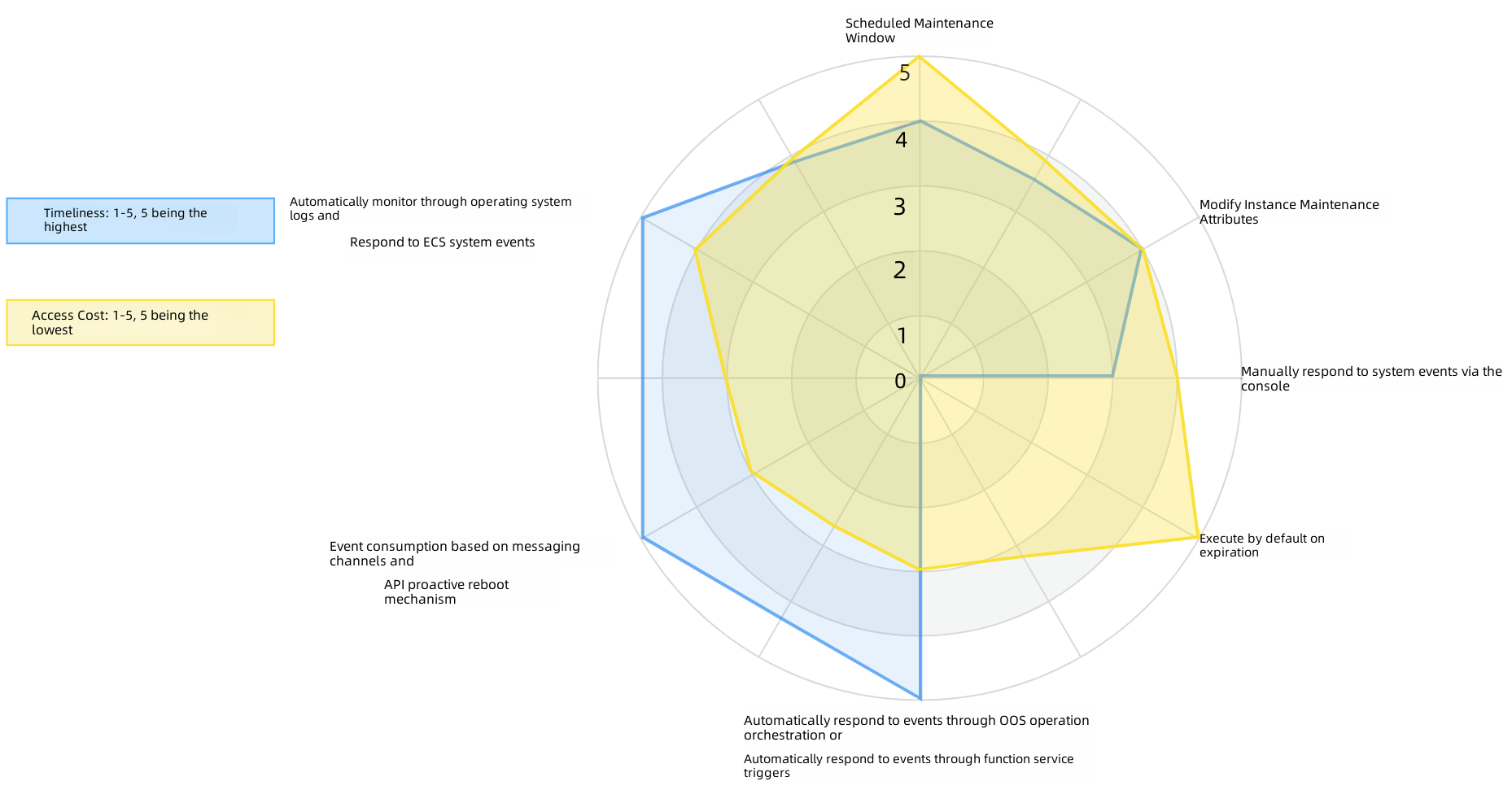
Early in a SystemMaintenance.Reboot event, the instance has a higher risk of failure. Respond as soon as possible to reduce business risks. The following evaluation compares the timeliness and cost of each mitigation measure:
-
Scheduled maintenance window: High timeliness, low cost. Provides basic protection quickly, especially if your O&M system is not yet mature.
-
OS log-based monitoring: Highest timeliness and best stability. For Kubernetes-managed clusters, integration via corresponding components keeps the cost low.
-
Manual console response: Low cost, but relies on O&M engineers. May lead to response delays or operational errors.
-
Instance maintenance properties: Timely, but requires per-instance configuration. High cost to cover all risks.
-
Default execution: Lowest cost. Relies only on ECS basic stability features with no additional business protection.
-
Other automated methods: High timeliness, high cost. Choose based on your business requirements.