Overview
Multi-tenant data isolation for ComfyUI is a feature on the FunArt platform that uses integrated authentication, authorization, and resource control mechanisms to provide an independent and secure ComfyUI operating environment for each user. When this feature is enabled, the system implements strict logical isolation across three dimensions: workflows, input files, and output results. This means that data is not visible and operations do not interfere with one another. This capability effectively resolves the single-user limitation of native ComfyUI, ensuring the privacy and security of business data. This document describes how to use the FunArt platform to configure and enable this multi-tenant feature for ComfyUI online services.
Overview of the process:
Prepare: Create a ComfyUI project and attach a custom domain name.
Configure: Select and configure an appropriate authentication method (BasicAuth or JWT).
Verify: Use different user accounts to verify resource isolation.
Use: After authentication, users access their independent environments.
Core Principles
Multi-tenant mode distinguishes users based on their user identity in the HTTP request header. After the gateway layer identifies the identity, it routes requests to the corresponding isolated space.
Authentication Method |
Isolation Identifier Source |
Mechanism Description |
BasicAuth |
Username |
Directly use the BasicAuth username as the resource isolation identifier. |
JWT |
Specified Claim Field |
Parse a specific field in the JWT Token (such as |
Prerequisites
You must have created a ComfyUI project (version 1.6.4 or later, created after February 9, 2026). For instructions, see Quick Start for Creating a ComfyUI Project.
You must have published an online service and attached a custom domain. For instructions on publishing an online service, see Publish an Online Service for a ComfyUI Project.
Note: Multi-tenancy relies on custom plugins. If your existing projects require multi-tenant support, contact the FunArt team to install the plugin.
Step One: Select Authentication Method
In , select an authentication method based on your security requirements and enable multi-tenant mode.
Option A: BasicAuth (Basic Authentication)
Scenarios: Internal testing or scenarios requiring relatively simple security, where access is controlled by usernames and passwords.
Select BASIC Authentication as the authentication method.
Enable the Multi-Tenant Mode switch.
In the USER List, add usernames and passwords.
Isolation mechanism: The client sends a Base64-encoded
username:passwordstring in the request header. The system extracts the BasicAuth username as the unique resource isolation identifier for the user.
Option B: JWT (JSON Web Token Authentication)
Scenarios: Production environments, supporting stateless token authentication and offering higher security.
1. How it works
Before selecting JWT authentication, refer to the following diagram to understand the end-to-end process from identity authentication to business invocation.
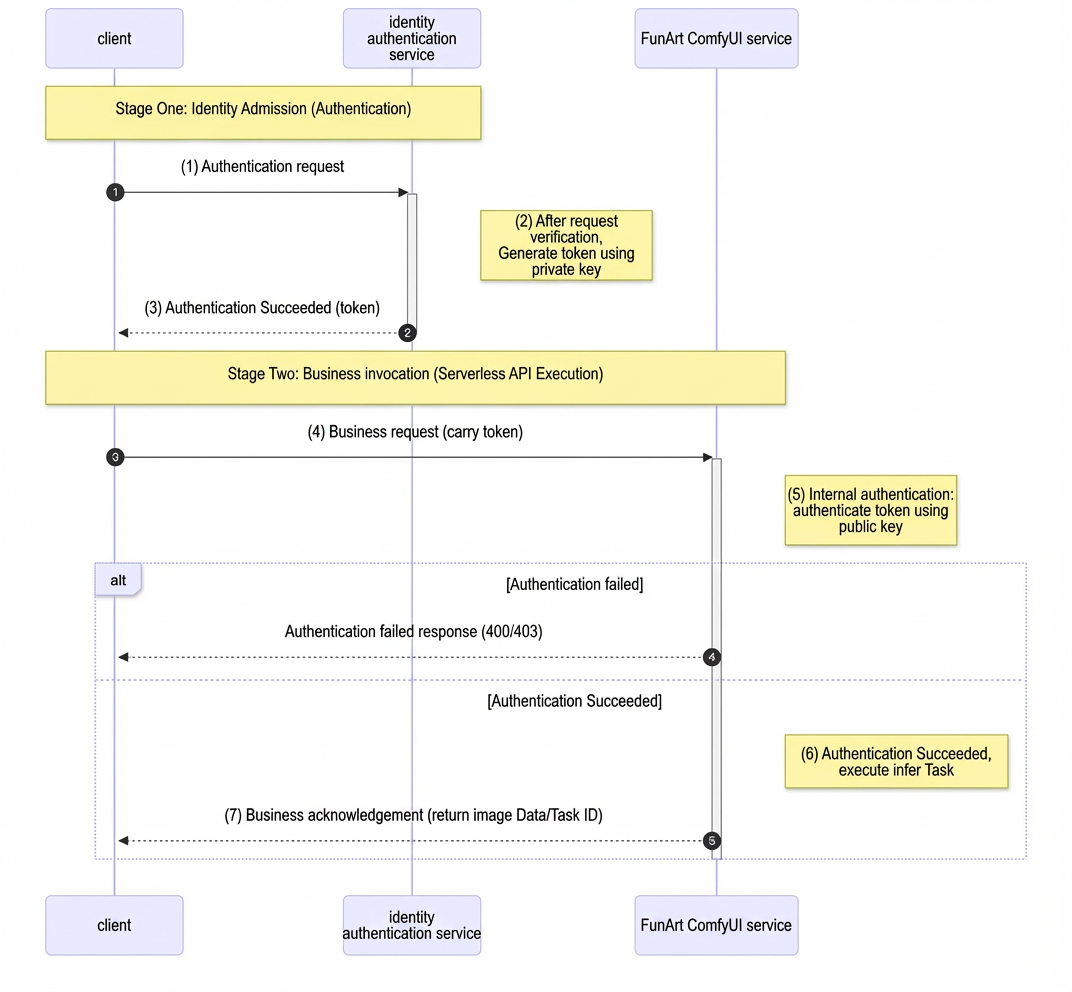
2. Configuration Steps
Select JWT Authentication as the authentication method.
Enable the Multi-Tenant Mode switch.
Configure JWKS: Enter the public key information used to verify the Token.
Configure JWT Claim Transformation (Key):
Map Parameter Location: Select
HEADER.Map Parameter Name: Enter
X-FunArt-Comfy-UserId.Claim Name: Enter the field in the JWT that represents the user's unique ID (such as
suboruser_id).
Isolation mechanism: After the gateway parses the token, it converts the specified Claim into an internal access token to achieve resource isolation.
Step Two: Save and Deploy
After configuring either authentication method, click Save and Deploy.
Wait for the deployment to take effect.
Verify Results
Access the ComfyUI WebUI via your custom domain name. Use different user identities (different BasicAuth usernames or different user identities in JWTs) to edit and execute workflows separately. Confirm the following:
Each user's workflows and input/output files are not visible to other users.
The same user sees their own data across multiple accesses.
This indicates that multi-tenant isolation is effective.
What to do next
For finer-grained permissions, implement additional access control at the application layer as needed.
In production environments, use JWT authentication and rotate keys regularly.