Parse custom data from devices
Resource-constrained devices may not be able to construct JSON-formatted Thing Specification Language (TSL) data. You can pass through raw data to IoT Platform and use the data parsing feature to convert data between custom device formats and JSON based on scripts that you submit.
Background information
The following figure shows the data flow between devices and servers.
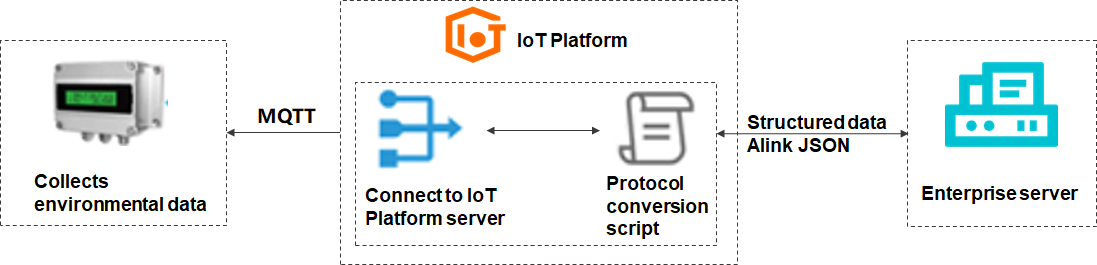
This example uses an environmental data collection device.
Connect a device to IoT Platform
-
Log on to the IoT Platform console IoT Platform console.
On the Overview page, find the instance that you want to manage and click the instance ID or instance name.
-
In the left-side navigation pane, choose . On the Products page, click Create Product to create a product. In this example, a product named EnvSensor is created.
Set the Data Type parameter to Custom. Use the default values for other parameters. For more information, see Create a product.
-
After the product is created, click Define TSL to add TSL features. Then, publish the TSL model.
In this example, a sample TSL model is provided. You can use the TSL model to add multiple TSL features at a time. For more information, see Import a TSL model.
The TSL model should include the following six custom properties:
Temperature (identifier
temperature, float, valid values: -10 to 50)Humidity (identifier
humidity, int32, valid values: 0 to 100)Carbon dioxide (identifier
co2, int32, valid values: 0 to 10000)Formaldehyde (identifier
hcho, float, valid values: 0 to 10)PM25 (identifier
PM25, int32, valid values: 0 to 1000)Illuminance (identifier
lightLux, float, valid values: 0 to 10000)
-
In the left-side navigation pane, choose Devices > Devices. On the Devices page, click Device List. On the Device List tab, click Add Device to create a device for the EnvSensor product. In this example, a device named Esensor is created.
After the device is created, obtain information about the device certificate. The information includes the ProductKey, DeviceName, and DeviceSecret.
-
Configure a device and perform a test.
Use a Link SDK to simulate a device and submit messages to IoT Platform. In this example, Link SDK for Node.js is used. For more information about how to configure a device, see Connect the device to IoT Platform and submit data.
For more information about how to use Link SDKs, see Device connection by using a Link SDK
Sample code:
const mqtt = require('aliyun-iot-mqtt');
// Specify information about the device certificate.
var options = {
    productKey: "g18lk****",
    deviceName: "Esensor",
    deviceSecret: "c39fe9dc32f97bfd753******b",
    host: "iot******.mqtt.iothub.aliyuncs.com"
};
// Establish a connection.
const client = mqtt.getAliyunIotMqttClient(options);
// Listen to commands from IoT Platform.
client.subscribe(`/${options.productKey}/${options.deviceName}/user/get`)
client.on('message', function(topic, message) {
    console.log("topic " + topic)
    console.log("message " + message)
})
setInterval(function() {
    // Submit environmental data.
	const payloadArray = new Buffer.from([0xaa,0x1f,0xc8,0x00,0x00,0x37,0x10,0xff,0x00,0x05,0xd7,0x6b,0x15,0x00,0x1c,0x01,0x34,0x00,0xad,0x04,0xff,0xff,0x04,0x00,0xff,0xff,0x18,0x00,0x30,0x00,0xff,0x2e])
    client.publish(`/sys/${options.productKey}/${options.deviceName}/thing/model/up_raw`, payloadArray, { qos: 0 });
}, 5 * 1000);
After you connect the device to IoT Platform, the device is in the Online state. You can view the status on the Devices page of the instance to which the device is connected.
After you run the device SDK, the device Esensor is displayed as Online in the device list on the Devices page of the IoT Platform console, and the Enabled toggle is turned on. This indicates that the device is successfully connected to IoT Platform.
Click View in the Actions column of Esensor. Then, click TSL Data. In this example, the data type of the product is set to Custom. In this case, the submitted TSL data is not displayed on the Status tab.
Choose . On the Cloud run log tab, select Device-to-cloud Messages to view the submitted messages that are displayed in the hexadecimal format.
In this example, the following data is displayed:
0xaa1fc800003710ff0005d76b15001c013400ad04ffff0400ffff18003000ff2e.
Write a data parsing script
Edit, submit, and debug data parsing scripts in the IoT Platform console.
-
Log on to the IoT Platform console. Click the name of the instance that you want to manage. In the left-side navigation pane of the Instance Details page, choose .
-
On the Products page, find the product and click View in the Actions column.
-
On the product details page, click Message Analysis.
-
On the Message Analysis tab, write a script in the Edit Script field.
Modify the script based on the communication protocol that is used by the device. The following table describes the message body structure of the device.
Byte
Description
Remarks
12
Low byte value of the PM2.5 property
Returns the value of the PM2.5 property. Valid values: 0 to 999. Unit: ug/m3.
13
High byte value of the PM2.5 property
14
Low byte value of the temperature property × 10
Returns the value of the temperature property. Valid values: -10 to 50. Unit: °C.
15
High byte value of the temperature property × 10
16
Low byte value of the humidity property
Returns the value of the humidity property. Valid values: 0 to 99. Unit: %.
17
High byte value of the humidity property
18
Low byte value of the carbon dioxide property
Returns the value of the carbon dioxide property. Valid values: 0 to 9999. Unit: mg/m3.
19
High byte value of the carbon dioxide property
22
Low byte value of the formaldehyde property × 100
Returns the value of the formaldehyde property. Valid values: 0 to 9.99.
23
High byte value of the formaldehyde property × 100
28
Low byte value of the illuminance property
Returns the value of the illuminance property. Unit: lux.
29
High byte value of the illuminance property
Because the device in this example only submits environmental data, you only need to configure the rawDataToProtocol() function for upstream data parsing. The protocolToRawData() function is not required. Custom data can be converted into property, service, or event data. This example converts custom data into property data.
var PROPERTY_REPORT_METHOD = 'thing.event.property.post'; // Submit upstream data. The following function converts data in a custom format into a TSL model in the JSON format. function rawDataToProtocol(bytes) { var uint8Array = new Uint8Array(bytes.length); for (var i = 0; i < bytes.length; i++) { uint8Array[i] = bytes[i] & 0xff; } var dataView = new DataView(uint8Array.buffer, 0); var jsonMap = new Object(); // Specify the request method. jsonMap['method'] = PROPERTY_REPORT_METHOD; // Specify the protocol version. Set the value to 1.0. jsonMap['version'] = '1.0'; // Specify the ID of the request. jsonMap['id'] = new Date().getTime(); var params = {}; // The values 12 and 13 are the values of the PM2.5 property. params['PM25'] = (dataView.getUint8(13)*256+dataView.getUint8(12)); // The values 14 and 15 are the values of the temperature property. params['temperature'] = (dataView.getUint8(15)*256+dataView.getUint8(14))/10; // The values 16 and 17 are the values of the humidity property. params['humidity'] = (dataView.getUint8(17)*256+dataView.getUint8(16)); // The values 18 and 19 are the values of the co2 property. params['co2'] = (dataView.getUint8(19)*256+dataView.getUint8(18)); // The values 22 and 23 are the values of the hcho property. params['hcho'] = (dataView.getUint8(23)*256+dataView.getUint8(22))/100; // The values 28 and 29 are the values of the lightLux property. params['lightLux'] = (dataView.getUint8(29)*256+dataView.getUint8(28)); jsonMap['params'] = params; return jsonMap; } // Send downstream commands. The following function converts a TSL model in the JSON format into data of a custom format. function protocolToRawData(json) { var payloadArray = [1];// The device can only submit data and cannot receive commands from IoT Platform. return payloadArray; } // Parse topic data in a custom format to Alink JSON data. function transformPayload(topic, rawData) { var jsonObj = {} return jsonObj; } -
Test data parsing.
-
Select Upstreamed Device Data from the Simulation Type drop-down list.
-
On the Input Simulation tab, enter test data in the field.
You can use the hexadecimal data that is submitted by the device as test data. To view the hexadecimal data, go to the Device Log page. Example: 0xaa1fc800003710ff0005d76b15001c013400ad04ffff0400ffff18003000ff2e.
-
Click Run.
On the Parsing Results tab, the parsing result is displayed in JSON format. The
methodfield isthing.event.property.post, and theparamsfield contains properties such ashcho,pm25,lightLux,co2,temperature, andhumiditywith their corresponding values.
-
-
After you confirm that test data can be parsed by the script, click Submit to submit the script to IoT Platform.
Debug the device and submit data
After you submit the script, use the device SDK to debug it.
When the device submits data to IoT Platform, IoT Platform uses the script to parse the data. Choose . On the Cloud run log tab, view the logs for data parsing.
On the Cloud run log tab of the IoT Platform console, you can view the complete link logs for data submitted by device Esensor. The log entries include the following business types:
Device-to-cloud messages
Message parsing (RawDataToProtocol)
Message parsing (ProtocolToRaw)
TSL model
Click View in the message content column of the TSL model log to view the parsed JSON data. The params field in ResultData contains sensor properties such as PM25:21, co2:1197, temperature:28.4, and humidity:52. The Reason field shows success, indicating that data submission and script parsing are both successful.
To view the parsed data, go to the Device Details page and choose .
The page displays the parsed real-time data of device Esensor in card format, showing the following six properties:
Illuminance: 48 Lux
PM25: 21 μg/m³
Formaldehyde: 0.04 ppm
CarbonDioxide: 1197 mg/m³
humidity: 52%
temperature: 28.4℃
Example of upstream TSL data
{
  "schema": "https://iotx-tsl.oss-ap-southeast-1.aliyuncs.com/schema.json",
  "profile": {
    "version": "1.0",
    "productKey": "g4****"
  },
  "properties": [
    {
      "identifier": "lightLux",
      "name": "illuminance",
      "accessMode": "rw",
      "required": false,
      "dataType": {
        "type": "float",
        "specs": {
          "min": "0",
          "max": "10000",
          "unit": "Lux",
          "unitName": "luminous flux per unit area",
          "step": "0.1"
        }
      }
    },
    {
      "identifier": "PM25",
      "name": "PM25",
      "accessMode": "rw",
      "required": false,
      "dataType": {
        "type": "int",
        "specs": {
          "min": "0",
          "max": "1000",
          "unit": "μg/m³",
          "unitName": "micrograms per cubic meter",
          "step": "1"
        }
      }
    },
    {
      "identifier": "hcho",
      "name": "formaldehyde",
      "accessMode": "rw",
      "desc": "HCHOValue",
      "required": false,
      "dataType": {
        "type": "float",
        "specs": {
          "min": "0",
          "max": "10",
          "unit": "ppm",
          "unitName": "parts per million",
          "step": "0.1"
        }
      }
    },
    {
      "identifier": "co2",
      "name": "carbon dioxide",
      "accessMode": "rw",
      "required": false,
      "dataType": {
        "type": "int",
        "specs": {
          "min": "0",
          "max": "10000",
          "unit": "mg/m³",
          "unitName": "milligrams per cubic meter",
          "step": "1"
        }
      }
    },
    {
      "identifier": "humidity",
      "name": "humidity",
      "accessMode": "rw",
      "required": false,
      "dataType": {
        "type": "int",
        "specs": {
          "min": "0",
          "max": "100",
          "unit": "%",
          "unitName": "percentage",
          "step": "1"
        }
      }
    },
    {
      "identifier": "temperature",
      "name": "temperature",
      "accessMode": "rw",
      "desc": "motor working temperature",
      "required": false,
      "dataType": {
        "type": "float",
        "specs": {
          "min": "-10",
          "max": "50",
          "unit": "℃",
          "step": "0.1"
        }
      }
    }
  ],
  "events": [
    {
      "identifier": "post",
      "name": "post",
      "type": "info",
      "required": true,
      "desc": "submit properties",
      "method": "thing.event.property.post",
      "outputData": [
        {
          "identifier": "lightLux",
          "name": "illuminance",
          "dataType": {
            "type": "float",
            "specs": {
              "min": "0",
              "max": "10000",
              "unit": "Lux",
              "unitName": "luminous flux per unit area",
              "step": "0.1"
            }
          }
        },
        {
          "identifier": "PM25",
          "name": "PM25",
          "dataType": {
            "type": "int",
            "specs": {
              "min": "0",
              "max": "1000",
              "unit": "μg/m³",
              "unitName": "micrograms per cubic meter",
              "step": "1"
            }
          }
        },
        {
          "identifier": "hcho",
          "name": "formaldehyde",
          "dataType": {
            "type": "float",
            "specs": {
              "min": "0",
              "max": "10",
              "unit": "ppm",
              "unitName": "parts per million",
              "step": "0.1"
            }
          }
        },
        {
          "identifier": "co2",
          "name": "carbon dioxide",
          "dataType": {
            "type": "int",
            "specs": {
              "min": "0",
              "max": "10000",
              "unit": "mg/m³",
              "unitName": "milligrams per cubic meter",
              "step": "1"
            }
          }
        },
        {
          "identifier": "humidity",
          "name": "humidity",
          "dataType": {
            "type": "int",
            "specs": {
              "min": "0",
              "max": "100",
              "unit": "%",
              "unitName": "percentage",
              "step": "1"
            }
          }
        },
        {
          "identifier": "temperature",
          "name": "temperature",
          "dataType": {
            "type": "float",
            "specs": {
              "min": "-10",
              "max": "50",
              "unit": "℃",
              "step": "0.1"
            }
          }
        }
      ]
    }
  ],
  "services": [
    {
      "identifier": "set",
      "name": "set",
      "required": true,
      "callType": "async",
      "desc": "set properties",
      "method": "thing.service.property.set",
      "inputData": [
        {
          "identifier": "lightLux",
          "name": "illuminance",
          "dataType": {
            "type": "float",
            "specs": {
              "min": "0",
              "max": "10000",
              "unit": "Lux",
              "unitName": "luminous flux per unit area",
              "step": "0.1"
            }
          }
        },
        {
          "identifier": "PM25",
          "name": "PM25",
          "dataType": {
            "type": "int",
            "specs": {
              "min": "0",
              "max": "1000",
              "unit": "μg/m³",
              "unitName": "micrograms per cubic meter",
              "step": "1"
            }
          }
        },
        {
          "identifier": "hcho",
          "name": "formaldehyde",
          "dataType": {
            "type": "float",
            "specs": {
              "min": "0",
              "max": "10",
              "unit": "ppm",
              "unitName": "parts per million",
              "step": "0.1"
            }
          }
        },
        {
          "identifier": "co2",
          "name": "carbon dioxide",
          "dataType": {
            "type": "int",
            "specs": {
              "min": "0",
              "max": "10000",
              "unit": "mg/m³",
              "unitName": "milligrams per cubic meter",
              "step": "1"
            }
          }
        },
        {
          "identifier": "humidity",
          "name": "humidity",
          "dataType": {
            "type": "int",
            "specs": {
              "min": "0",
              "max": "100",
              "unit": "%",
              "unitName": "percentage",
              "step": "1"
            }
          }
        },
        {
          "identifier": "temperature",
          "name": "temperature",
          "dataType": {
            "type": "float",
            "specs": {
              "min": "-10",
              "max": "50",
              "unit": "℃",
              "step": "0.1"
            }
          }
        }
      ],
      "outputData": []
    },
    {
      "identifier": "get",
      "name": "get",
      "required": true,
      "callType": "async",
      "desc": "obtain properties",
      "method": "thing.service.property.get",
      "inputData": [
        "lightLux",
        "PM25",
        "hcho",
        "co2",
        "humidity",
        "temperature"
      ],
      "outputData": [
        {
          "identifier": "lightLux",
          "name": "illuminance",
          "dataType": {
            "type": "float",
            "specs": {
              "min": "0",
              "max": "10000",
              "unit": "Lux",
              "unitName": "luminous flux per unit area",
              "step": "0.1"
            }
          }
        },
        {
          "identifier": "PM25",
          "name": "PM25",
          "dataType": {
            "type": "int",
            "specs": {
              "min": "0",
              "max": "1000",
              "unit": "μg/m³",
              "unitName": "micrograms per cubic meter",
              "step": "1"
            }
          }
        },
        {
          "identifier": "hcho",
          "name": "formaldehyde",
          "dataType": {
            "type": "float",
            "specs": {
              "min": "0",
              "max": "10",
              "unit": "ppm",
              "unitName": "parts per million",
              "step": "0.1"
            }
          }
        },
        {
          "identifier": "co2",
          "name": "carbon dioxide",
          "dataType": {
            "type": "int",
            "specs": {
              "min": "0",
              "max": "10000",
              "unit": "mg/m³",
              "unitName": "milligrams per cubic meter",
              "step": "1"
            }
          }
        },
        {
          "identifier": "humidity",
          "name": "humidity",
          "dataType": {
            "type": "int",
            "specs": {
              "min": "0",
              "max": "100",
              "unit": "%",
              "unitName": "percentage",
              "step": "1"
            }
          }
        },
        {
          "identifier": "temperature",
          "name": "temperature",
          "dataType": {
            "type": "float",
            "specs": {
              "min": "-10",
              "max": "50",
              "unit": "℃",
              "step": "0.1"
            }
          }
        }
      ]
    }
  ]
}