Device connection overview
Link SDK is a device-side software development kit (SDK) provided by Alibaba Cloud IoT Platform. It simplifies the development process and allows devices to quickly connect to Alibaba Cloud IoT Platform. After device manufacturers obtain the SDK, they can select and port the required features to quickly integrate Link SDK and connect their devices.
Prerequisites
Before you start device-side development, you must complete the required operations in the IoT Platform console to obtain the information required for the development stage. This information includes device details and topic information. For more information, see Device connection guide.
Background information
IoT Platform supports the connection of a massive number of heterogeneous devices. Alibaba Cloud IoT Platform provides the device-side Link SDK and the standard Alink protocol.
To develop using the Alink protocol, see Develop on your own based on the Alink protocol.
We recommend that you use Link SDK to quickly develop and connect devices to IoT Platform. The following figure shows the development process for a device that uses Link SDK.
For an explanation of related terms, see Terms.

Integration methods
The method for integrating Link SDK varies depending on the device type:
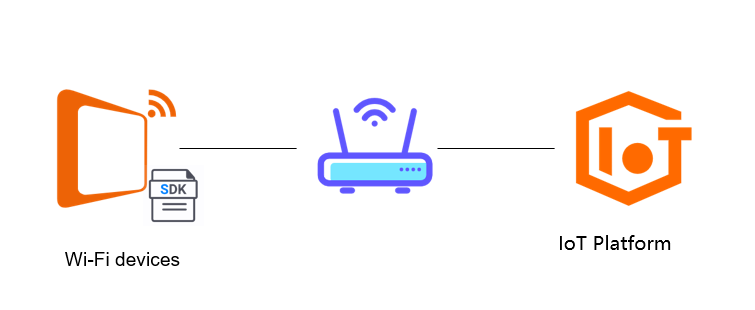
IP devices: These devices, such as Wi-Fi devices, support the TCP/IP protocol stack. You can directly integrate Link SDK with them.
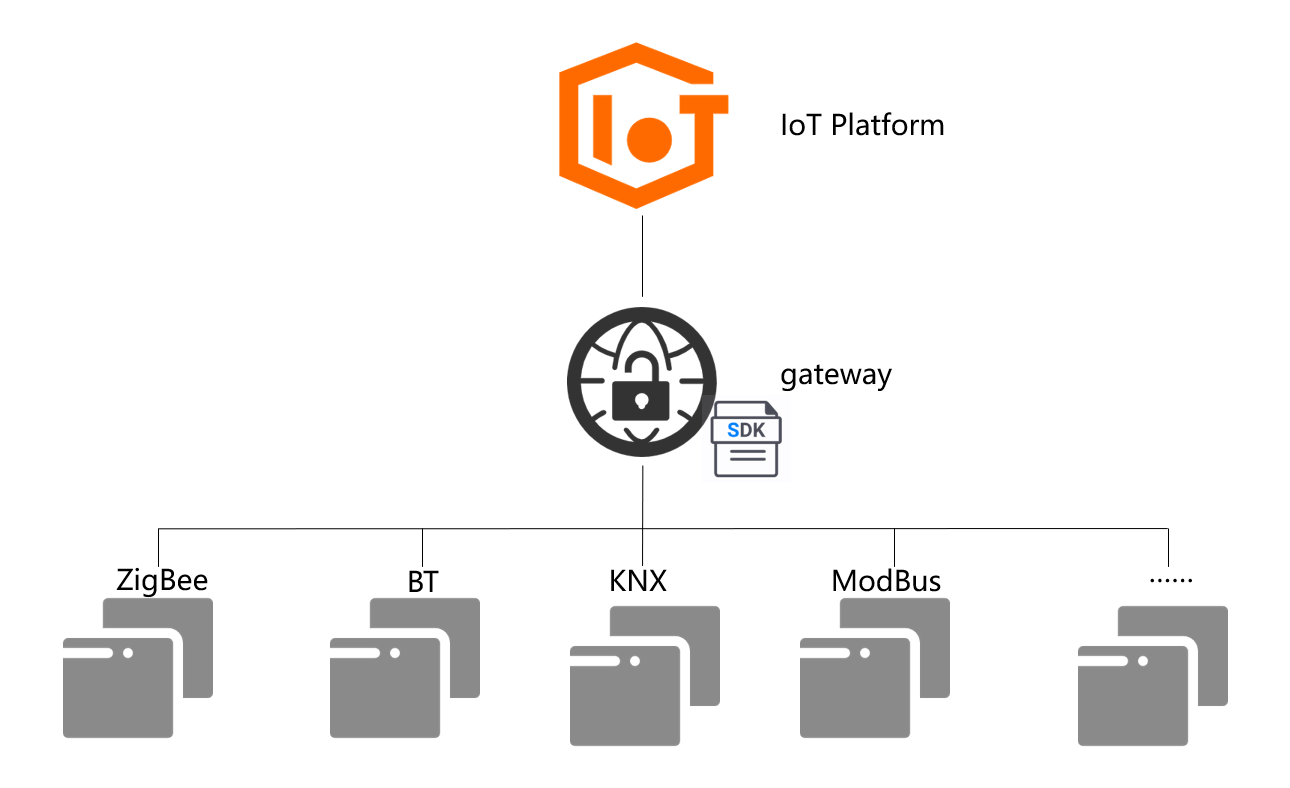
Non-IP devices: These devices, such as ZigBee, BT, KNX, and ModBus devices, do not support the TCP/IP protocol stack. They must connect to Alibaba Cloud IoT Platform through a gateway device that has Link SDK integrated. Sub-devices establish a connection through this gateway proxy. The communication method between the sub-device and the gateway is user-defined. For more information about connecting sub-devices using C Link SDK, see Overview.
Select a Link SDK
Link SDK is available in multiple languages, including C, Java, Python, Node.js, Android, and iOS. You can select the SDK in the language that suits your product.
SDK type | Scenario | Configuration link | Example |
C Link SDK | Suitable for resource-constrained devices in an embedded C environment. | ||
C Link SDK Extended | Suitable for resource-rich devices in a general C environment. | ||
Android Link SDK | Suitable for Android devices. | ||
Python Link SDK | Suitable for devices developed in Python. Not applicable for Python lightweight application development. | ||
Java Link SDK | Suitable for devices developed in Java. | ||
Node.js Link SDK | Suitable for devices developed in Node.js. | ||
iOS Link SDK | Suitable for iOS devices. |
C SDK version | Features | Notes | References |
C Link SDK Extended |
|
| |
C Link SDK 4.x |
|
| |
C Link SDK 3.x | Provides a code extraction tool for easier feature clipping. | No longer updated. Not recommended for new users. | |
C Link SDK 1.x/2.x | Initial version. | Not recommended. | None. |
If you do not use Link SDK, you can connect devices on your own by following the protocol standards. For more information, see Develop based on the Alink protocol.
Common open source Message Queuing Telemetry Transport (MQTT) libraries include paho.mqtt.c, paho.mqtt.embedded-c, paho.mqtt.android, and paho.mqtt.python.
Adapt and port Link SDK
Porting is required only when you use C Link SDK for embedded devices. Other Link SDKs do not require porting and can be directly integrated.
C Link SDK supports visual custom clipping. Before you port the SDK, you must clip and download it based on your device requirements.
C Link SDK is written in the C99 standard. Its system interface implementation varies by environment and must be ported. For porting instructions, see Porting example.
The default implementation of the C Link SDK system interface is
POSIX(Linux). Therefore, Linux devices can use it directly without porting.
Hardware environment | Operating system | Description | References |
PC/SoC | Linux | If it is an embedded device, configure cross compilation. | |
Windows | No reference implementation is provided. You need to port it yourself. | ||
MCU + communication module | RTOS | The MCU and the communication module use AT commands to connect the device to the network. | |
noneOS | The MCU connects through bare machine development. | ||
Module OpenCPU | RTOS | Integrate Link SDK based on the ESP-IDF framework. |
Device development: Connection and messaging
To meet different device connection requirements, IoT Platform supports multiple protocols and authentication methods. The following sections describe several solutions for connecting devices to IoT Platform.
Feature | Description | References |
Multi-protocol connection | Supports connection over protocols such as MQTT, CoAP, and HTTP. Most devices use the MQTT protocol. | |
Unique-certificate-per-device | Each device uses a unique key for authentication. | |
Unique-certificate-per-product | Each product model uses a shared key, which simplifies the device provisioning process. Note Unique-certificate-per-product and unique-certificate-per-device authentication can be used together. When a device connects to IoT Platform for the first time, it can use unique-certificate-per-product authentication (dynamic registration) to obtain a unique key. Subsequent connections can then use unique-certificate-per-device authentication. | |
X.509 certificate-based authentication | Each device has an independent certificate. Device authentication can be completed during the TLS phase, which provides higher security. | |
Gateway and sub-devices | A gateway acts as a proxy for sub-devices to connect to IoT Platform. After a sub-device is connected, it can use its own topic to communicate with the cloud platform. |
Feature | C Link SDK Extended | C (v4.x) | C (v3.x) | Android | Java | Python | Node.js | |
Device connection and messaging | Unique-certificate-per-device authentication | |||||||
Unique-certificate-per-product authentication | ||||||||
X.509 certificate-based authentication | Not supported | |||||||
Message communication | ||||||||
Gateway and sub-devices | Not supported | |||||||
Device development: Business features
After a device is connected to IoT Platform, it can send and receive messages through the platform. Devices can report business data to IoT Platform in the following ways:
Custom: You can define the topic and payload for custom messages. For more information, see Use custom topics for communication.
Thing Specification Language (TSL) model: You can define device properties, events, and services based on a TSL model. You can also report and receive data in the TSL model format. For more information, see What is a TSL model? and Use a TSL model for device communication. The TSL model is a core feature of IoT Platform. The advantages of using a TSL model are as follows:
Structured data storage: This simplifies subsequent data development processes.
State caching (device shadow): The device or server-side can query the device status or data at any time.
Data visualization: You can view data on the IoT Platform page.
Online debugging: You can debug devices online.
Feature | C Link SDK Extended | C (v4.x) | C (v3.x) | Android | Java | Python | Node.js | iOS | |
Device management | TSL model | Not supported | |||||||
Device tag | Not supported | ||||||||
File management | Not supported | Not supported | |||||||
Device distribution | Not supported | ||||||||
Device shadow | Not supported | ||||||||
Device task | Not supported | Not supported | |||||||
Device development: O&M features
After you finish developing business features and before you start mass production, you should add O&M features. This helps with future device iterations, configurations, and troubleshooting. IoT Platform provides the following main O&M capabilities:
Feature | Description | References |
OTA | Device upgrade. Provides the ability to remotely upgrade device firmware. | |
Remote logon | Based on a secure tunnel, it provides the ability to remotely log on to a device from the console using the Secure Shell (SSH) protocol. | |
Log reporting | Devices report operational logs to IoT Platform. You can use these logs to troubleshoot device issues. | |
Remote Configuration | Remotely configure devices. | |
NTP service | Provides the ability for device time synchronization. |
Feature | C Link SDK Extended | C (v4.x) | C (v3.x) | Android | Java | Python | Node.js | |
Monitoring and O&M | OTA | Not supported | Not supported | |||||
Remote logon | Not supported | |||||||
Log reporting | Not supported | Not supported | ||||||
Remote Configuration | Not supported | |||||||
NTP service | Not supported | |||||||