Forward data to the cloud-native database PolarDB for MySQL
PolarDB for MySQL is a proprietary, cloud-native database from Alibaba Cloud that supports hybrid transactional and analytical processing (HTAP). It is built on a cloud-native architecture that separates compute and storage resources and integrates software and hardware. PolarDB for MySQL is a cost-effective database service that provides high elasticity, performance, availability, and reliability. IoT Platform uses a parser script to process and filter messages from specific device topics and then forwards the messages to a data table in PolarDB for MySQL for storage. This topic uses a Thing Specification Language (TSL) model data submission topic as an example to describe the complete process of forwarding messages to a PolarDB for MySQL data table.
How it works

Data forwarding sends device topic messages to a data table in a PolarDB for MySQL cluster for storage. This process uses the PolarDB for MySQL database service. For more information, see PolarDB for MySQL.
In the preceding figure:
Data source: For information about supported topic message types, see Data formats (for products and devices that are not cloud gateways), Custom topics (for MQTT cloud gateways), Message forwarding topics (for GB/T 32960 cloud gateways), Message forwarding topics (for JT/T 808 cloud gateways), and Message forwarding topics (for SL 651 cloud gateways).
Data destination: A data table in a PolarDB for MySQL cluster that is used to receive device data. The cluster must be in a virtual private cloud (VPC) that you create.
Parser script: The data forwarding function
writePolarDB(destinationId, data)is used in the parser script to forward topic data to a PolarDB for MySQL data table.The
dataparameter supports only Map data. The keys correspond to the column names in the database table, and the values correspond to the column values. For more information about the function, see Function list.
Scenarios
Internet of Things (IoT) application scenarios with the following requirements for device data storage:
Production databases for devices from medium-sized and large enterprises.
Core databases that require a high level of data security.
Limits
IoT Platform instances can forward data to PolarDB for MySQL only in supported regions. For more information about supported regions, see Features by region.
Data can be forwarded only within the same region. For example, data from an IoT Platform instance in the China (Shanghai) region can be forwarded only to a PolarDB data table in the China (Shanghai) region.
Data can be forwarded only to PolarDB for MySQL clusters in a VPC.
Only the following PolarDB engine types are supported: MySQL 5.6, MySQL 5.7, MySQL 8.0.1, and MySQL 8.0.2.
Only the new version of the data forwarding feature supports forwarding data to PolarDB for MySQL.
For other limits on forwarding device messages from an IoT Platform instance, see Limits.
Prerequisites
A data source is created. For more information, see Add a data source for data forwarding.
This topic uses a TSL model data submission topic as an example. A data source named DataSource is created, and the TSL Model Data Submission topic is added.
A PolarDB for MySQL cluster is created in a VPC that is in the same region as your IoT Platform instance. A database, a data table, a database account, and a password are also created. For information about how to use a PolarDB for MySQL instance, see Quick Start.
Background information
When you configure the data destination for forwarding, the following configurations are automatically completed. This allows IoT Platform to forward device data to PolarDB for MySQL.
IoT Platform uses two IP addresses from the virtual switch where the PolarDB for MySQL cluster resides. The IPv4 CIDR block of the virtual switch is added to the whitelist of the PolarDB for MySQL cluster.
A managed security group is created in the VPC where the PolarDB for MySQL cluster resides. The security group name starts with sg-nsm- by default.
Create a data destination
Log on to the IoT Platform console.
On the Instance Overview tab, under All Environments, find the instance that you want to manage and click the instance card.
In the navigation pane on the left, choose .
On the Data Forwarding page, click Try New Version in the upper-right corner to go to the new version page.
NoteIf you have performed this operation before, you are automatically directed to the new version page when you go to the Data Forwarding page.
Click the Data Destination tab, and then click Create Data Destination.
In the Create Data Destination dialog box, enter a name for the data destination, such as
DataPurpose. Configure the parameters as described in the following table and click OK.Parameter
Description
Select Operation
Select Store data in the cloud-native database (PolarDB for MySQL).
Authorization
Click Authorize. The system creates a role and an authorization policy to grant IoT Platform the permissions to write data to the PolarDB for MySQL data table. For more information, see Service-linked role for forwarding data to the cloud-native database PolarDB for MySQL.
NoteIf you have granted the permissions, skip this step.
Region
This parameter is fixed to the region where your IoT Platform instance resides.
PolarDB Cluster
Select the PolarDB cluster in the VPC that you created as the data destination.
You can click Create Cluster to add a PolarDB for MySQL cluster. For more information, see Purchase a cluster.
Database
Select the name of the destination database that is in the PolarDB for MySQL cluster and receives data.
For more information about how to create a database, see Create a database.
Account
Enter the account and password that are used to manage the database. The account must have read and write permissions on the database. Otherwise, data forwarding cannot write data to the PolarDB for MySQL database.
For more information about database management accounts and passwords, see Create and manage database accounts.
Password
Table Name
Enter the name of the data table that is in the destination database and receives data. Data forwarding writes data to this table.
Configure and start the parser
Create a parser, such as DataParser. For more information, see Create a parser.
On the Resolver Details page, associate a data source.
In the configuration wizard, under Data Source, click Associate Data Source.
In the dialog box that appears, select the DataSource data source from the Data Source drop-down list and click OK.
On the Resolver Details page, associate a data destination.
In the configuration wizard, click Data Destination. Then, click Associate Data Destination in the upper-right corner of the Data Destination list.
In the dialog box that appears, select the DataPurpose data destination from the Data Destination drop-down list and click OK.
In the data destination list, view and save the Data Destination ID, for example, 1000.
You will use this Data Destination ID in the parser script.
On the Resolver Details page, click Resolver.
In the script editor, enter the following parser script.
For information about how to edit a script, see Script examples. For more information about function parameters, see Function list.
// Use the payload() function to obtain the message reported by the device and convert the message to the JSON format.
var data = payload("json");
// Filter the reported temperature and humidity values.
var h = data.items.Humidity.value;
var t = data.items.Temperature.value;
// The PolarDB for MySQL table schema is id (auto-increment primary key), deviceName, temperature, humidity, and time. In the writePolarDB method, you can write values to the corresponding columns in the column:value format.
// Set a rule that is triggered when the temperature is higher than 30.
if (t > 30) {
    writePolarDB(1000, {"deviceName":deviceName(), "temperature":t, "time":timestamp(), "humidity":h});
}
Click Debug. Follow the on-screen instructions to select a product and a device, enter the topic and payload, and then verify that the script can be executed.
Example debugging parameters:
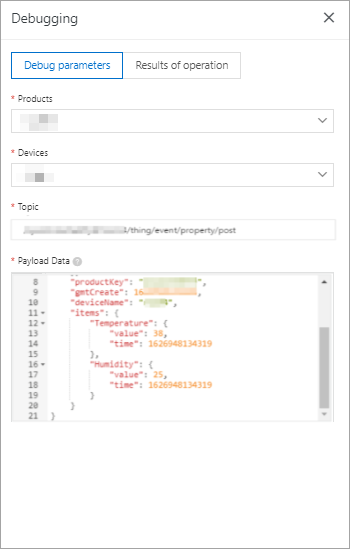
The following result indicates that the script was executed successfully.
action:
    transmit to polardb[destinationId=1000], data:{"temperature":38,"humidity":25,"time":1700631588609,"deviceName":"devce****"}
variables:
    data : {"deviceType":"CustomCategory","iotId":"JCp9***","requestId":"16269*******7","checkFailedData":{},"productKey":"ic*******z","gmtCreate":1626948134445,"deviceName":"devce****","items":{"temperature":{"time":1626948134319,"value":38},"humidity":{"time":1626948134319,"value":25}}}
    t : 38
    h : 25
Click Publish.
Go back to the Parser tab of the Data Forwarding page. In the Actions column for the DataParser parser, click Start.
What to do next
In the IoT Platform console, go to your instance page. On the IoT Platform Logs tab of the page, you can view the operational logs for Device-to-Cloud Messages and Data Forwarding. For more information, see IoT Platform logs.
You can log on to the PolarDB console, connect to the database, and query the stored IoT Platform data. For more information, see Connect to a database cluster.
References
For instructions on how to connect a device to IoT Platform and report data, see Device connection guide.
On the instance details page, you can view the available resources for message forwarding in transactions per second (TPS) to ensure that device messages can be forwarded to PolarDB for MySQL. For more information, see View instance information and operational data. If the available resources are insufficient, you can upgrade the instance. For more information, see Upgrade an instance.
For answers to frequently asked questions (FAQs) about using PolarDB for MySQL to store data, such as questions about fees, cluster access (read/write splitting), performance, capacity, stability, and storage space, see FAQ about PolarDB for MySQL.