Unique-certificate-per-product verification
Unique-certificate-per-product verification allows you to provision all devices of the same product with identical credentials. This means all devices share the same product certificate, which consists of a ProductKey and a ProductSecret. When a device sends an activation request, IoT Platform verifies its identity and provides the information required for the device to connect.
Background information
The following unique-certificate-per-product verification methods are supported: pre-registration unique-certificate-per-product verification and preregistration-free unique-certificate-per-product verification. The following table describes the differences between the verification methods.
If you use unique-certificate-per-product verification, the certificate information may be disclosed because all devices of a product have the same certificate information. On the Product Details page, you can turn off Dynamic Registration to reject verification requests from new devices.
If you dynamically register the devices based on unique-certificate-per-product verification, you must use Transport Layer Security (TLS) encryption. If your device SDK does not support TLS encryption, you must use the Unique-certificate-per-device verification method.
Item | Preregistration-free unique-certificate-per-product verification | Pre-registration unique-certificate-per-product verification |
Protocol | Message Queuing Telemetry Transport (MQTT) | HTTPS and MQTT |
Supported regions | China (Shanghai) and China (Beijing) |
|
Supported instance types | Enterprise Edition instances | Enterprise Edition instances and public instances |
Features | You do not need to pre-register the DeviceName of a device in IoT Platform. | You must pre-register the DeviceName of a device in IoT Platform. The sub-devices of a gateway support only pre-registration unique-certificate-per-product verification. |
Limits |
Up to five physical devices that have the same ProductKey, ProductSecret, and DeviceName can be activated in the IoT Platform console. Each device has a unique ClientID and DeviceToken. |
|
Process
The following figure shows the unique-certificate-per-product verification process.
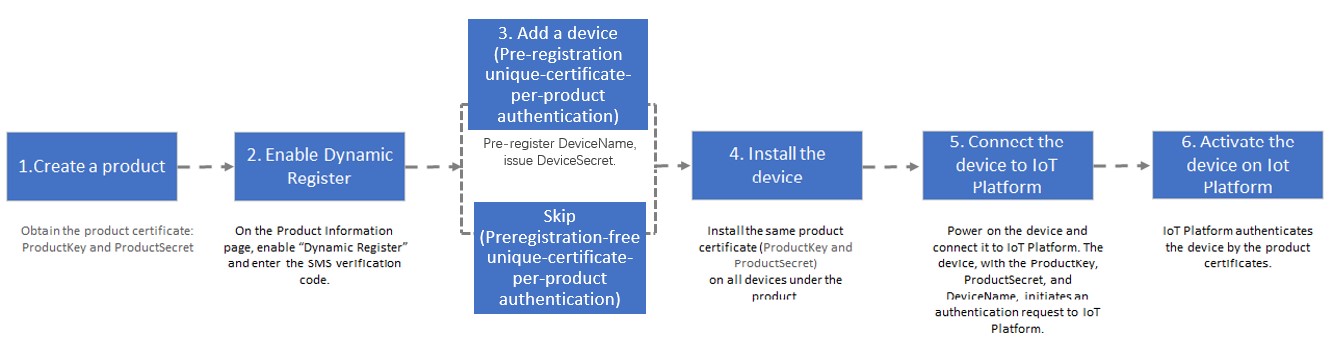
Dynamic registration for directly connected devices
Directly connected devices can be dynamically registered by using pre-registration unique-certificate-per-product verification or preregistration-free unique-certificate-per-product verification.
Pre-registration unique-certificate-per-product verification
Create a product: When you create a product, set the Node Type parameter to Directly Connected Device.
-
Enable dynamic registration. On the Product Details page, turn on the Dynamic Registration switch.
IoT Platform sends an SMS verification code to verify your identity.
NoteIf dynamic registration is disabled when devices initiate activation requests, IoT Platform rejects the requests. Activated devices are not affected.
On the Product Information tab, confirm that the Dynamic Registration switch is in the Enabled state.
-
Create a device or create multiple devices at the same time. If you use pre-registration unique-certificate-per-product verification, you must add one or more devices to an existing product.
-
When a device is activated, IoT Platform verifies its
DeviceName. We recommend using a hardware-based identifier, such as a MAC address, International Mobile Equipment Identity (IMEI), or serial number (SN), for the DeviceName. -
After you successfully add a device, IoT Platform issues it a
DeviceSecret. The device's initial status is Inactive.
-
Burn the device certificate on the device: Develop the device SDK to complete the step.
Select the protocol that is used to connect the device to IoT Platform. Valid values: MQTT and HTTPS.
The following topics describe how to register and verify a device:
Develop a device SDK based on your business requirements. For example, you can develop the following features: communication by using topics defined in the Thing Specification Language (TSL) model, communication by using custom topics, over-the-air (OTA) updates, and device shadows.
For more information about device-side development, see Use a device SDK to connect a device to IoT Platform.
ImportantIf you use Link SDK for C provided by IoT Platform, you must use Link SDK for C of version 4.x on your device. The SDK integrates the device verification service (DAS) that allows you to manage the security risks of devices.
If you do not use Link SDK for C of version 4.x on your device, Alibaba Cloud shall not be liable for security risks that may arise.
Burn the developed device SDK on the device in the production line.
-
Connect the device to the network: After the device is powered on and connected to a network, it sends an authentication request with the
ProductKey,ProductSecret, andDeviceName. -
Activate the device in IoT Platform.
After verifying the request, IoT Platform sends the
DeviceSecretfrom Step 3 to the device. The device now has the credentials (ProductKey,DeviceName, andDeviceSecret) required to connect to IoT Platform for data communication.
Preregistration-free unique-certificate-per-product verification
Create a product: When you create a product, set the Node Type parameter to Directly Connected Device.
-
Enable dynamic registration. On the Product Details page of an existing product, turn on Dynamic Registration.
IoT Platform sends an SMS verification code to verify your identity.
NoteIf dynamic registration is disabled when devices initiate activation requests, IoT Platform rejects the requests. Activated devices are not affected.
Burn the device certificate on the device: Develop a device SDK to complete the step.
Select the protocol that is used to connect the device to IoT Platform. Valid value: MQTT.
To register and verify a device, see MQTT-based dynamic registration.
Develop a device SDK based on your business requirements. For example, you can develop the following features: communication by using topics defined in the TSL model, communication by using custom topics, OTA updates, and device shadows.
For more information about device-side development, see Use a device SDK to connect a device to IoT Platform.
ImportantIf you use Link SDK for C provided by IoT Platform, you must use Link SDK for C of version 4.x on your device. This SDK integrates the DAS that allows you to manage the security risks of devices.
If you do not use Link SDK for C of version 4.x on your device, Alibaba Cloud shall not be liable for security risks that may arise.
Burn the developed device SDK on the device in the production line.
-
Connect the device to the network: After the device is powered on and connected to a network, it sends an authentication request with the
ProductKey,ProductSecret, andDeviceName. -
Activate the device in IoT Platform.
-
After successful verification, IoT Platform issues a
ClientIDand aDeviceToken. The device then uses theProductKey,ProductSecret, and the issuedClientIDandDeviceTokento connect to IoT Platform for data communication. -
When multiple physical devices with different ClientIDs share the same
DeviceName, a message appears on the Product Details page in the IoT Platform console: A device under the current product has two ClientIDs at the same time. Follow these steps to retain a single physical device or clear all of them:On the Product Details page, click View next to the message to view the security-compromised devices of the product.
-
On the page, find the target device in the list and click View to go to the Device Details page. The page displays the
ClientIDfor the current connection. Click Switch or Clear next to theClientID.-
Switch: From the drop-down list, select a
ClientID. To determine which physical device to keep, check the first connection time of the device that corresponds to theClientID, or click Log Service to view the IoT Platform logs for thatClientID. Select theClientIDof the physical device that you want to keep and click Confirm. IoT Platform then blocks connections from the devices associated with the unselectedClientIDs.NoteFor more information about IoT Platform logs, see IoT Platform logs.
Clear: All physical devices cannot be connected to IoT Platform.
-
-
Dynamic registration for sub-devices
The dynamic registration methods for gateways are the same as the dynamic registration methods for directly connected devices. However, sub-devices of gateways can be dynamically registered only by using the pre-registration unique-certificate-per-product verification method. To complete dynamic registration for a sub-device, perform the following steps:
Create a product: Create a product for a gateway and a product for a sub-device. When you create a product for the gateway, set the Node Type parameter to Gateway Device. When you create a product for the sub-device, set the Node Type parameter to Gateway Sub-device.
-
Enable dynamic registration. On the Product Details page of the product to which the gateway and the sub-device belong, turn on Dynamic Registration.
IoT Platform sends an SMS verification code to verify your identity.
NoteIf dynamic registration is disabled when devices initiate activation requests, IoT Platform rejects the requests. Activated devices are not affected.
-
Add one or more devices to the product to which the gateway and the sub-device belong. For more information, see Create multiple devices at a time or Create a device.
-
When a device is activated, IoT Platform verifies its
DeviceName. We recommend using a hardware-based identifier, such as a MAC address, International Mobile Equipment Identity (IMEI), or serial number (SN), for the DeviceName. -
After you successfully add a device, IoT Platform issues it a
DeviceSecret. The device's initial status is Inactive.
-
-
Perform the following steps to burn the device certificate to the sub-device.
Configure the device certificate and endpoint of the gateway, and use the Link SDK of the gateway to initialize an instance to manage the sub-device. Then, configure the topological relationship between the gateway and the sub-device and register the sub-device. For more information, see MQTT-based dynamic registration and MQTT-based dynamic registration for sub-devices.
For more information about how to manage topological relationships between gateways and sub-devices, see Manage topological relationships.
-
Develop the device-side SDK based on your business requirements, such as implementing the feature for the gateway to proxy communication for its sub-devices.
For more information about device-side development, see Use a device SDK to connect a device to IoT Platform.
Burn the device SDK of the gateway and the ProductKey of the sub-device to the gateway, and burn the sub-device certificate to the sub-device in the production line.
Power on the gateway and sub-device and connect them to IoT Platform. The gateway sends a verification request that contains the ProductKey and DeviceName of the sub-device to IoT Platform.
Activate the gateway and sub-device in the IoT Platform console.
For more information about how to activate a gateway, see Dynamic registration for directly connected devices. For more information about how to connect a sub-device to IoT Platform by using a gateway, see Connect or disconnect sub-devices.