Update sub-devices by using OTA
Sub-devices connect to IoT Platform through gateways instead of connecting directly. After a sub-device connects to a gateway, you can perform Over-the-Air (OTA) updates on the sub-device by using the communication channel between the gateway and IoT Platform. The topics used for OTA updates must be the sub-device topics, which contain the ProductKey and DeviceName of the sub-device.
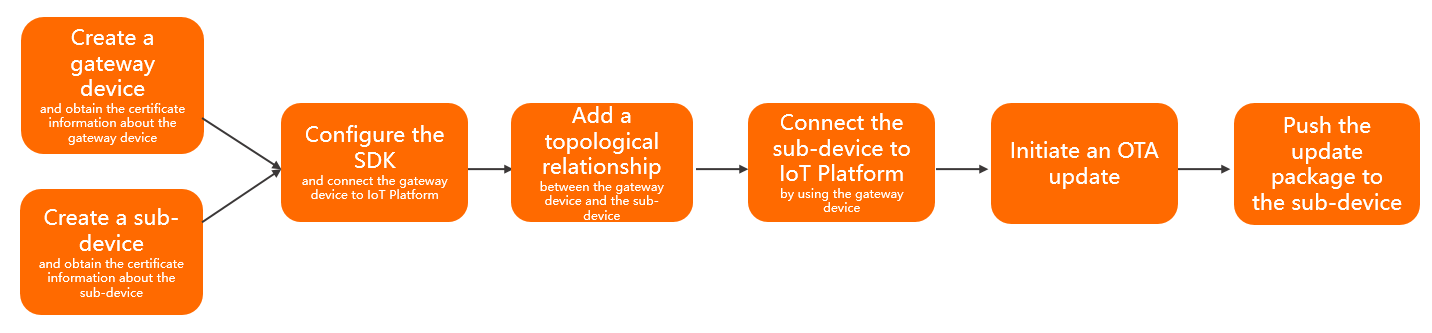
- Create a gateway device and a sub-device and obtain the ProductKeys, DeviceNames, and DeviceSecrets.
- When you create a product, set the Node Type parameter to Gateway device. Then, create a device in the product.
- When you create a product, set the Node Type parameter to Gateway sub-device and select a gateway protocol. Then, create a sub-device in the product.
For more information, see Create a product and Create a device.
- Specify the certificate information of the gateway device and connect the gateway device to IoT Platform. The certificate information includes the ProductKey, DeviceName, and DeviceSecret.
- Add a topological relationship between the gateway device and the sub-device.
For more information, see Add a topology relationship.
- Connect the sub-device to IoT Platform by using the gateway device.
You can connect a sub-device to IoT Platform by using one of the following methods:
Unique-certificate-per-device authentication: The gateway obtains the device certificate of the sub-device and reports the certificate information (ProductKey, DeviceName, and DeviceSecret) to IoT Platform.
Dynamic registration and authentication: In the IoT Platform console, enable dynamic registration for the sub-device. The gateway obtains the sub-device's ProductKey and DeviceName and acts as a proxy to dynamically register the sub-device. IoT Platform verifies the identity of the sub-device. After the verification is successful, IoT Platform dynamically issues a DeviceSecret. The sub-device then uses its device certificate (ProductKey, DeviceName, and DeviceSecret) to connect to IoT Platform.
- Configure the gateway device to perform the following operations for the sub-device: initiate a request for an OTA update, report the version of the OTA module to be updated, monitor messages that are pushed from IoT Platform, report the update progress, and pull the information about the update packages.
For more information, see OTA update overview.Note
- If you want to implement an OTA update on a sub-device by using a gateway device, you must use the topics of the sub-device.
For more information about the topics that are used to transmit OTA update messages and the Alink JSON format, see OTA updates.
- When you add an OTA update package, you must specify the product of the sub-device as the product to which the package belongs.
- If you want to implement an OTA update on a sub-device by using a gateway device, you must use the topics of the sub-device.