This topic describes how to purchase new vouchers for shared data plans, add SIM cards, expand a data pool, set usage limits to suspend service, and purchase monthly service fees.
Background information
Individual card plan
You can purchase a separate data plan for each Internet of Things (IoT) card. If a card's monthly traffic exceeds its data plan, the service for the card is suspended. Service automatically resumes the following month. You can also purchase a data add-on to resume the service.
Same-tier pooled plan
Same-tier: Each card is allocated the same amount of data, such as 100 MB.
Pool: Cards of the same tier form a data pool and share the traffic within it. When the total traffic for all cards in the pool is consumed, the cards are not suspended. However, overage fees are charged (China Mobile: CNY 0.2/MB, China Telecom: CNY 2/GB, China Unicom: CNY 4/GB). Note: The overage fee for Alibaba Cloud Tariff 1.0 is CNY 10/GB. You can set a usage-based suspension policy to avoid overage fees. You can also purchase more cards before the end of the month to expand the pool and avoid overage fees. Any remaining traffic expires at the end of the month.
This plan is suitable for scenarios where multiple cards have similar and consistent traffic usage.
Unified pooled plan
You can purchase a data pool where individual cards do not have a fixed data tier and share the total traffic in the pool. When the total traffic in the pool is consumed, the cards are not suspended. However, overage fees are charged (China Mobile: CNY 3/GB, China Telecom: CNY 2/GB, China Unicom: CNY 4/GB). Note: The overage fee for Alibaba Cloud Tariff 1.0 is CNY 10/GB. You can set a usage-based suspension policy to avoid overage fees. You can also purchase more traffic before the end of the month to expand the pool and avoid overage fees. This plan is suitable for scenarios where traffic usage varies significantly among individual cards.
General-purpose traffic
Provides access to the entire public network.
Directional traffic
Provides access to specified endpoints only.
Purchase new vouchers
Log on to the IoT SIM Service console.
In the navigation pane on the left, choose SIM Card Management > Plan Vouchers.
Click the Shared Data Plan tab, and then click Purchase Voucher.
On the purchase page, select the appropriate IoT card for your business scenario.
Parameter
Description
Purchase Type
Select New Purchase.
Carrier
China Mobile
China Unicom
China Telecom
Virtual Carrier (Multi-network Card): Lets you intelligently switch between China Mobile, China Unicom, and China Telecom networks. Also known as a smart card.
Virtual Type
If you set Carrier to Virtual Carrier (Multi-network Card), you must select a virtual type.
Tri-network (Nationwide)
Dual-network Card (Unicom + Telecom)
Dual-network DR Card (Mobile + Telecom)
If you set Carrier to China Mobile, China Unicom, or China Telecom, this parameter is fixed to Single Network (standard single-network card from the carrier) and does not need to be selected.
Network Type
Fixed to 4G.
Traffic Type
Select a type based on the Background information section.
NoteThe page displays all traffic plan types. You can select other types in addition to shared data plans.
China Mobile only supports directed traffic for shared data plans. If you need general-purpose traffic for a shared data plan, select a different carrier.
Directed Type
When you select Single-Card Dedicated Traffic or Same-Tier Shared Dedicated Traffic, the Dedicated Type is fixed to Alibaba-Dedicated.
If you select Shared Plan Directed Traffic, you can set this parameter to Alibaba Cloud Directed or Alibaba Cloud Directed - VPC Egress.
Alibaba Cloud Directed: After purchasing a directed traffic card, you must configure its endpoints. For more information, see Instructions for directed traffic service.
Alibaba Cloud Directed - VPC Egress: A directed traffic card that can only access specified internal Alibaba Cloud endpoints. To configure the card's endpoints, see Cloud Connector User Guide.
SIM Card Type
The specifications and material of the IoT card.
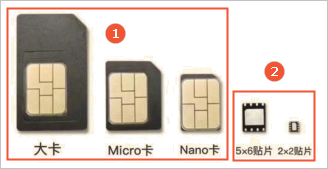
IoT card specifications:
 Note
NoteIn the figure, ① is a plug-in card and ② is a chip card. Chip cards must be attached to devices by methods such as soldering.
The following units are in millimeters:
Standard card: 25 × 15
Micro card: 15 × 12
Nano card: 12.3 × 8.8
Chip card: 5 × 6
Chip card: 2 × 2
Tri-cut card: An IoT card that supports Standard, Micro, and Nano sizes. You do not need to crop the card. You can break the IoT card out of its holder in three different sizes.
IoT card materials:
Consumer-grade card: Made of standard materials such as plastic. Suitable for general consumer use.
Industrial-grade card: Made of materials such as injection-molded plastic or ceramic. Features high-temperature resistance, vibration resistance, and a long service life.
Select the appropriate SIM card type based on the information above:
Plug-in Tri-cut Card (Consumer-grade)
Plug-in Dual-cut Card (Consumer-grade)
Plug-in Standard Card (Consumer-grade)
Chip Card 5×6 (Consumer-grade)
Chip Card 2×2 (Consumer-grade)
Plug-in Dual-cut Card (Industrial-grade)
Plug-in Standard Card (Industrial-grade)
Chip Card 5×6 (Industrial-grade)
Chip Card 2×2 (Industrial-grade)
NoteIndustrial-grade SIM cards have a longer lead time. Contact customer service in advance to confirm availability and avoid delays.
Total Data in Shared Pool
Unit: GB. Default: 1024 GB. The data is valid for 3 years.
Pool ID
Enter a custom pool ID for easy identification. It can contain letters, digits, and underscores (_). The ID must be 30 characters or less.
Shared Pool Service Fee
A monthly service fee is deducted for each activated card in the pool. A shared data plan consists of two parts: total data and a monthly service fee.
Identity Verification Type
Enterprise Verification: The card user is an enterprise. The card is directly attached to the enterprise identity verification information of the purchasing Alibaba Cloud account.
Personal Verification: The card user is an individual. The end user must complete the carrier's personal identity verification process before using the card.
ImportantIf you select enterprise verification, the IoT cards cannot access consumer applications, such as social media, e-commerce, and video services. Cards with personal verification can access these applications.
Confirm whether you need to access consumer applications and select the corresponding verification type.
Subscription Duration
The default subscription duration for a shared data plan is 3 years. This means the data is valid for 3 years.
Scenario
You can select an option based on your scenario.
Number of Cards
The total number of IoT cards to purchase.
Range: 1 to 500,000. Default: 100.
Notes
Add notes for special requirements, such as the province where the cards will be used.
NoteCards cannot be used in Xinjiang, Tibet, Yunnan, Guangxi, or Fujian.
If you select a high-volume China Mobile plan (average monthly data per card is greater than 100 MB), you must specify the province of use here due to carrier restrictions. The cards can only be used in the specified province. Otherwise, the carrier may suspend service.
Click Buy Now.
Interface basics
The Shared Data Plan tab lists the shared data plans in your account and their basic information.
Field Name |
Description |
Shared Data Plans |
The total number of shared data plans in the account. |
Plan Voucher |
The voucher for the purchased plan. The format is: Carrier_PlanType_BillingCycle_TariffVersion_PoolID.
|
Total Cards |
The total number of IoT cards in the plan. |
Testable |
The number of IoT cards in the plan with the Testable status. After you request a test period for an IoT card, its status changes to Testable. You must actively request to start the test period. The test period lasts for 3 months and includes 6 MB of data. It is valid for 3 months from the order date. After the test period ends or the test data is used up, the card enters a silent period. |
Unused |
The number of IoT cards in the plan with the Unused status. Unused means the card is in a silent period. After purchase, a card's default status is silent period, which lasts for 6 months from the order date. If you requested a test period, the card enters the silent period after the test period ends or the test data is used up. After the silent period, the card is forcibly activated. For a card that is forcibly activated after its silent period, the corresponding monthly service fee is deducted even if the card is not inserted into a device and does not generate any traffic. |
In Use |
The number of IoT cards in the plan with the In Use status. |
Deactivated |
The number of IoT cards in the plan with the Deactivated status. |
Suspended |
The number of IoT cards in the plan with the Suspended status. |
Canceled |
The number of IoT cards in the plan with the Canceled status. |
Card management
In the Operations column for a plan, click View to see its details, including the pool overview and card information.
Pool overview
You can view the pool overview for the plan, which includes pool statistics, SIM card status distribution, and traffic usage trends.
Card information
The Card Information page displays all IoT cards under the plan, including their ICCID, MSISDN, and card status. You can also perform operations such as topping up, exporting card details, deactivating, reactivating, and canceling cards.
The Card Information page shows the same content and operations as the Card Management page. The difference is that the Card Management page lists all IoT cards in your account, while the Card Information page lists only the IoT cards for a specific plan. For more information, see Card management.
Set usage limits to suspend service
When the data in a shared data plan is used up, individual cards are not suspended, and overage charges are incurred. You can set a usage limit rule to automatically suspend service and avoid these charges. When data usage reaches the value you set, the card's service is automatically suspended. Follow these steps:
On the SIM Card Management > Plan Vouchers page, click the Unified Payment Pool Plan tab.
Click View in the Actions column for the corresponding plan voucher.
On the shared data plan details page, click Set next to Usage Limit Suspension.
In the Set Voucher Usage Limit Suspension dialog box, configure the parameters.
Usage Limit Suspension Value: Set a monthly data usage value for the card. When usage reaches this value, the card's service is automatically suspended, and no overage charges are incurred.
Automatically Resume Next Month: Specifies whether to automatically reactivate the card's service next month after it is suspended.
Click OK.
Card replacement
If you do not have enough IoT cards for a plan voucher, click Add Cards to the right of the plan to add more cards to it.
Compared to purchasing new cards, the Add Cards option automatically fills in the same carrier, traffic type, SIM card type, and other information from the plan voucher.
Expand data pool
When the data in the pool is low, you can purchase more data to expand the pool. If you have already used up the data and incurred overage charges, you can expand the pool before the end of the month. The newly purchased data can be used to offset the overage charges.
Click Expand Pool in the Actions column for a specific plan to purchase more traffic for the plan. The system automatically fills in the same information for the carrier, traffic type, billing cycle, and data plan tier as the existing plan. You must keep the default options.
Purchase monthly service fees
When the service fee balance in the pool is low, you can purchase additional service fees. For shared data plans, a monthly service fee is deducted for each activated card in the pool.
Click Purchase Monthly Service Fee in the Actions column for a specific package. The system automatically fills in the corresponding information from the package voucher, such as the carrier and traffic type. You must select the number of monthly service fees for the shared pool and leave the other parameters at their default settings.