Channel distribution mall onboarding process
Onboarding for LinkedMall channel partners is by invitation only. This topic explains how invited partners can apply to join LinkedMall.
Alibaba Cloud account registration and verification
Go to the official Alibaba Cloud website. If you have an Alibaba Cloud account, log on. If you do not have an account, you can register for one. For more information, see Account Registration (PC).
Verify an enterprise account
Multiple identity verification methods are available. We recommend using Alipay authorization for enterprise identity verification because it is fast and simple. For more information, see Enterprise identity verification and individual business owner verification.
Activate the LinkedMall service
Log on to the LinkedMall Enterprise Mall. Click Activate Now and follow the on-screen instructions to complete the activation.

Create customers and services
Create a customer
The customer name is typically the legal name of your company. The customer description is a brief overview of your company's primary business.
Creating a business
Keep the service name simple and easy to distinguish. Confirm the service type with your product director. The service validity period is not related to the contract period, so you can set a long duration. After you create the service, contact a LinkedMall representative for approval.
Enable automatic deductions
In the LinkedMall Enterprise Mall, on the Customer Information page, find the withholding agreement under Customer Dimension Agreement and click Go To Sign. The Alipay withholding agreement page automatically opens. Enter your enterprise Alipay account and payment password to activate the service.
The enterprise Alipay account used for this step must be under the same name as the verified enterprise. This account cannot be used to receive payments for a Tmall or Taobao store.
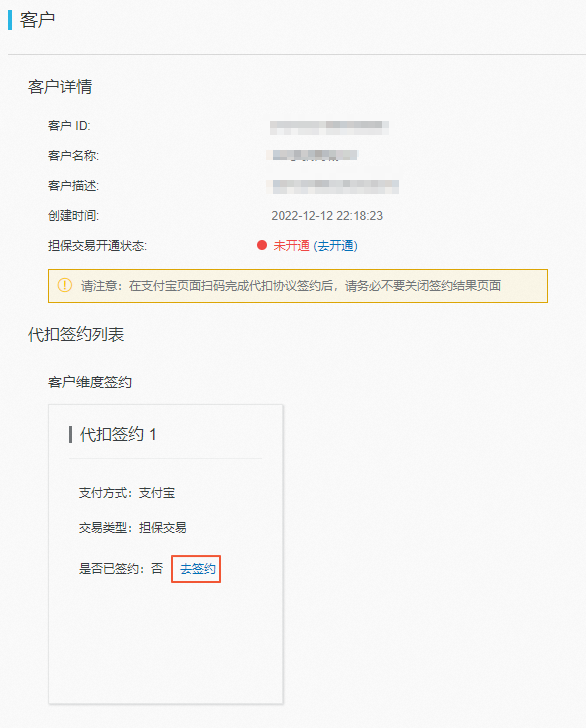
After you complete the signing process, you can check the status of automatic deductions on the Customer Information page in the LinkedMall Enterprise Mall. If the Is Signed field shows Yes, you have successfully signed up for automatic deductions.
Q1: Is the agreement signed as soon as I click Go To Sign?
A1: No. Clicking Go To Sign in the LinkedMall Enterprise Mall only establishes the contractual link between your LinkedMall business and your Alipay account. You are then redirected to an Alipay page to complete the agreement signing. This operation is compliant with our company's policies and is completely secure. Our policy requires that Alipay agreements must be signed on the Alipay platform. Signing on non-Alipay pages, such as Alibaba Cloud pages, is not permitted.
Q2: Can I use any Alipay account to sign the automatic deduction agreement?
A2: No, you cannot. The account used for signing the agreement must be an enterprise Alipay account that has the same name as your company. Additionally, this account cannot be the receiving account that you used when your company joined the Tmall platform. This is because when you join the Tmall platform, you are required to sign an agreement that Prohibits This Account From Signing Up For Alipay Balance Payments, which prevents you from signing the Alipay auto-debit agreement. If your account is not eligible for signing, we recommend that you use a different account that meets the requirements to complete the agreement signing.
Q3: If I have multiple services, can I use different Alipay accounts for the automatic deduction agreements?
A3: Yes, you can. Contact a LinkedMall representative to submit a request. After the request is approved, multiple entries for automatic deduction agreements appear on the Customer Information page. Make sure you sign the correct agreement for each service.
Sign contracts
In the LinkedMall Enterprise Mall, go to the Contract Management > Alibaba Cloud page. Find the LinkedMall Channel Partner Service Agreement and the Special Integrity Agreement for Online Commission Sharing, and click Sign on the right.

Review the contract. Fill in the Party A information as instructed in the image below. Select the I have read checkbox and click Sign to complete the signing process.
Onboarding complete
The onboarding process is complete after the status of both contracts changes to In Effect. If other agreements need to be signed, a LinkedMall representative sends them to you and contacts you separately.
Completing the onboarding process does not mean you can begin collaboration. Technical integration must also be completed.