Build a personal knowledge base with MobiNext, Alibaba Cloud Model Studio, and DeepSeek
Background
In today's information-rich era, effectively extracting, integrating, and applying knowledge is a key challenge for every organization and individual. Imagine having a personal knowledge vault that not only stores your professional information and insights but also intelligently provides the most accurate answers. This is the personal knowledge tutor created by combining MobiNext, Alibaba Cloud Model Studio, and DeepSeek.
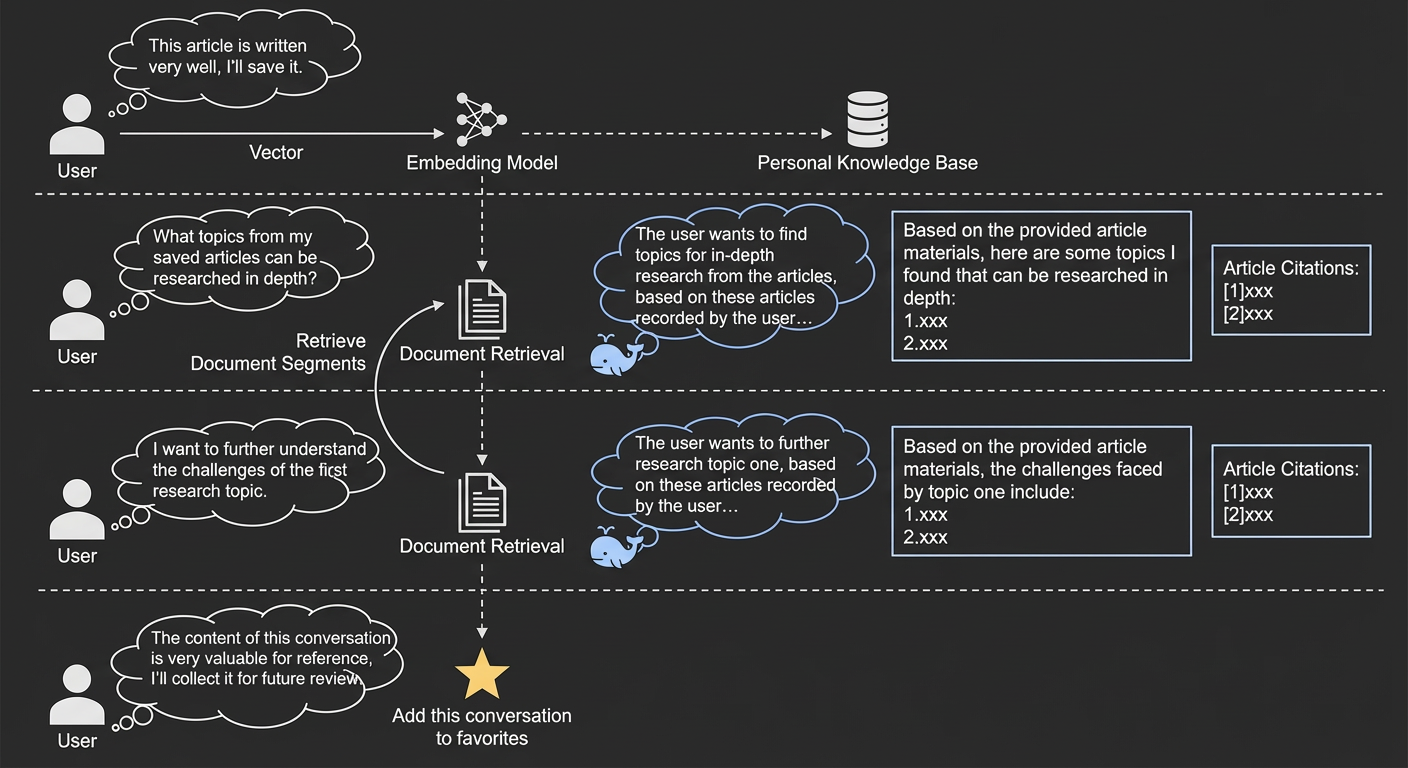
This personal knowledge tutor is ideal for organizing the papers you read daily, extracting innovative ideas, and identifying research challenges. You can also use it to compile interview experiences, combine them with interview techniques to formulate the best answers, or distill problem-solving experience from complex materials for graduate entrance exams and civil service exams to quickly find the right approach. The tutor lets you upload high-quality articles to build a personalized, custom knowledge base, which prevents the loss of important content. The personal knowledge tutor retrieves relevant documents from your private knowledge base and passes them to DeepSeek as prior knowledge. This process supports customized inference to help you organize and extract key information. You can have in-depth discussions with your personal knowledge tutor about the documents in your knowledge base to spark inspiration and summarize knowledge for self-improvement. You can also save existing conversation records for future review and reference.
Personal knowledge tutor functional architecture
The personal knowledge tutor provides the following functions:
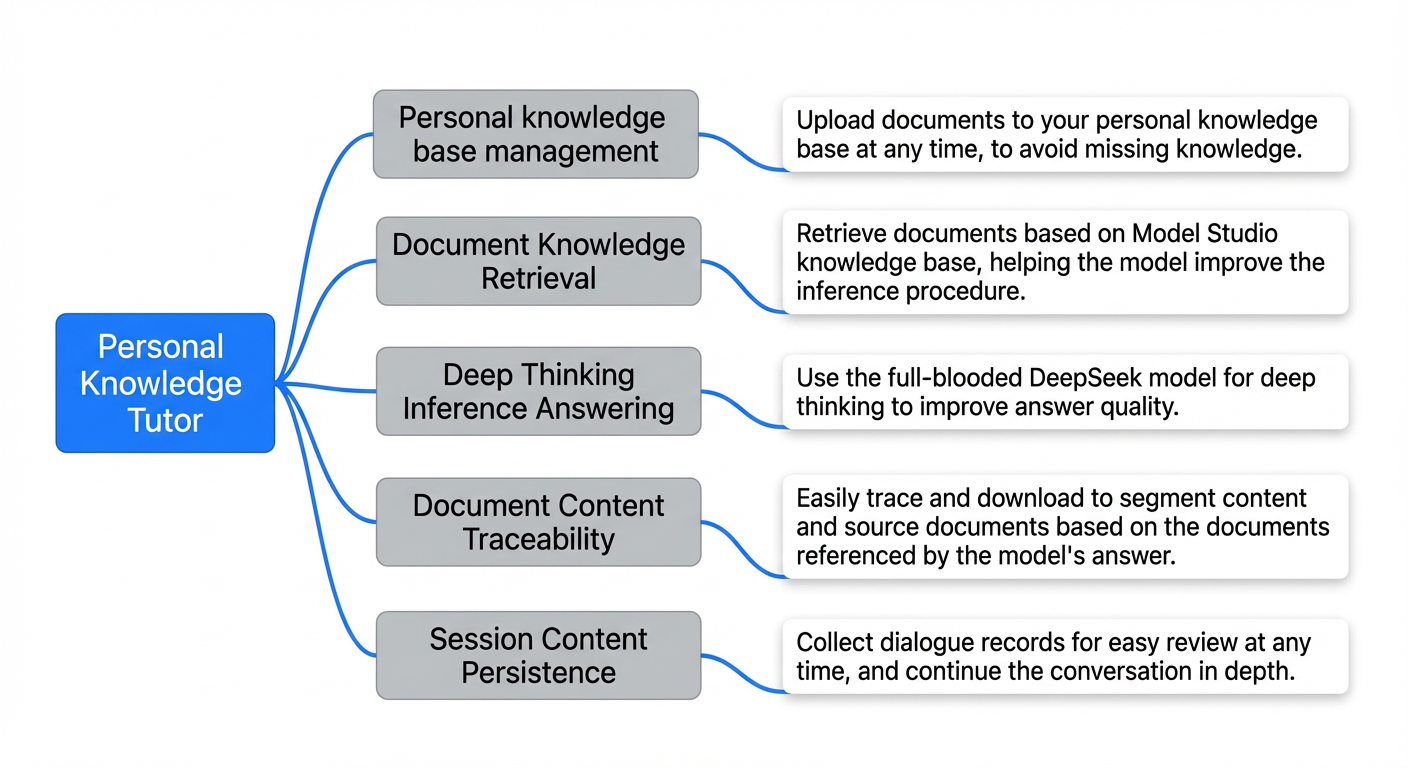
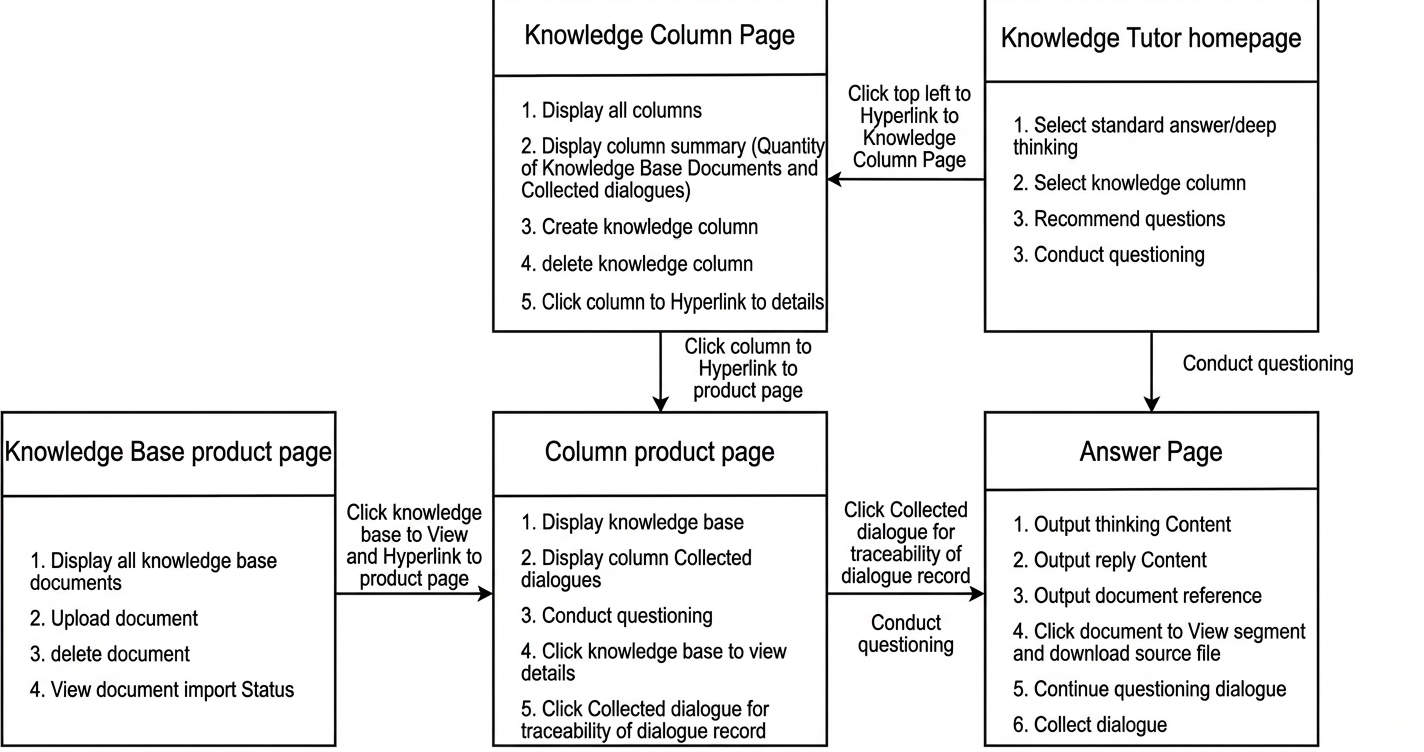
To support these functions, the MobiNext personal knowledge tutor application includes the following five pages:
Personal Knowledge Tutor Homepage: You can switch between different modes, such as Standard Answer or Deep Thinking. You can also select a knowledge column to ask questions. Subsequent conversations use the knowledge base of the selected column as the source, and saved conversations are stored in that column.
Answer Page: This page displays the content provided by the personal knowledge tutor agent. If you select the deep thinking mode, the agent first outputs its thought process and then the reply. For a standard answer, it directly outputs the reply. On this page, you can engage in a multi-turn conversation with the tutor to explore topics in depth. Each conversation includes document segments retrieved from the column's knowledge base, and you can click to download the source files. You can click the star icon next to a conversation to save it to the column for future reference.
Knowledge Column Page: This page displays all knowledge columns and their summary information. The summary for each column includes the number of documents in the knowledge base and the number of saved conversations. You can create new knowledge columns or delete existing ones. You can click a knowledge column to go to its details page.
Column Details Page: This page displays the knowledge base within a specific column and all the conversations saved in that column. You can ask questions directly on this page, which has the same effect as asking on the Personal Knowledge Tutor homepage. You can also click a saved conversation on this page to go to the conversation page, review previous conversation records, and continue asking questions to delve deeper into the topic.
Knowledge Base Details Page: This page is for managing your personal knowledge base. It displays all documents in the current knowledge base and lets you upload new documents or delete existing ones.
Application results
Q&A:
Knowledge base management:
Personal knowledge tutor initialization
Build an Alibaba Cloud Model Studio agent application
This section describes how to quickly generate a highly customizable personal knowledge tutor application using MobiNext and the Alibaba Cloud Model Studio platform. First, create a retrieval-augmented generation (RAG) Large Language Model (LLM) application. Log on to the Alibaba Cloud Model Studio console. In the Application Management section, click Create Application to create a RAG application:
For better knowledge-based inference, select DeepSeek-V3.1 as the foundation model for the application on the Alibaba Cloud Model Studio application configuration interface:
To improve the source tracing experience, add a knowledge base and enable the display of answer sources in the replies:
To allow the Alibaba Cloud Model Studio application to access more knowledge from the Internet, enable the real-time web search feature. This feature combines web search with the personal knowledge base to make conversations more intelligent:
After a simple trial or debugging, you can publish the Alibaba Cloud Model Studio application:
By following the same procedure, you can select a model from the Qwen series or other DeepSeek versions as the foundation model to build an Alibaba Cloud Model Studio application for quick answers and question recommendations:
Get resource configuration parameters
Next, you must obtain the necessary resource configuration parameters to build the end-to-end application. The main configuration information required is as follows:
Configuration Item |
Scenario |
Alibaba Cloud Model Studio API-KEY |
The credential required to access the Alibaba Cloud Model Studio Q&A API. |
Alibaba Cloud Model Studio workspace ID |
The workspace ID required to access the Alibaba Cloud Model Studio knowledge base. |
Alibaba Cloud Model Studio application ID |
The Alibaba Cloud Model Studio application that is accessed for knowledge Q&A and question recommendations. |
Alibaba Cloud AccessKey pair (AK/SK) |
The credential required to call Alibaba Cloud OpenAPI for knowledge base management. |
Get the Alibaba Cloud Model Studio API-KEY, application ID, and workspace ID
First, obtain the API-KEY from the Deployment & Integration tab, the APPID of the published application, and the workspace ID from the Application List. This information is required to create the MobiNext application later:
Get an Alibaba Cloud AccessKey pair (AK/SK)
An AccessKey pair is a permanent access credential that Alibaba Cloud provides to users. It consists of an AccessKey ID and an AccessKey secret. You can use an AccessKey pair to build services by accessing OpenAPI operations. For more information, see Best Practices for using access credentials to call Alibaba Cloud OpenAPI. You will use OpenAPI in the end-to-end application to manage the knowledge base in the Alibaba Cloud Model Studio console. For information on how to create an AccessKey pair for a root account or a RAM user, see Create an AccessKey pair.
Create a Magic Pen application
Next, you can build an end-to-end web application on the MobiNext platform based on the Alibaba Cloud Model Studio agent application that you created in the previous step. First, go to the MobiNext application console. In the template marketplace, select the Personal Knowledge Base template and then select "Use this template":
After you enter the application name, fill in the API-KEY, application ID, and AccessKey pair (AK/SK) that you obtained in the previous sections into the basic information fields and click OK to create the application:
Ensure the prompt indicates that the database and tables do not exist. This allows the template to create new ones.
After you enter the application, you must also enter the Alibaba Cloud Model Studio workspace ID into the global variable that is maintained within the application:
Customize content
After completing the initialization, you can customize or test the application content. For example, you can change the title displayed on the homepage to "MobiNext Smart Note Tutor":
Publish the application
When you are ready, you can publish the application to the staging environment. Click the publish button in the MobiNext designer and fill in the required publishing information:
After the application is published, click the application access link to use the application:
Future extensions
Domain preparation and production environment publication
After application development is complete, you can publish the application to a production environment type and prepare a domain name that has completed ICP filing so that others can access it. For more information about domain name ICP filing, see How to obtain an ICP filing service code.
Multi-tenant data isolation business extension
After you build the basic frame, you can further optimize the system to support multi-user Q&A and knowledge base isolation. This provides a more stable and personalized user experience. This upgrade meets the unique needs of different users and ensures data security and privacy protection. You can use the features provided by the MobiNext platform to achieve this goal:
User identity management: Use the identity authentication system of the MobiNext User Center to achieve precise user identification and access control. This system provides an independent operating environment for each user and ensures data isolation and security.
Data persistence: Use the built-in database feature of MobiNext to create exclusive data storage space for each user. This ensures long-term data preservation and lays the foundation for subsequent data analytics and personalized services.
Personalized Q&A experience: Based on isolated knowledge bases and user data, you can provide tailor-made Q&A services for each user, for example, using Model Studio long-term memory. This improves the accuracy and relevance of the answers.
Through these optimizations, you can build a more robust, secure, and personalized multi-user Q&A system. This enhances the user experience and lays a solid foundation for future feature extensions and commercial applications.
End user access and identity sources
As your business expands, you will encounter diverse user identity authentication needs from different publishing channels and application scenarios. To meet this challenge, the MobiNext User Center provides unified management of identity sources. This is not limited to the Alibaba Cloud account logon method used in this topic's example. It can be extended to support anonymous user access or various frequently-used end user access methods. Using the identity source management and logon configuration features of the MobiNext platform, you can implement the following identity authentication solutions:
Alibaba Cloud service integration: Supports Alibaba Cloud account logon to provide a seamless experience for users within the Alibaba Cloud ecosystem.
Internal testing support: Provides a test account sharing feature to facilitate system testing and validation by developer and quality assurance teams.
Enterprise collaboration tool integration:
Supports DingTalk corporate application SSO to provide a convenient access channel for enterprise users who already use DingTalk.
Integrates WeCom to meet the needs of enterprise users who rely on the WeChat ecosystem.
Customized solutions: Supports enterprise-customized iDaaS (Identity as a Service) identity source logon. This provides a flexible integration solution for enterprises with special security requirements or existing identity authentication systems.
This diversified identity authentication strategy improves the system's adaptability and compatibility and meets the needs of enterprises of different sizes and industries. By integrating various mainstream identity authentication methods, the system can provide users with a more convenient, secure, and personalized access experience, while also reducing the complexity and cost of identity management for enterprises and individuals.