Best practices for accessing Alibaba Cloud OpenAPI
Leaked access credentials can compromise cloud resources and business operations. Secure your credentials by choosing the right authentication method for each deployment scenario.
What is an access credential?
An access credential verifies your identity when you use development tools (API, CLI, SDK, or Terraform) to access Alibaba Cloud.
AccessKey pair: Consists of an AccessKey ID and an AccessKey secret. This is a permanent credential for Alibaba Cloud accounts and RAM users. Create an AccessKey pair.
STS token: A Security Token Service (STS) token is a temporary credential issued to a RAM role with a custom validity period and permission scope. What is STS?.
Common causes of credential leaks
Hardcoded AccessKey pairs in application code are exposed to anyone with repository read access and become public if the code is pushed to open source communities or code hosting services.
AccessKey pairs embedded in client-side code can be extracted by decompiling the application.
Technical documentation or shared materials contain AccessKey pair information.
Sample code in product documentation contains AccessKey pair information.
API responses that lack proper permission controls return access credential information.
Secure methods for using access credentials
Minimize credential exposure time and scope. Choose a secure method based on your deployment scenario.
Method | Scenario |
Applications deployed in an ACK cluster. RRSA isolates permissions at the RAM role level so each application assumes a unique role. | |
Applications deployed on an ECS instance. The instance assumes a RAM role to access Alibaba Cloud OpenAPI. | |
Development, operations, and product personnel who need credentials for O&M, management, or debugging. Use role-based SSO to assume a RAM role and obtain an STS token. | |
Applications deployed in Function Compute (FC) that need access to other cloud resources. Associate the FC function with a RAM role to use an STS token instead of permanent credentials. | |
Scenarios where the preceding solutions do not apply. Store credentials in system environment variables. |
Use RAM Roles for Service Accounts (RRSA)
Prerequisites
This method applies to cloud services that support RAM.
Cluster version: Kubernetes 1.22 or later, on an ACK managed cluster (Basic or Pro), ACK Serverless cluster (Basic or Pro), or ACK Edge cluster (Pro only).
Alibaba Cloud SDK V2.0 is used.
Custom SDKs for self-managed gateway products cannot be used.
How it works
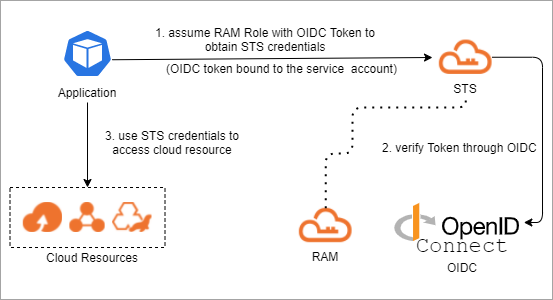
How RRSA works
Without RRSA, all pods on a node share the ECS instance role's permissions through instance metadata, posing a significant security risk.
RRSA solves this by binding a RAM role to a Kubernetes service account. When a pod starts, it receives an OpenID Connect (OIDC) token scoped to its service account, calls the AssumeRoleWithOIDC API, and receives a role-scoped STS token for cloud API access.
The authentication flow:
Token injection: When a pod starts, ACK uses service account token volume projection to mount an OIDC token file scoped to the pod's service account.
Assume role: The application calls the
AssumeRoleWithOIDCAPI using this OIDC token.Receive STS credentials: Alibaba Cloud RAM verifies the OIDC token against the cluster's OIDC provider and returns role-scoped STS credentials.
Access resources: The pod uses the short-lived STS credentials to access authorized Alibaba Cloud APIs.
OIDC tokens are short-lived. Read the token from the file on every authentication request — do not cache it. ACK renews tokens automatically before expiration.
When RRSA is enabled, ACK automatically:
Creates a dedicated OIDC issuer for the cluster.
Enables service account token volume projection for the cluster.
Creates a RAM identity provider (IdP) in your account, named
ack-rrsa-<cluster_id>, configured for single sign-on (SSO) with the cluster's OIDC issuer.
Procedure
Enable RRSA for your ACK cluster.
Use RRSA in your ACK cluster.
Code examples
Alibaba Cloud SDK V2.0 supports RRSA OIDC token authentication. Any cloud service SDK built on V2.0 that supports STS tokens also supports RRSA.
Language | Minimum version | Demo |
Go | Alibaba Cloud Credentials for Go 1.2.6 or later. For instructions, see Method 6: Use OIDCRoleArn. | |
Java | Alibaba Cloud Credentials for Java 0.2.10 or later. For instructions, see Method 6: OIDC role ARN. | |
Python 3 | Alibaba Cloud Credentials for Python 0.3.1 or later. For instructions, see Manage access credentials. | |
Node.js / TypeScript | Alibaba Cloud Credentials for TypeScript/Node.js 2.2.6 or later. For instructions, see Method 6: Use OIDCRoleArn. |
Use an instance RAM role
Prerequisites
This method applies to cloud services that support RAM.
Alibaba Cloud SDK V2.0 is used.
Custom SDKs for self-managed gateway products cannot be used.
How it works
You can attach an instance Resource Access Management (RAM) role to an Elastic Compute Service (ECS) instance. Then, the ECS instance can use the Security Token Service (STS) temporary credential of the instance RAM role to access the APIs of other Alibaba Cloud services. The STS temporary credential is updated on a periodic basis. This ensures the security of your AccessKey pair and implements fine-grained access control and permissions management by using RAM.
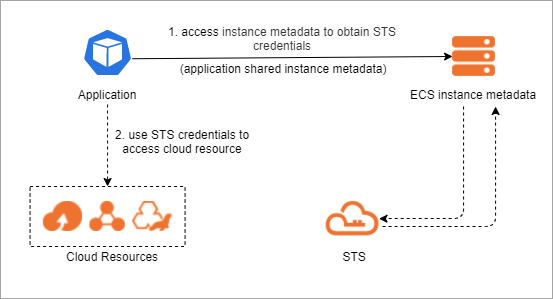
Workflow:
The application retrieves an STS token by accessing the ECS instance metadata.
The application uses the STS token to access cloud resources. What is STS?.
Procedure
Assign a RAM role to an ECS instance. Instance RAM roles.
Code examples
Alibaba Cloud Credentials simplifies instance RAM role usage. These examples call the ECS DescribeRegions operation with an instance RAM role.
Programming language | Code example |
Go | |
Java | |
Python | |
PHP | |
Node.js | |
.NET |
Cross-account chained role assumption
If your application on an ECS instance needs to access resources in another Alibaba Cloud account, you can use cross-account chained role assumption to obtain access without storing an AccessKey pair.
How it works
The ECS instance first obtains temporary credentials for its own instance RAM role from instance metadata. It then uses these credentials to call sts:AssumeRole to assume a RAM role in the destination account and obtain an STS token for the destination account. This process is called chained role assumption.
Procedure
In the destination account, create a RAM role. Set
Principal.RAMin the role's trust policy to the Alibaba Cloud Resource Name (ARN) of the instance RAM role in the source account, for example,acs:ram::<source-account-id>:role/<instance-role-name>. Grant this role the permissions that the application needs.On the instance RAM role in the source account, attach a permission policy that grants the
sts:AssumeRolepermission. You can use the system policyAliyunSTSAssumeRoleAccess.On the ECS instance, use the Alibaba Cloud Credentials tool to perform chained role assumption. The tool first obtains the temporary credentials of the instance RAM role from instance metadata. It then uses these credentials to call
sts:AssumeRoleto assume the RAM role in the destination account and obtain a cross-account STS token.
STS token for development and debugging
Scenario
For development, operations, and product personnel who need credentials for O&M, management, or debugging, use role-based SSO to assume a RAM role and obtain an STS token instead of a permanent AccessKey pair.
Procedure
For single-account scenarios, we recommend that you configure SAML-based role SSO within the cloud account and assign RAM roles to employees based on their job functions. Employees can then use the saml2alibabacloud tool on the command line to obtain an STS token after authenticating with the identity provider (IdP).
For multi-account scenarios, we recommend that you use CloudSSO to configure single sign-on for multiple accounts. After configuration, employees can use the CLI to log on to CloudSSO and access Alibaba Cloud resources.
Use an STS token in Function Compute
Scenario
Instead of hardcoding a RAM user's AccessKey pair in an FC function, associate the function with a RAM role. The application then uses an STS token to access cloud resources, avoiding permanent credential leaks.
Solution architecture
FC function roles manage temporary credentials at runtime, avoiding long-term AccessKey pair exposure. Configure the role and permissions once; functions obtain temporary credentials automatically.
An administrator creates a role trusted by Function Compute and grants it the required permissions (1), then associates the role with the FC function (2). The application retrieves an STS token from the function context (3). During this process, Function Compute calls AssumeRole to obtain the STS token from RAM/STS (i). The application uses the STS token to call the target cloud resource API (4), and the resource API returns the result to the client application.
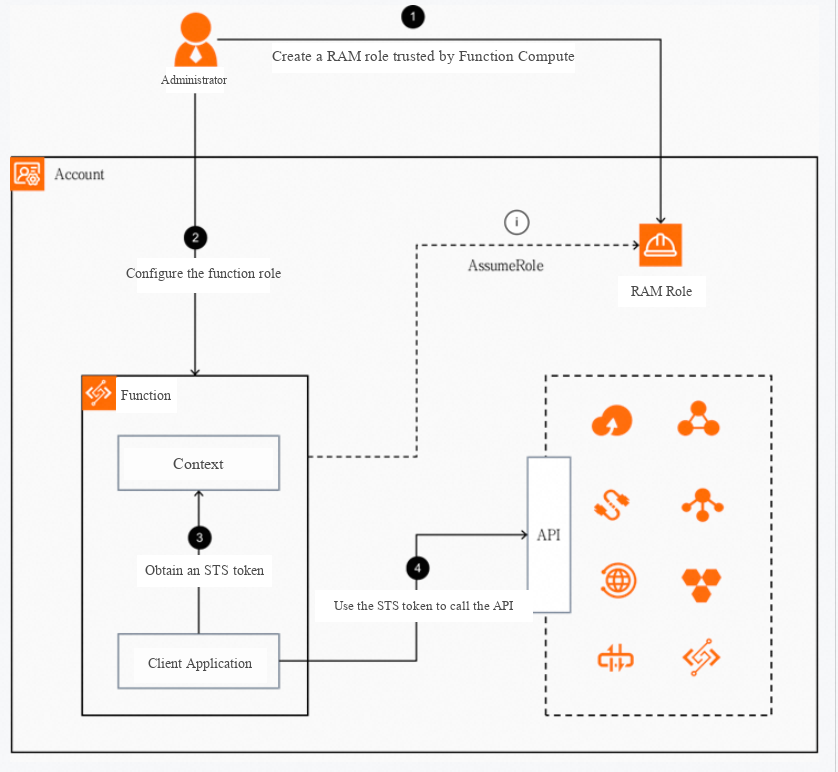
Procedure
Obtain and use temporary credentials by using an FC function role.
Configure system environment variables
Procedure
Configure the ALIBABA_CLOUD_ACCESS_KEY_ID and ALIBABA_CLOUD_ACCESS_KEY_SECRET environment variables.
<ACCESS_KEY_ID>
Alibaba Cloud SDK code examples
Alibaba Cloud SDKs create a default credential from the ALIBABA_CLOUD_ACCESS_KEY_ID and ALIBABA_CLOUD_ACCESS_KEY_SECRET environment variables and use it to authenticate requests automatically. These examples call the ECS DescribeRegions operation.
Programming language | Code example |
Go | |
Java | |
Python | |
PHP | |
Node.js | |
.NET |
Generic code example
If you cannot use Alibaba Cloud SDKs (for example, custom SDKs for self-managed gateway products), load environment variables directly. Java example:
import com.aliyun.credentials.Client;
import com.aliyun.credentials.models.Config;

public class DemoTest {
    public static void main(String[] args) throws Exception{
        Config config = new Config();
        // Specify the type of credential you want to use.
        config.setType("access_key");
        // The AccessKeyId of your RAM user.
        config.setAccessKeyId(System.getenv("ALIBABA_CLOUD_ACCESS_KEY_ID"));
        // The AccessKeySecret of your RAM user.
        config.setAccessKeySecret(System.getenv("ALIBABA_CLOUD_ACCESS_KEY_SECRET"));
        Client client = new Client(config);
    }
}
Remediate leaked credentials
AccessKey pair leak: Remediate a compromised AccessKey pair.
STS token leak: What do I do if an STS token is leaked?.
References
Related cloud security best practices:
Detect AccessKey pair leaks on GitHub by using Security Center
Manage RAM credentials by using Key Management Service (KMS)
Best practices for applications to access cloud resources in ACK
Obtain and use temporary credentials by using RRSA in Container Service
Obtain and use temporary credentials by using an instance RAM role
Obtain and use temporary credentials by using an FC function role