Data cleansing and augmentation
Data processing lets you use various model operators to clean and augment the training set used for model tuning, improving its quality.
ImportantThis topic is applicable only to the China (Beijing) region.
ImportantSkip this topic if your training set contains data unsuitable for data cleaning and augmentation, such as legal documents, medical records, literary works, dialect collections, user reviews, or technical manuals.
Why data processing
In the model fine-tuning process, a high-quality training set will significantly improve the training performance and prediction capability of a large model. However, most existing training sets have low data quality and are insufficient in quantity. Therefore, you should first use the Data Processing feature of Alibaba Cloud Model Studio to perform Data Cleansing and Data Augmentation on your training set. After you obtain sufficient high-quality training data, you can then perform model fine-tuning.
Building an effective SFT training set typically requires 1,000+ samples.
-
Data Cleansing: You need to correct issues in the training data, such as issues with standardization, compliance, consistency, and duplication. Model Studio currently supports ten data cleansing operations, including special content removal and sensitive data masking.
-
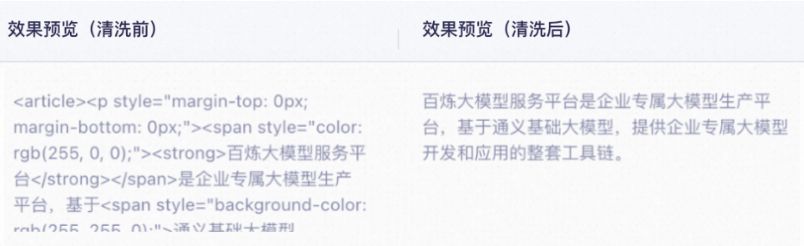
special content removal: Identifies and removes content such as URLs and special characters from your training data.
-
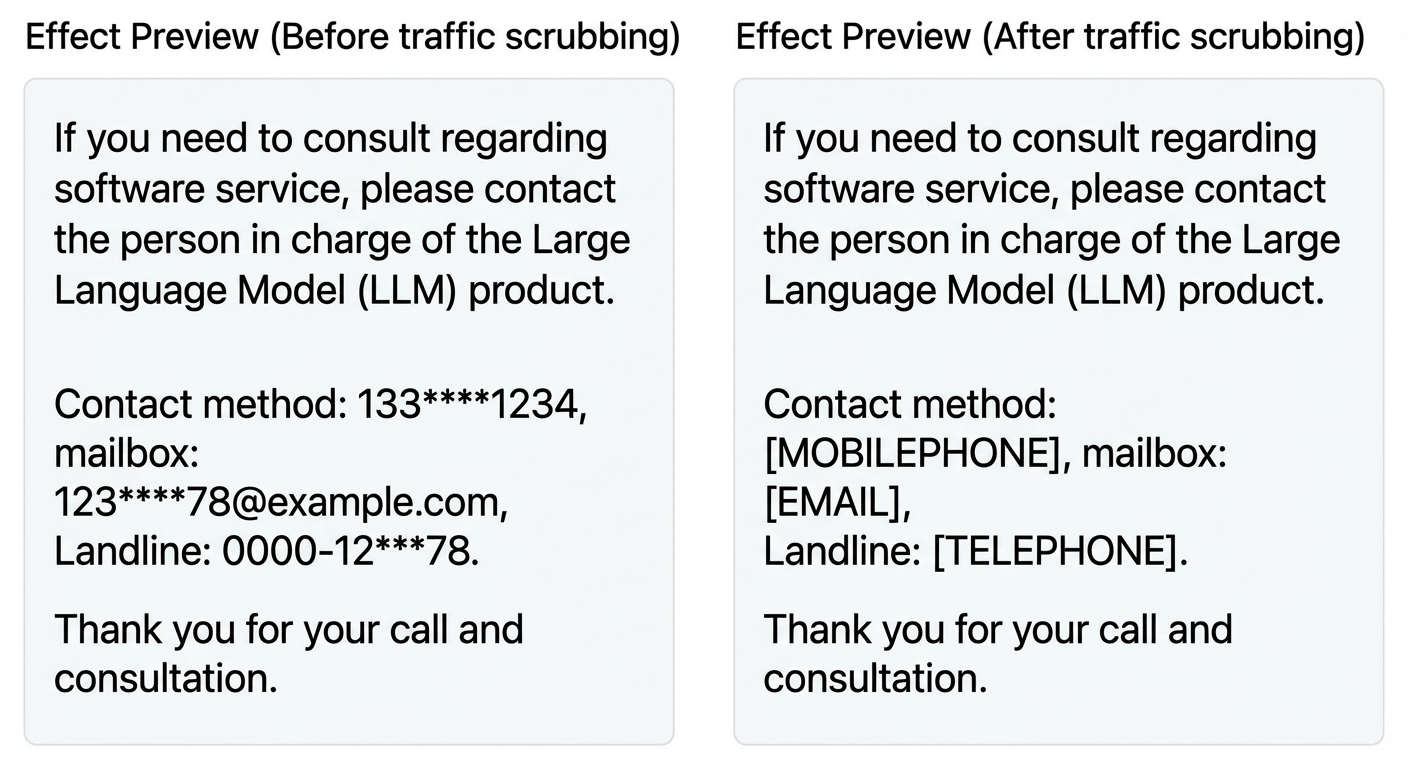
sensitive data masking: Identifies and masks sensitive data in your training data.
-
-
Data Augmentation: To increase the diversity and balance of your training data or expand its size.
Supported training sets
Data processing supports the SFT-text generation training set, but does not currently support the SFT-image understanding training set or the DPO-text generation training set.
This training set contains single-turn or multi-turn dialogue data in the ChatML format. SFT-ChatML format example.jsonl
Create a data flow task
Alibaba Cloud Model Studio does not currently provide an API for data processing.
This section shows you how to build a custom data flow in the console to illustrate the data processing workflow. This data flow first applies sensitive information masking (data cleaning) to the training data, and then performs data augmentation. The process has two steps:
- Create a data flow: Build a custom data flow from a blank canvas.
- Create a data flow task: Start a data flow task based on the created data flow to process your training set.
Clean the data before augmenting it to ensure the augmentation process runs on a high-quality dataset. This helps ensure that the data source for model fine-tuning is accurate.
If you only need to perform data cleaning or augmentation on your training data, you can use a prebuilt Data Flow Template in Alibaba Cloud Model Studio. Go to the Data Management page, and on the Data Flow tab, click Data Flow Template, then create a data flow based on this template.
Step 1: Create a data flow
-
Go to the Data Management page. On the Data Flow tab, click the Create Data Flow button in the Data Flow list.
-
In the Create Data Flow dialog box, enter a Data Flow Name and Data Flow Description, and then click OK to open the data flow canvas. The data flow remains in the Draft state until you click Publish in the upper-right corner.
The Start node is pre-configured with a
dialogue_textparameter that represents the training set to be processed. You cannot modify this parameter.Click the
 icon in the upper-left corner to exit the canvas. The system automatically saves your data flow draft. You can click Manage to open the canvas again and continue editing.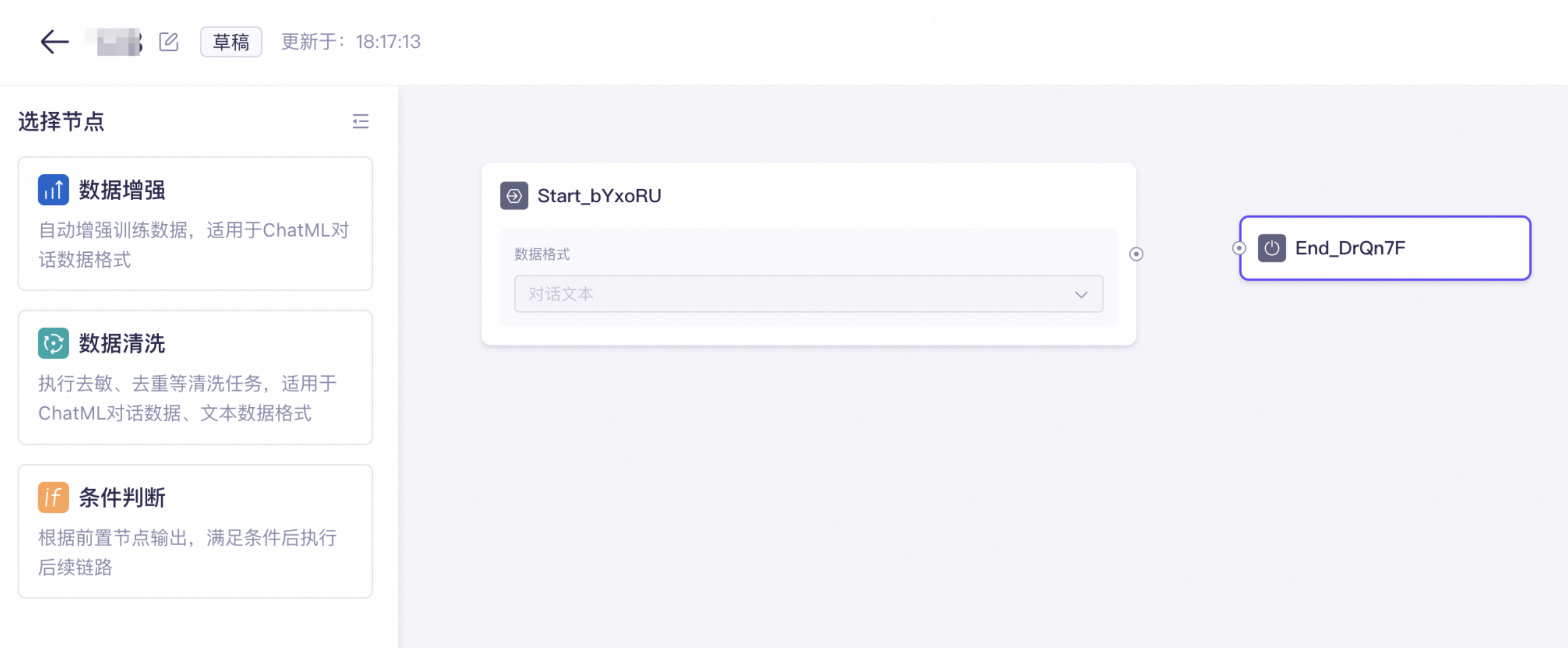
-
Drag the Data Cleansing node from the left to the canvas, enable the Sensitive Data Masking operator for the Data Cleansing node, and disable the other operators.
The Data Cleansing node is pre-configured with a
dataSetCountparameter, which represents the size of the training set generated when the node finishes. You cannot modify this parameter.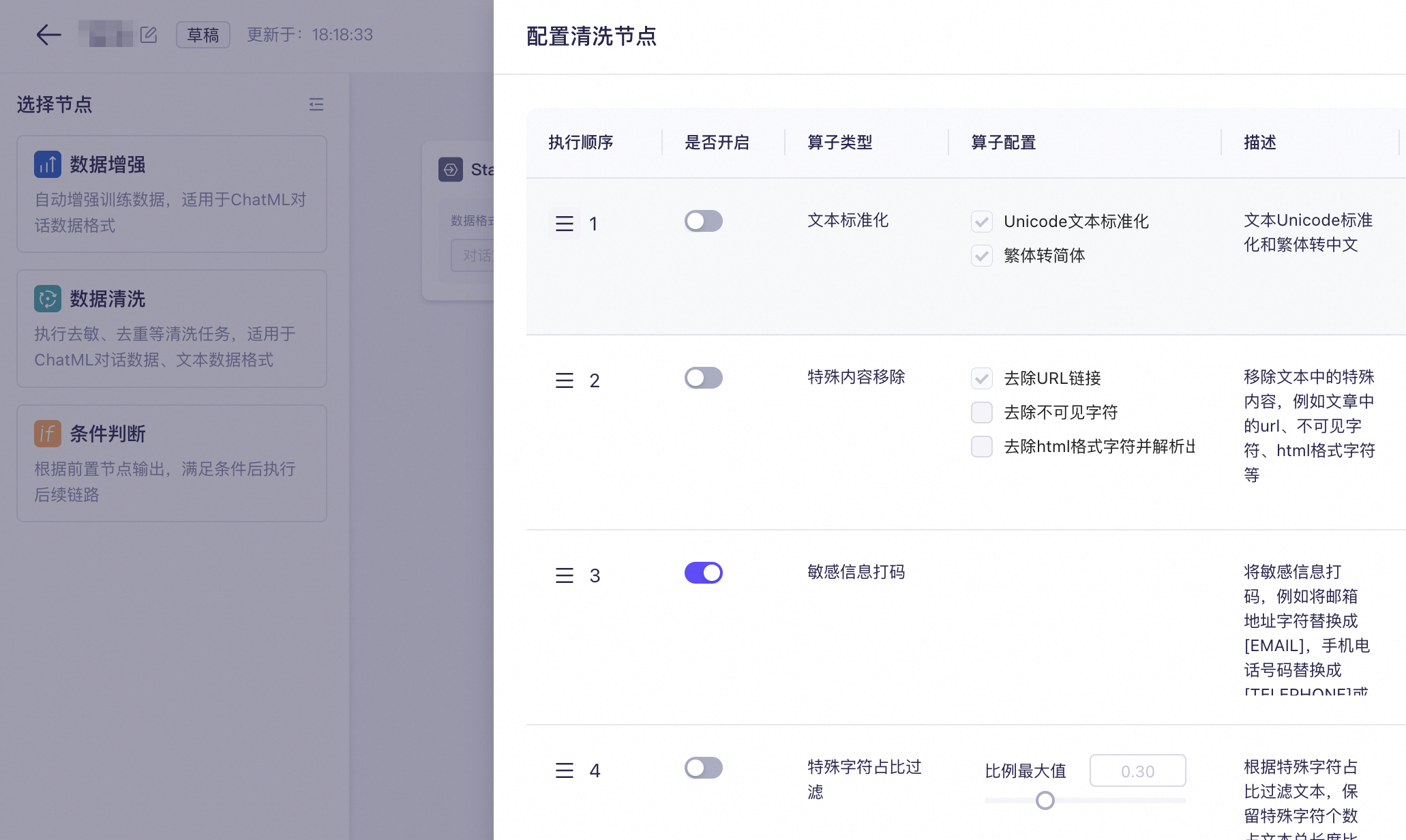
-
Connect the Start node to the Data Cleansing node.
-
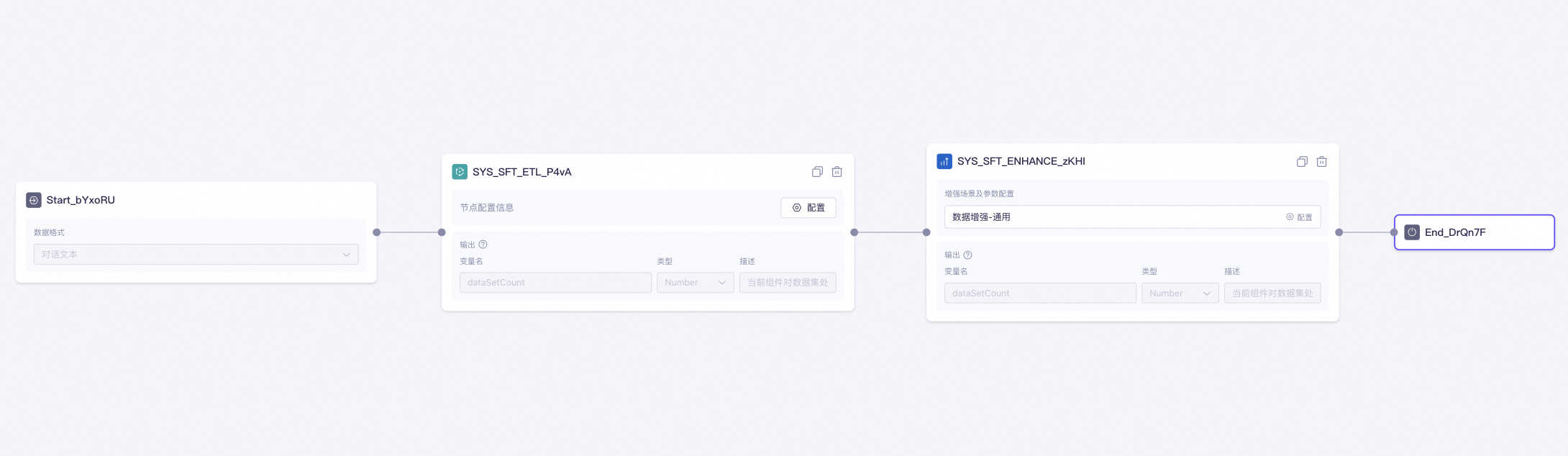
Drag the Data Augmentation node from the left onto the canvas, and configure the parameters for the Data Augmentation node. Learn more about the parameters.
Parameter Configuration Select Scenario Data Augmentation - General.
Sample count for instruction generation This value must be smaller than the size of the input data for this node. Otherwise, use the default value.
Similarity filtering threshold Keep the default value.
Number of samples to generate Keep the default value.
Prompt Configuration Use the default template provided by Alibaba Cloud Model Studio.
System Prompt: Please carefully observe the inputs and outputs of multiple data samples, summarize the underlying patterns based on your understanding, and then write a new [Question] and [Answer] pair. Note that the newly generated [Question] and [Answer] must meet the following requirements: 1. The generated [Question] and [Answer] must not be identical to any input samples, but they must maintain the same format. 2. The generated [Question] is not required to be limited to the topics or domains of the input questions. The generated [Answer] must correctly answer the generated [Question]. 3. The provided samples may be multi-turn conversations. The generated [Question] and [Answer] can also be multi-turn, but must keep the same format. 4. The generated [Question] and [Answer] must appear as a pair, with the [Question] preceding the [Answer]. ${few_shot_examples} -
Connect the Data Cleansing node to the Data Augmentation node, and then connect the Data Augmentation node to the End node.

-
Click Publish in the upper-right corner. The data flow status changes to Publish. If you edit the data flow again, its status reverts to Draft. Click the
icon in the upper-left corner to exit the canvas.Searching for a data flow: On the Data Flows tab, enter the data flow name in the search box and click the
icon to find the data flow. Fuzzy search is supported. -
Next, follow the instructions in Step 2: Create a data flow task to process your training set with this data flow.
 icon to find the data flow. Fuzzy search is supported.
Step 2: Create a data flow task
-
Go to the Data Management page. On the Data Flow tab, click Task List, then create a task from the data flow list. In the dialog box that appears, select the target data flow and click OK. If a data flow that you created does not appear in the list, this may be because:
-
The data flow has not been published.
You can go to Data Flow list, find the data flow that you want to publish, and then click Manage to publish.
-
The data flow does not belong to the current workspace.
-
-
Enter a Task Name, select Model Data as the Data Source, and select the training set to process from the list.
If no training set is available, click Manage to go to Model Data and upload a training set. For more information, see Training Sets and Evaluation Sets.
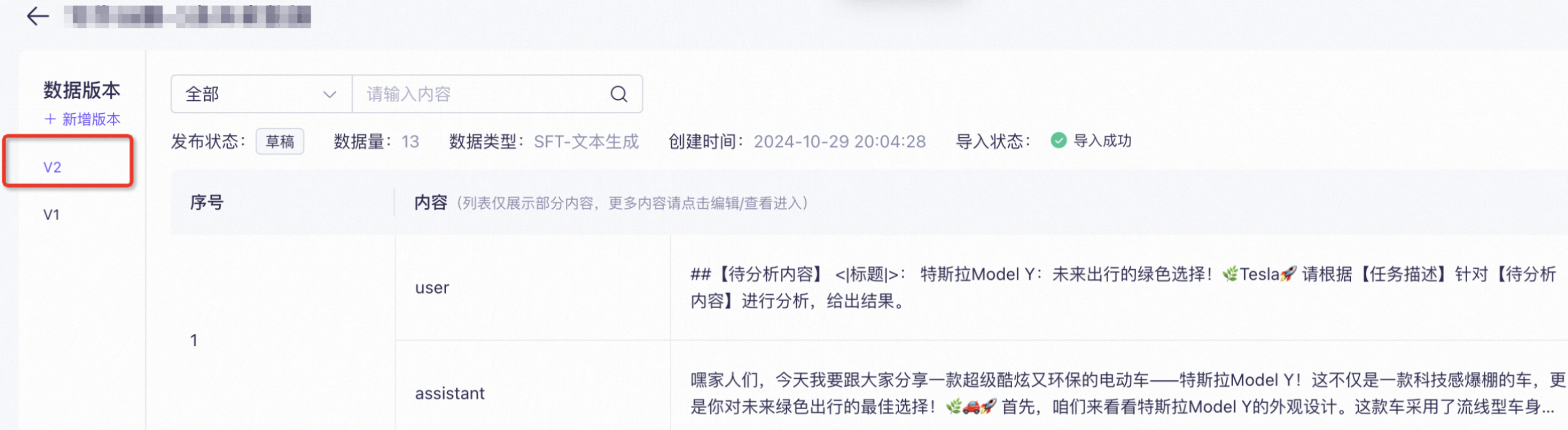
Model Data provides version management for training sets. After a training set is cleaned or augmented, a new version is automatically generated. This new version is saved independently and does not overwrite the original training set.
Data Processing currently supports only SFT-text generation training sets in formats other than ChatML. SFT-ChatML format example.jsonl
-
Click Created. The data flow task starts automatically.
The task may take some time to complete. During execution, you cannot manually stop the task.
-
Click the
icon to refresh the Processing Status. The possible Processing Status are described in the following table.Status
Description
Processing
The data flow task isrunning. During peak hours, tasks may be queued. No user action is required.
Completed
The data flow task completed successfully. Click Execution Process to the right of the task to view the results.
Processing failed
The data flow task failed. We recommend that you submit a ticket to determine the cause.
-
After the task completes, the system creates a new version of the processed training set. Make sure to use the correct version for subsequent operations.
 icon to refresh the Processing Status. The possible Processing Status are described in the following table.
Manage data flow tasks
This section shows you how to view the list of data flow tasks in your workspace, find a specific task, and review its basic information, configuration, processing status, and results.
Go to the Data management page and click the Tasks tab. On this page, you can:
-
View data flow task list: View the complete list and an overview of data flow tasks in the current workspace, including the Processing Status and Data Flow of each task.
-
Find a data flow task: Enter a data flow task name in the search box and click the
icon. Fuzzy search is supported. -
ViewingData SourceandData Flow: A new version of your training set is automatically generated after it is cleaned or enhanced. This new version is saved independently and does not overwrite the original training set. For example, if the training set before processing is version
V1, the processed data is stored as versionV2of the training set.Review the cleansed dataset to verify its integrity and accuracy.
-
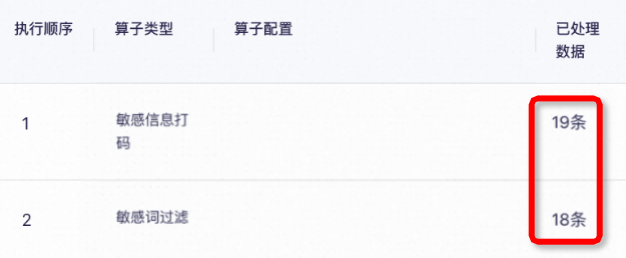
View Execution Process: Click Execution Process in the Actions column to view the processing results and time taken for the data flow task, including the intermediate results and time taken for each processing node.
The Data Cleansing node displays the size of the output training set after each operator is applied. For example, in the figure above, the sensitive word filtering operator runs after the sensitive data masking operator, and the sensitive word filtering operator filters out one data entry.
-
Delete data flow task: Click Delete in the Actions column.
Deleting a task also permanently deletes its execution history. Proceed with caution.
Node
Start and end node
-
Definition: The Start node initiates a data flow, and the end node outputs the data flow's result. Every data flow must have a Start node and an end node. The end node is the final node that outputs the processed training set. You cannot add other nodes after it. In a workflow, the process generates the execution result only after reaching the end node.
-
Start node parameter configuration:
Description
Parameter configuration
Input
Output
Other parameters
Receives the user's training set for data cleaning or augmentation. Custom variables are not currently supported.
dialogue textrepresents the training set to be processed. (This parameter cannot be changed.)Passes the input variable to the next node without modification.
None.
-
End node parameter configuration:
Description
Parameter configuration
Input
Output
Other parameters
Outputs the cleaned or augmented training set. Custom variables are not currently supported.
The training set processed by the preceding node.
Same as the input variable.
None.
-
Example:
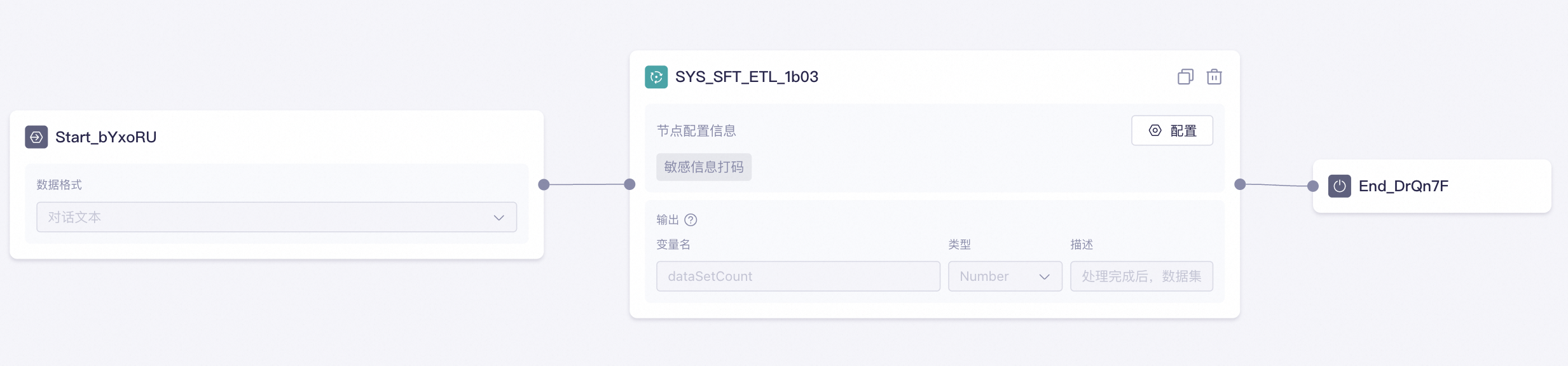
In the example below, the input of the end node is the output of the preceding Data Cleansing node. This means that the data flow ends after the Data Cleansing node finishes execution and outputs the processing result of the Data Cleansing node.
-
End node output:
The end node's output automatically generates a new version. This new version is saved independently without overwriting the original training set, and you can view it in the Data Flow column.

Condition node
-
Usage: Controls the workflow path by evaluating one or more conditions. If a condition is met, the workflow follows the corresponding branch. The node supports AND/OR logic and evaluates conditions sequentially from top to bottom.
-
Parameter configuration:
Parameter
Description
Conditional branch
Enter a conditional expression.
Other
The default branch to use if no other conditions are met.
-
Node example:
The following is a simple example of a workflow that first cleans and then augments data. The workflow logic is as follows: A training set is first processed by the Data Cleansing node. The cleaned data is then passed to the Conditional Judgment node. Inside the node, a condition is evaluated for
dataSetCount(the number of messages in the cleaned result). If the count isless than or equal to 10, the data is sent to the Data Augmentation node for augmentation. Finally, the end node outputs the result.

Data cleaning node
-
Usage: Use this node to fix issues in your training data related to standardization, compliance, consistency, and duplication.
-
Parameters:
Parameter Description Input The training set to clean (dialogue text in ChatML format).
Cleaning operator Select the cleaning operators to execute, such as document similarity deduplication, sensitive word filtering, and toxicity removal. The operators run in the specified order to prepare data for subsequent nodes.
Adjust operator execution order: Drag the
icon to change the operator execution order. The Data Cleansing node runs the operators in this order.Whether to Enable: Use the
toggle to enable or disable an operator. For easier troubleshooting, enable only one operator per data cleaning node.Operator Configuration: A selected checkbox
indicates that the operator will perform this action.Output Outputs the cleaned training set and the
dataSetCountvariable. This read-only variable indicates the number of messages in the cleaned training set. -
Node example:
In the example below, the Start passes the training set to the Data Cleansing. Inside the node, the cleaning operators process the training data in their configured order. Finally, the Data Cleansing outputs the cleaned training set.
 icon to change the operator execution order. The Data Cleansing node runs the operators in this order.
 toggle to enable or disable an operator. For easier troubleshooting, enable only one operator per data cleaning node.
 indicates that the operator will perform this action.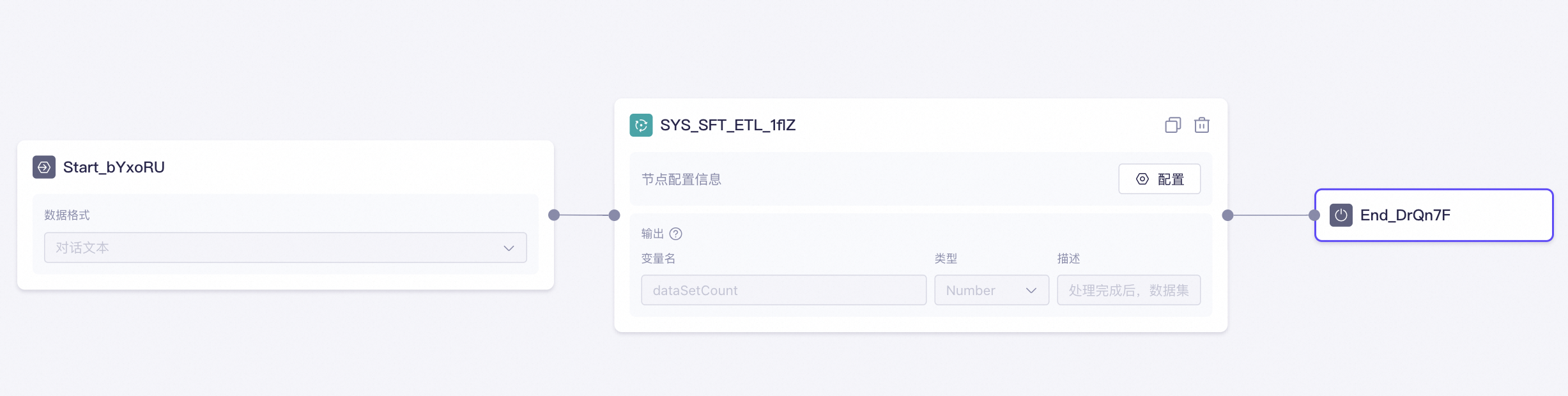
Data augmentation node
-
Usage: Diversifies and balances training data, or expands the dataset by creating augmented data.
-
Scenario selection:
-
Data Augmentation - General: This scenario generates new data using a few-shot strategy. It randomly selects samples (seeds) from the training set (seed pool), appends them to a prompt, and sends a request to the
Qwen-Maxlarge model. Model selection is not supported. Use this scenario to augment SFT training sets for fine-tuning large models for text question answering. -
Data Augmentation - Text Classification, Data Augmentation - Text Extraction, and Data Augmentation - Text Creation are scenario-optimized versions of Data Augmentation - General. They are purpose-built to augment SFT training sets for fine-tuning large models for text classification, text extraction, and text generation tasks, respectively.
For their specific tasks, they produce better augmentation results than Data Augmentation - General.
-
-
Parameter configuration:
Data augmentation - general
Parameter Description Input The training set to be augmented by this node. The data must be dialogue text in ChatML format.
Example format:
{
  "messages": [
    {
      "role": "user",
      "content": "Do you exercise regularly?"
    },
    {
      "role": "assistant",
      "content": "Yes, I exercise regularly."
    }
  ]
}
Number of Samples to Generate The number of new data samples to generate. For example, if your original training set has 10 entries and you set Number of Samples to Generate to 10, the augmented training set will contain 20 entries.
Each Data Augmentation - General task can generate up to 2,000 samples.
Example of data generated by Data Augmentation - General based on the provided seeds:
{
  "messages": [
    {
      "role": "user",
      "content": "What types of books do you like to read?"
    },
    {
      "role": "assistant",
      "content": "I enjoy reading science fiction and history books."
    }
  ],
  "foreignKey": "8ba0304e2452476d89ed6a60c4xxxxxx"
}
The system adds the
foreignKeyfield to track the origin of each text sample. The augmented training set can be used directly for model fine-tuning without removing theforeignKeyfield, as it does not affect the fine-tuning results.Number of Samples for Instruction Generation The number of seeds the system selects from the pre-augmentation training set. These seeds are appended to the prompt (see Prompt Configuration below) and used as input to the large language model for data augmentation.
If the total length of the seeds and the prompt exceeds the maximum input token limit of Qwen-Max, the system automatically adjusts Number of Samples for Instruction Generation to stay within the token limit.
Prompt Configuration Define the input and output requirements for the data augmentation job. The system provides a default template you can use as a starting point.
System Prompt: Please carefully review the inputs and outputs of multiple examples. Based on your understanding, summarize the patterns and then write a new [Question] and [Answer]. Note that the new [Question] and [Answer] must meet the following requirements: 1. The generated [Question] and [Answer] must not be identical to any input [Question] and [Answer], but they must follow the same format. 2. The generated [Question] is not limited to the topic or domain of the input [Question]. The generated [Answer] must correctly answer the generated [Question]. 3. The provided [Question] and [Answer] may be multi-turn dialogues. The generated [Question] and [Answer] can also be multi-turn, but they must follow the same format. 4. The generated [Question] and [Answer] must appear as a pair, and the [Question] must come before the [Answer]. ${few_shot_examples}NoteThe Data Augmentation - General node is essentially a
Qwen-Maxlarge language model (LLM). Based on the Prompt Configuration, the node augments the input training data using a few-shot strategy. Adjust the Prompt Configuration to match the goal of each data augmentation task, such as improving data diversity or balance.Currently, only the
few_shot_examplesparameter is supported.Few-shot strategy: For example, when you create a data flow task, you select a training set with 1,000 data entries. You set Number of Samples for Instruction Generation to 5 and the desired Number of Samples to Generate to 200. In this case, the algorithm samples 5 entries from the 1,000 entries, inserts them into the
few_shot_examplesvariable in the prompt, and then requests Qwen-Max to generate 1 new data entry. This process repeats 200 times to generate 200 new entries.Note
Tips: Precision and diversity-
Task relevance: Ensure that the generated data is highly relevant to the target task. Avoid introducing irrelevant variations to preserve the data's context and meaning.
-
Diversification strategy: Use multiple data augmentation strategies, such as synonym replacement, random sampling, and translation, to maximize data diversity. This helps the large language model generalize better.
-
Balanced augmentation: Keep the generated data balanced across class, difficulty, and structure. Avoid exposing the large language model to too much data of a single type, which can cause overfitting. During augmentation, do not significantly deviate from the original data's distribution.
Reduce the risk of overfitting: When a training set has insufficient data volume or diversity, a large language model may overfit the dominant training data during full-parameter training. This hinders the model's ability to learn generalized features.
Similarity Filter Threshold Valid values: 0.1 to 1.0. A lower value enforces a stricter acceptance threshold for newly generated data. This helps reduce duplicates by filtering out high-similarity data (high ROUGE-L scores). The system computes similarity across the full ChatML record.
The system evaluates each candidate sample. If a sample's similarity score is below the threshold, it is accepted; otherwise, it is discarded.
ROUGE-L measures similarity by calculating the length of the longest common subsequence (LCS) between the generated text and a reference text. A score closer to 1.0 indicates higher similarity.
Output Outputs the augmented training set from this node and the
dataSetCountvariable, which represents the number of messages in the augmented training set.NoteAlibaba Cloud Model Studio cannot distinguish between original and newly generated records in the augmented training set. You must use a third-party diff tool to compare them manually.
Example output format:
{
  "messages": [
    {
      "role": "user",
      "content": "What types of books do you like to read?"
    },
    {
      "role": "assistant",
      "content": "I enjoy reading science fiction and history books."
    }
  ],
  "foreignKey": "8ba0304e2452476d89ed6a60c4xxxxxx"
}
The system adds the
foreignKeyfield to track the origin of each text sample. The augmented training set can be used directly for model fine-tuning without removing theforeignKeyfield, as it does not affect the fine-tuning results.Data augmentation - text classification
Parameter Description Data Example The training data to be augmented must match the structure of the provided data example. Otherwise, the process will fail.
You can click Download JSON Template on the page, replace the sample data with your training data, and then use the file to augment your data.
Input Specifies the training set (dialogue text in ChatML format) that this node will augment.
Example format:
{
  "messages": [
    {
      "role": "system",
      "content": "You are an AI assistant."
    },
    {
      "role": "user",
      "content": "
      【Task Description】\nPlease classify the following movie review into one of the categories below:\n1. Sci-fi & Adventure\n2. Romance & Love\n3. Comedy & Humor\n4. Action & Thriller\n5. Drama & Art\n6. Animation & Family\n7. Horror & Suspense\n8. Documentary & History\n9. Other\n\nProvide the final result in the JSON format: {\"category\": \"<category_result>\"}.\n
      【Content to Analyze】'Titanic' is a timeless classic. The love story between Jack and Rose is deeply moving. Their love transcends social class and even death, making one believe in the power of true love.\nPlease analyze the 【Content to Analyze】 based on the 【Task Description】 and provide the result."
    },
    {
      "role": "assistant",
      "content": "{\"category\": \"Romantic Love\"}"
    }
  ]
}
Number of Generated Samples For example, if the original training set has 10 samples and you set Number of Generated Samples to 10, the augmented training set will contain 20 samples.
A Data Augmentation - Text Classification task can generate a maximum of 500 samples at a time.
The following is an example of data generated by Data Augmentation - Text Classification based on the provided seed:
{
  "messages": [
    {
      "role": "system",
      "content": "You are an AI assistant."
    },
    {
      "role": "user",
      "content": "
      ##【Task Description】\n Please classify the following movie review into one of the categories below:\n1. Sci-fi & Adventure\n2. Romance & Love\n3. Comedy & Humor\n4. Action & Thriller\n5. Drama & Art\n6. Animation & Family\n7. Horror & Suspense\n8. Documentary & History\n9. Other\n\nProvide the final result in the JSON format: {\"category\": \"<category_result>\"}.\n
      ##【Content to Analyze】'Titanic' portrays the undying love between Jack and Rose. This poignant story, which transcends social classes, is deeply moving and emphasizes that the power of love can overcome all obstacles.\n Please analyze the 【Content to Analyze】 based on the 【Task Description】 and provide the result."
    },
    {
      "role": "assistant",
      "content": "{\"category\": \"Romantic Love\"}"
    }
  ],
  "foreignKey": "file-86970235b7ac4af8a0faf0338c5b1df0_2_e260ae4c8fec4732b40221a9a1xxxxxx"
}
In the output data,
##andforeignKeyare added by the system to identify text and hierarchical structure information. The enhanced training set can be used directly for model fine-tuning. You do not need to delete##andforeignKeybecause they will not affect the model fine-tuning results.Task Description Augmentation Ratio The following ChatML example of a seed illustrates how this parameter works:
{
  "messages": [
    {
      "role": "system",
      "content": "You are an AI assistant."
    },
    {
      "role": "user",
      "content": "
      【Task Description】\nPlease classify the following movie review into one of the categories below:\n1. Sci-fi & Adventure\n2. Romance & Love\n3. Comedy & Humor\n4. Action & Thriller\n5. Drama & Art\n6. Animation & Family\n7. Horror & Suspense\n8. Documentary & History\n9. Other\n\nProvide the final result in the JSON format: {\"category\": \"<category_result>\"}.\n
      【Content to Analyze】'Titanic' is a timeless classic. The love story between Jack and Rose is deeply moving. Their love transcends social class and even death, making one believe in the power of true love.\nPlease analyze the 【Content to Analyze】 based on the 【Task Description】 and provide the result."
    },
    {
      "role": "assistant",
      "content": "{\"category\": \"Romantic Love\"}"
    }
  ]
}
The Data Augmentation - Text Classification node is essentially a
Qwen-Maxlarge model. The node generates augmented data based on the built-in Prompt Configuration, which is not customizable. It imitates the format of the seeds by replacing either the "Task Description" part or the "Content to be Analyzed" part. For example, if Number of Samples to Generate is set to 10 and Task Description Augmentation Ratio is set to 0.3, this means that for 30% (3) of the 10 new augmented samples, the "Task Description" part is replaced with an equivalent expression by the large model while the "Content to be Analyzed" part is unchanged. For the remaining 70% (7) samples, the "Content to be Analyzed" part is replaced with an equivalent expression while the "Task Description" part is unchanged. The value range for this parameter is 0 to 1.Category Information(Optional) The following ChatML example of a seed illustrates how this parameter works:
{
  "messages": [
    {
      "role": "system",
      "content": "You are an AI assistant."
    },
    {
      "role": "user",
      "content": "
      【Task Description】\nPlease classify the following movie review into one of the categories below:\n1. Sci-fi & Adventure\n2. Romance & Love\n3. Comedy & Humor\n4. Action & Thriller\n5. Drama & Art\n6. Animation & Family\n7. Horror & Suspense\n8. Documentary & History\n9. Other\n\nProvide the final result in the JSON format: {\"category\": \"<category_result>\"}.\n
      【Content to Analyze】With its beautiful visuals and moving music, 'Frozen' tells a story of courage, love, and self-discovery, marking another masterpiece from Disney Animation.\nPlease analyze the 【Content to Analyze】 based on the 【Task Description】 and provide the result."
    },
    {
      "role": "assistant",
      "content": "{\"category\": Animation & Family}"
    }
  ],
  "foreignKey": "file-86970235b7ac4af8a0faf0338c5b1df0_1_71ee53ef0d364b539ffa7577bexxxxxx"
}
The task description for this seed includes a total of 9 categories:
1. Sci-fi & Adventure
2. Romance & Love
3. Comedy & Humor
4. Action & Thriller
5. Drama & Art
6. Animation & Family
7. Horror & Suspense
8. Documentary & History
9. Other
Based on the seed, here is an example of data generated by Data Augmentation - Text Classification:
{
  "messages": [
    {
      "role": "system",
      "content": "You are an AI assistant."
    },
    {
      "role": "user",
      "content": "
      You are an expert with the following skills:\n- Understanding text content: Accurately grasping the description of movie genres in reviews.\n- Classification ability: Selecting the most appropriate category from the given nine options based on the review's content.\n- Information matching: Matching keywords or phrases in the review with predefined genre features.\n- Formatted output: Accurately providing the answer in the required JSON format: {\"category\": \"<category_result>\"}.\n\n【Task Description】\nPlease classify the following movie review into one of the categories below:\n1. Sci-fi & Adventure\n2. Romance & Love\n3. Comedy & Humor\n4. Action & Thriller\n5. Drama & Art\n6. Animation & Family\n7. Horror & Suspense\n8. Documentary & History\n9. Other\n\nProvide the final result in the JSON format: {\"category\": \"<category_result>\"}.\n\n【Task Steps】\n1. Carefully read the given movie review to understand its main content and emotional tone.\n2. Identify the most fitting category based on keywords, described plot points, and the emotion conveyed in the review. For instance, words like 'future technology' or 'space exploration' might point to \"Sci-fi & Adventure,\" while a love story and romantic scenes would likely be \"Romance & Love.\"\n3. After confirming the classification, fill in the corresponding result using the provided JSON format {\"category\": \"<category_result>\"}, ensuring that <category_result> accurately reflects the selected category.\n4. Check your entry for accuracy before submitting the final answer.\n\n
      【Content to Analyze】\nWith its beautiful visuals and moving music, 'Frozen' tells a story of courage, love, and self-discovery, marking another masterpiece from Disney Animation.\n\nPlease analyze the 【Content to Analyze】 based on the 【Task Description】 and refer to the given 【Task Steps】 to provide the result. Please note:\n- Carefully read the provided review content to understand its core message.\n- Match the most appropriate movie category based on the plot, style, or evaluation mentioned in the review.\n- Pay attention to the subtle differences between similar genres, such as the distinction between \"Action & Thriller\" and \"Sci-fi & Adventure.\"\n- After confirming your selection, respond accurately using the specified format {\"category\": \"<selected_category>\"}.\n- If the review content involves features of multiple categories but has a clear focus, decide the final classification based on the primary characteristic. If it cannot be clearly assigned to a specific category, consider classifying it as \"Other.\"\n"
    },
    {
      "role": "assistant",
      "content": "{\"category\": Animation & Family}"
    }
  ],
  "foreignKey": "file-86970235b7ac4af8a0faf0338c5b1df0_5_9cba8195a8xxxxxx"
}
The task description for data generation includes 9 categories:
1. Sci-fi & Adventure
2. Romance & Love
3. Comedy & Humor
4. Action & Thriller
5. Drama & Art
6. Animation & Family
7. Horror & Suspense
8. Documentary & History
9. Other
Because the task description is generated by a large model, the output may be unstable. You can specify a category here, such as 'romantic love', to prevent it from being generalized into similar terms, such as 'romantic relationship'. If you do not specify a category, the system, by default, checks all categories found in the task description of the training data to prevent generalization.
This parameter is optional.
Similarity threshold The value ranges from 0.1 to 1. A lower threshold filters out highly similar data (samples with a high ROUGE-L score), enforcing stricter criteria for new data and reducing duplication. The system calculates similarity based on the entire ChatML data record.
The system evaluates each candidate sample generated by the large model. It accepts samples with a similarity score below the threshold and discards those at or above it.
ROUGE-L measures similarity by calculating the length of the Longest Common Subsequence (LCS) between the generated text and a reference text. A score closer to 1.0 indicates higher similarity.
Output Outputs the augmented training set from this node and the
dataSetCountvariable, which represents the number of messages in the augmented training set.NoteAlibaba Cloud Model Studio does not distinguish between new and original data in the augmented training set. You must use a third-party diff tool to manually identify the new samples.
Example output format:
{
  "messages": [
    {
      "role": "system",
      "content": "You are an AI assistant."
    },
    {
      "role": "user",
      "content": "
      ## 【Task Description】\n Please classify the following movie review into one of the categories below:\n1. Sci-fi & Adventure\n2. Romance & Love\n3. Comedy & Humor\n4. Action & Thriller\n5. Drama & Art\n6. Animation & Family\n7. Horror & Suspense\n8. Documentary & History\n9. Other\n\nProvide the final result in the JSON format: {\"category\": \"<类别结果>\"}.\n
      ##【Content to Analyze】'Titanic' portrays the undying love between Jack and Rose. This poignant story, which transcends social classes, is deeply moving and emphasizes that the power of love can overcome all obstacles.\n Please analyze the 【Content to Analyze】 based on the 【Task Description】 and provide the result."
    },
    {
      "role": "assistant",
      "content": "{\"category\": \"Romantic Love\"}"
    }
  ],
  "foreignKey": "file-86970235b7ac4af8a0faf0338c5b1df0_2_e260ae4c8fec4732b40221a9a1xxxxxx"
}
In the output data,
##andforeignKeyare added by the system to identify text and hierarchical structure information. The enhanced training set can be used directly for model fine-tuning. You do not need to delete##andforeignKeybecause they will not affect the model fine-tuning results.Data augmentation - text extraction
Parameter Description Data Example The training data for augmentation must match the structure of the provided data example. Otherwise, augmentation will fail.
Click Download JSON Template on the page, replace the sample data with your training data, and then use it directly for data augmentation.
Input The training set that this node augments (conversational text in ChatML format).
Example format:
{
  "messages": [
    {
      "role": "system",
      "content": "You are an AI assistant."
    },
    {
      "role": "user",
      "content": "
      [Task Description] Extract information related to time, location, and phone number from a phone conversation. Return the result in JSON format: {\"time\": <time>, \"location\": <location>, \"telephone\": <phone>}.\nNote: If the conversation does not explicitly mention a time, location, or phone number, return an empty string in the corresponding field of the result. For example: {\"time\": <time>, \"location\": <location>, \"telephone\": \"\"}\n
      [Content to Analyze] A: Alex, do you remember the meeting tomorrow at 9 AM? We'll meet in the company conference room.\\nB: Understood. I'll be there on time. I'll prepare the presentation materials beforehand.\nAnalyze the [Content to Analyze] based on the [Task Description] and provide the result."
    },
    {
      "role": "assistant",
      "content": "{\"time\": \"tomorrow at 9 AM\", \"location\": \"company conference room\", \"telephone\": \"\"}"
    }
  ]
}
Number of samples to generate The number of data samples to generate. For example, if the original training set contains 10 samples and you set Number of samples to generate to 10, the augmented training set will contain a total of 20 samples.
Each Data Augmentation - Text Extraction task can generate up to 500 samples.
Example of data generated by the Data Augmentation - Text Extraction node based on the provided seed:
{
  "messages": [
    {
      "role": "system",
      "content": "You are an AI assistant."
    },
    {
      "role": "user",
      "content": "
      ## [Task Description]\n Extract information related to time, location, and phone number from a phone conversation. Return the result in JSON format: {\"time\": <time>, \"location\": <location>, \"telephone\": <phone>}.\nNote: If the conversation does not explicitly mention a time, location, or phone number, return an empty string in the corresponding field of the result. For example: {\"time\": <time>, \"location\": <location>, \"telephone\": \"\"}\n
      ##[Content to Analyze] A: Alex, this week's book club meeting has been moved to Friday at 7 PM. The location is the downtown library. Please make sure to be there.\nB: Got it! I'm free that evening. By the way, here's my new phone number: 1865432****. Feel free to add me as a friend.\n Analyze the [Content to Analyze] based on the [Task Description] and provide the result."
    },
    {
      "role": "assistant",
      "content": "{'time': 'Friday at 7 PM', 'location': 'downtown library', 'telephone': '1865432****'}"
    }
  ],
  "foreignKey": "file-168ee54fa66a47e2970ed76352d90941_2_91c81c0efcaf437284ec5d1c65xxxxxx"
}
The system adds the
##andforeignKeyfields to the output data to identify text and hierarchical structure information. You can use the augmented training set directly for model fine-tuning without removing the##andforeignKeyfields. These fields do not affect the fine-tuning performance.Prompt Configuration You can define the specific input and output requirements for this data augmentation task. The system also provides a default template for your use.
A complete training example for a large language model is structured as follows: Question: A description of the task for the large language model. Context: The content for the large language model to analyze. Answer: The correct output expected from the large language model. Given Question: ${Question} Given <Context, Answer> data pair: Context: ${Context} Answer: ${Answer} [Instructions] 1. To ensure your new answer is accurate, first create it based on your understanding of the provided Question and Answer. 2. Your new Answer must correspond to the given Question. 3. The format of your new Answer must match the format of the given Answer. 4. Based on your new Answer, create a Context that implies this Answer. 5. The length of your new Context should be similar to the length of the example Context. 6. Combine your new Answer and Context into a JSON object using the following format: ${Format_Constraint} First, analyze the provided <Question> and <Context, Answer> data. Then, create a new <Answer, Context> pair that follows all the [Instructions]. Use these steps as a guide: 1. Analyze the characteristics of the given <Question> and <Context, Answer> data. 2. Understand each requirement in the [Instructions]. 3. Create a new Answer and Context, and output them in the specified format. Follow these steps to complete the task.NoteThe Data Augmentation - Text Extraction node is essentially a
Qwen-Maxlarge language model. The node augments the input training set based on the Prompt Configuration. We recommend adjusting the Prompt Configuration content to match the goal of each data augmentation task, such as improving data diversity or balance.Note
Tip: Precision and diversity-
Task relevance: When performing data augmentation, ensure that the generated data is highly relevant to the target task. Avoid introducing irrelevant variations to maintain data context and semantic consistency.
-
Diversity strategies: Use multiple data augmentation strategies (such as synonym replacement, random sampling, and translation) to maximize data diversity. This helps improve the generalization capability of the large language model.
-
Balanced augmentation: The generated data should be relatively balanced in terms of category, difficulty, and structure. Avoid exposing the large language model to an excessive amount of a specific data type to prevent overfitting. Make sure the data augmentation process does not deviate from the true data distribution.
Reduce the risk of overfitting: If a training set has insufficient data volume or diversity, a large language model may overfit the dominant training data during full-parameter training and fail to learn more generalizable features.
Filter similarity threshold Value range: 0.1 to 1.0. A lower threshold sets a stricter standard for accepting newly generated data. This helps reduce data duplication by filtering out samples with high similarity (a high Rouge-L score). The system evaluates similarity based on the entire ChatML record.
The system evaluates candidate augmented samples generated by the large language model. If a sample's similarity score is below the threshold, it is accepted; otherwise, it is discarded.
Rouge-L measures similarity by calculating the length of the longest common subsequence (LCS) between the generated text and a reference text. A score closer to 1.0 indicates greater similarity.
Output Outputs the augmented training set from this node and the
dataSetCountvariable, which represents the number of messages in the augmented training set.NoteAlibaba Cloud Model Studio does not currently distinguish between newly generated and original data in the augmented training set. You need to use a third-party diff tool to compare them manually.
{
  "messages": [
    {
      "role": "system",
      "content": "You are an AI assistant."
    },
    {
      "role": "user",
      "content": "
      ## [Task Description]\n Extract information related to time, location, and phone number from a phone conversation. Return the result in JSON format: {\"time\": <time>, \"location\": <location>, \"telephone\": <phone>}.\nNote: If the conversation does not explicitly mention a time, location, or phone number, return an empty string in the corresponding field of the result. For example: {\"time\": <time>, \"location\": <location>, \"telephone\": \"\"}\n
      ##[Content to Analyze] A: Alex, this week's book club meeting has been moved to Friday at 7 PM. The location is the downtown library. Please make sure to be there.\nB: Got it! I'm free that evening. By the way, here's my new phone number: 1865432****. Feel free to add me as a friend.\n Analyze the [Content to Analyze] based on the [Task Description] and provide the result."
    },
    {
      "role": "assistant",
      "content": "{'time': 'Friday at 7 PM', 'location': 'downtown library', 'telephone': '1865432****'}"
    }
  ],
  "foreignKey": "file-168ee54fa66a47e2970ed76352d90941_2_91c81c0efcaf437284ec5d1c65xxxxxx"
}
The system adds the
##andforeignKeyfields to the output data to identify text and hierarchical structure information. You can use the augmented training set directly for model fine-tuning without removing the##andforeignKeyfields. These fields do not affect the fine-tuning performance.Data augmentation - text creation
Parameter Description Data Example Your training data must have the same structure as the provided example. Otherwise, the augmentation will fail.
Click Download JSON Template on the page, replace the example data with your training data, and then use the file for data augmentation.
Input The training set (dialogue text in ChatML format) to be augmented by this node.
Example format:
{
  "messages": [
    {
      "role": "system",
"content": "You are an AI assistant."
    },
    {
      "role": "user",
      "content": "
      ##【Task Description】\n\nDear family, your task is to create a vivid and interesting recommendation post in the style of a Xiaohongshu automotive sales blogger based on the <|title|> I provide. Use your imagination to craft engaging content. Add carefully selected emojis to each paragraph to make the content more fun and interactive, so everyone enjoys reading and is more willing to like and share.\n\nThe opening must be very attractive, letting readers immediately understand that you're sharing valuable content and sparking their interest to continue reading. Then, write at least three paragraphs related to the topic, with each paragraph highlighting unique features and attractions to make readers feel super happy and entertained while reading.\n\nRemember to use emojis when writing to add liveliness. Each emoji has its own personality, like pots with different temperaments, so you need to choose cleverly based on experience. Additionally, you can reference some common Xiaohongshu vocabulary like 'super awesome', 'heart-fluttering', 'don't miss out', 'carefree', 'explosive', 'great deals', etc. This way your post will be more aligned with Xiaohongshu's style and more popular.\n\nFinally, don't forget to add the 'tags' I provide after a line break at the end of the main text!\n\n\n      ##【Content to Analyze】\n<|Title|>:\nHow to Choose New Energy Vehicles for Women with a 100,000 Yuan Budget\nPlease analyze the 【Content to Analyze】 according to the 【Task Description】 and provide results."
    },
    {
      "role": "assistant",
      "content": "女生10万预算新能源车怎么选\n\nHey,美腻的小姐姐们,你们是不是也曾面对琳琅满目的新能源汽车市场,却不知如何下手?今天,你们的专属汽车顾问来啦!让我带你们穿越这片“绿动森林”,找到那辆专属于你的梦幻座驾,让出行生活从此与众不同!这篇帖子绝对满满的干货,记得收藏起来随时查阅哦!\n\n首先登场的是我们的“城市精灵”-A款电动车!它的外观设计宛如一颗精致糖果,俘获无数少女心。小巧玲珑的车身,轻松应对城市狭窄街道与停车位挑战。内饰更是温馨舒适,仿佛把自家客厅搬进了车里。最重要的是,续航里程完全满足日常通勤需求,让你无忧无虑地穿梭于都市丛林之间。而且,价格美丽到让你忍不住尖叫,性价比之王非它莫属!\n\n接下来是B款新能源车,它可是名副其实的“科技潮女”赋能神器。全液晶仪表盘、智能语音助手、手机无线充电。这些酷炫科技配置一应俱全,让你的驾驶体验瞬间升级到未来级别。更赞的是,它拥有同价位罕见的L2级自动驾驶辅助系统,让长途驾驶也能变得轻松惬意。如此前沿且实用的座驾,绝对能让你成为朋友圈的焦点,赚足回头率!\n\n最后压轴的是C款混动小车,环保理念与时尚元素完美融合的艺术品。其流线型车身线条优雅灵动,低风阻设计不仅美观,还能有效提升能耗效率。内饰采用环保材料,触感细腻,散发出淡淡的自然清香。最关键的是,它以低于10万的预算,为你提供超越期待的驾驶乐趣与节能环保双重享受。这款车型,无疑是你追求绿色生活方式的最佳拍档。\n\n以上就是我为各位女神精心挑选的三款新能源车型,无论你是钟情于可爱风、科技控,还是热衷环保生活,总有一款能触动你的小心脏。心动不如行动,赶快去试驾体验吧!记住,适合自己的才是最好的,祝每位仙女都能早日邂逅心仪的新能源座驾,开启属于你的无忧绿色旅程!\n\n#Car Guide for Women #New Energy Vehicle Recommendations #10万预算购车攻略 #New Urban Travel Trend #Green Travel is My Choice"
    }
  ]
}
Number of generated samples Specifies the number of new data samples to generate. For example, if the original training set contains 10 samples and Number of Generated Samples is set to 10, the augmented training set will contain a total of 20 samples.
Each Data Augmentation - Text Creation task can generate a maximum of 200 samples.
Example of data generated by Data Augmentation - Text Creation based on the provided seed:
{
  "messages": [
    {
      "role": "system",
"content": "You are an AI assistant."
    },
    {
      "role": "user",
      "content": "
      ##【Task Description】\n Dear family, your task is to write in the style of a Xiaohongshu automotive sales blogger. Based on the <|Title|> I provide, use your imagination to create a vivid and interesting recommendation post. Each paragraph should include carefully selected emojis to make the content more fun and interactive, so everyone enjoys reading and is more willing to like and share.\n\nThe opening must be very attractive, letting readers immediately understand that you're sharing valuable content and sparking their interest to continue reading. Next, write at least three paragraphs related to the theme, with each paragraph highlighting unique features and appeal, making everyone feel delighted while reading, entertaining and incredibly fun.\n\nRemember to use emojis when writing to add liveliness. Each emoji has its own personality, like pots, each with different temperaments, so you need to choose skillfully based on experience. Additionally, you can reference some common Xiaohongshu vocabulary, such as \"amazing\", \"heart-stirring\", \"don't miss out\", \"carefree\", \"explosive\", \"great deal\", etc. This way your post will be more aligned with Xiaohongshu's style and more popular.\n\nFinally, don't forget to add the \"tags\" I provide after a line break at the end of the \"main text\"!\n\n\n##\n \n      ##【Content to Analyze】<|Title|>:\nWhich electric car under 200,000 yuan is most worth it for National Day travel?\n Please analyze the【Content to Analyze】according to the【Task Description】and provide results."
    },
    {
      "role": "assistant",
      "content": "国庆出游选电车20万内哪款最值?\n\n【国庆出游必备!20万内超值电车推荐】\n\n国庆长假即将来临,你是不是已经计划好了一场说走就走的旅行?但面对琳琅满目的新能源汽车市场,该如何选择一款既实用又高性价比的座驾呢?今天,本博主就为大家精心挑选了几款20万内的超值电车,让你的国庆出游更加无忧无虑、充满乐趣!\n\n**续航王者:比亚迪秦Pro EV**\n第一款推荐车型是比亚迪秦Pro EV。这款车拥有超长的续航里程,最高可达500公里以上!这意味着你可以毫无顾虑地踏上长途旅程,无需频繁寻找充电站。此外,秦Pro EV还配备了丰富的智能科技配置,如12.8英寸旋转大屏、DiLink智能网联系统等,让旅途中的娱乐和导航更加便捷。最重要的是,它的价格十分亲民,绝对物超所值!\n\n**颜值担当:小鹏G3i**\n如果你追求时尚与个性,那么小鹏G3i绝对是你的不二之选!这款车采用了流线型设计,外观极具未来感,无论是城市穿梭还是乡村探险,都能赚足回头率。内饰方面,小鹏G3i同样表现出色,全景天窗、Nappa真皮座椅、15.6英寸中控大屏。每一处细节都彰显出高级感。而且,它还配备了L2+级自动驾驶辅助系统,为你的出行安全保驾护航。\n\n**全能选手:广汽埃安AION Y**\n最后一款推荐车型是广汽埃安AION Y。这是一款综合性能出色的电动SUV,不仅拥有宽敞舒适的乘坐空间,还能提供高达500公里的续航里程。无论你是带着家人朋友出游,还是独自一人探索未知,AION Y都能满足你的需求。另外,它的智能化配置也非常丰富,包括ADiGO 3.0智驾互联生态系统、远程控制等功能,让驾驶变得更加轻松愉悦。\n\n总之,以上三款车型各有千秋,无论你是追求续航能力、时尚设计还是全能表现,总有一款适合你!亲爱的家人们,赶快行动起来吧,抓住这次国庆购车的好时机,开启一段精彩纷呈的旅程!\n\n#National Day Travel #New Energy Vehicles #20万预算 #BYD QinPro EV #XPengG3i #GAC AionAION Y #Great Value EV Recommendations #Range Champion #Beauty Star #All-Around Player #Smart Technology #Self-Drive Travel Guide"
    }
  ],
  "foreignKey": "file-fe9bbd31fc6c4e659a53787331254617_3_d3d92a4208cb4376994feef8a3xxxxxx"
}
The
##andforeignKeyfields in the output data are added by the system to identify text and hierarchical information. The augmented training set can be used directly for model fine-tuning. You do not need to remove the##andforeignKeyfields, as they do not affect the fine-tuning results.Task description augmentation ratio The following ChatML example seed illustrates how this parameter works:
{
  "messages": [
    {
      "role": "system",
"content": "You are an AI assistant."
    },
    {
      "role": "user",
      "content": "
      ##[Task Description]

Dear family, your task is to create a vivid and interesting recommendation post in the style of a Xiaohongshu automotive sales blogger based on the <|title|> I provide. Use your imagination to craft engaging content. Add carefully selected emojis to each paragraph to make the content more fun and interactive, so everyone enjoys reading and is more willing to like and share.

The opening must be very captivating, letting readers immediately understand that you're sharing valuable content and sparking their interest to continue reading. Next, write at least three paragraphs related to the theme, with each paragraph highlighting unique features and appeal, making readers feel extremely happy while reading, full of fun and excitement.

Remember to use emojis when writing to add vibrancy. Each emoji has its own personality, like different pots with their own temperaments - you need to choose cleverly based on experience. Additionally, you can reference some common Xiaohongshu vocabulary, such as 'awesome', 'heart-fluttering', 'don't miss out', 'carefree', 'explosive', 'super discounted', etc. This way your post will be more aligned with Xiaohongshu's style and more popular.

Finally, don't forget to add the 'tags' I provide after a line break at the end of the main content!

      ##[Content to Analyze]
<|title|>:
How to choose a new energy vehicle for girls with a 100,000 yuan budget
Please analyze the [Content to Analyze] according to the [Task Description] and provide results."
    },
    {
      "role": "assistant",
      "content": "女生10万预算新能源车怎么选\n\nHey,美腻的小姐姐们,你们是不是也曾面对琳琅满目的新能源汽车市场,却不知如何下手?今天,你们的专属汽车顾问来啦!让我带你们穿越这片“绿动森林”,找到那辆专属于你的梦幻座驾,让出行生活从此与众不同!这篇帖子绝对满满的干货,记得收藏起来随时查阅哦!\n\n首先登场的是我们的“城市精灵”-A款电动车!它的外观设计宛如一颗精致糖果,俘获无数少女心。小巧玲珑的车身,轻松应对城市狭窄街道与停车位挑战。内饰更是温馨舒适,仿佛把自家客厅搬进了车里。最重要的是,续航里程完全满足日常通勤需求,让你无忧无虑地穿梭于都市丛林之间。而且,价格美丽到让你忍不住尖叫,性价比之王非它莫属!\n\n接下来是B款新能源车,它可是名副其实的“科技潮女”赋能神器。全液晶仪表盘、智能语音助手、手机无线充电。这些酷炫科技配置一应俱全,让你的驾驶体验瞬间升级到未来级别。更赞的是,它拥有同价位罕见的L2级自动驾驶辅助系统,让长途驾驶也能变得轻松惬意。如此前沿且实用的座驾,绝对能让你成为朋友圈的焦点,赚足回头率!\n\n最后压轴的是C款混动小车,环保理念与时尚元素完美融合的艺术品。其流线型车身线条优雅灵动,低风阻设计不仅美观,还能有效提升能耗效率。内饰采用环保材料,触感细腻,散发出淡淡的自然清香。最关键的是,它以低于10万的预算,为你提供超越期待的驾驶乐趣与节能环保双重享受。这款车型,无疑是你追求绿色生活方式的最佳拍档。\n\n以上就是我为各位女神精心挑选的三款新能源车型,无论你是钟情于可爱风、科技控,还是热衷环保生活,总有一款能触动你的小心脏。心动不如行动,赶快去试驾体验吧!记住,适合自己的才是最好的,祝每位仙女都能早日邂逅心仪的新能源座驾,开启属于你的无忧绿色旅程!\n\n#Car Guide for Women #New Energy Vehicle Recommendations #10万预算购车攻略 #New Urban Travel Trend #Green Travel is My Choice"
    }
  ]
}
The Data Augmentation - Text Creation node is essentially a
Qwen-Maxlarge model. The node generates augmented data based on the built-in Prompt Configuration (which you cannot customize at the moment). It imitates the format of a seed and generates augmented data by replacing either the 'Task Description' part or the 'Content to be Analyzed' part. For example, if the Number of Generated Samples is 10 and the Task Description Augmentation Ratio is 0.3, this means that for 30% (3) of the newly generated samples, the large model replaces the 'Task Description' part with an equivalent expression while keeping the 'Content to be Analyzed' part unchanged. For the remaining 70% (7) of the samples, the large model replaces the 'Content to be Analyzed' part with an equivalent expression while keeping the 'Task Description' part unchanged. The value of this parameter ranges from 0 to 1.Filter similarity threshold Value range: 0.1 to 1.0. A lower threshold makes the acceptance criteria for new data stricter, which helps reduce duplication by filtering out highly similar data (data with a high Rouge-L score). The system calculates similarity based on the entire ChatML data record.
The system discards any generated sample with a similarity score greater than or equal to this threshold.
Rouge-L measures similarity by calculating the length of the Longest Common Subsequence (LCS) between the generated text and a reference text. A score closer to 1.0 indicates higher similarity.
Output This node outputs the augmented training set and the
dataSetCountvariable, which represents the number of messages in the augmented training set.NoteModel Studio currently does not distinguish between newly generated and original data in the augmented training set. Use a third-party diff tool to compare them manually.
{
  "messages": [
    {
      "role": "system",
"content": "You are an AI assistant."
    },
    {
      "role": "user",
      "content": "
      ##【Task Description】\n Dear friends, your task is to write in the style of a Xiaohongshu automotive sales blogger. Based on the <|title|> I provide, use your imagination to create a vivid and interesting recommendation post. Each paragraph should include carefully selected emojis to make the content more fun and interactive, so everyone enjoys reading and is more willing to like and share.\n\nThe opening must be very captivating, letting readers immediately understand that you're sharing valuable content and sparking their interest to continue reading. Next, write at least three paragraphs related to the topic, with each paragraph highlighting unique features and appeal, making readers feel extremely happy while reading, full of fun and entertainment.\n\nRemember to use emojis when writing to add liveliness. Each emoji has its own personality, like different pots with their own temperaments, so you need to choose cleverly based on experience. Additionally, you can reference common Xiaohongshu vocabulary such as 'amazing', 'heart-stirring', 'don't miss out', 'carefree', 'explosive', 'great deal', etc. This way your post will be more aligned with Xiaohongshu's style and more popular.\n\nFinally, don't forget to add the 'tags' I provide after a line break at the end of the main text!\n\n\n##\n
      ##【Content to Analyze】<|Title|>:\nWhich electric car under 200,000 yuan is most worth it for National Day travel?\n Please analyze the【Content to Analyze】according to the【Task Description】and provide results."
    },
    {
      "role": "assistant",
      "content": "国庆出游选电车20万内哪款最值?\n\n【国庆出游必备!20万内超值电车推荐】\n\n国庆长假即将来临,你是不是已经计划好了一场说走就走的旅行?但面对琳琅满目的新能源汽车市场,该如何选择一款既实用又高性价比的座驾呢?今天,本博主就为大家精心挑选了几款20万内的超值电车,让你的国庆出游更加无忧无虑、充满乐趣!\n\n**续航王者:比亚迪秦Pro EV**\n第一款推荐车型是比亚迪秦Pro EV。这款车拥有超长的续航里程,最高可达500公里以上!这意味着你可以毫无顾虑地踏上长途旅程,无需频繁寻找充电站。此外,秦Pro EV还配备了丰富的智能科技配置,如12.8英寸旋转大屏、DiLink智能网联系统等,让旅途中的娱乐和导航更加便捷。最重要的是,它的价格十分亲民,绝对物超所值!\n\n**颜值担当:小鹏G3i**\n如果你追求时尚与个性,那么小鹏G3i绝对是你的不二之选!这款车采用了流线型设计,外观极具未来感,无论是城市穿梭还是乡村探险,都能赚足回头率。内饰方面,小鹏G3i同样表现出色,全景天窗、Nappa真皮座椅、15.6英寸中控大屏。每一处细节都彰显出高级感。而且,它还配备了L2+级自动驾驶辅助系统,为你的出行安全保驾护航。\n\n**全能选手:广汽埃安AION Y**\n最后一款推荐车型是广汽埃安AION Y。这是一款综合性能出色的电动SUV,不仅拥有宽敞舒适的乘坐空间,还能提供高达500公里的续航里程。无论你是带着家人朋友出游,还是独自一人探索未知,AION Y都能满足你的需求。另外,它的智能化配置也非常丰富,包括ADiGO 3.0智驾互联生态系统、远程控制等功能,让驾驶变得更加轻松愉悦。\n\n总之,以上三款车型各有千秋,无论你是追求续航能力、时尚设计还是全能表现,总有一款适合你!亲爱的家人们,赶快行动起来吧,抓住这次国庆购车的好时机,开启一段精彩纷呈的旅程!\n\n#National Day Travel #New Energy Vehicles #20万预算 #BYD QinPro EV #XPengG3i #GAC AionAION Y #Great Value EV Recommendations #Range Champion #Beauty Icon #All-Rounder #Smart Tech #Road Trip Guide"
    }
  ],
  "foreignKey": "file-fe9bbd31fc6c4e659a53787331254617_3_d3d92a4208cb4376994feef8a3xxxxxx"
}
In the output data,
##andforeignKeyare added by the system to identify text and hierarchical structure information. The augmented training set can be used directly for model fine-tuning. You do not need to delete##andforeignKeybecause they do not affect the fine-tuning results. -
-
Example:
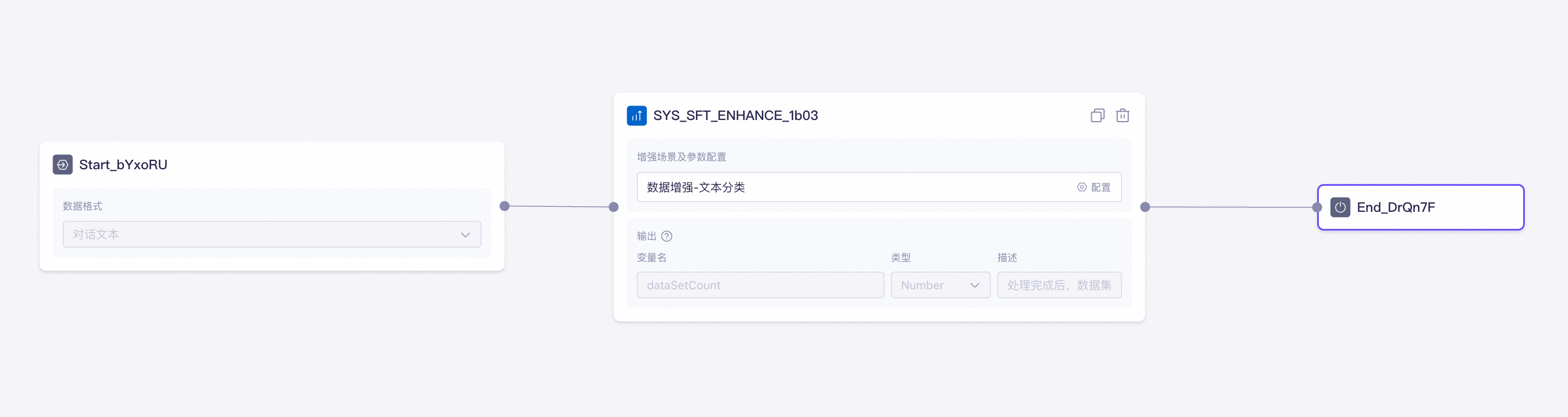
In the example below, the training set to be augmented is passed from the Start node to the Data Augmentation node. The latter processes the training data based on the configured scenario and parameters and finally outputs the augmented training set from the end node.
Billing
This feature is free to use for a limited time. The start date for billing will be announced at a later date.
Next steps
Once you are satisfied with the processed training set, you can start model tuning.