Training set and evaluation set

更新时间:
复制 MD 格式

Datasets are essential for model training and evaluation. The data management feature in Alibaba Cloud Model Studio lets you create and manage datasets efficiently.

Important

This topic is applicable only to the China (Beijing) region.

Supported datasets

Data Management manages all large model datasets in your workspace. These datasets are categorized into two types: Training Set (for model fine-tuning) and Evaluation Set (for model evaluation).

Type

Description

Training Set

Training sets are used to fine-tune large models. Supervised training on a task-specific dataset teaches the model to solve specific problems and distinguish subtle feature differences. This process significantly improves the model's accuracy and efficiency on that task.

Currently, training sets are supported for Text Generation, Multimodal Understanding, Image-to-Video (First Frame), and Image to Video (First and Last Frames). For details, see the descriptions below.

Evaluation Set

An evaluation set assesses a fine-tuned model's performance on unseen data.

Currently, only Text Generation evaluation sets are supported. For details, see the descriptions below.

Text generation and multimodal understanding training sets

SFT training set

The SFT training set uses the ChatML (Chat Markup Language) format, which supports multi-turn conversations and various role settings.

The OpenAI parameters name and weight are not supported. All assistant outputs are used for training.
# A typical line of expanded JSON training data:
{"messages": [
  {"role": "system", "content": "System input 1"}, 
  {"role": "user", "content": "User input 1"}, 
  {"role": "assistant", "content": "Desired model output 1"}, 
  {"role": "user", "content": "User input 2"}, 
  {"role": "assistant", "content": "Desired model output 2"}
  ...
]}

For details on the system, user, and assistant roles, see Overview. For training dataset samples, see SFT-ChatML Format Sample.jsonl and SFT-ChatML Format Sample.xlsx. Note that the XLS and XLSX formats support only single-turn conversations.

In a single training example, all assistant messages support the "loss_weight" parameter. This parameter sets the message's relative importance during training. The value ranges from 0.0 to 1.0, where a higher value indicates greater importance.

This is a beta parameter. To use it, please contact your account manager.
 {"role": "assistant", "content": "Desired model output 1", "loss_weight": 1.0}, 
 {"role": "assistant", "content": "Desired model output 2", "loss_weight": 0.5}

SFT thinking model

The training data supports multi-turn conversations and various role settings, but the model trains only on the last assistant output. Each expanded line of training data has the following structure:

The newline characters \n before and after the tag must be preserved.
# A single line of training data (JSON format) has the following typical structure when expanded:
{"messages": [
  {"role": "system", "content": "System input 1"}, 
  {"role": "user", "content": "User input 1"}, 
  {"role": "assistant", "content": "Model output 1"}, --Intermediate assistant outputs must not include <think> tags.
   ...
  {"role": "user", "content": "User input 2"}, 
  {"role": "assistant", "content": "<think>\nDesired thinking content 2\n</think>\n\nDesired output 2"} --Include thinking content only in the final assistant output. 
]}

For details on the system, user, and assistant roles, see Overview. For a training dataset sample, see SFT-Deep Thinking Content Sample.jsonl.

You can also provide training examples without the <think> tag. If you use this method, we do not recommend enabling thinking mode for inference after training.

{"role": "assistant", "content": "Desired model output 2"}  --Instructs the model not to enable thinking.

In a single training example, the final assistant message supports the "loss_weight" parameter. This parameter sets the message's relative importance during training. The value ranges from 0.0 to 1.0, where a higher value indicates greater importance.

This is a beta parameter. To use it, please contact your account manager.
 {"role": "assistant", "content": "<think>\nDesired thinking content 2\n</think>\n\nDesired output 2", "loss_weight": 1.0}

SFT for visual understanding

The OpenAI parameters name and weight are not supported. All assistant outputs are used for training.

For the differences between system, user, and assistant, see Overview. The following is an example of training data in the ChatML format:

If you pass a system message, its content must use the array format [{"text":"..."}]. The string format "content":"string" is not supported.
# A typical line of expanded JSON training data:
{"messages": [
  {"role": "system", "content": [{"text": "System input"}]},
  {"role": "user", "content": [{"text": "User input 1"}, {"image": "image_filename_1.jpg", "resized_width": 200, "resized_height": 200}]},
  {"role": "assistant", "content": [{"text": "Desired model output 1"}]},
  {"role": "user", "content": [{"text": "User input 2"}, {"video": "video_filename_1.mp4", "fps": 3.0, "resized_width": 200, "resized_height": 200, "video_start": 0.0, "video_end": 3.0}]},
  {"role": "assistant", "content": [{"text": "Desired model output 2"}]},
  {"role": "user", "content": [{"text": "User input 2"}, {"video": ["0.jpg", "1.jpg", "2.jpg", "3.jpg"], "sample_fps": 5.0, "resized_width": 200, "resized_height": 200}]},
  {"role": "assistant", "content": [{"text": "Desired model output 2"}]},
  ...
]}

More supported parameters

Parameter

Type

Required

Description

Image file

image

str

Yes

The path to the image file.

resized_width

int

No

The target width of the resized image, in pixels.

resized_height

int

No

The target height of the resized image, in pixels.

Video file - File path mode (Supported on Qwen-VL models qwen3.5 and later)

Example: Aliyun_VL_Video.zip

video

str

Yes

File path mode for videos: {"video": "video_filename_1.mp4"}

resized_width

int

No

The target width of the resized video, in pixels.

resized_height

int

No

The target height of the resized video, in pixels.

fps

float

No

The frame rate for training, in frames per second (FPS). For example, a value of 30 sets the rate to 30 FPS.

video_start

float

No

The start time for video trimming, in seconds.

video_end

float

No

The end time for video trimming, in seconds.

Video file - Image frame list mode (Supported on Qwen-VL models qwen3.5 and later)

video

List[str]

Yes

Image frame list mode for videos: {"video": ["0.jpg", "1.jpg", "2.jpg", ...], "sample_fps": 2.0}

sample_fps

float

No

Specifies the frame rate of the image frames.

resized_width

int

No

The target width of the resized image frames, in pixels.

resized_height

int

No

The target height of the resized image frames, in pixels.

Note

When training a thinking model, also follow the data format requirements for the SFT thinking model.

ZIP file requirements

  1. The ZIP file must be 2 GB or smaller. Folder and file names within it must contain only ASCII letters (a-z, A-Z), digits (0-9), underscores (_), and hyphens (-).

  2. Place the training text file, named data.jsonl, in the root directory of the ZIP file.

  3. Each image must be 10 MB or smaller, with dimensions no greater than 1024x1024 pixels. Supported formats include .bmp, .jpeg/.jpg, .png, .tif/.tiff, or .webp.

  4. Image file names must be unique within the ZIP file, even if they are in different folders.

  5. ZIP file directory structure:

    Single-level directory (recommended)

    Place image and video files in the root directory with the data.jsonl file.

    Trainingdata_vl.zip
       |--- data.jsonl # Note: Do not place this file inside another folder.
       |--- image1.png
       |--- video1.mp4
    Multi-level directory
    1. The data.jsonl file must be in the root directory.

    2. In data.jsonl, you only need to declare the image or video filename, not the file path. For example:

      Correct: image1.jpg; Incorrect: jpg_folder/image1.jpg.

    3. Image and video filenames must be unique across the entire ZIP file.

    Trainingdata_vl.zip
        |--- data.jsonl # Note: Do not place this file inside another folder.
        |--- jpg_folder
        |   └── image1.jpg
        |--- mp4_folder
            └── video.mp4

DPO dataset

The DPO dataset uses the ChatML format. Each expanded line of training data has the following structure:

For details on the system, user, and assistant roles, see Overview. For a training dataset sample, see DPO ChatML Format Sample.jsonl.

# A typical line of expanded JSON training data:
{"messages": [
  {"role": "system", "content": "System input"},
  {"role": "user", "content": "User input 1"},
  {"role": "assistant", "content": "Model output 1"},
  {"role": "user", "content": "User input 2"},
  {"role": "assistant", "content": "Model output 2"},
  {"role": "user", "content": "User input 3"}
 ],
 "chosen":
   {"role": "assistant", "content": "The chosen model output for Input 3"},
 "rejected":
   {"role": "assistant", "content": "The rejected model output for Input 3"}}

The model uses all content within messages as input. DPO then trains the model to prefer the chosen response over the rejected response for the final user input.

To include thinking content, wrap it with the <think> tag:

{"role": "assistant", "content": "<think>Desired model thinking content</think>Desired model output"}

The "chosen" module of a single training data sample supports the "loss_weight" parameter, which sets the relative importance of that sample during training. (The valid range is 0.0 to 1.0, where a larger value indicates higher importance.)

This is a beta parameter. To use it, please contact your account manager.
 "chosen":
   {"role": "assistant", "content": "The chosen model output for Input 3", "loss_weight": 1.0},

CPT training set

The CPT training set uses the plain text format. Each line of training data has the following structure:

{"text":"Text content"}

For a training dataset sample, see CPT-Text Generation Training Set Sample.jsonl.

Image-to-video training sets

Dataset format

Training set: Required

Image-to-video (first-frame-based)

The training set includes first-frame images, training videos, and an annotation file (data.jsonl).

  • Sample training set: wan-i2v-training-dataset.zip.

  • ZIP directory structure:

    wan-i2v-training-dataset.zip
    ├── data.jsonl        # Must be named data.jsonl. Max size: 20 MB.
    ├── image_1.jpeg      # Max resolution: 4096×4096. Formats: BMP, JPEG, PNG, WEBP.
    ├── video_1.mp4       # Max resolution: 4096×4096. Formats: MP4, MOV.
    ├── image_2.jpeg
    └── video_2.mp4
  • Annotation file (data.jsonl): Each line is one training sample. It must be a JSON object. Structure:

    {
        "prompt": "The video begins showing a young woman standing in front of a brick wall covered with ivy. She has long, smooth reddish-brown hair, wearing a white sleeveless dress, a shiny silver necklace, and a smile on her face. The brick wall in the background is covered with green vines, appearing rustic and natural. Then the s86b5p money rain effect begins, countless huge-sized US dollar bills (beige background/dark green patterns) pour down like a torrential rain, densely hitting and surrounding her. The bills continue to fall, she stretches her arms upward, neck slightly tilted back, expression surprised, completely immersed in this wild money rain.",
        "first_frame_path": "image_1.jpg",
        "video_path": "video_1.mp4"        
    }
Image-to-video (first-and-last-frame-based)

The training set includes first-frame images, last-frame images, training videos, and an annotation file (data.jsonl).

  • Sample training set: wan-kf2v-training-dataset.zip.

  • ZIP directory structure:

    wan-kf2v-training-dataset.zip
    ├── data.jsonl                # Must be named data.jsonl. Max size: 20 MB.
    ├── image/                    # First-frame and last-frame images.
    │   ├── image_1_first.jpg     # Max resolution: 4096×4096. Formats: BMP, JPEG, PNG, WEBP.
    │   └── image_1_last.png
    └── video/                    # Training videos.
        ├── video_1.mp4           # Max resolution: 4096×4096. Formats: MP4, MOV.
        └── video_2.mov
  • Annotation file (data.jsonl): Each line is one training sample. It must be a JSON object. Structure:

    {
        "prompt": "The video begins by showing a young woman in an outdoor setting. She has short, curly dark brown hair, a smile on her face, and looks very friendly. She is wearing a black polo shirt with colorful floral embroidery, with a background of green vegetation and distant mountains. Then she begins the s86b5p transformation.",
        "first_frame_path": "image/image_1_first.jpg",
        "last_frame_path": "image/image_1_last.jpg", 
        "video_path": "video/video_1.mp4"  
    }

Validation set: Optional

Image-to-video (first-frame-based)

The validation set includes first-frame images and an annotation file (data.jsonl). Videos are not required. At each evaluation point, the training job automatically calls the model service to generate preview videos using the validation images and prompts.

  • Sample validation set: wan-i2v-valid-dataset.zip.

  • ZIP directory structure:

    wan-i2v-valid-dataset.zip
    ├── data.jsonl       # Must be named data.jsonl. Max size: 20 MB.
    ├── image_1.jpeg     # Max resolution: 4096×4096. Formats: BMP, JPEG, PNG, WEBP.
    └── image_2.jpeg
  • Annotation file (data.jsonl): Each line is one validation sample. It must be a JSON object. Structure:

    {
        "prompt": "The video begins showing a scene of a young man standing in front of a cityscape. He is wearing a black and white checkered jacket over a black hoodie, with a smile on his face and a confident expression. The background is a city skyline at sunset, with a famous domed building and layered roofs visible in the distance, the sky filled with clouds showing warm orange-yellow hues. Then the s86b5p money rain effect begins, countless huge-sized US dollar bills (beige background/dark green patterns) pour down like a torrential rain, densely hitting and surrounding him. The bills continue to fall while the camera slowly zooms in, he stretches his arms upward, neck slightly tilted back, expression surprised, completely immersed in this wild money rain.",
        "first_frame_path": "image_1.jpg"
    }
Image-to-video (first-and-last-frame-based)

The validation set includes first-frame images, last-frame images, and an annotation file (data.jsonl). Videos are not required. At each evaluation point, the training job automatically calls the model service to generate preview videos using the validation images and prompts.

  • Sample validation set: wan-kf2v-valid-dataset.zip.

  • ZIP directory structure:

    wan-kf2v-valid-dataset.zip
    ├── data.jsonl                 # Must be named data.jsonl. Max size: 20 MB.
    └── image/                     # First-frame and last-frame images.
        ├── image_1_first.jpg      # Max resolution: 4096×4096. Formats: BMP, JPEG, PNG, WEBP.
        └── image_1_last.jpg
  • Annotation file (data.jsonl): Each line is one validation sample. It must be a JSON object. Structure:

    {
        "prompt": "The video begins showing a scene of a young man standing in front of a cityscape. He is wearing a black and white checkered jacket over a black hoodie, with a smile on his face and a confident expression. The background is a city skyline at sunset, with a famous domed building and layered roofs visible in the distance, the sky filled with clouds showing warm orange-yellow hues. Then the s86b5p money rain effect begins, countless huge-sized US dollar bills (beige background/dark green patterns) pour down like a torrential rain, densely hitting and surrounding him. The bills continue to fall while the camera slowly zooms in, he stretches his arms upward, neck slightly tilted back, expression surprised, completely immersed in this wild money rain.",
        "first_frame_path": "image/image_1_first.jpg",
        "last_frame_path": "image/image_1_last.jpg",
    }

Text generation evaluation set

This evaluation set uses a single-turn conversation format to evaluate text generation models.

In an Excel file, each evaluation record has the following structure:

Prompt

Completion

<User input 1>

<Expected model output 1>

During model evaluation, the model performs inference on each prompt in the evaluation set. Raters or an automated scoring system then score the model's output against the corresponding completion data.

Text Generation evaluation set format example.xlsx

Dataset creation tips

Text and multimodal

Training set size requirements

For CPT, a dataset requires at least 10 million tokens of high-quality pre-training data; for SFT, a training set requires at least a thousand high-quality fine-tuning examples; and for DPO, a training set typically requires at least a hundred human preference examples. If the model performs poorly after fine-tuning, the simplest way to improve it is by adding more training data.

You can use the following strategies to expand your training set:

While preparing your training set, create a separate evaluation set with non-overlapping data to assess the performance of the fine-tuned model.
  1. Use a larger, high-performing large language model to simulate and generate relevant content for your specific business or scenario. This helps you generate more fine-tuning data.

  2. Use the data processing feature in Alibaba Cloud Model Studio for data cleaning and data augmentation on your dataset.

  3. Manually acquire more data from various sources, such as application usage, web scraping, social media and online forums, public datasets, partners and industry resources, and user contributions.

Diversity and balance of training data

For an intelligent AI assistant, for example, a professional and diverse training set should cover a variety of business scenarios:

Business domain

Scenarios

E-commerce customer service

Campaign notifications, pre-sales inquiries, in-sales guidance, after-sales support, after-sales follow-ups, and complaint handling.

Financial services

Loan consultation, investment advisory, credit card services, and bank account management.

Online healthcare

Symptom consultation, appointment booking, visit guidelines, drug information lookups, and basic health tips.

AI assistant

IT information, administrative information, HR information, employee benefits Q&A, and company calendar lookups.

Travel assistant

Trip planning, travel and immigration guidance, travel insurance consultation, and information on destination culture and customs.

Corporate legal advisor

Contract review, intellectual property protection, compliance checks, labor law Q&A, cross-border transaction consultation, and case-based legal analysis.

Image-to-video

1. Define the fine-tuning scenario

Wanxiang supports fine-tuning for image-to-video in these scenarios:

  • Fixed video effects: Teach the model a specific visual change, such as a carousel or magic costume change.

  • Fixed character actions: Improve the model’s ability to reproduce specific body movements, such as dance moves or martial arts techniques.

  • Fixed camera motion: Replicate complex cinematography, such as push, pull, pan, tilt, or orbit shots.

2. Collect raw assets

  • AI generation and filtering: Use the Wanxiang foundation model to batch-generate videos. Manually select high-quality samples that best match your target effect. This is the most common method.

  • Real-world filming: If you need high realism for interactive scenes (e.g., hugging, shaking hands), use real footage.

  • 3D software rendering: For effects or abstract animations requiring precise control, use 3D software (e.g., Blender, Cinema 4D).

3. Clean the data

Dimension

Positive Requirements

Negative example

Consistency

Core features must be highly uniform.

Example: For training “360-degree rotation”, all videos must rotate clockwise at roughly the same speed.

Mixed directions.

The dataset contains both clockwise and counterclockwise rotations. The model does not know which direction to learn.

Diversity

More variety in subjects and scenes is better.

Cover different subjects (men, women, children, animals, buildings) and compositions (close-ups, wide shots, high angles, low angles). Also vary resolution and aspect ratio.

Single scene or subject.

All videos show “a person in red clothes rotating in front of a white wall”. The model may mistakenly treat “red clothes” and “white wall” as part of the effect. It fails when clothes change.

Balance

Data types should be balanced.

If multiple styles exist, their counts should be roughly equal.

Severe imbalance.

90% are portrait videos, 10% are landscape videos. The model may perform poorly on landscape videos.

Purity

Clean and clear visuals.

Use original assets without interference.

Interfering elements.

Videos contain subtitles, logos, watermarks, obvious black bars, or noise. The model may learn the watermark as part of the effect.

Duration

Asset duration ≤ target duration.

If you want 5-second videos, crop assets to 4–5 seconds.

Too long assets.

You want 5-second videos but feed the model 8-second assets. This leads to incomplete action learning and a choppy feel.

Create a dataset

This section explains how to create a dataset on the Alibaba Cloud Model Studio console.

Alibaba Cloud Model Studio currently does not limit the number of datasets you can create or the volume of data you can import.
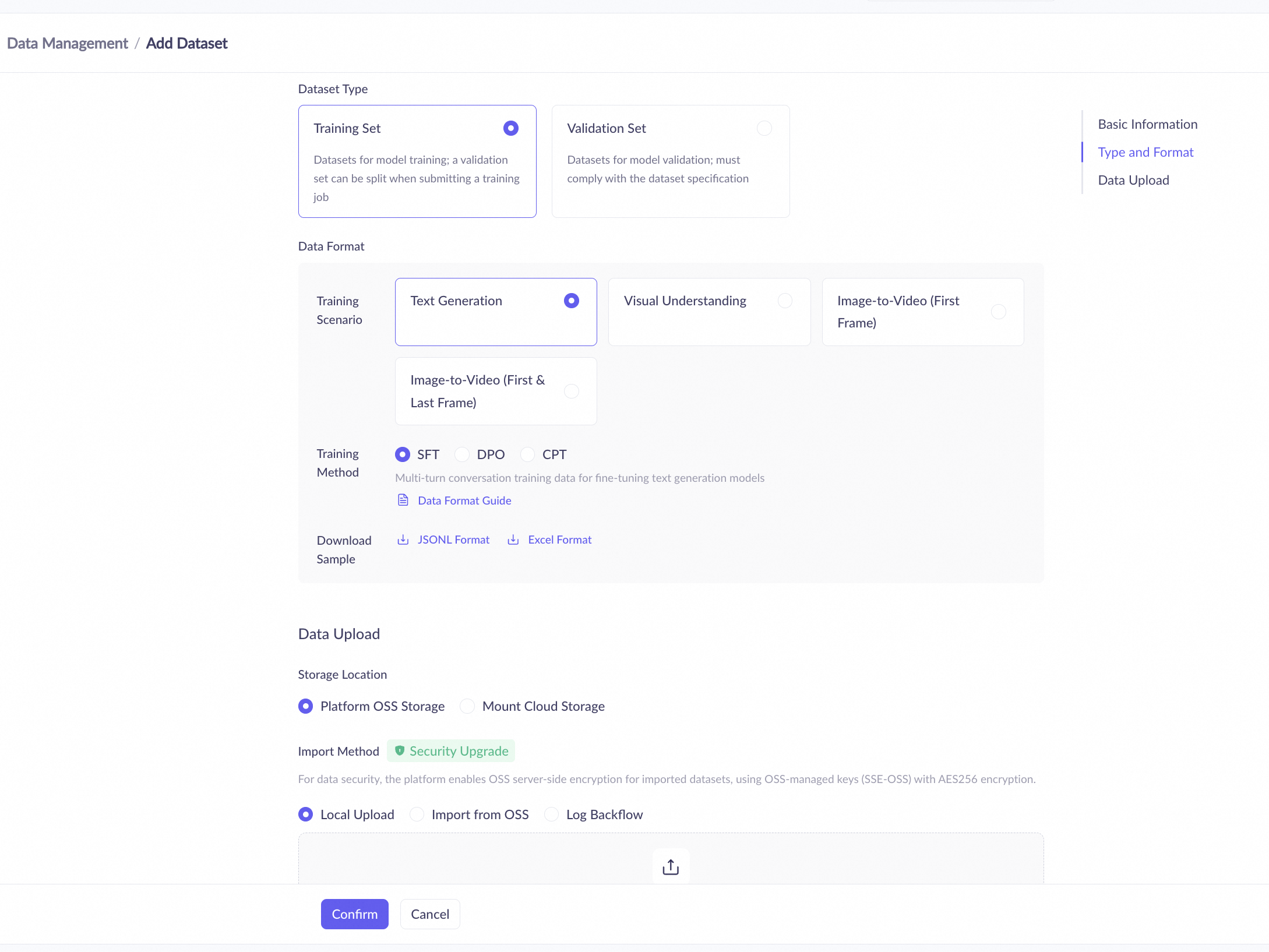
  1. Navigate to the Datasets page and click Add Dataset.

  2. Enter a Dataset Name and an optional Dataset Description, and then select a Dataset Type.

    Training set

    1. For Data Format, select a Training Scenario and Training Method based on your training requirements. The available training methods depend on the selected training scenario.

    2. For Storage Location, select Platform OSS Storage or Mount Cloud Storage.

      When you select Platform OSS Storage, you use the free storage space provided by Alibaba Cloud Model Studio. Currently, there is no limit on data import volume.
    3. For Import Method, select Upload Local File, Import from OSS, or Log Backflow.

      To ensure data security, the platform encrypts your imported dataset using OSS server-side encryption (SSE-OSS), which employs the AES-256 algorithm with OSS-managed keys.
      When you select Import from OSS, you must first add the tag bailian-datahub-access=read to the target bucket. Then, on the console, select the corresponding bucket and file. You can only select files that match the required data format.
    4. For Upload File, click the image icon to select and upload files. Your uploaded training data must match the structure of the provided data example. Otherwise, the import will fail.

      You can use the data template provided by Alibaba Cloud Model Studio. Replace the sample data with your training data and then upload the file.
      You cannot create empty training sets in Alibaba Cloud Model Studio.
      For the differences between system, user, and assistant roles, see Overview.
      For SFT - Text Generation and DPO - Text Generation training sets, you can upload multiple files at once. Alibaba Cloud Model Studio merges and imports them into a single training set.
    5. For Publish Settings, select Publish Now or Save as Draft. Selecting Save as Draft creates the dataset with a Draft status. Selecting Publish Now creates and publishes the dataset.

      CPT - Text Generation and I2V training sets do not support the Draft status and can only be published immediately.

      Publish status

      Description

      Draft

      A dataset in the Draft status can be edited online and can be used for tasks like data cleansing or data augmentation. However, it cannot be used for model fine-tuning or model evaluation. You must publish the dataset to use it for these tasks.

      Publish

      A dataset in the Published status cannot be edited online. It can be used for data cleansing or data augmentation, model fine-tuning (for training sets), and model evaluation (for evaluation sets).

    Evaluation set

    1. For Dataset Type, select Text Generation. Other types are not currently supported.

    2. For Storage Location, select Platform OSS Storage.

      This option uses the free storage space provided by Model Studio. Currently, there is no limit on data import volume.
    3. For Import Method, select Upload Local File. Importing from OSS is not currently supported for evaluation sets.

    4. For Upload File, click the image icon to select and upload files. Your uploaded evaluation data must match the structure of the provided data example. Otherwise, the import will fail.

      You can use the data template provided by Alibaba Cloud Model Studio. Replace the sample data with your evaluation data and then upload the file.
      You cannot create empty evaluation sets in Model Studio.
      Model Studio merges and imports the data from these files into a single evaluation set.
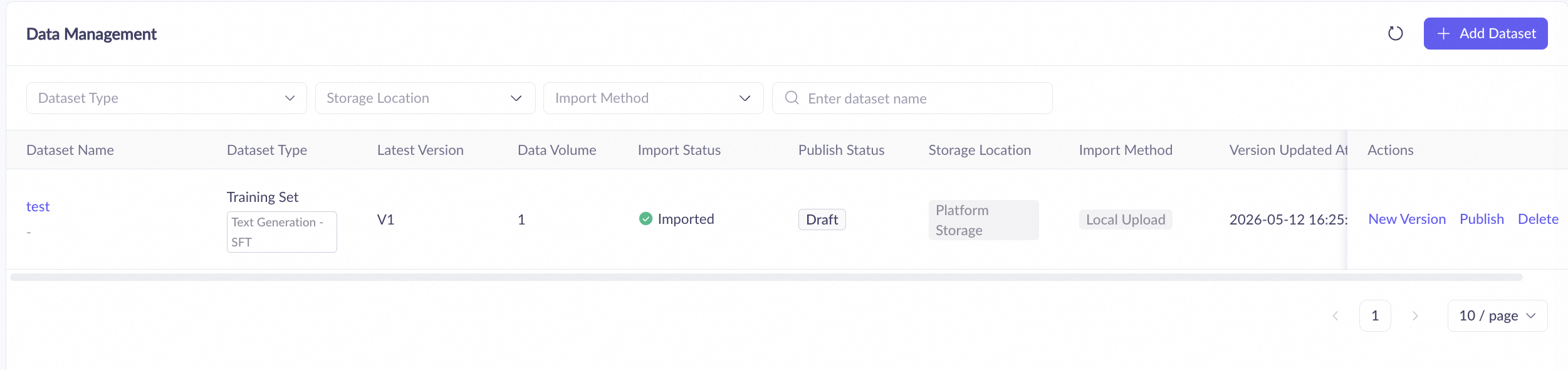
  3. Click Confirm. The new dataset (version V1) appears in the Datasets list, and the import process begins automatically. Click the image icon to view the latest Import Status.

    Import status

    Description

    Importing

    This process may take a long time during peak hours. No further action is required.

    Import succeeded

    The dataset was imported successfully.

    Import failed.

    The dataset creation failed.

Manage datasets

Actions

Description

Manage dataset versions

You can create multiple versions of a dataset. Each version can be edited independently. On the dataset list page, click a dataset name. The Data Version navigation tree on the left displays all versions of the current dataset.

  • Add a version: Click Add Version. The Version Number increments automatically.

    1. For Data Inheritance, select Inherit Data or Create Data.

      Inherit Data: The new version retains all data from the parent version, and the Dataset Type remains the same. This allows you to modify the data from the parent version. Note that this mode is not supported for CPT - Text Generation training sets.
      Create New Data: The new version is empty, and the Dataset Type remains the same, allowing you to import new data.
    2. Click OK. The new version appears in the Data Version navigation tree on the left.

  • Delete a version: From the Data Version navigation tree, select the version to delete and click Delete in the upper-right corner.

    A deleted version cannot be restored. Proceed with caution.

View a dataset

On the dataset list page, click a dataset name to view its basic information (such as dataset type and creation time), versions, and data.

Find a dataset

On the dataset list page, enter a dataset name in the search box and click the image icon to search for datasets in your workspace. Fuzzy search is supported, and you can filter results by Dataset Type.

Edit a dataset

You cannot edit a published dataset. To make changes, create a new Data Version.

Export a dataset

Click a dataset name to open its details page. From the Data Version navigation tree, select the desired version and click Export in the upper-right corner to download its data.

Alibaba Cloud Model Studio does not support exporting empty datasets.
  • Training set: SFT - Text Generation (exported in JSONL format), SFT - Image Understanding (exported in ZIP format), DPO - Text Generation (exported in JSONL format), and CPT - Text Generation (exported in JSONL format).

  • Evaluation set: Text Generation (exported in XLSX format).

Publish a dataset

On the dataset list page, click Publish next to a dataset to publish its latest version. This option is available only if the latest version's Publish Status is Draft. After publishing, you can use the version for model tuning or model evaluation.

To publish a specific version of a dataset, first View the dataset, select the desired version from the Data Version navigation tree on the left, and then click Publish in the upper-right corner of the page.
Once published, a data version cannot be reverted to a Draft. To make changes, create a new version.
Alibaba Cloud Model Studio does not support publishing empty datasets.

Delete a dataset

To permanently delete a dataset, click Delete next to its name on the dataset list page. A deleted dataset cannot be recovered. Please proceed with caution.

To delete a specific version of a dataset, first View the dataset, select the corresponding version from the Data Version navigation tree on the left, and then click Delete in the upper-right corner of the page.

Billing

Data management and dataset storage are free.

API

No APIs are currently available for the data management feature of Alibaba Cloud Model Studio.

Next steps

  • Once a Training Set is published, it can be used for model tuning.

  • Once an Evaluation Set is published, it can be used for model evaluation.