Scheduled fix
To prevent security attacks, we recommend that you fix system vulnerabilities promptly. You can use the patch management feature of OOS to keep software packages updated, scan for or install patches, and manage custom patch baselines. This feature helps you quickly fix vulnerabilities to ensure system security and stability. This topic describes how to use the patch management feature of OOS to schedule vulnerability fixes.
Patch modes
OOS provides three patch management modes:
If you select RebootIfNeed when you install patches, the system automatically restarts the instance if a patch requires it.
-
Scan for patches: Scans your ECS instances for system vulnerabilities.
-
Install patches without a restart: Fixes system vulnerabilities on the ECS instance without a restart.
-
Install patches and restart: Fixes system vulnerabilities and restarts the ECS instance if a patch requires it.
Required permissions
To perform patch management operations, you need the following permissions:
{
    "Policy": {
        "Version": "1",
        "Statement": [
            {
                "Action": [
                    "ecs:RebootInstance",
                    "ecs:DescribeInvocationResults",
                    "ecs:DescribeCloudAssistantStatus",
                    "ecs:DescribeInstances",
                    "ecs:DescribeInvocations",
                    "ecs:RunCommand"
                 ],
                 "Resource": "*",
                 "Effect": "Allow"
             },
             {
                 "Action": [
                     "oos:ListInstancePatchStates"
                 ],
                 "Resource": "*",
                 "Effect": "Allow"
              }
      ]
   }
}
You can configure these permissions on the RAM console.
Procedure
-
Log in to the CloudOps Orchestration Service console. In the left-side navigation pane, choose Quick Setup.
-
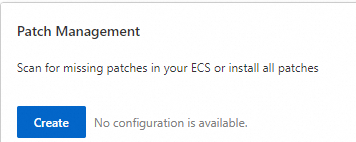
On the Quick Setup page, choose patch management, and then click Create .
-
Select a schedule type: Executed Once at the Specified Time or Executed Periodically.
-
Once: Runs the task once at a specified time.

-
Recurring: Runs the task on a recurring schedule that you define.

-
-
Select an operation: Scan and Install or Scan Only. If you select Scan and Install, you can allow the instance to restart and create a snapshot.

-
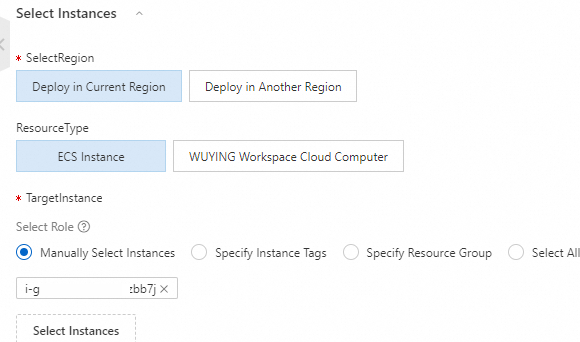
Select the instances to patch.
-
Click Create. In the dialog box that appears, click OK.
-
You can view the patching status under in the left-side navigation pane.

