1. Component overview
This component requires one of the following prerequisite components: Start Excel or Get opened Excel.
This component clears the format of cells in a specified range.
2. Inputs
For more information about each input, see the component panel in the application flow editor.
3. Outputs
For more information about each output, see the component panel in the application flow editor.
4. Component example
4.1. Configuration example
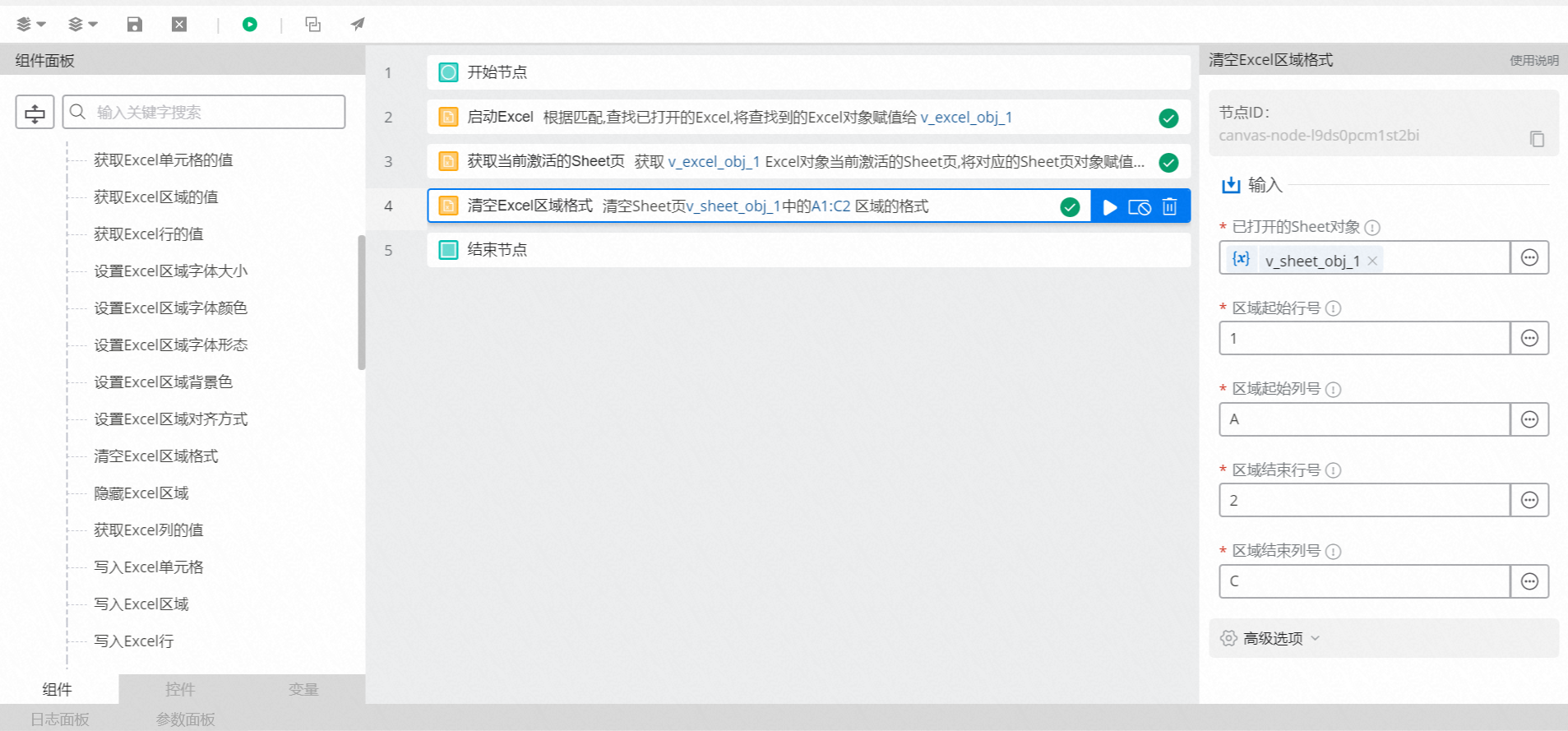
For
Opened sheet object, select v_Sheet_obj_1. This is the output of the Get current active sheet or Activate sheet component.For
Start row of range, the default value is '1'.For
Start column of range, the default value is 'A'.For
End row of range, the default value is '2'.For
End column of range, the default value is 'C'.Keep the default values for the advanced options.
4.2. Execution result
None
5. Example flow
Setup flow
Use the Start Excel component to open a specific Excel file.
Use the Get current active sheet component to retrieve the active sheet object.
Use the Clear Excel range format component to clear the format of cells in a specified range.
Execution result
After the flow runs, the format of the cells in the specified range is cleared, as shown in the following figures.