Clear a text box (Window)
1. Component introduction
Prerequisite component: Get Window
This component clears the content of a text box.
2. Inputs
For information about the inputs, see the help text for each input in the component panel of the ROS Visual Editor.
3. Outputs
For information about the outputs, see the help text for each output in the component panel of the ROS Visual Editor.
4. Component usage examples
4.1. Component configuration example
For
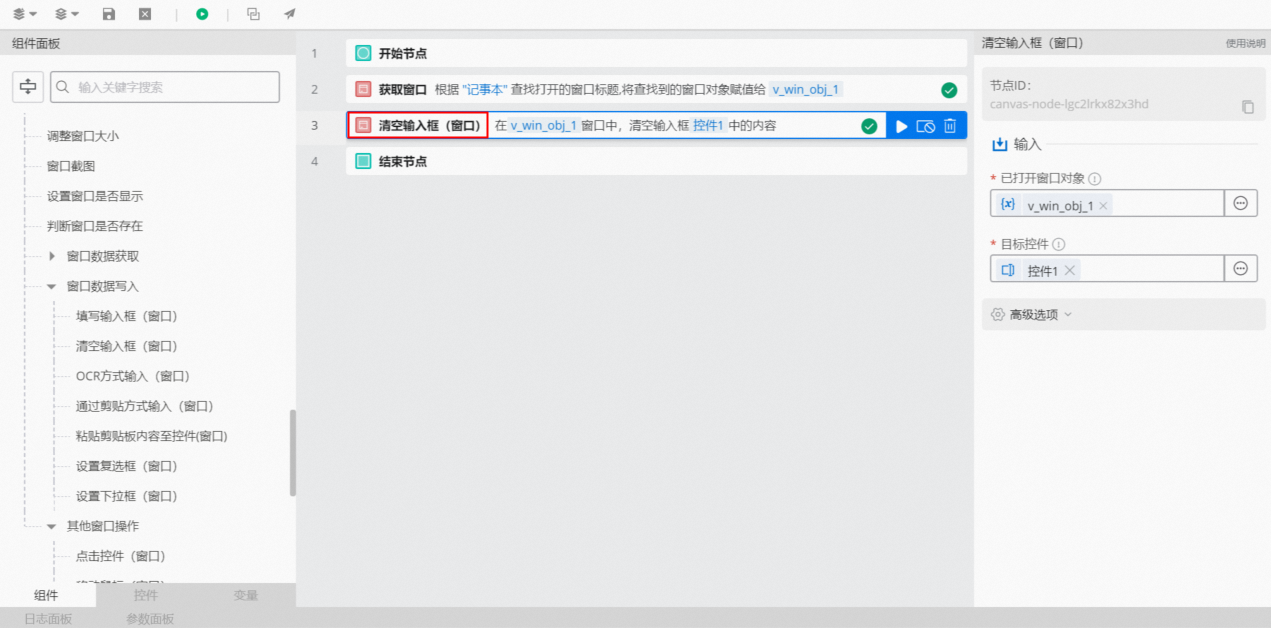
Window, select v_win_obj_1, which is the output of the prerequisite Get Window component.Use the Capture Control feature to capture a text box in the window. Name the captured control "Control 1".
For
Target Control, select "Control 1".Keep the default values for the advanced options.
4.2. Example execution result
The component automatically clears the text in the text box of the specified window.
5. Example of building a flow
Setup flow
Create and open a text document named "New Text Document - Window Example".
Use the Get Window component to retrieve the "New Text Document - Window Example" window.
Use the Clear Text Box (Window) component to clear the text.
Execution result
As shown in the following figure, the flow successfully clears the content of the text document.