Paste into window
1. Overview
Prerequisite: Get Window
This component pastes text into a specified text box within a Windows application window.
This component uses the system clipboard to paste text into a target control, simulating the ctrl+c (copy) and ctrl+v (paste) keyboard shortcuts for faster input.
For more information on clipboard-based input operations, see Input Using System Clipboard.
This component's reliance on the system clipboard makes it dependent on the runtime environment. Note the following:
This component is not recommended for scenarios that involve user interaction, such as manual client execution with an Attended Robot.
When used with an Unattended Robot, you must disable the clipboard in the Elastic Desktop Service policy (Standardization of Robot Operating Environment). This prevents the robot from pasting incorrect data, which can result from clipboard synchronization between the client's host machine and the cloud desktop.
2. Input
For details on each input parameter, see its description in the visual editor's component panel.
3. Output
For details on each output parameter, see its description in the visual editor's component panel.
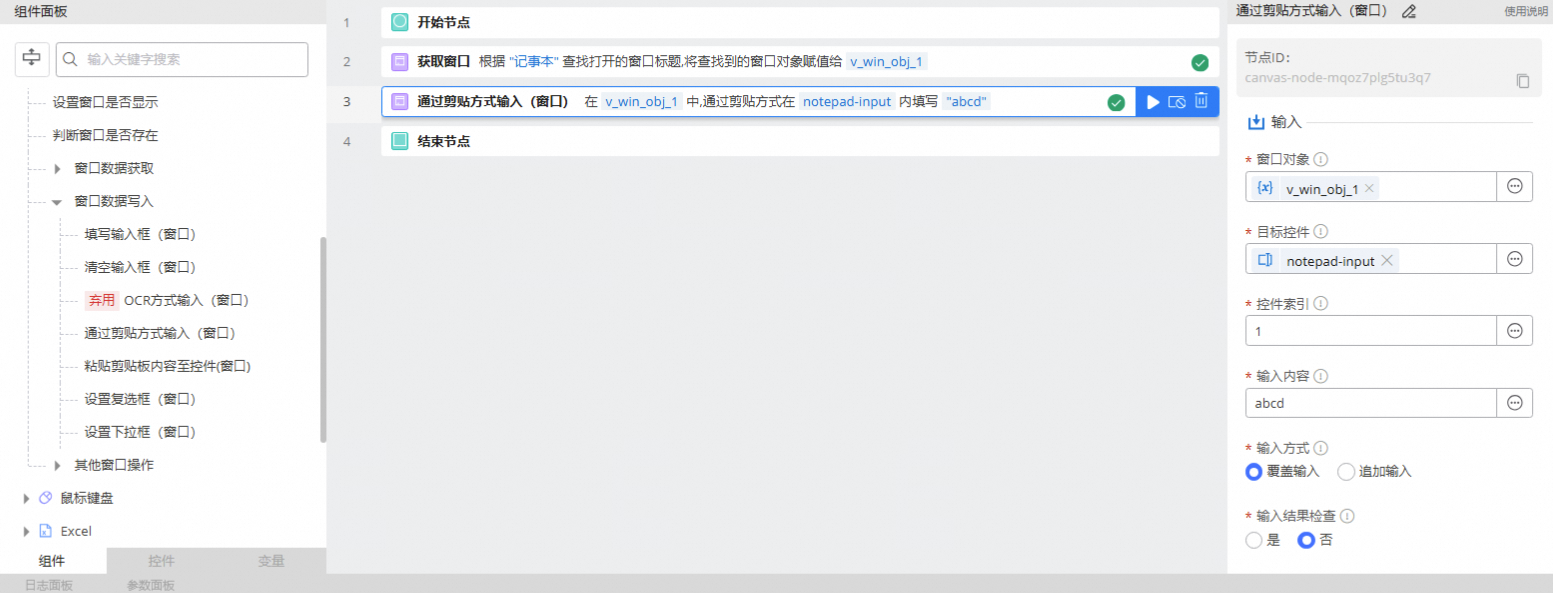
4. Usage example
This example shows how to enter text into Notepad.