Overview of Lightweight Container Service
Lightweight Container Service is designed for students and individual developers. It helps you quickly learn about containers and Kubernetes (K8s) in the cloud. This topic describes the features, billing, limits, common scenarios, and related operations of Lightweight Container Service.
Introduction
Lightweight Container Service offers a simple way to run containerized applications in the cloud. You can deploy your applications from container images. The service runs on Simple Application Server and provides public network access. You do not need to manage the underlying infrastructure. You can create multiple pods within a single container service instance. All pods in the same instance must deploy the same payload. Load balancing is handled automatically.
The following figure shows the deployment architecture of Lightweight Container Service.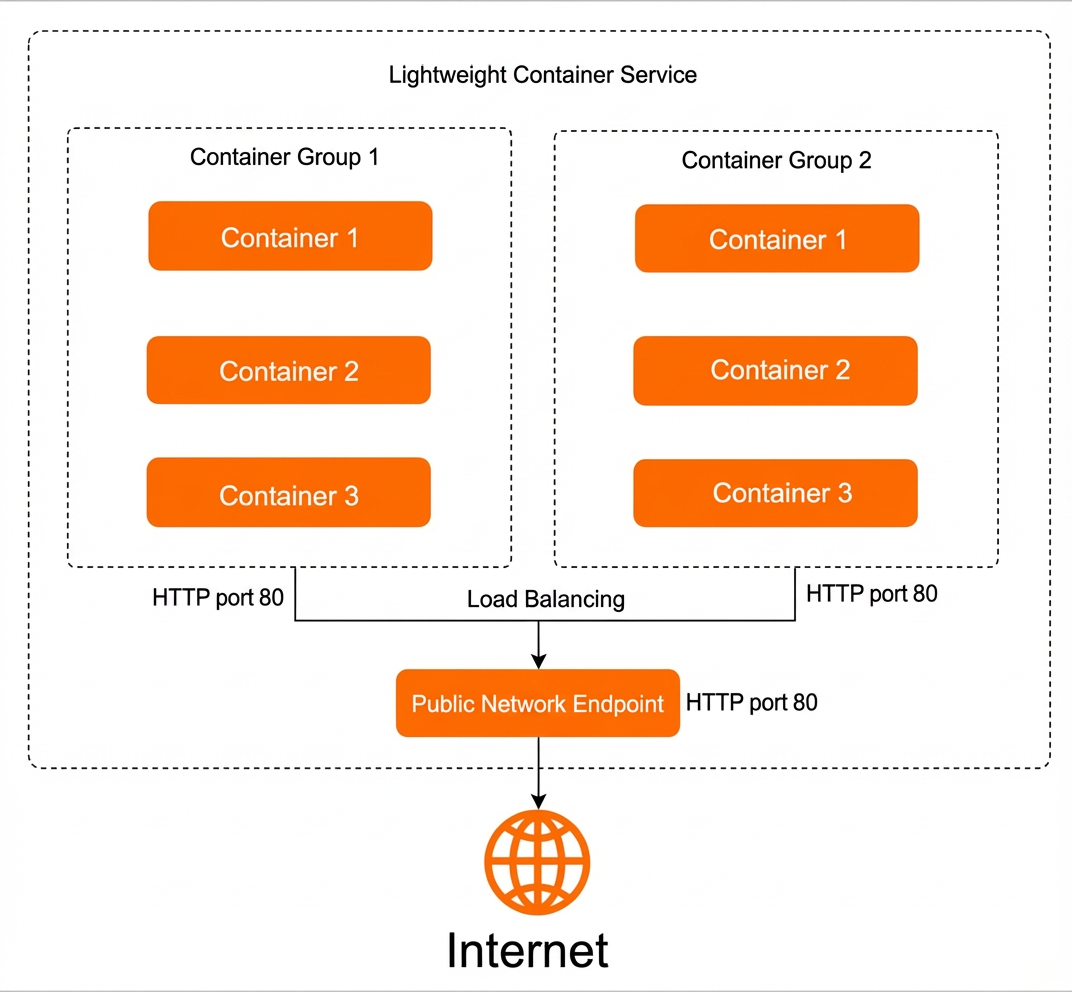
Advantages
Lightweight Container Service is simpler than standard Kubernetes, which makes it ideal for beginners.
It supports remote logon to containers from a web interface for easy operations and maintenance.
It offers cost-effective subscription packages.
Scenarios
Quick start for containers and Kubernetes
Lightweight Container Service is simple to use, making it an ideal way to get started with containers and Kubernetes.
Deploy stateless workloads
You can deploy stateless workloads for applications where instances are independent and identical, such as Nginx and WordPress.
Billing
Lightweight Container Service supports only the subscription billing method. When you create a container service, you pay a fee based on your selected package and subscription duration. You can subscribe for 1 month, 3 months, 6 months, 1 year, 2 years, or 3 years.
Lightweight Container Service offers packages at CNY 70/month, CNY 80/month, CNY 100/month, and CNY 120/month. The following table describes the package configurations.
Supported packages vary by region. You can view the available packages on the console.
The following table describes the packages supported in the Chinese mainland.
Lightweight Container Service is available in the following regions in the Chinese mainland: China (Hangzhou), China (Beijing), China (Shenzhen), China (Shanghai), and China (Chengdu).
Package configuration
CNY 70/month package
CNY 100/month package
CPU
2-core
2-core
Memory
1 GB
2 GB
Peak bandwidth
3 Mbps
4 Mbps
The following table describes the packages supported in regions outside the Chinese mainland.
Lightweight Container Service is available in the following regions outside the Chinese mainland: China (Hong Kong) and Singapore.
Package configuration
CNY 80/month package
CNY 120/month package
CPU
2-core
2-core
Memory
1 GB
2 GB
Peak bandwidth
3 Mbps
4 Mbps
Limits
You can create a maximum of 10 pods for a single container service.
You can deploy a maximum of 5 containers in a single pod.
Different containers in the same pod cannot use the same port.
Only Linux containers are supported. Windows containers are not supported.
The container service does not support mounting persistent volumes. Therefore, you can deploy only stateless workloads.
Feature overview
Lightweight Container Service lets you manage container services, pods, and containers. The following table describes these features and related operations.
Feature | Description | Related operations |
Manage container services | Deploy services, view service information, start and stop services, bind domain names, and view monitoring data. | |
Manage pods | You can scale out pods and upgrade pod configurations. | |
Manage containers | Deploy containers, view container information, view container logs, and remotely connect to containers. |
If you need more features, you can use Alibaba Cloud's Container Service for Kubernetes and Elastic Container Instance.
Related concepts
The following table describes concepts related to Lightweight Container Service.
Concept | Description |
Container | A container is an application that runs in an isolated environment. You can package an application with all its dependencies for cross-platform deployment. Containers are isolated from each other. |
Container image | A container image is a collection of files needed to run a container. It includes the application's programs and configurations. You can deploy containers from images. The images can be from the official Docker Hub or your private repository. |
Pod | A pod is a group of containers that can be scheduled to the same host. A pod can contain one or more containers. This concept is similar to a Kubernetes pod. |
Container Service | A service provides a stable, unified endpoint for pods. A service instance can contain one or more pods. This concept is similar to a Kubernetes service. |
For more information, see the Kubernetes official documentation and Comparison of ACK and native Kubernetes terms.