What is Tablestore?
Tablestore is a serverless table storage service for large volumes of structured data. It supports four data models — Wide Column, AI (Agent Memory), TimeSeries, and Timeline — for AI, metadata, messaging, and spatio-temporal workloads. Built-in features include search index, vector search, and SQL query. Tablestore integrates with compute ecosystems such as MaxCompute, Flink, Spark, and Presto, and is compatible with AI frameworks including Dify, LangChain, and LlamaIndex. It also provides the MCP intelligent Agent architecture for AI chat applications and the IoTstore solution for IoT use cases.
Key concepts
Term | Description |
Region | A physical data center where Tablestore is deployed. Regions and zones. |
Read/write throughput | Measured in read capacity units (RCUs) and write capacity units (WCUs). A CU is the smallest billing unit for read and write operations. Read/write throughput. |
Instance | An entity for managing and using Tablestore, equivalent to a database. Access control and resource metering operate at the instance level. See Instances. |
Endpoint | Each instance has an endpoint that applications must specify when performing operations on tables and data. See Endpoints. |
Data lifecycle | Time to live (TTL) is a property of a data table that specifies the data retention period in seconds. Tablestore clears expired data in the background, reducing storage costs. See Data versions and TTL. |
Data storage models
Tablestore provides three data storage models. Select a model based on your use case. For a feature comparison across models, see Features.
Model | Description |
Wide table model | Similar to Bigtable and HBase. Suitable for metadata and big data scenarios. Supports data versions, TTL, auto-increment primary key columns, conditional updates, local transactions, atomic counters, and filters. See Wide Column Model. |
TimeSeries model | Designed for time series data from IoT device monitoring, device data collection, and machine monitoring. Supports automatic time series metadata indexes and time series queries. See TimeSeries model. |
Message model | Designed for instant messaging (IM) and feed streams. Provides message ordering, massive storage, real-time synchronization, full-text search, and multi-dimensional composite queries. Timeline model. |
Billing
Tablestore supports two billing modes: reserved capacity (subscription) and on-demand (pay-as-you-go).
Billing mode | Description |
VCU mode (formerly reserved mode) | Purchase reserved VCUs based on resource estimates, or enable elastic capacity to pay for consumed compute on a pay-as-you-go basis. Combine both to optimize costs.
VCU mode reduces compute costs and lets you control resource usage by capping or disabling elastic capacity, preventing unexpected charges from traffic spikes. Best for cost-controlled scenarios. Note For more information, see Resource assessment and selection. Billable items: computing power, data storage (high-performance, Capacity, and search index), cross-region replication traffic, and outbound public traffic. VCU mode (formerly Reserved mode). |
CU mode (formerly pay-as-you-go mode) | Charges are based on real-time read/write throughput and storage. No upfront resource planning is required. Best for unpredictable workloads with traffic bursts, where high service stability is required. Important CU mode does not cap overall resource usage. Manage consumption at the application layer to avoid unexpected costs from traffic spikes. Billable items: read throughput, write throughput, data storage, cross-region replication traffic, and outbound public traffic. CU mode (formerly Pay-As-You-Go mode). |
Choose a solution based on your workload pattern.
Business scenario | Description | Recommended solution | References |
Stable and predictable workloads | Consistent workloads without traffic spikes, such as monitoring and IoT. | VCU mode (formerly reserved mode) | |
Workloads with traffic bursts | Unpredictable traffic bursts, such as media and news workloads. |
|
|
Batch offline tasks | Scheduled large-scale offline reads and writes at low frequency. | CU mode (formerly pay-as-you-go mode) and resource plans | |
Business testing | Early-stage product testing in a staging environment. | CU mode (formerly pay-as-you-go mode) |
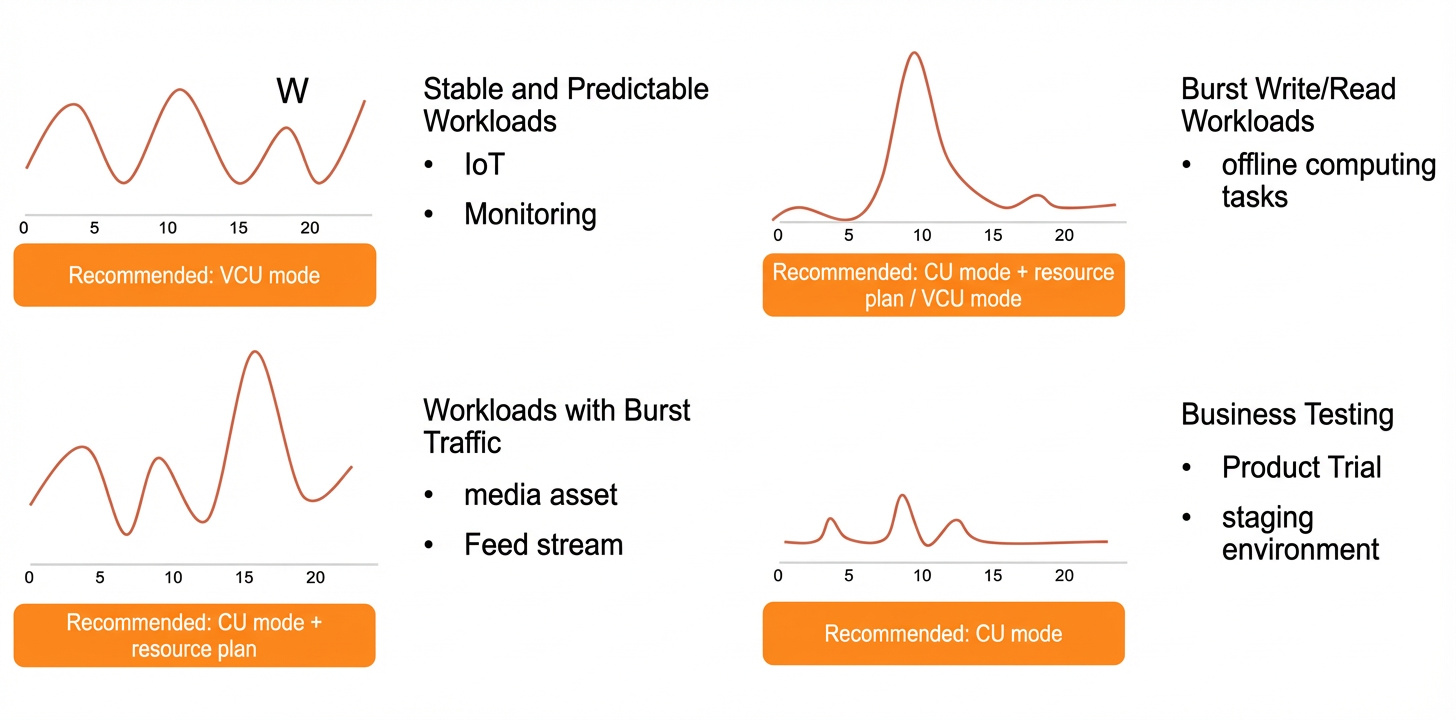
Use cases
Use case | Description |
AI applications | Store and retrieve AI agent memory and contextual data using the AI (Agent Memory) model and vector search. The MCP intelligent Agent architecture supports AI chat applications built with Dify, LangChain, or LlamaIndex. |
IoT data management | Collect and analyze time series data from IoT devices at scale using the TimeSeries model and the IoTstore solution. |
Metadata storage | Store and query large-scale metadata — such as file indexes, user profiles, and product catalogs — using the Wide Column model with search index and SQL query. |
Messaging and social feeds | Build instant messaging systems and feed streams using the Timeline model, with support for message ordering and real-time synchronization across massive data volumes. |
Spatio-temporal data | Query and analyze location and event data with multi-dimensional composite queries and the search index. |
Access methods
Method | Description |
Console | Manage Tablestore through the Tablestore console. |
SDK | Develop applications using SDKs for Java, Go, Python, Node.js, .NET, and PHP. SDK reference. |
Command line interface | Run Tablestore operations using simple commands. Command line interface. |
Quick start
Get started with the Wide Column or TimeSeries model using the console or CLI:
Computing and analytics
Tablestore integrates with multiple compute and analytics engines. Select an engine based on your scenario.
Analytical tool | Applicable model | Description |
MaxCompute | Wide table model | Create a foreign table via the MaxCompute client to access Tablestore data. Use MaxCompute. |
Spark | Wide table model | Access Tablestore through E-MapReduce SQL or DataFrame programming. Spark/SparkSQL overview. |
Hive or HadoopMR | Wide table model | Access Tablestore data with Hive or Hadoop MapReduce. Tutorials. |
Function Compute | Wide table model | Run real-time computing on Tablestore incremental data. Use Function Compute. |
Flink | Wide table model, TimeSeries model | Use Real-time Compute Flink to access source, dimension, or sink tables in Tablestore for real-time big data analysis. Use Realtime Compute for Apache Flink to process Tablestore data. |
PrestoDB | Wide table model | Query, write, and import Tablestore data using SQL through PrestoDB. Use Tablestore with PrestoDB. |
Tablestore search index | Wide table model | Use inverted indexes and columnar storage for complex multidimensional queries and statistical analysis. Supports non-primary key column queries, multi-column combined queries, fuzzy queries, and aggregations (max/min, count, grouping). Search index. |
Tablestore SQL query | Wide table model, TimeSeries model | Access Tablestore data through a unified SQL interface for complex queries and analysis. SQL query. |
Migration and synchronization
Migrate and synchronize heterogeneous data to Tablestore, or export Tablestore data to other services.
Category | Operation | Description |
Data import | Use the Tablestore Sink Connector to batch import data from Apache Kafka into a data table or time series table. | |
Data import | Use Tunnel Service, DataWorks, or DataX to synchronize data between Tablestore tables. | |
Data export | Use DataWorks to export full data from Tablestore to MaxCompute. | |
Data export | Use DataWorks to export full or incremental data to Object Storage Service (OSS). | |
Data export | Use the CLI or DataX to download data to a local file directly, or use DataWorks to export to OSS and then download from OSS. |
Category | Data synchronization | Description |
Data import | Use DataX, DTS, Canal, or Tapdata Cloud to synchronize data from a MySQL database to Tablestore. | |
Use the Tablestore Sink Connector to batch import data from Apache Kafka into data tables or time series tables in Tablestore. | ||
Use the Tapdata Cloud visualization interface to sync Oracle data to Tablestore in real time. | ||
Synchronize full data from an HBase database to Tablestore using DataX. | ||
Use DataWorks to sync full data from MaxCompute to Tablestore. | ||
Use Tunnel Service, DataWorks, or DataX to synchronize data from a Tablestore data table to another data table. | ||
Use the DataWorks tool to synchronize full data or incremental data from a Tablestore time series table to another time series table. | ||
Data exporting | Use DataWorks to export full data or incremental data from Tablestore to MaxCompute. | |
Use DataWorks to export full or incremental data from Tablestore to OSS. | ||
Use the CLI or DataX to download data directly to a local file. Alternatively, use DataWorks to sync data to OSS, then download the data from OSS. |
More features
Feature | Description |
Access control | Configure custom permissions with Resource Access Management (RAM). Grant permissions to a RAM user using a RAM policy. Further restrict access with control policies in a resource directory, Tablestore network ACLs, and instance policies. See Authorization management. |
Security | Protect data at rest and in transit using data table encryption and VPC network access. See Data encryption and Network security management. |
Backup | Back up important data periodically to prevent accidental deletion. Data backup. |
Monitoring and alerts | Configure alert notifications for monitoring metrics using Cloud Monitor. Data monitoring and alerts. |
Visualization | Visualize Tablestore data as charts using DataV or Grafana. See Data visualization. |
FAQ
Technical support
Tablestore provides professional and free technical consulting services. Join the DingTalk communication groups for technical support.
The latest technical communication group for developers of internet applications, big data, and social applications is 36165029092 (
Tablestore Technical Support-3).NoteTablestore user groups 11789671 (
Tablestore Technical Support) and 23307953 (Tablestore Technical Support-2) are full and cannot be joined at the moment.The technical communication group for developers of IoT and TimeSeries models is 44327024 (
IoTstore Developer Group).