How to submit an appeal if you cannot complete identity verification?
If you cannot retrieve your username or reset your password online, or if you cannot complete identity verification for other tasks such as modifying account information, you can follow the steps in this topic to submit an account appeal.
When to submit an appeal
If you cannot complete identity verification online using the provided methods in certain scenarios, you can select Submit Appeal. You can then submit supporting documents to complete identity verification offline and modify your account information.
Appeal scenarios (multiple selections allowed)
Retrieve username: If your appeal is approved, your secure phone number is changed. You can then use your phone to retrieve your account. For information about other methods, see How to retrieve your username.
Reset password: If your appeal is approved, your secure phone number is changed. You can then use your phone to reset your password. For information about other methods, see How to reset your password.
Change secure phone number: If your appeal is approved, your secure phone number is changed. For information about other methods, see Change your secure phone number.
Change security email address: If your appeal is approved, your secure phone number is changed. You can then use your phone to change your security email address. For information about other methods, see Manage basic account information.
Detach Multi-Factor Authentication (MFA) security verification: If your appeal is approved, your virtual MFA device is detached. For information about other methods, see Attach or detach a virtual MFA device.
Clear security questions: If your appeal is approved, your security questions are cleared. For information about other methods, see Set or modify security questions.
Clear IP logon mask: If your appeal is approved, your IP logon mask is cleared. For information about other methods, see Protect your account logon.
Other: Your account has other issues and needs to be restored to normal use. Common scenarios include the following:
The system detects an issue with your account and temporarily freezes it.
Your enterprise is deregistered, and you can no longer log on to the account that was verified with the deregistered entity. You can submit an appeal to recover logon access and change the identity verification entity.
Your phone number has been re-issued to another person, or you need assistance to detach a third-party account.
Scenarios where you cannot submit an appeal
You forgot your username and cannot log on. If the account has no associated phone number, domain name, ICP-filed domain name, enterprise email domain name, or issued invoices, you cannot access the identity verification page to submit an appeal.
If your account has not completed identity verification, Alibaba Cloud cannot determine its ownership and your appeal will be rejected. If the account contains domain names or products with ICP filings, you must first perform an offline transfer. If you can still log on to the account, you must first complete identity verification for the account.
Account appeal process overview
The account appeal process has three steps: prepare appeal documents, submit the appeal, and check the appeal result. The review process takes about 3 business days.
An account appeal involves modifying sensitive account information. We need to verify your account and identity information based on the documents that you provide. The required document types depend on your account's identity verification type, your enterprise's operational status, the operator's identity, and the appeal items. You must prepare the required documents before you start an appeal.
Step 1: Prepare appeal documents
To ensure that your appeal proceeds smoothly, you must prepare the following documents in advance based on your account's situation.
For accounts with individual identity verification
For accounts that have completed individual identity verification, you must prepare the documents from the following checklists. The required documents depend on whether the person who submits the appeal is the verified individual.
Submitting an appeal as the verified individual
No identity documents required. During the appeal process, the system verifies your identity using methods such as facial recognition.
Supplementary documents (as needed)
If you have documents or additional information to explain your account's special circumstances, you can upload them in the Supplementary Documents section or enter the information in the Supplementary Content section. For more information, see Checklist of supplementary documents for an individual account appeal.
If you set Service Type to Other, you must provide an explanation in the Supplementary Content section.
Appeals submitted by a person other than the verified individual
If the account has completed individual identity verification as a mainland China resident, the appeal must be submitted by the verified individual in person. Proxy appeals (submitted by a family member, agent, or other person) are not supported for mainland China resident personal accounts. If the verified individual is a non-mainland China resident, a proxy may submit the appeal with the documents listed below.
Photos of the front and back of the ID card of the verified individual (required)
Account Appeal Application Letter (required). You must fill out the individual appeal letter template, stamp it, and take a photo.
Proof of payment (as needed). This is required only if you want to change the secure phone number. Proof can be an invoice, a screenshot of the successful payment page, or an electronic receipt.
Supplementary documents (as needed)
If you have documents or additional information to explain your account's special circumstances, you can upload them in the Supplementary Documents section or enter the information in the Supplementary Content section. For more information, see Checklist of supplementary documents for an individual account appeal.
If you set Service Type to Other, you must provide an explanation in the Supplementary Content section.
For accounts with enterprise identity verification - Enterprise is active
For accounts that have completed enterprise identity verification, if the enterprise is still active, you must prepare the documents from the following checklist.
Photo of the latest business license duplicate (required). For examples of the format, see Examples of common Unified Social Credit Code certificates.
Account Appeal Application Letter (required). You must fill out the enterprise appeal letter template, stamp it, and take a photo.
Operator's ID card number and facial recognition (required).
Proof of payment (as needed). This is required only if you want to change the secure phone number. Proof can be an invoice, a screenshot of the successful payment page, or an electronic receipt.
Business Name Change Certificate (as needed). This is required only if the enterprise name has changed.
Supplementary documents (as needed)
If you have documents or additional information to explain your account's special circumstances, you can upload them in the Supplementary Documents section or enter the information in the Supplementary Content section. For more information, see Checklist of supplementary documents for an enterprise account appeal.
If you set Service Type to Other, you must provide an explanation in the Supplementary Content section.
For accounts with enterprise identity verification - Enterprise is deregistered
If your enterprise has been deregistered, you must handle the assets in your Alibaba Cloud account as soon as possible.
If you can log on to the Alibaba Cloud account, you must change the enterprise entity or unregister your Alibaba Cloud account as soon as possible.
If you can no longer log on to the Alibaba Cloud account, you must submit the following documents. Select 'Change secure phone number' as the appeal item. This lets you recover account access and change the account's verified entity to a new company.
The checklist of appeal documents for a deregistered enterprise is provided below.
If you cannot change the verified entity of the Alibaba Cloud account from the deregistered enterprise to a new one, see the appeal document instructions in The enterprise is deregistered but the entity cannot be changed to a new one.
Photo of the new company's business license duplicate (required). This must be a photo of the original business license of the new company. For examples of the format, see Examples of common Unified Social Credit Code certificates.
Account Appeal Application Letter (required). You must fill in the information for the new company and select 'Change secure phone number' as the appeal item. For the format, see the enterprise appeal letter template. You must then stamp the letter and take a photo.
Proof of payment (required). This is required to change the secure phone number and recover account access. Proof can be an invoice, a screenshot of a successful payment page, or an electronic receipt.
Operator's ID card number and facial recognition (required).
Supplementary documents (required).
Member Account Holder Change Application Form. Shareholders who hold more than two-thirds of the shares must sign and affix their thumbprints or stamp the form. Then, you must take a photo and upload it. Template - Member Account Holder Change Application Form
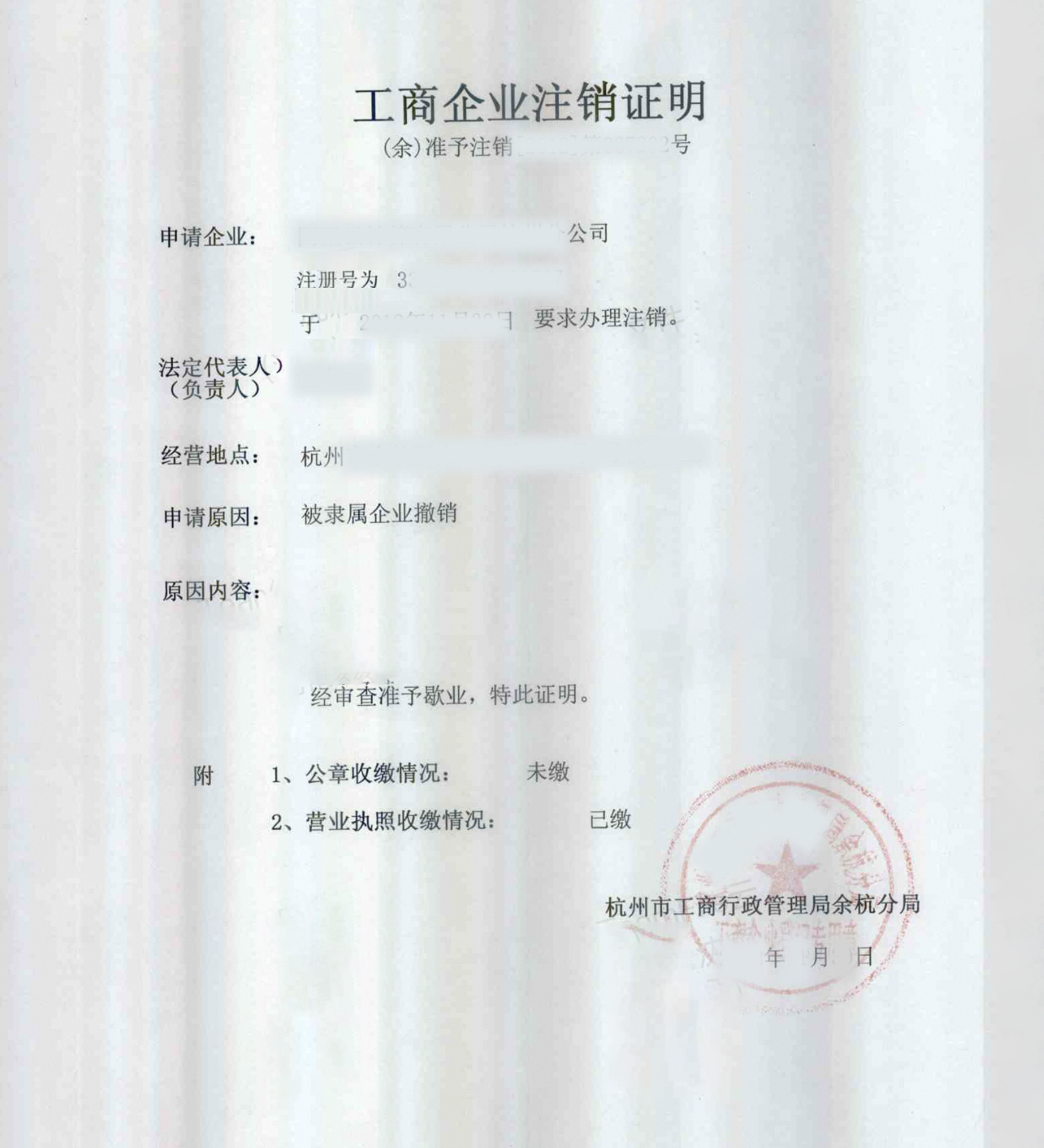
Business Deregistration Certificate. See the example format below.
-
The deregistration certificate is issued by the local Administration for Market Regulation. The specific materials that are required may vary based on local policies and actual conditions.
-
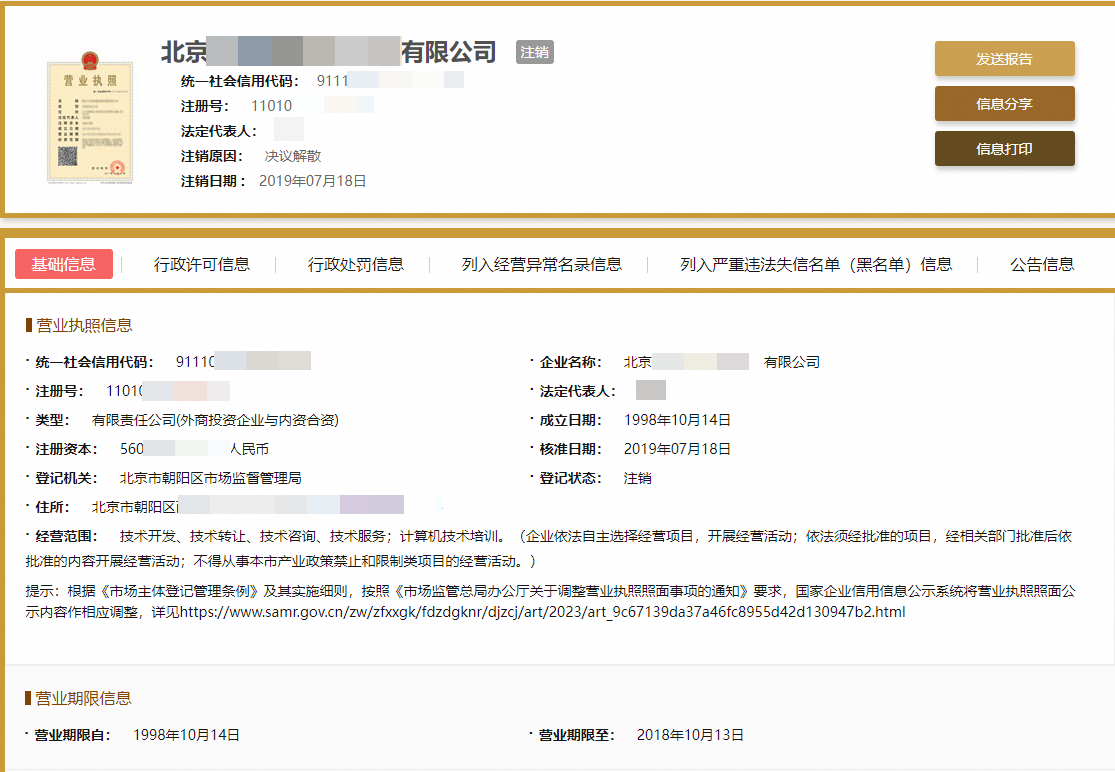
If you cannot provide a business deregistration certificate, go to the National Enterprise Credit Information Publicity System. Enter the enterprise name or Unified Social Credit Code to search for the target enterprise. Go to the enterprise details page and take a screenshot of the page that shows the enterprise registration status as deregistered.
-
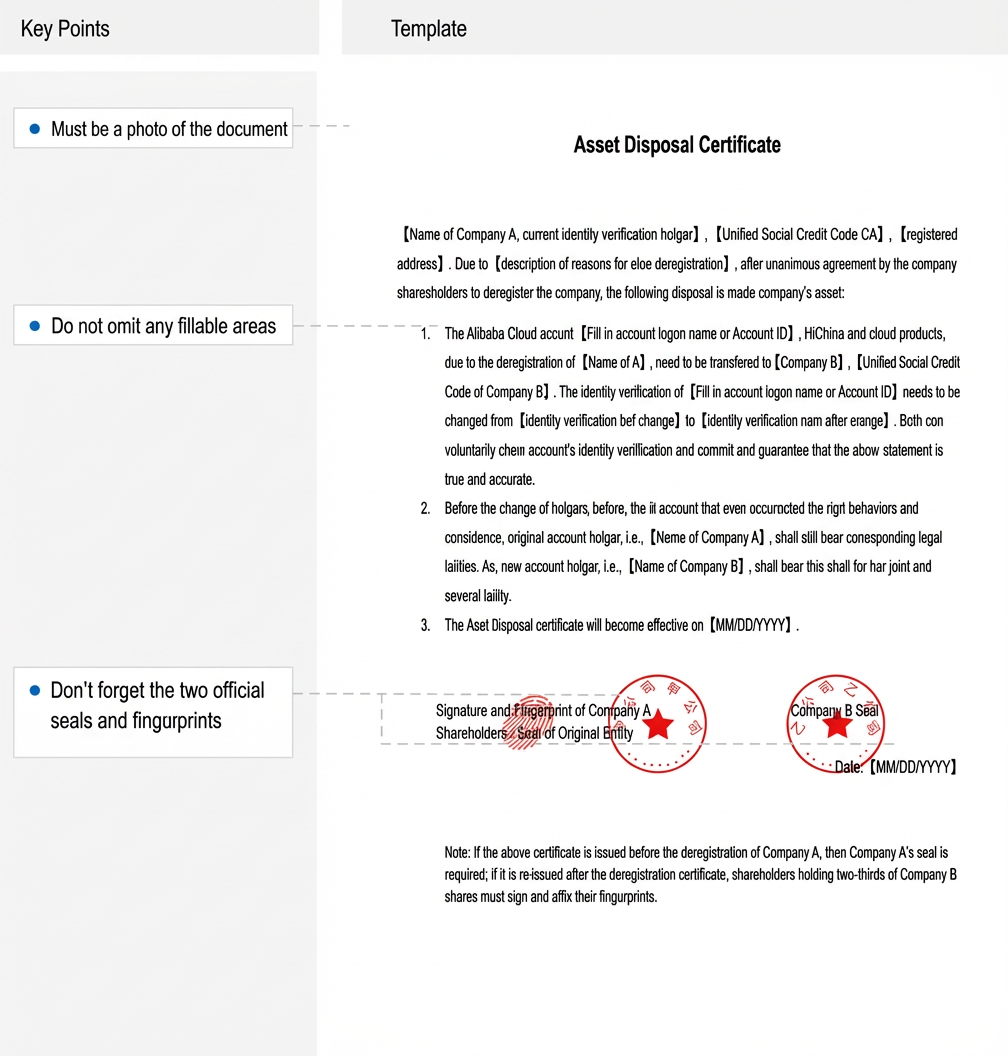
Enterprise Asset Disposal Certificate. See the example format below.
The asset disposal certificate is a document that explains the disposal of the Alibaba Cloud account and its business assets. It can be issued before or after the company is deregistered.
Issued before company deregistration
If the asset disposal certificate is issued before the company is officially deregistered, follow these steps:
-
Click Asset Disposal Certificate Template to download it. Edit the template and print it.
-
Stamp the hard copy with the company's official seal to confirm its legal validity.
-
Take a photo of the stamped document.
-
Upload this photo when you submit the documents.
Issued after company deregistration
To issue an asset disposal certificate after the company is deregistered, follow these steps:
-
Click Asset Disposal Certificate Template to download it. Edit the template and print it.
-
Shareholders who hold more than two-thirds of the company's shares must sign the hard copy and add their fingerprints to show their consent and confirmation.
-
Take a photo of the document after the shareholders have signed and added their fingerprints.
-
Make sure that you upload this photo when you submit the documents.
-
A copy of the front and back of the new company's legal representative's ID card, stamped with the official seal.
Additional steps after submitting the appeal (required). After you submit the appeal, you must log on to an Alibaba Cloud account that is verified with the new company's identity (this can be an existing account or a newly registered and verified one). Then, you must submit a ticket to verify the enterprise's identity. Use the following text as a reference: I am applying to change the identity verification entity of account xxx (account ID or username) from xxx to my company, xxx. Please assist with this process.
Step 2: Submit the appeal
You can access the identity verification page from the 'Forgot Username' or 'Forgot Password' pages. If you can log on to your account, you can also go to the Account Security page and select 'Change Phone Number' to access the identity verification page.
Forgot username
Go to the Alibaba Cloud homepage. In the upper-right corner, click Log On. On the logon page, click Forgot Username.
On the Retrieve Username page, select Domain Name, ICP-filed Domain Name, or Enterprise Email Domain Name. Enter the corresponding domain name, complete the slider verification, and click Next to go to the identity verification page.
Forgot password
Go to the Alibaba Cloud homepage. In the upper-right corner, click Log On. On the logon page, click Forgot password.
Enter the Alibaba Cloud account for which you want to reset the password, and then click Next to go to the identity verification page.
On the identity verification page, click Submit Appeal and then Continue Appeal to start the account appeal process.
On the Basic Information page, for an individual account, select Appeal Service and Operator Information. For an enterprise account, select Appeal Service, Appeal Scenario, and Operator Information. Then, click Start Appeal. You can also change the appeal account on this page.
NoteIf your appeal scenario is Enterprise has been deregistered, only the legal representative of the original enterprise can select I am the legal representative for Operator Status. All other operators must select I am not the legal representative.
Follow the on-screen instructions to submit the appeal documents, complete the operator's facial recognition, and provide a valid contact method. Click Confirm Submission. A ticket for the appeal is generated, and the ticket number is sent to you in a text message.
Step 3: Check the appeal result
After your appeal is received, our staff processes it within 3 business days. You can go to the Manual Appeal Progress Query page. Enter the query number and contact phone number to check the progress and result of your appeal.
Appeal Approved: Your appeal has been approved. Our support engineers will update the relevant information for you.
Appeal rejected: Common reasons for rejection include documents that do not meet the requirements, an inapplicable appeal scenario (such as an account that has not completed identity verification), or missing documents. Within 3 calendar days of receiving the appeal result, you can modify and add documents to continue the appeal. You can also prepare the required documents and start a new appeal process.