Automatic performance scaling
As your business grows, data volume increases, or new services and features go live, database traffic can rise and your computing resources may become insufficient. Scaling up your database specifications (CPU and memory) is an effective solution. Database Autonomy Service (DAS) supports automatic performance scaling to scale up your instance specifications, allowing you to quickly and elastically handle peak traffic. DAS also supports scaling down specifications when traffic drops to prevent resource waste.
Prerequisites
-
This feature supports the following database instances:
Database
Region
-
RDS for MySQL High-availability Edition instances with cloud disks (General-purpose and Dedicated), High-availability Edition instances with local disks (General-purpose), and Three-node Enterprise Edition instances (General-purpose)
-
PolarDB for MySQL Cluster Edition
The automatic performance scaling feature relies on anomaly detection. Therefore, the region where your database instance resides must support anomaly detection. The supported regions are:
China (Hangzhou), China (Shanghai), China (Shenzhen), China (Heyuan), China (Guangzhou), China (Qingdao), China (Beijing), China (Zhangjiakou), China (Hohhot), China (Ulanqab), China (Nanjing - Local Region) (Decommissioned), China (Fuzhou - Local Region) (Decommissioned), China (Chengdu), China (Zhengzhou), China (Hong Kong), Japan (Tokyo), South Korea (Seoul), Singapore, Malaysia (Kuala Lumpur), Indonesia (Jakarta), Philippines (Manila), Thailand (Bangkok), UAE (Dubai), Saudi Arabia (Riyadh), Germany (Frankfurt), US (Silicon Valley), US (Virginia), and UK (London)
NoteRDS for MySQL instances that use discontinued specifications do not support automatic performance scaling. To use this feature, you must first change the instance specifications. For more information, see Change instance specifications.
-
-
You must have a sufficient account balance to cover scale-up costs.
-
You must have a DAS service-linked role.
NoteIf you have not created a DAS service-linked role, DAS automatically creates one for you before a scaling operation is run.
How it works
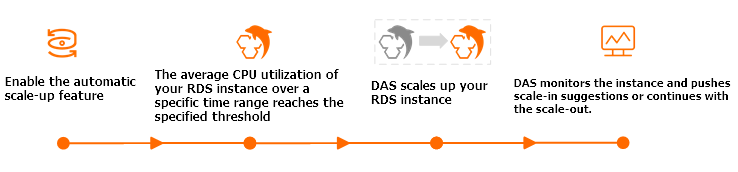
Automatic scale-up
After you enable automatic scale-up, when the Average CPU Utilization of your database instance reaches the configured threshold within an observation window:
During a scale-up, extreme scenarios such as a high-availability (HA) switchover, severe host resource shortages, or resource reclamation due to conflicts with existing control processes may occur. For critical instances, we recommend using auto scaling for short-term evaluation to determine peak CPU requirements. For long-term stability, we suggest upgrading instance specifications based on peak business workloads.
-
For RDS for MySQL High-availability Edition instances with cloud disks and PolarDB for MySQL Cluster Edition instances:
DAS automatically selects appropriate specifications within the configured upper limit and performs a scale-up operation based on the current instance workload. After the scale-up is complete, DAS continues to monitor the CPU utilization. If the scale-up conditions are met again, DAS continues to scale up the instance until it reaches the maximum specifications you set.
-
For RDS for MySQL High-availability Edition instances with local disks (General-purpose) and RDS for MySQL Three-node Enterprise Edition instances (General-purpose):
DAS doubles the number of CPU cores based on the original specifications. For example, if an instance has 4 CPU cores, it is scaled up to 8 CPU cores. Instance IOPS also increases. For each additional CPU core, IOPS increases by 1,000. The scale-up operation does not proceed if the host has insufficient CPU resources.
NoteThe number of CPU cores can only be doubled from the original specifications. It cannot be doubled again from the scaled-up state. For example, if the number of CPU cores is increased to 8, it cannot be further increased to 16.
Automatic scale-down
If a scale-up occurs while automatic scale-down is enabled, the system scales the instance back down to its pre-scale-up state when the scale-down conditions are met. However, scale-ups that occurred before you enabled automatic scale-down are not eligible for automatic scale-down.
-
For RDS for MySQL High-availability Edition instances with cloud disks and PolarDB for MySQL Cluster Edition instances:
After you enable Automatic Scale-down/in, if the instance is not in a Quiescent Period and its CPU utilization is below 30% for more than 99% of the scale-down observation window, the system automatically scales down the instance specifications step-by-step until they return to the pre-scale-up specifications.
Important-
The scale-down observation window is calculated as the configured
observation window + 10 minutes. For example, if the Observation Window is set to 30 minutes, the scale-down observation window is 40 minutes. -
For RDS for MySQL High-availability Edition instances with cloud disks, the automatic scale-down feature is stable only on the new architecture (kindcode=18). You can query the instance architecture version by using an API operation. For details, see DescribeDBInstanceAttribute.
-
-
For RDS for MySQL High-availability Edition instances with local disks (General-purpose) and RDS for MySQL Three-node Enterprise Edition instances (General-purpose):
During the specified Scale-down Observation Window, if the CPU utilization is below 30% for more than 99% of the time, the system automatically scales down the number of CPU cores and IOPS to their pre-scaling specifications.
After you enable automatic performance scaling, the system monitors the database instance based on the latest parameters. When the conditions for scaling up or down are met, the system automatically performs the corresponding scaling operation.
For a detailed technical explanation of automatic performance scaling, see DAS Auto Scaling.
Billing
-
For RDS for MySQL database instances:
-
High-availability Edition instances with local disks (General-purpose) and Three-node Enterprise Edition instances (General-purpose): These instances are billed on a pay-as-you-go basis, with fees deducted hourly.
Billing formula: (Price per core × Number of added CPU cores) × Duration of scale-up (in hours)
For example, consider an instance in the China (Hangzhou) region with 4 CPU cores. After an automatic performance scale-up is triggered, the number of cores increases to 8. The scale-up duration is 30 minutes (0.5 hours). The unit price in the China (Hangzhou) region is CNY 0.54 per core-hour. The fee is calculated as follows:
0.54 (unit price) x 4 (added cores) x 0.5 (hours) = CNY 1.08. -
High-availability Edition instances with cloud disks: You are charged based on the new specifications after a scale-up. The fees vary depending on the region, the new specifications, and other configurations. For details, visit the buy page.
-
-
For PolarDB for MySQL database instances:
For detailed billing information, see Configuration change fees.
If your business workloads fluctuate significantly and frequently, we recommend that you purchase a PolarDB compute plan and use it with the automatic scale-up and scale-down features of DAS. When the cluster configuration is adjusted, the compute plan automatically covers the costs based on the current specifications.
NoteIf your PolarDB for MySQL cluster is on a Subscription plan, you must first convert it to a Pay-as-you-go plan before you can use a compute plan. For more information, see Change the billing method from subscription to pay-as-you-go.
Impacts
-
For RDS for MySQL High-availability Edition instances with cloud disks and PolarDB for MySQL Cluster Edition instances, a transient connection interruption of about 30 seconds may occur as the new configuration is applied. Ensure that your application has an automatic reconnection mechanism.
-
For PolarDB for MySQL Cluster Edition instances, you can scale only the entire cluster's specifications, not those of a single node.
-
To ensure better performance and stability, if your instance is not running the latest minor engine version, the system automatically updates it to the latest version during a configuration change.
-
Scale-up operations apply only to the primary instance. If a Primary/Secondary Switchover is triggered after the primary instance is scaled up:
-
The system automatically scales the new primary instance (the original secondary instance) up or down when the trigger conditions are met.
-
The system automatically scales the new secondary instance (the original primary instance) back to its original specifications when the scale-down trigger conditions are met.
-
Procedure
Log on to the DAS console.
In the navigation pane on the left, click .
Find the target instance and click the instance ID to open the instance details page.
-
In the left-side navigation pane, click Autonomy Center.
-
On the Autonomy Center page, click Autonomy Service Settings in the upper-right corner.
-
On the panel, turn on the main switch for the autonomy service.
-
On the Optimization and Throttling tab, configure the following parameters:
RDS for MySQL
-
For RDS for MySQL High-availability Edition instances with cloud disks, select Automatic Performance Scaling.
-
For RDS for MySQL High-availability Edition instances with local disks (General-purpose) and RDS for MySQL Three-node Enterprise Edition instances (General-purpose), select Automatic Resource Elasticity.
Instance type
Parameter
Description
All types
Average CPU Utilization ≥
The trigger threshold for automatic scale-up. A scale-up operation is triggered when the average CPU utilization is greater than or equal to this value.
High-availability Edition instances with cloud disks
Observation Window
The period during which instance performance is observed.
The system periodically checks the instance's CPU utilization during this window. An automatic scale-up is triggered when the Average CPU Utilization ≥ threshold is met.
ImportantThe scale-down observation window is calculated as
Observation Window + 10 minutes.For example, if the Observation Window is set to 30 minutes, the scale-down observation window is 40 minutes.
Maximum Specifications
The upper limit for automatic scale-up.
If the auto-scaling threshold is reached, DAS incrementally scales up the specifications and continues to monitor the Average CPU Utilization. If the threshold is reached again within the Observation Window, DAS continues to scale up until the specifications reach the upper limit that you set.
ImportantIf an instance with specifications of 1 core and 2 GB memory triggers an automatic scale-up, it is directly scaled up to 4 cores and 8 GB memory. In this case, you must set the Maximum Specifications to at least 4 cores and 8 GB memory. Otherwise, the automatic scale-up will fail.
Automatic Scale-down/in
After you enable Automatic Scale-down/in, if an instance is not in the Quiescent Period and the percentage of time that its CPU utilization is less than 30% exceeds 99% during the scale-down observation window (
observation window + 10 minutes), DAS will automatically scale down the instance specification step-by-step until it reaches its original specification.Quiescent Period
The minimum time interval after an Auto Scaling or Auto Scale-back is triggered, before another Auto Scaling or Auto Scale-back can be triggered.
Note-
During the quiescent period, DAS continues to monitor the instance but does not trigger any scaling operations.
-
If the quiescent period and the observation window end at the same time, and the CPU utilization threshold was met during that window, DAS triggers a scaling operation.
High-availability Edition instances with local disks (General-purpose) and Three-node Enterprise Edition instances (General-purpose)
Scale-up Observation Window
The period during which instance performance is observed. The system periodically checks the instance's average CPU utilization during this window. An automatic scale-up is triggered when the average CPU utilization reaches the specified threshold.
Scale-back Observation Window
The period during which instance performance is observed for a scale-down. An automatic scale-down is triggered if the CPU utilization is below 30% for more than 99% of the time during this window.
PolarDB for MySQL
Select Auto Scaling and Auto Scale-back, and then configure the following parameters:
-
Auto Scaling
-
If the average CPU utilization is greater than or equal to the specified value within the Observation Window, PolarDB scales up the cluster based on the workload after the observation window ends.
-
When scaling up a cluster, the system chooses to add nodes or upgrade specifications based on real-time read and write traffic:
-
If read traffic is dominant, adding read-only nodes is prioritized.
-
If write traffic is dominant, upgrading cluster specifications is prioritized.
-
In special cases, such as a high workload on the primary node, upgrading cluster specifications is prioritized.
-
-
-
Auto Scale-back
ImportantFor PolarDB for MySQL Cluster Edition instances, you can scale only the entire cluster's specifications, not those of a single node.
-
During a scale-down observation window, if the average CPU utilization of a node added by Auto Scaling is below 30% for more than 99% of the time, the system automatically scales down the PolarDB for MySQL cluster specifications in decrements until it returns to its original specifications.
-
If read-only nodes were added during a scale-up, they are removed one by one during a scale-down.
-
If cluster specifications were upgraded during a scale-up, they are downgraded during a scale-down.
-
Parameter
Description
CPU Utilization ≥
The trigger threshold for automatic scale-up. A scale-up operation is triggered when the average CPU utilization is greater than or equal to this value.
Maximum Specifications
The upper limit for automatic scale-up. After a scale-up is triggered, the PolarDB cluster specifications are scaled up in increments, for example, from 4 cores to 8 cores, and then to 16 cores, until the upper limit is reached.
Max number of Read-Only nodes
The maximum number of read-only nodes that can be automatically added. After a scale-up is triggered, the system adds one or two PolarDB read-only nodes based on the actual conditions, until the upper limit is reached.
NoteAuto-scaled nodes are added to the default cluster endpoint. For custom endpoints, you must configure the Automatically Associate New Nodes option. For more information about how to configure Automatically Associate New Nodes, see Configure Database Proxy.
Observation Window
If the average CPU utilization is greater than or equal to the specified value for the entire observation window, DAS initiates a scale-up by either adding nodes or upgrading specifications based on the cluster's real-time read/write traffic after the window ends. For example, if the observation window is 5 minutes and the scaling operation takes 10 minutes, the effect of the automatic scale-up will be visible after about 15 minutes.
ImportantThe scale-down observation window is calculated as the configured
observation window + 10 minutes. For example, if the Observation Period is set to 30 minutes, the scale-down observation window is 40 minutes.Quiescent Period
The minimum interval between consecutive automatic scaling operations. During the quiescent period, DAS continues to monitor the instance but does not trigger any scaling operations. If the quiescent period and the observation window end at the same time, and the CPU utilization threshold was met during that window, DAS triggers a scaling operation.
-
-
Click OK.
-
Configure an Alert Template to subscribe to alerts so that you can stay informed about the automatic performance scaling status of your database instance.
The system recommends an alert template and adds alert rules for the corresponding autonomy events. You can follow the prompts to complete the configuration.
Note-
If you have already configured an alert template for the instance, follow the prompts to add the corresponding alert rules for the autonomy events to the template.
-
To configure your own alert templates and alert rules, see Configure alert templates and Configure alert rules.
-
-
Select an Alert Contact Group to receive notifications.
-
Click Add Contact to add a new alert contact.
-
Click Create Contact Group to add a new alert contact group.
-
Click Modify or Remove next to a contact to edit or delete their information.
For detailed instructions, see Manage alert contacts.
-
-
Click Submit Configuration and confirm the alert settings in the dialog box that appears.
FAQ
Q: What should I do if my instance has reached the maximum specifications for its instance family and cannot be scaled up further?
A: We recommend that you purchase an instance with higher specifications from a different instance family. For example, an RDS for MySQL High-availability Dedicated instance supports up to 104 cores and 768 GB of memory. Then, you can migrate your data to the new instance. For more information about instance specifications and migration solutions, see the following documents:
-
RDS for MySQL: Instance types and Migrate data between RDS for MySQL instances.
-
PolarDB for MySQL: Instance types and Migrate data between PolarDB for MySQL clusters.
Q: Does the system continuously monitor the instance during a scale-up operation?
A: Yes.
For example, if the Observation Window is set to 5 minutes and the scale-up operation takes 10 minutes, the total time for the scaling event is 15 minutes.
During the scale-up period, the system continuously monitors the instance's performance but will not trigger another scaling operation until the current one finishes. After the scale-up is finished, if the CPU utilization threshold is met at the end of the next Observation Window, another scale-up is triggered. This process repeats until the instance reaches the specified Maximum Specifications.
Q: Is it normal for an order to be created and paid for within seconds after an automatic scale-up is triggered?
A: Yes, this is normal. When automatic performance scaling triggers a scale-up, the system automatically creates and pays for the order. This entire process is automated and can be completed within seconds. To confirm whether an order was triggered by a user or the system, you can check the relevant records in operation audit.
Related documents
-
For RDS for MySQL instances, you can change the billing method to Serverless to enable real-time elasticity for CPU and memory. For more information, see Change the billing method from pay-as-you-go to Serverless.
NoteIf the instance is on a subscription plan, you must first change the billing method from subscription to pay-as-you-go before you can change it to Serverless.
-
If your business traffic has predictable peaks, you can use scheduled automatic scaling. This feature allows you to scale up your instance specifications based on a predefined schedule. The instance automatically returns to its original specifications after the configured duration ends.
-
If your instance type does not support automatic performance scaling, you can manually change the specifications to scale the instance up or down. For more information, see the following documents:
-
For RDS for MySQL, see Change instance specifications.
-
For PolarDB for MySQL, see Manually change cluster specifications.
-