Monitoring and alerts
Use monitoring tools and alerts to detect cost anomalies, track resource usage, and control cloud spending.
Cost monitoring and alerts help identify cost issues and optimization opportunities. Use monitoring tools to track cost and resource data, and configure alerts to notify O&M engineers or finance staff. This helps avoid unexpected costs and optimize resource usage.
Manage budgets and send alerts
Budgets provide a closed-loop cost management process: creation, alerts and forecasts, rolling adjustments, and estimate-to-actual analysis.
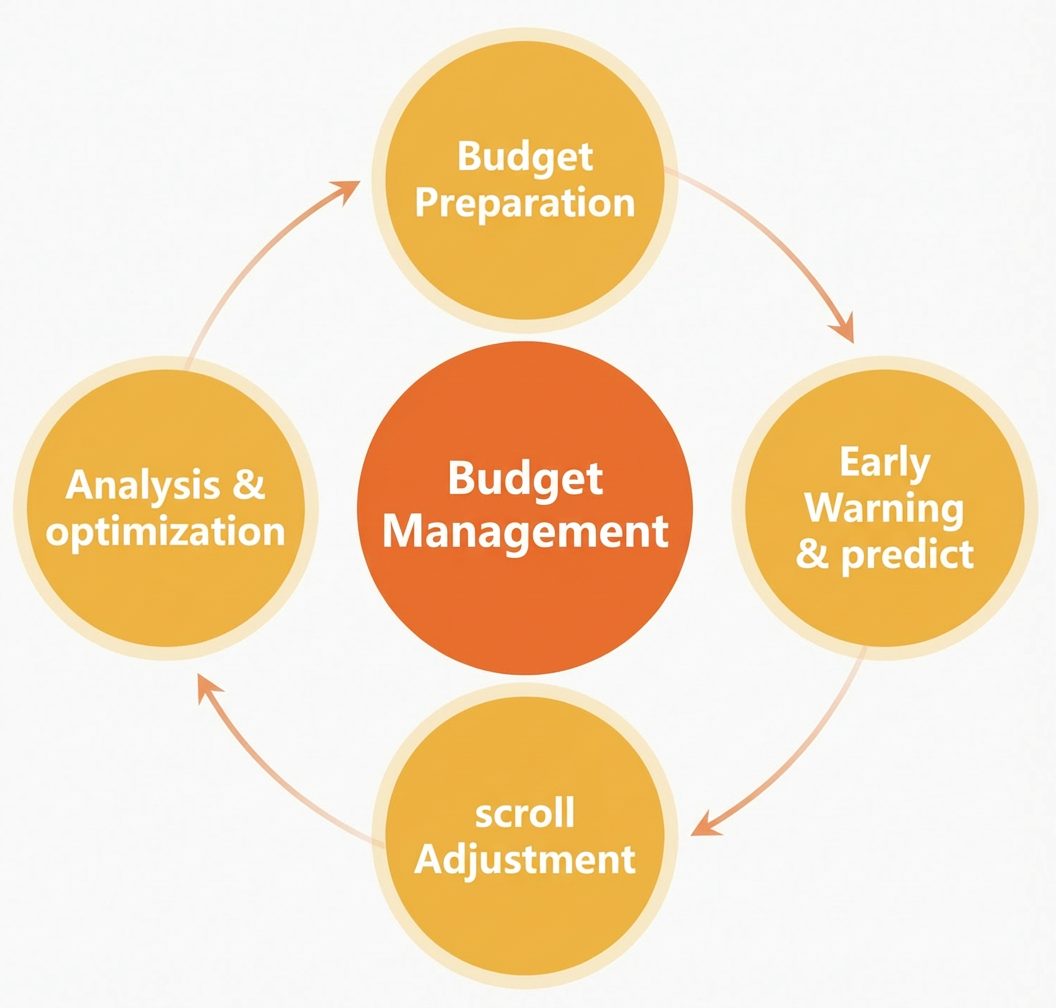
The Budget Management tool lets you create budgets, monitor spending, send alerts, and run estimate-to-actual analysis. Key capabilities:
-
Manage budgets across multiple dimensions, such as cost centers, products, and accounts.
-
Track budgets for costs, usage, and coverage rates across pay-as-you-go resources and resource plans.
-
Use 12-month cost predictions to plan budgets.
-
Set separate alerts for actual costs and predicted costs.
-
Set multiple alerts to trigger at different thresholds.
-
Run estimate-to-actual analysis to identify variances.
Enable anomaly detection alerts
Unexpected spending is a common cause of cost overruns. Use the Anomaly Detection feature to detect cost anomalies and get root cause information for quick resolution.
Anomaly detection uses AI algorithms with customizable sensitivity to identify abnormal cost fluctuations and send alerts automatically.
Monitor available credit and send alerts
Available credit is the usable amount in an account after subtracting frozen amounts and future deductions. For credit-controlled users, the credit control limit is also included. Enable available credit alerts to stay informed about your available credit.
Monitor high spending and send alerts
Monitor high spending and analyze the causes of overages. The High Spending Alert tool sends an alert when a pay-as-you-go product's daily bill exceeds the threshold, calculated based on the previous day's costs.
Monitor resource plan usage
Set usage alerts for resource plans to prevent shortages. Alert rules differ by plan type:
Calendar month and dynamic month plans send one alert per period at the usage threshold and another when depleted. Total-decreasing plans send one alert when the threshold is reached during the plan's lifecycle.
Monitor resource usage
Monitor cloud resource utilization to identify overloaded, underutilized, and idle resources. Use historical data to predict capacity changes and send proactive alerts.
Daily cloud resource monitoring
-
Set up daily monitoring of cloud resource usage with the cloud service monitoring feature of Cloud Monitor (CMS) to observe usage in real time and configure alert rules.
-
High load typically signals the need to scale out. Analyze high-load data to check for improper resource use that requires architecture or code optimization. If consumption is normal, request new resources based on cost planning standards and scale out after financial approval.
-
Low load indicates underutilized or idle resources. Scale in these resources during off-peak hours to reduce waste without affecting your business.
-
Monitor Auto Scaling resource changes to prevent extra costs from excessive scale-outs or delayed scale-ins caused by misconfigured rules.
-
Shut down and release long-idle compute resources. Delete unneeded storage files, such as snapshots, to avoid ongoing waste.
Use sustained monitoring data to identify optimization opportunities. Peak and off-peak traffic patterns can guide you toward a flexible mix of billing methods to reduce costs.
Enterprise-level cloud monitoring
Use a resource directory for unified monitoring across Alibaba Cloud accounts. For hybrid cloud scenarios, enterprise-level cloud monitoring aggregates on-premises monitoring data to build an integrated cloud and on-premises monitoring system. The resource usage report tool uses big data and AI algorithms to analyze product usage in depth.
Correlate budget and resource monitoring
Budget monitoring links spending to specific cloud product usage. Combined with resource monitoring, you can identify when and why consumption occurs. Track resource activation and usage during each budget period — if consumption is below budget, this may indicate a delayed launch or stalled project. Adjust the budget plan as needed.