Domain name renewal
An expired domain name can lead to service interruptions, such as an inaccessible website or email downtime. It also risks another party registering the domain, permanently harming your brand and business. This topic describes how to use automatic and manual renewal to keep your domain name active and outlines strategies for each stage after a domain name expires.
Domain name lifecycle and renewal strategy
A domain name goes through several stages from registration to deletion. Each stage has a different timeframe and cost. As a best practice, renew your domain name before it expires.
Stage | Time window | Domain status | Actions and cost |
Active | Within the domain's validity period | Resolves normally | Set up automatic renewal or perform manual renewal. The fee is the standard renewal price. |
Renewal grace period | Approximately 0 to 30 days after expiration Note
| Resolution may be suspended | You can still renew at the standard price. |
Redemption period | Typically 31 to 60 days after expiration Note The redemption period for CNNIC domain names such as | Resolution suspended | You must pay a redemption fee, which is significantly higher than the standard renewal fee. |
Pending deletion period | After the redemption period ends | Pending deletion | The registry deletes the domain, making it available for public registration. At this point, the original owner can no longer recover it. |
The console displays the actual stage and renewal deadline for your domain name.
You must complete real-name verification for your domain name before it can be renewed. For more information, see Real-name verification for domain names.
If you transfer a domain name away from Alibaba Cloud within 45 days of a successful renewal or redemption, the renewed term is voided and the fee is non-refundable. To avoid this, schedule your renewal and transfer activities accordingly. For more information, see Transfer a domain name away from Alibaba Cloud.
Set up automatic renewal (recommended)
Enabling automatic renewal is the best practice to prevent the accidental loss of your domain name from a missed renewal.
Log on to the Domain List page, select the domain names, and then click at the bottom of the page.
Make sure you are logged on with the Alibaba Cloud account that owns the domain name or a RAM user with domain management permissions.
Confirm the domain names for enabling automatic renewal and click Submit.
Billing rules:
Billing time: Starting 15 days before the domain expires, the system attempts to process the payment once per day until the payment is successful or the domain expires.
Payment method: The system deducts the fee from your account balance or credit limit. You cannot use both methods for a single payment.
Ensure your Alibaba Cloud account has a sufficient account balance or credit limit. Set up low-balance alerts to prevent automatic renewal failures.
If automatic renewal fails due to an insufficient account balance or credit limit before the domain expires, you must renew the domain manually.
Manual renewal procedure
A successful bank transfer claim only means that the funds have been credited to your Alibaba Cloud account balance. It does not mean that your domain name renewal is complete. After the claim is processed, log on to the Domain List page, find the target domain name, click Renew, and then use your account balance to complete the payment.
Use this method to immediately renew one or more domain names.
Console (recommended)
Log on to the Domain List page with the Alibaba Cloud account that owns the domain name.
Make sure you are logged on with the Alibaba Cloud account that owns the domain name or a RAM user with domain management permissions.
Single renewal: Find the target domain and click Renew in the Actions column.
Batch renewal: Select the checkboxes for the domains you want to renew and click the Renew button at the bottom of the list.
On the order confirmation page, select a renewal period for each domain name and click Buy Now.
App
Use these steps to renew from a mobile device.
On the Domain Registration page, tap Renew/Redeem.
In the Domain List, select the domain names you want to renew and tap Batch Renew/Redeem.
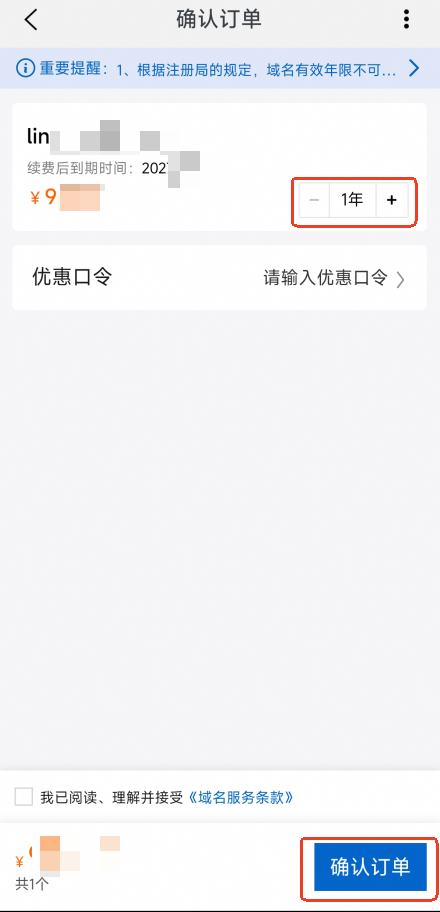
Confirm the renewal order.
On the Confirm Order tab, select a Renewal Duration and tap Confirm Order.
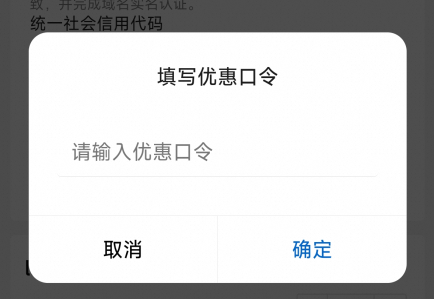
Optional: Enter a promotional code.
Above the order confirmation section, tap the promotional code field to enter it. For details on how to get a promotional code, see How do I get a promotional code for a domain name?.
After the payment is complete, tap the Renew/Redeem button on the Domain Registration page to open the Domain List. Check the Expiration Date of the domain name to confirm that the renewal was successful.
DNS resolution recovery time
After you successfully renew a domain name during its renewal grace period, the time for DNS resolution to resume depends on DNS cache refresh cycles.
DNS provider | Recovery time |
Alibaba Cloud DNS | Typically within 10 minutes, but can take up to 24 hours |
Other DNS providers | 24 to 48 hours |
Invoice management
You can request an invoice after paying for your order. For more information, see How to request an invoice.
Troubleshoot renewal failures
Problem type | Check | Solution |
Payment issue | Insufficient account balance | Add funds to your account and try again. |
The linked payment method (such as a credit card) is invalid. | Update to a valid payment method. | |
Your account has overdue payments. | Pay the overdue amount before renewing. | |
Domain Name Status Issues | The domain name is in an abnormal status (such as | Contact the registrar to identify the cause and remove the restriction. For information about the meanings of domain name status codes, see Remove a domain lock. |
Domain name real-name verification failed ( | You must first complete the real-name verification process. | |
Account real-name verification entity abnormality | The enterprise entity registered for Alibaba Cloud account real-name verification is listed as cancelled or revoked in the National Enterprise Credit Information Publicity System. | Update the real-name verification for your Alibaba Cloud account to a valid, active enterprise entity or individual. |
Renewal succeeded but the expiration date is not updated
If your renewal order was paid successfully but the domain name's expiration date has not been extended, complete the following steps:
Log on to the Domain List page and check whether the expiration date has been extended. The list supports sorting by expiration date and filtering by date range.
Go to the Billing Management console and check whether the status of the renewal order is Paid.
FAQ
Q: What do I do if the automatic renewal payment fails?
A: Check if your account balance or credit limit is sufficient. If not, add funds to your account and then manually renew the domain name before it expires. Alternatively, after adding funds, you can wait for the system's daily automatic retry.
Q: What renewal reminders will I receive before my domain name expires?
A: Renewal reminders are sent to the domain name holder's registered email address, and to the email address, secure phone number, and internal messages associated with your Alibaba Cloud account.
Notifications are sent based on the domain name holder information and your Alibaba Cloud account information. Changing the domain name's administrator, payer, or technical contact information does not affect notification delivery. Adding additional notification recipients is not supported.
Before your domain name expires, Alibaba Cloud sends renewal reminders by email, SMS, and internal messages on the following schedule:
Email: 60, 45, 30, 15, and 10 days before expiration, and the first Monday after expiration
SMS: 10 and 5 days before expiration, and 1 day after expiration
Internal messages: 10 and 5 days before expiration, and 1 day after expiration
Domain names under Alibaba Cloud partner accounts (including former Wanwang reseller accounts) follow the same renewal notification rules as standard member accounts.
Q: What should I do if I see an error message such as "Failed to get product" or "An unpaid order exists" when I try to renew?
A: Go to Order Management to check for unpaid orders. Pay for or cancel the unpaid orders and then try again. Alternatively, you can empty your shopping cart and re-add the renewal order.