Create a hybrid cloud ECS cluster
Enterprise Distributed Application Service (EDAS) supports hybrid cloud Elastic Compute Service (ECS) clusters and provides complete solutions for scaling, networking, and unified management of these clusters. Use Express Connect to connect Alibaba Cloud ECS instances, servers from on-premises data centers, and servers from other cloud service providers. Then, add them to an EDAS hybrid cloud ECS cluster. This lets you host applications in the cluster and use the application hosting capabilities that EDAS provides.
Prerequisites
Use the Professional Edition or Platinum Edition of EDAS. For more information, see Product series and Billing overview.
Background information
Your application system may face the following challenges:
Traffic on Alibaba Cloud fluctuates and has occasional spikes. You can forecast traffic, but predictions may be inaccurate. This makes it difficult to control the timing of scale-outs and the number of required ECS instances. You may also need to purchase instances in advance.
Some core business systems have high security requirements, which means you must deploy these applications in your on-premises Internet data center (IDC). This can cause network connectivity issues between Alibaba Cloud, your on-premises IDC, and servers from other cloud service providers. As a result, you cannot centrally manage applications that are deployed in different environments.
For business and availability purposes, you may want to deploy your application system in a hybrid cloud environment. However, this approach can prevent unified management, require manual processing, and lead to operational errors.
A hybrid cloud architecture can solve these problems.
The following figure shows the architecture of a hybrid cloud ECS cluster.
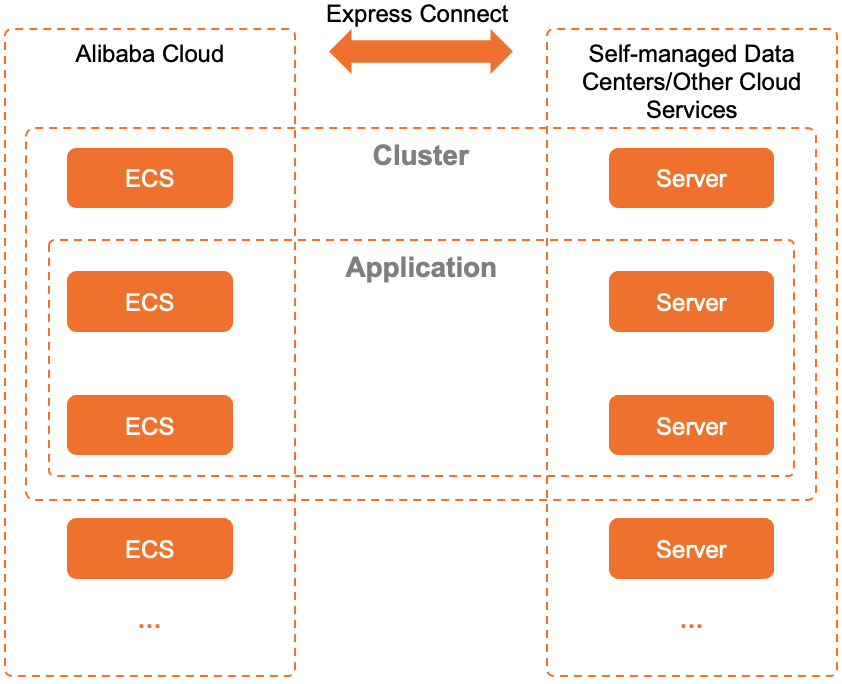
A hybrid cloud cluster contains Alibaba Cloud ECS instances, servers from on-premises IDCs, and servers from other cloud providers.
Alibaba Cloud ECS instances, servers from on-premises IDCs, and servers from other cloud providers are connected through Express Connect.
Applications can be deployed in hybrid cloud ECS clusters.
Hybrid cloud is suitable for the following scenarios:
Manage an on-premises IDC from Alibaba Cloud: After you connect your on-premises IDC to an Alibaba Cloud VPC using a leased line, you can use EDAS on Alibaba Cloud to manage applications in your on-premises IDC.
Deploy and manage servers from other cloud service providers: You can use EDAS to deploy applications to servers from cloud service providers other than Alibaba Cloud and manage them centrally.
This document describes how to manage an on-premises IDC from Alibaba Cloud. To deploy and manage servers from other cloud service providers, you must connect the required servers to an Alibaba Cloud VPC in EDAS using a leased line. The subsequent steps are the same as those for managing an on-premises IDC from the public cloud.
Preparations
You can create a VPC. For more information, see Create a VPC with an IPv4 CIDR block in the .
Activate Express Connect.
Apply for a connection in Classic Connection mode to connect your on-premises IDC to an Alibaba Cloud VPC. For more information, see Apply for a connection in Classic Connection mode.
Make sure that the servers in your on-premises IDC meet the following requirements:
Operating system: CentOS 7
Physical servers or virtual machines. Docker containers are not supported.
Hardware: No special requirements for CPU and memory.
Step 1: Create a hybrid cloud cluster
-
Log on to the EDAS consoleEDAS console.
In the navigation pane on the left, choose .
On the EDAS ECS Clusters page, select a region from the menu bar at the top. In the upper part of the page, select a microservices namespace and then click Create Cluster.
You can select a microservices namespace on this page or in the Create Cluster dialog box.
If you require environment isolation, select the microservices namespace that you created.
If you do not require environment isolation, select the Default microservices namespace.
In the Create Cluster dialog box, set the cluster parameters and click Create.
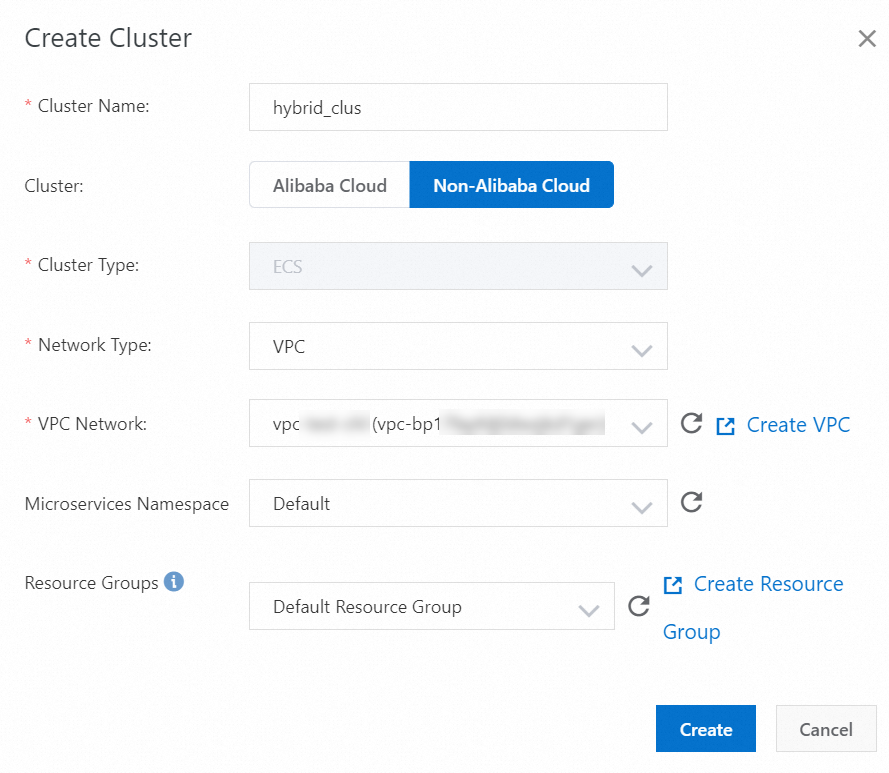
Configuration Item
Description
Cluster Name
The cluster name can contain only letters, digits, underscores (_), and periods (.). The name can be up to 64 characters long.
Cluster Ownership
Select Non-Alibaba Cloud.
Cluster Type
This parameter can only be set to ECS. You cannot change the value.
Cluster Network Type
For a Non-Alibaba Cloud ECS cluster, the network type can only be VPC.
VPC Network
After you select VPC, select a specific VPC that you created.
Microservices Namespace
The microservices namespace to which the cluster belongs. By default, the microservices namespace selected on the ECS Clusters page is displayed. If no microservices namespace is selected, the Default microservices namespace is displayed in the list. Select a namespace as needed.
Resource Group
The resource group to which the cluster belongs. This resource group is created by the current Alibaba Cloud account in the Resource Management console, not an EDAS resource group. If no resource groups are available, click Create Resource Group to go to the Resource Management console and create one. For more information, see Create a resource group.
After the cluster is created, a Creation successful message appears at the top of the page. The new cluster appears in the cluster list.
NoteAfter the cluster is created, it is an empty cluster. You must add Alibaba Cloud ECS instances and servers from your on-premises IDC to the cluster.
Step 2: Add instances to the hybrid cloud cluster
Add Alibaba Cloud ECS instances, servers from your on-premises IDC, and servers from other cloud service providers to the empty hybrid cloud cluster that you created.
On the Cluster List page, click the ID of the cluster that you created.
On the Cluster Details page, click Add Existing ECS in the upper-right corner of the ECS Instances section.
In the Add ECS Instance dialog box, copy the installation command for the EDAS Agent.
NoteIn a hybrid cloud cluster, you can add instances only by manually installing the EDAS Agent from the command line.
Log on to your Alibaba Cloud ECS instance or a server in your on-premises IDC as the root user. Then, paste and run the EDAS Agent installation command.
After the installation command is run, the instance or server is added to the cluster.
Step 3: Open required ports
To ensure that your applications in the hybrid cloud can use all EDAS capabilities, you must open the following ports for the instances after you add them:
8182: Used to scrape infrastructure monitoring and trace monitoring logs.
12200 to 12300: Used to complete remote procedure calls (RPCs).
65000 to 65535: Web ports.
The method for opening ports varies depending on the instance type in the cluster.
To open ports for an Alibaba Cloud ECS instance, see Add a security group rule.
Servers from an on-premises IDC or other cloud service providers: Open the ports based on the corresponding solution.
Verify the result
- Return to the ECS Cluster page. In the cluster list, view the values of Cluster Type, Cluster Status, and Instances of the newly created cluster.
- If the value of Cluster Type is ECS Clusters (Non-Alibaba Cloud) and the value of Cluster Status is Normal, the cluster is created.
- If the value of Instances is the same as the number of added instances, the instances are added.
- Click the ID of the cluster that you want to view. The Cluster Details page appears. In the ECS Instance section, view the Instance ID/Name and Health Check parameters of the added instances. If the value of Health Check of an instance is Running, the status of the instance is normal.
What to do next
After the hybrid cloud ECS cluster is created, you can deploy applications in the cluster. The deployment method is the same as that for a standard Alibaba Cloud ECS cluster. For more information, see Overview of application creation and deployment.