LinkedMall v2.0 integration process
This document describes the steps for distributors to integrate with Alibaba Cloud LinkedMall for Enterprise. You can follow these steps to complete onboarding, development, and launching your business.
This document is intended for the business, operations, development, and testing teams of distributors who are responsible for LinkedMall onboarding.
Prerequisites
Before you start the onboarding and development process, you can prepare the materials in the following table to improve efficiency.
Prerequisite |
Quantity |
Description |
Enterprise Alipay account |
1 |
The enterprise Alipay account is used as the payment account for the distributor's store to pay for goods. Note the following constraints: 1. An Alipay account used for receiving payments for a Tmall flagship store cannot be used as the payment account for a distributor store. 2. If the payment method is real-time payment, the distributor must ensure the payment account has a sufficient balance to prevent payment failures. For information about enterprise Alipay account registration and identity verification, see the official Alipay documentation. |
Alibaba Cloud enterprise account |
1 |
This account must complete enterprise identity verification and is used for distributor onboarding. For information about Alibaba Cloud account registration and enterprise identity verification, see Register an account (PC).
Important
Securely store important information such as the username and password for your Alibaba Cloud account and Resource Access Management (RAM) users. The LinkedMall team cannot view usernames or reset or retrieve passwords. |
Alibaba Cloud RAM user |
1 |
Used for API integration development. To create a RAM user, see Create a RAM user. The RAM user must be granted permissions. |
Identity account and AccessKey pair |
1 pair |
Before you use an API, you must prepare your identity account and AccessKey pair to access the API through client tools such as a software development kit (SDK) or command-line interface (CLI). For more information, see Create an AccessKey pair.
Important
Save the AccessKey ID and AccessKey secret locally when they are generated. The console does not allow you to view the AccessKey secret again. |
E-Sign |
- |
The distributor's enterprise must register with eSign to sign online procurement contracts with channel suppliers. |
Integration process
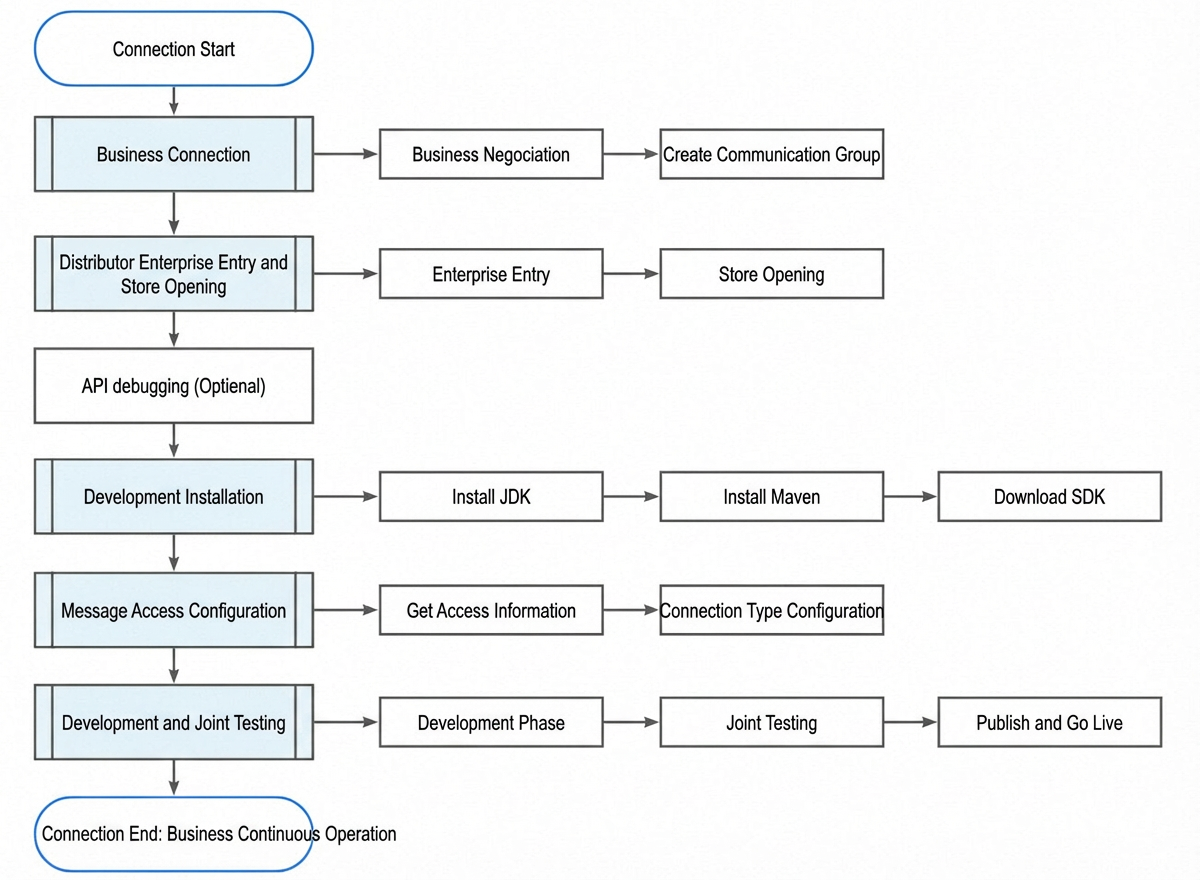
Step 1: Business negotiation
Negotiation
Because of the specific nature of LinkedMall for Enterprise, distributors must first contact Alibaba Cloud operations personnel. They will help facilitate business negotiations among the distributor, the channel supplier, and Alibaba Cloud.
Create a service group
Alibaba Cloud operations personnel will create a dedicated technical support DingTalk group for the distributor. This group provides support for integration and development.
Step 2: Distributor onboarding and store creation
Enterprise onboarding
For more information, see Distributor enterprise onboarding guide.
Store creation
For more information, see Distributor store creation guide.
After the store is created, you must select a channel business and sign the online contract. After the contract is signed, channel operations personnel will import products for the distributor.
After you complete these steps, you will receive a distributor ID and a distributor store ID.
For distributors who use the real-time payment method, ensure that the Alipay payment account has a sufficient balance. This prevents payment failures due to an insufficient balance during the integration process.
Step 3: API debugging (Optional)
Before you use the Alibaba Cloud OpenAPI portal, you must complete LinkedMall enterprise onboarding and distributor store creation.
You can log on to the Alibaba Cloud OpenAPI Portal to call LinkedMall for Enterprise API operations and view the requests and responses. The OpenAPI Portal automatically generates API call examples to help developers learn how to use the API operations.
LinkedMall API version: Select the latest version (currently 2023-09-30).
Service Endpoint: Select China (Zhangjiakou). For more information about endpoints, see Endpoints.
SDK Version: We recommend that you select the latest version (currently V2.0).
API list: Select an API operation to test. For more information, see the API directory or click the Document button.
Parameter Settings: The parameters for the API. For more information, see the API Directory or click the Document button.
Step 4: Set up the development environment
The following steps use Java as an example.
Install the JDK
You can install JDK 1.8 or later. For more information, see Install the JDK.
Install Maven
You can install Maven 2.5 or later. For more information, see Install Maven.
Download the SDK
Developers can download the SDK to call the OpenAPI operations for this product.
Step 5: Configure message access
Developers can use Kafka to subscribe to product and order messages, and then consume the messages for business processing. You must complete the message access configuration before you start integration development.
Obtain access information
After the distributor enterprise and store are created, you can go to the LinkedMall Open Platform and view the basic information to obtain the Kafka message access information.
Configure the connection type
After you obtain the access information, you can perform the following configurations:
Install the dependency library.
Create and configure the kafka.properties file.
For more information, see Connection types.
Step 6: Development and joint debugging
After you complete the preceding tasks, you can start integration development. You can find help documents in the API Reference and Message Reference. You can also read the documents in LinkedMall API V2.0 Best Practices to understand how to use API operations in business scenarios. The best practices for order-related operations will be available soon.
Development phase
Integration guide
The distributor's technical team can read the Integration Guide to learn more about topics such as forward and reverse transaction state machines (see the description in Integration Guide - Phase 2: Integration Development), order splitting logic, after-sales scenarios, and how to obtain error messages.
The Integration Guide is important for understanding forward and reverse transactions in the LinkedMall system. The technical team must read it carefully.
Joint debugging
For distributors who integrate with Alibaba Sports channels (such as Ledongli Sports, Shanghai Ledongli, and Hangzhou Ledongli), the channel supplier provides test products. The supplier can also help with tasks such as product editing, order shipping, and after-sales processing to help the distributor's technical team complete joint debugging.
How to obtain test products
In the technical support DingTalk group, you can use the at sign (@) to mention the service bot.
Test orders are also settled and included in bills. After testing, you must promptly complete the after-sales refund.
Go-live and publishing
Before you go live, you must ensure that your Alipay withholding account has a sufficient balance to prevent payment failures.
LinkedMall does not support retrying payments. If a payment fails, the order is automatically closed 30 minutes after it is created.
Other information
Shipping times
The shipping time is based on the agreement between the distributor and the channel supplier. The typical rules are as follows:
Standard products: The logistics tracking number is typically uploaded within 24 hours after the buyer's payment. The product is shipped within 48 hours after the buyer's payment.
Products with a separately agreed shipping time, such as customized or pre-sale items: Shipped within the agreed time.
Reconciliation and invoicing
Distributors who use the Real-time Payment method must follow the Distribution Store Opening Guide to open a distribution store and, based on the Reconciliation Period that you set, complete reconciliation on time and contact your channel supplier for invoicing.
Technical support
1. During the development phase or after your service goes live, you can obtain self-service support from the Service Assistant in your dedicated technical communication DingTalk group.
2. If the Service Assistant cannot solve your problem, you can submit a Ticket to obtain manual technical support.
In the ticket, describe the issue clearly. Provide information that can help technical support quickly locate the problem, such as an order ID, a product ID, or a RequestID.