CLI integration examples
The Alibaba Cloud Command Line Interface (CLI) is a command-line tool built on OpenAPI Explorer. You can use the Alibaba Cloud CLI to automate the management of CloudOps Orchestration Service. This topic describes how to use the Alibaba Cloud CLI to call CloudOps Orchestration Service APIs and provides examples.
Prerequisites
If you are not familiar with the Alibaba Cloud CLI, see What is Alibaba Cloud CLI?.
Install the Alibaba Cloud CLI
Before you can use the Alibaba Cloud CLI, you must install it. The Alibaba Cloud CLI can be installed on Windows, Linux, and macOS. For installation instructions, select the link for your operating system.
Windows: Install the CLI on Windows.
Linux: Install the CLI on Linux.
macOS: Install the CLI on macOS.
You can also use Cloud Shell to debug Alibaba Cloud CLI commands. For more information about Cloud Shell, see What is Cloud Shell?.
Configure the Alibaba Cloud CLI
An Alibaba Cloud account has full access permissions for all APIs, which poses a high security risk. We recommend that you create and use a Resource Access Management (RAM) user for API calls or daily operations and maintenance (O&M).
Before you can use the Alibaba Cloud CLI, you must configure your identity credentials, region ID, and other information. The Alibaba Cloud CLI supports multiple types of identity credentials. For more information, see Credential types. This topic uses AccessKey-based credentials as an example. The procedure is as follows:
Create a RAM user and grant the required permissions to manage products. For more information, see Create a RAM user and Use RAM for access control.
Create an AccessKey for the RAM user. Record the
AccessKey IDandAccessKey secretto configure your identity credentials. For more information, see Create an AccessKey.Set a region ID. The Alibaba Cloud CLI uses your specified region to make API calls. For a list of available regions, see Endpoints.
NoteWhen you use the Alibaba Cloud CLI, you can use the
--regionoption to specify a region for a single command. This option overrides the region specified in the default credential configuration and environment variables. For more information, see Command-line options.Use the AccessKey of the RAM user to configure AccessKey-based credentials. Name the configuration file
AkProfile. For more information, see Configuration examples.
Generate CLI command examples
Log on to the OOS API debugging list.
On the API debugging page, use the search box on the left to find the API that you want to use. On the Parameter Settings tab, enter the parameters based on the API documentation. Click the CLI Example tab to generate a command example that includes the specified parameters.
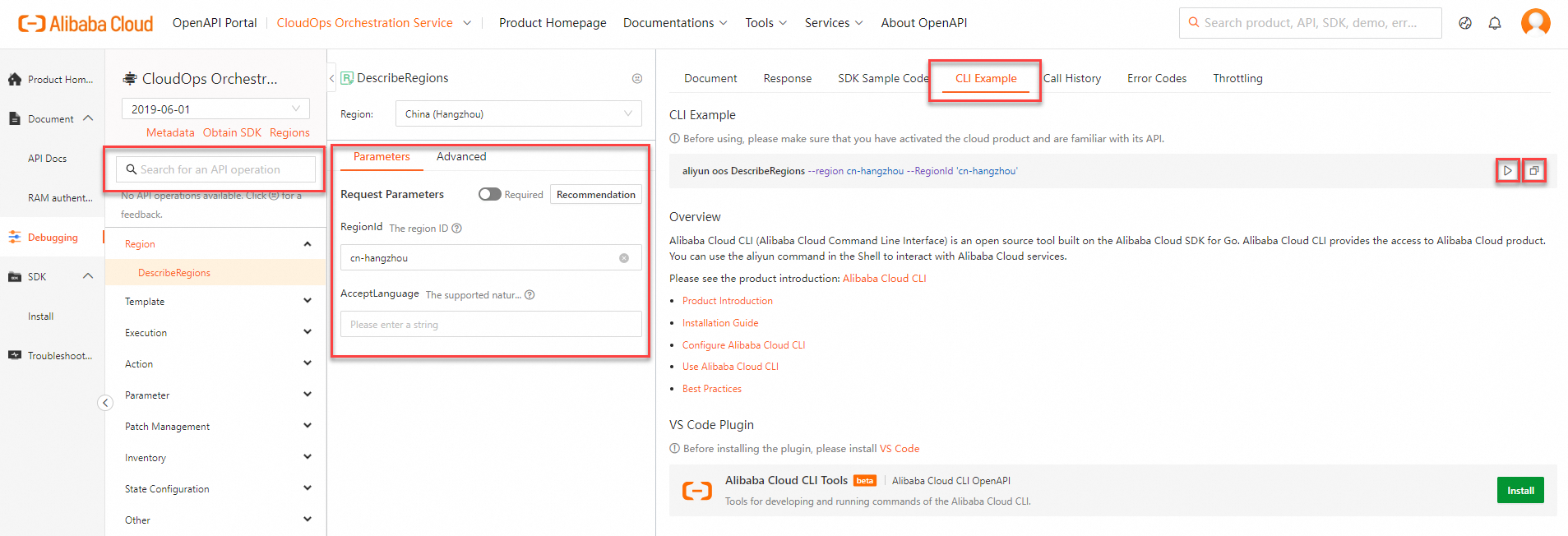
Click the Run Command
 button to open Cloud Shell and quickly debug the command.
Click the Copy
 button to copy the CLI example to the clipboard. You can then paste it into a local shell tool to run it.
When you copy a CLI example to a local shell tool for debugging, ensure that you use the correct parameter format. For more information about the parameter format for Alibaba Cloud CLI commands, see Parameter format.
OpenAPI Explorer adds the
--regionoption to the example by default. When you run the command locally, the Alibaba Cloud CLI uses the specified region and ignores the region configured in your default credentials and environment variables. You can keep or remove this option as needed.
Call APIs
Command structure
The general command structure for the Alibaba Cloud CLI is as follows. For more information, see Generate and call a command.
aliyun <command> <subcommand> [options and parameters]Common command options
In the Alibaba Cloud CLI, you can use command-line options to modify the default behavior of a command or access additional features. The common command-line options are as follows:
--profile <profileName>: When you use the--profileoption and specify a valid configuration nameprofileName, the Alibaba Cloud CLI ignores the default credential configuration and environment variables and uses the specified configuration to run the command.--help: To obtain help information for a command, add the--helpoption at the desired command level. For more information, see Get help information.
For more information, see Command-line options.
Call examples
Example 1: The following code shows how to use the --help option to obtain a list of CloudOps Orchestration Service APIs that you can call from the Alibaba Cloud CLI. You can also view the supported APIs in API overview.
Run the command.
aliyun oos --helpOutput:

Example 2: The following code shows how to use the Alibaba Cloud CLI to run the CreateTemplate command in OOS to create a template named CLI_Template.
Run the command.
NoteThe format for passing parameter values of the String JSON array type varies by operating system. Select the command that corresponds to your operating system. For more information about formats, see Parameter format.
Linux/macOS
aliyun oos CreateTemplate --RegionId 'cn-hangzhou' --TemplateName CLI_Template --Content '{"FormatVersion": "OOS-2019-06-01", "Description": "Describe instances of given status", "Parameters": {"Status": {"Type": "String", "Description": "(Required) The status of the Ecs instance."}}, "Tasks": [{"Properties": {"Parameters": {"Status": "{{ Status }}"}, "API": "DescribeInstances", "Service": "Ecs"}, "Name": "foo", "Action": "ACS::ExecuteApi"}]}'Windows
aliyun oos CreateTemplate --RegionId 'cn-hangzhou' --TemplateName CLI_Template --Content "{'FormatVersion': 'OOS-2019-06-01', 'Description': 'Describe instances of given status', 'Parameters': {'Status': {'Type': 'String', 'Description': '(Required) The status of the Ecs instance.'}}, 'Tasks': [{'Properties': {'Parameters': {'Status': '{{ Status }}'}, 'API': 'DescribeInstances', 'Service': 'Ecs'}, 'Name': 'foo', 'Action': 'ACS::ExecuteApi'}]}"Output:
{ "RequestId": "989F0944-E653-5826-9FA7-8ADE6E66F485", "Template": { "Description": "Describe instances of given status", "CreatedBy": "test(2039927162697*****)", "TemplateFormat": "JSON", "ResourceGroupId": "rg-acfmykd6*****", "UpdatedDate": "2024-08-05T10:28:24Z", "TemplateVersion": "v1", "Hash": "8abc5921b5a05051992*****", "UpdatedBy": "test(2039927162697*****)", "HasTrigger": false, "CreatedDate": "2024-08-05T10:28:24Z", "TemplateName": "CLI_Template", "Tags": {}, "TemplateId": "t-9246d5246f*****", "ShareType": "Private" } }NoteIf an error is returned after you call an CloudOps Orchestration Service API, check the error code to verify whether the request parameters and their values are correct.
You can also record the RequestID or error message from the response and use the Alibaba Cloud OpenAPI Diagnostic Platform to diagnose the issue.