Overview
When you develop an automation process, you may encounter complex web elements that require direct manipulation with JavaScript. This topic explains how to execute a JS code snippet to handle these scenarios.
Example
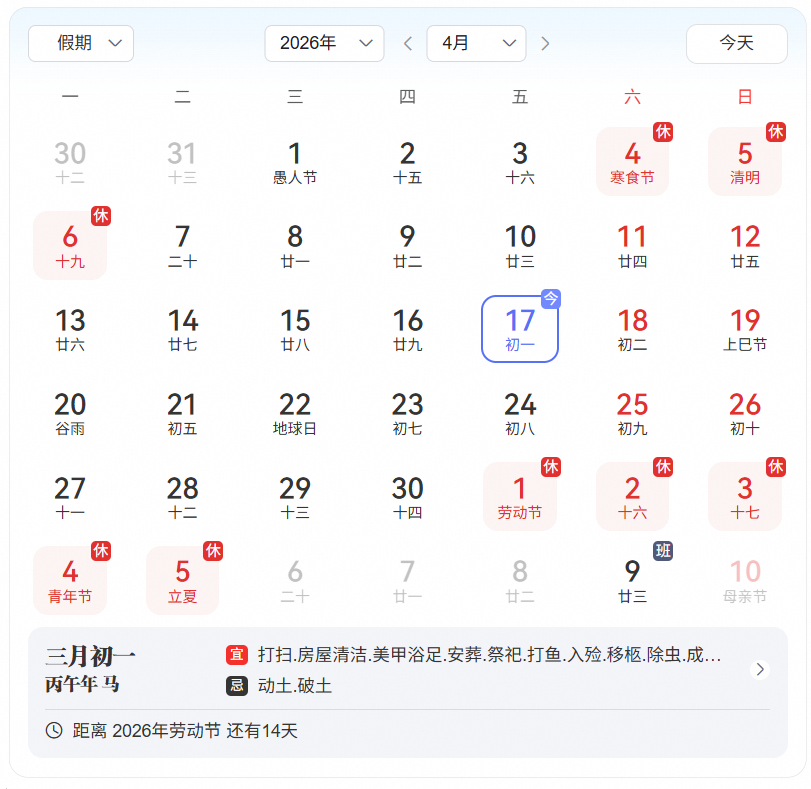
This topic uses the example of selecting a specific year, month, and day from a calendar widget.
Note
Alternatively, you can use the dynamic control capturing method to achieve the same result.
Code-based development
Use the execute_js function to select the specified year, month, and day.
from rpa.core import *
from rpa.utils import *
import rpa4 as rpa # Use the V4 engine

def start():
    # Start writing your application here
    # Set a specific date
    date = '2022-9-22'
    # JS script
    js_code = """
    function data(params){
    var years = params.split('-')[0];
    var month = params.split('-')[1];
    var day = params.split('-')[2];

    var date_doc = document.getElementsByClassName('cosc-card-content-border cosc-card-shadow cosc-card-light-bg-border')[0];
    setTimeout(function(){
       console.log('Start selecting the year');
        var year = date_doc.getElementsByClassName('cos-cascader')[0].getElementsByTagName('div')[0].getElementsByTagName('span')[0].innerText.split('年')[0];
        if(year != years){

			date_doc.getElementsByClassName('cos-cascader')[0].getElementsByTagName('i')[0].click();
            setTimeout(function() {
				years_list=date_doc.getElementsByClassName('cos-cascader')[0].getElementsByClassName('cos-cascader-options')[0].getElementsByClassName('cos-cascader-option-text');
				for(var i = 0;i < years_list.length;i++){
					year = years_list[i].innerText.split('年')[0];
					if(year == years){
						years_list[i].click();
						console.log('Year selected');

					}
				}
			}, 1000);


        }
		setTimeout(function() {
		    console.log('Start selecting the month');
	        month_part = date_doc.getElementsByClassName('header-block-2_38JLk cu-ml-sm-lg')[0].getElementsByClassName('cos-cascader-entry')[0].getElementsByTagName('span')[0].innerText.split('月')[0];
	        if(month_part != month){
				date_doc.getElementsByClassName('header-block-2_38JLk cu-ml-sm-lg')[0].getElementsByClassName('cos-cascader-entry')[0].getElementsByTagName('i')[0].click();
				setTimeout(function() {
					month_list = date_doc.getElementsByClassName('header-block-2_38JLk cu-ml-sm-lg')[0].getElementsByClassName('cos-popover cos-cascader-panel')[0].getElementsByClassName('cos-cascader-options')[0].getElementsByClassName('cos-cascader-option-text');
					for(var i = 0;i < month_list.length;i++){
						month_part = month_list[i].innerText.split('月')[0];
						if(month_part == month){
							month_list[i].click();
							console.log('Month selected');
						}
					}
				}, 500);

	        }
		}, 2000);

		setTimeout(function() {
		    console.log('Start selecting the day');
	        var lists = document.getElementsByClassName('_page-list_shkz3_132 page-list_6fhk3')[0].getElementsByClassName('_light_1so0w_1')[0].getElementsByClassName('content_1Jdsr')[0].getElementsByClassName('cos-row')[0].getElementsByClassName('cos-col');
	        for(var i = 0;i < lists.length;i++){
	            class_name = lists[i].className;
				var reg = RegExp('opacity')
				if(reg.test(class_name) != true){
					date = lists[i].getElementsByClassName('number_7sHfk')[0].innerText;
					if(date == day){
						lists[i].getElementsByClassName('number_7sHfk')[0].click();
						console.log('Day selected');
					}


			}


	        }
		}, 3000);

    },1000)

    return('Date selection is complete')
};
// Call the JS function
result = data('%s');
return result;
                """%date

    page = rpa.app.chrome.create('https://www.baidu.com/s?wd=%E6%97%A5%E5%8E%86')
    sleep(3)
    # Execute the JS script by using the execute_js function
    result = page.execute_js(js_code)
    print(result)
Visual development
Use the execute JS component to select the specified year, month, and day.
The visual project is shown below:
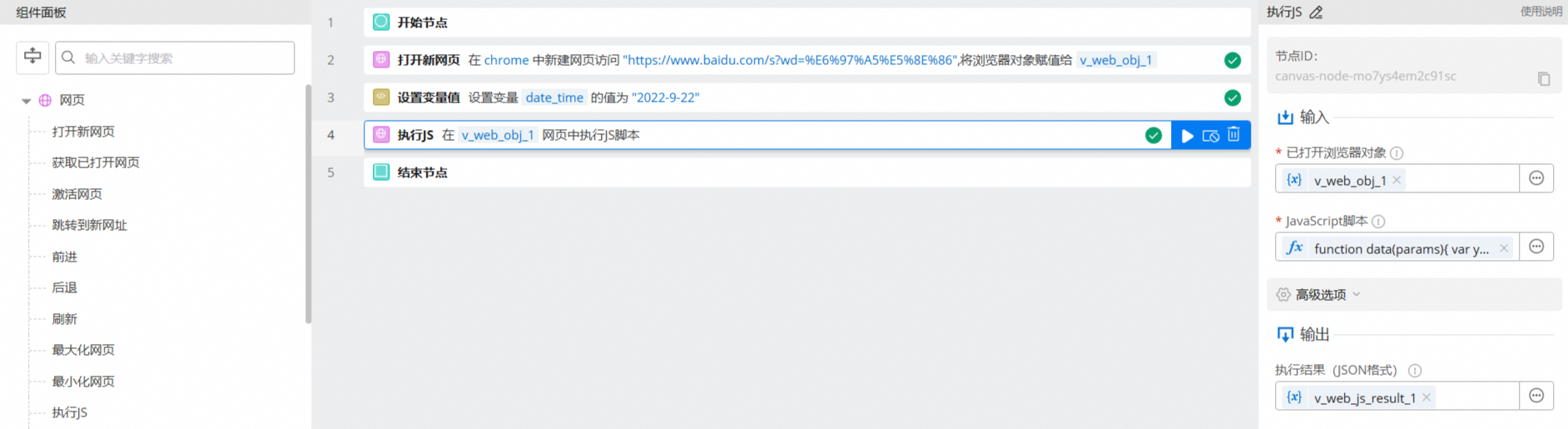
The execute JS component uses the following code:
function data(params){
    var years = params.split('-')[0];
    var month = params.split('-')[1];
    var day = params.split('-')[2];

    var date_doc = document.getElementsByClassName('cosc-card-content-border cosc-card-shadow cosc-card-light-bg-border')[0];
    setTimeout(function(){
       console.log('Start selecting the year');
        var year = date_doc.getElementsByClassName('cos-cascader')[0].getElementsByTagName('div')[0].getElementsByTagName('span')[0].innerText.split('年')[0];
        if(year != years){

			date_doc.getElementsByClassName('cos-cascader')[0].getElementsByTagName('i')[0].click();
            setTimeout(function() {
				years_list=date_doc.getElementsByClassName('cos-cascader')[0].getElementsByClassName('cos-cascader-options')[0].getElementsByClassName('cos-cascader-option-text');
				for(var i = 0;i < years_list.length;i++){
					year = years_list[i].innerText.split('年')[0];
					if(year == years){
						years_list[i].click();
						console.log('Year selected');

					}
				}
			}, 1000);


        }
		setTimeout(function() {
		    console.log('Start selecting the month');
	        month_part = date_doc.getElementsByClassName('header-block-2_38JLk cu-ml-sm-lg')[0].getElementsByClassName('cos-cascader-entry')[0].getElementsByTagName('span')[0].innerText.split('月')[0];
	        if(month_part != month){
				date_doc.getElementsByClassName('header-block-2_38JLk cu-ml-sm-lg')[0].getElementsByClassName('cos-cascader-entry')[0].getElementsByTagName('i')[0].click();
				setTimeout(function() {
					month_list = date_doc.getElementsByClassName('header-block-2_38JLk cu-ml-sm-lg')[0].getElementsByClassName('cos-popover cos-cascader-panel')[0].getElementsByClassName('cos-cascader-options')[0].getElementsByClassName('cos-cascader-option-text');
					for(var i = 0;i < month_list.length;i++){
						month_part = month_list[i].innerText.split('月')[0];
						if(month_part == month){
							month_list[i].click();
							console.log('Month selected');
						}
					}
				}, 500);

	        }
		}, 2000);

		setTimeout(function() {
		    console.log('Start selecting the day');
	        var lists = document.getElementsByClassName('_page-list_shkz3_132 page-list_6fhk3')[0].getElementsByClassName('_light_1so0w_1')[0].getElementsByClassName('content_1Jdsr')[0].getElementsByClassName('cos-row')[0].getElementsByClassName('cos-col');
	        for(var i = 0;i < lists.length;i++){
	            class_name = lists[i].className;
				var reg = RegExp('opacity')
				if(reg.test(class_name) != true){
					date = lists[i].getElementsByClassName('number_7sHfk')[0].innerText;
					if(date == day){
						lists[i].getElementsByClassName('number_7sHfk')[0].click();
						console.log('Day selected');
					}


			}


	        }
		}, 3000);

    },1000)

    return('Date selection is complete')
};
result = data("''' + date_time + '''");
return result;
该文章对您有帮助吗?