Invoice FAQ
If you have questions about requesting or using invoices, refer to the following common issues and recommendations.
Invoice content and rules
Issuing companies, content, and tax rates for Alibaba Cloud invoices
The official Alibaba Cloud website sells many products, and different products may be sold by different companies. The issuing company is the same as the selling company. The following table lists the selling companies, invoice content, and tax rates for major products on the official Alibaba Cloud website. The actual invoice content is subject to what is displayed on the invoicing page.
The official Alibaba Cloud website (www.aliyun.com) offers various cloud products and services. To simplify customer payments, Alibaba Cloud uses an exclusive account provided by Alibaba Cloud Computing Co., Ltd. to collect payments on behalf of the following affiliated companies. If you find that the invoicing entity is inconsistent with the payment-receiving entity, you can download the following affiliated company proof documents to assist with financial work such as reimbursement.
For digital electronic special invoices (electronic invoices (special VAT invoices)), the buyer and seller information shows only the enterprise name and the unified social credit code/taxpayer identification number. Address, phone, bank, and bank account details are no longer shown. This is the standard format for digital electronic invoices and is normal.
|
Selling company |
Applicable products |
Invoice content |
Tax rate |
Header information |
|
Alibaba Cloud Computing Co., Ltd. |
Alibaba Cloud University, ACP Exam Certification |
Life and production services*Training service fee |
6% |
Header: Alibaba Cloud Computing Co., Ltd. Tax ID: 91330106673959654P |
|
WUYING Terminal |
Electronic computer*hardware |
13% |
||
|
Other Alibaba Cloud products not listed above |
Life and production services*Software service fee, Life and production services*Technical service fee |
6% |
||
|
Alibaba Cloud Computing (Beijing) Co., Ltd. |
Cloud communication products |
Life and production services*Technical service fee |
6% |
Header: Alibaba Cloud Computing (Beijing) Co., Ltd. Tax ID: 91110108769914581E |
|
Cloud communication products (Short Message Service) |
SMS and MMS services*SMS service fee |
9% |
||
|
Tongyi Yunqi (Hangzhou) Information Technology Co., Ltd. |
Generative artificial intelligence products (such as Model Studio), deep synthesis services |
Life and production services*Software service fee |
6% |
Header: Tongyi Yunqi (Hangzhou) Information Technology Co., Ltd. Tax ID: 91330106MA2CFLDG4R |
|
Zhiyu Internet Technology Co., Ltd. |
Software copyright registration, trademark registration-related products, smart logo design, Alibaba Cloud Qualification Manager, and domain name trading |
Life and production services*Agency service fee, Life and production services*Trademark agency service fee, Life and production services*Trademark registration agency service fee, Life and production services*Intellectual property service fee, Life and production services*Design service fee, Life and production services*Software service fee, etc. |
6% |
Header: Zhiyu Internet Technology Co., Ltd. Tax ID: 91110105MA01NFRX6N |
|
Bainian Yunqi (Shanghai) Network Technology Co., Ltd. |
CDN, PCDN, Secure Content Delivery Network (SCDN), and related technology and network support services |
Life and production services*Software service fee |
6% |
Header: Bainian Yunqi (Shanghai) Network Technology Co., Ltd. Tax ID: 91310116MA1JF3LT7T |
|
Alibaba Cloud Intelligent Technology (Jiangsu) Co., Ltd. |
DingTalk smart hardware, smart payment speakers, WUYING Terminals, etc. |
Computer peripherals*DingTalk smart hardware, Electronic computer*hardware |
13% |
Header: Alibaba Cloud Intelligent Technology (Jiangsu) Co., Ltd. Tax ID: 91320105MACQCC5K6Y |
|
Alibaba Cloud Marketplace self-operated services (orders placed on or after September 1, 2023) |
Life and production services*Software service fee, Life and production services*Technical service fee, Life and production services*Advertising service fee, etc. |
6% |
||
|
Alibaba East China Co., Ltd. |
Alibaba Cloud Marketplace self-operated services (existing orders placed before September 1, 2023) |
Life and production services*Software service fee, Life and production services*Technical service fee, Life and production services*Advertising service fee, etc. |
6% |
Header: Alibaba East China Co., Ltd. Tax ID: 91320105MA1R9GM220 |
|
Hangzhou Alibaba Cloud Intelligent Technology Co., Ltd. |
Enterprise Financial Cloud products |
Life and production services*Software service fee, Life and production services*Technical service fee, Life and production services*Advertising publishing fee |
6% |
Header: Hangzhou Alibaba Cloud Intelligent Technology Co., Ltd. Tax ID: 91330108MA27X5YE1Y |
|
Alibaba Cloud (Beijing) Technology Co., Ltd. |
Trademark agency |
Life and production services*Trademark agency service fee, Life and production services*Trademark registration agency service fee, etc. |
6% |
Header: Alibaba Cloud (Beijing) Technology Co., Ltd. Tax ID: 91110105783951338G |
What to do if the invoicing entity and receiving entity are inconsistent?
If you find that the invoicing entity is inconsistent with the payment-receiving entity, you can download the proof documents for Alibaba Cloud first-party products and for the affiliated companies of Alibaba Cloud third-party products. These documents assist with financial work such as reimbursement.
-
For Alibaba Cloud first-party products, the invoicing entity is inconsistent with the payment-receiving entity
The official Alibaba Cloud website (www.aliyun.com) offers various cloud products and services. To simplify customer payments, Alibaba Cloud uses an exclusive account provided by Alibaba Cloud Computing Co., Ltd. to collect payments on behalf of the following affiliated companies, and provides the following affiliated company proof documents.
No.
Affiliated company name
Affiliated company proof document download
1
Alibaba Cloud Computing (Beijing) Co., Ltd.
2
Hangzhou Alibaba Cloud Intelligent Technology Co., Ltd.
3
Alibaba Technology (Beijing) Co., Ltd.
4
Alibaba East China Co., Ltd.
5
Zhiyu Internet Technology Co., Ltd.
6
Alibaba Cloud Intelligent Technology (Jiangsu) Co., Ltd.
7
Tongyi Yunqi (Hangzhou) Information Technology Co., Ltd.
8
Bainian Yunqi (Shanghai) Network Technology Co., Ltd.
-
For Alibaba Cloud Marketplace third-party products or services, the invoicing entity is inconsistent with the payment-receiving entity
For products or services purchased from third-party service provider stores on Alibaba Cloud Marketplace (https://market.aliyun.com), the invoice is issued by the service provider. If you have questions about the invoicing entity, the payment-receiving entity, or other matters, submit a ticket to obtain an explanation letter.
No.
Alibaba Cloud Marketplace service provider name
Explanation letter download
1
China United Network Communications Co., Ltd. Hangzhou Branch
NoteYou can directly download and use the China Unicom Express Connect invoice explanation letter.
How do I get an invoice for a top-up prepayment?
Top-ups do not support direct invoicing. An invoice can only be issued for the actual amount you have consumed when purchasing cloud products or services.
How do I get an invoice for pay-as-you-go products?
After a pay-as-you-go product is activated, postpaid bills are generated based on actual resource consumption. The monthly bill for the previous month is generated after the 3rd of the following month. You can then request an invoice on the Invoice Management page. For details about the invoicing operation, see Issue an invoice.
Are there time or amount limits for invoice requests?
There is no time limit for invoice requests, but note that invoices cannot be issued normally after an account is canceled. Within the range of the actual consumption amount, there is no amount limit for invoice requests.
Electronic invoice sample
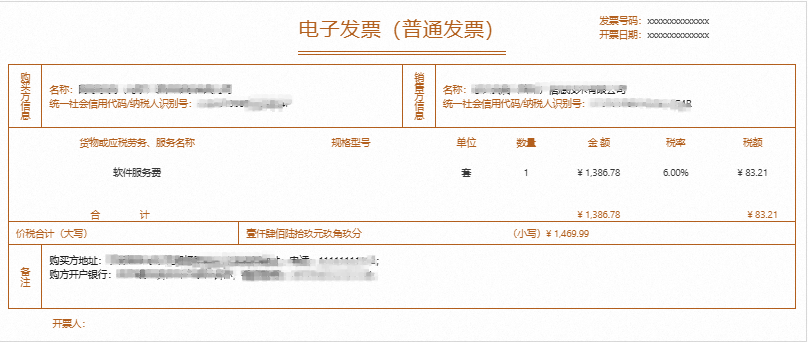
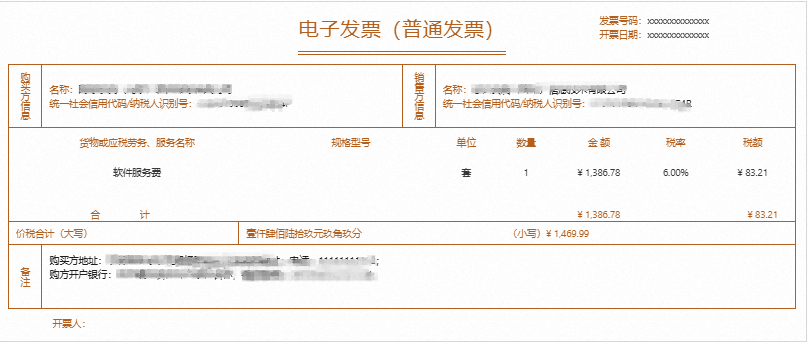
The official Alibaba Cloud website sells many products, and the issuing company, content, and tax rate vary by product. The following samples are previewed invoice information for reference only. The actual content is subject to the successfully issued invoice.
Electronic special invoice
Electronic plain invoice
Can the expense type (invoice content/tax item) be modified?
No. The expense type of an invoice (that is, the invoice content, such as "Information technology services*Software service fee") is automatically matched by the system based on the product or service you actually purchased. It cannot be changed to another type.
If you want the invoice to reflect specific cloud service information (such as the product name or instance ID), you can add a supplementary note in the Remarks field when you request the invoice.
How do I get a stamped expense statement?
If you need a reimbursement voucher with the dedicated Alibaba Cloud financial seal, go to Expenses and Costs (bills console) > Monthly Bill Overview, export the bill in PDF format, and use it together with the invoice.
What are the differences in default invoicing rules between personal and enterprise accounts?
|
Category |
Personal account |
Enterprise account |
|
Invoice header |
The header name is "Individual", which can be changed to the name used for identity verification |
The full enterprise name (the account's verified entity) |
|
Invoice type |
Only plain invoices are supported |
Plain invoices or special invoices can be requested |
|
Tax deduction |
Cannot be used for enterprise VAT deduction |
Special invoices can be used to deduct enterprise VAT input tax |
|
Tax ID requirement |
No tax ID |
Has an enterprise tax ID (unified social credit code) |
Can the invoice issue time be customized?
No. The invoice issue time is when the Alibaba Cloud system automatically completes issuance after you submit the request. It is subject to when Alibaba Cloud actually completes the issuance. You cannot specify or customize the issue date when requesting an invoice.
After my company name changes, how do I update the invoice header?
The invoice header stays consistent with the account's identity verification information. After your company name changes, perform the following steps in order:
First, complete the company name change for the account's identity verification. For the operation, see Change enterprise entity or update enterprise name.
After the identity verification change is complete, go to the Invoice Information page and click Update to Latest Identity Information to sync the new header.
If you have historical orders that have not been invoiced, they will be invoiced under the new header after the change. Already issued invoices are not affected.
Issuing invoices
How can a personal account issue an invoice with an enterprise header?
The invoice header is consistent with the account's identity verification information by default. If a personal account needs to issue an invoice with an enterprise header, one way is to change the account to enterprise identity verification (recommended, no special approval process required), and the other is to submit an application for manual review (to avoid compliance risks, this requires sufficient materials and strict approval). For details, see Issuing corporate-titled invoices from a personal account.
A personal account cannot issue invoices with two enterprise headers at the same time. Only one header can be in effect at a time.
How can a personal account issue an invoice with a university header?
If a personal account needs to issue an invoice with a university header, go to the Invoices > Invoice Information (Title) tab, click Request Corporate Invoice Title in the upper-right corner of the page, select Individual requesting Corporate Title, select the corresponding identity, and follow the page requirements to Select Application Type and Fill in Information. After the review is approved, you can issue invoices with the university header. For detailed operations and limits, see Manage invoice headers.
After changing a personal account to enterprise verification, can historical orders be invoiced under the new entity?
Yes. After the account's identity verification is changed from personal to enterprise, all historical paid orders can be invoiced under the new enterprise entity. For the identity verification change operation, see Change individual verification to enterprise verification.
Does applying for an enterprise header on a personal account affect the account's identity verification status?
Through the "personal applies for enterprise header" process, after you submit materials and the application is approved, only the invoicing permission with the corresponding enterprise as the header is enabled for the account. The account's own identity verification type remains personal and is not changed to enterprise verification.
The enterprise invoice header requested by my personal account has expired. How do I reapply?
After a personally verified account's enterprise invoice header application is approved, the header is valid for up to 365 days (an enterprise special invoice header is valid for up to 90 days). After the header expires, you need to submit a new application. You can handle this in one of the following two ways:
Method 1: Change to enterprise identity verification. Change the account's identity verification from personal to enterprise. After the change, you can directly issue invoices with the enterprise header. For the change operation, see Change individual verification to enterprise verification. Changing identity verification from personal to enterprise is irreversible.
Method 2: Resubmit the enterprise header application. On the Invoice Information page, resubmit the enterprise header application materials following the original process. The review cycle is 3 to 5 business days.
After changing my identity verification, how do I update the invoice header?
After the identity verification change is complete, go to the Invoice Information page and click Update to Latest Identity Information to the right of the current header. The system syncs the new identity information as the invoice header, and the original header automatically expires.
Can another Alibaba Cloud account issue an invoice on my behalf?
This depends on the specific account type:
Invoices for a personal account must be requested and issued by the original purchasing account. Cross-account invoicing is not supported.
For multiple accounts with the same enterprise identity verification, you can Enable the multi-account management service to establish a financial relationship between the primary and secondary accounts, and the primary account issues invoices for the secondary accounts in a unified manner. In this case, the invoice header is a valid header under the primary account.
For accounts with different enterprise identity verifications, invoicing on behalf of another account is not allowed.
In distribution payment-on-behalf scenarios, the invoice must be issued by the distribution partner.
Can one Alibaba Cloud account have multiple invoice headers?
An Alibaba Cloud account can have only one valid invoice header at a time, which is consistent with the account's identity verification entity by default. After a newly requested enterprise header is approved and takes effect, the original header automatically expires.
After you switch back to a personal header, the original enterprise header expires. To restore the enterprise header, you must resubmit the application materials. We recommend that you confirm whether there are still items to be invoiced under the original enterprise header before switching.
Can a single order or monthly bill be split into multiple invoices with specified amounts?
Yes. You can use the Invoice by Amount method to split the amount of the same order or bill across multiple invoices.
How do I handle scenarios such as unpaid orders, discrepancies between contract and invoice amounts, or unused top-ups?
Unpaid orders cannot be invoiced. Request an invoice after the payment succeeds. If you need a payment request voucher in advance, you can apply for an order contract.
A contract usually covers only subscription (prepaid) orders, while an invoice also covers postpaid bills. Because their coverage differs, the amounts may be inconsistent. To issue a contract for the postpaid portion, request an invoice separately based on the bill amount.
Amounts that have been topped up but not yet consumed cannot be invoiced. Request an invoice after actual consumption.
For refunded orders, only the actual consumption difference can be invoiced. Full invoicing based on the original payment amount is not supported.
When reissuing an invoice for a historical bill, is the date on the invoice the application date or the consumption date?
The issue date on the invoice is subject to when you actually submit the request and the invoice is successfully issued. It does not show the month or year to which the historical consumption belongs. For example, if a bill from January 2025 is reissued in July 2026, the invoice date shows July 2026.
To reflect the period to which the expenses belong, you can add a supplementary note in one of the following ways:
When requesting the invoice, enter "Expenses for [Month] [Year]" in the Remarks field (25 characters or fewer recommended).
Use the Invoice by Monthly Bill method and select the bill for the corresponding month, so that the invoice is associated with a specific billing period.
Why were six invoices issued for three invoicing entities?
If the selected consumption orders belong to different invoicing entities and correspond to different tax rates, they are further split into multiple invoices.
If information such as the invoice header, tax ID, bank name, bank account, registered address, or registered phone differs, the orders are split into multiple invoices.
Two Alibaba Cloud accounts each requested an invoice. How can they be combined into one?
Invoices for different Alibaba Cloud accounts cannot be combined into the same invoice. For details about the invoicing operation, see Issue an invoice.
How do I issue an invoice when my account is canceled, my identity verification has changed, or I have multiple accounts?
A canceled account cannot request an invoice. If you have historical orders that have not been invoiced, be sure to complete invoicing before canceling the account.
Identity verification change:
After the identity verification change is complete, go to the Invoice Information page and click Update to Latest Identity Information to sync the invoice header to the new entity.
If an invoice already issued under the original entity needs to be reversed or changed, you must first change the identity verification back to the original entity, or reissue the invoice under the new entity.
The same account can change its identity verification only once within 30 days. To issue invoices for multiple entities, you can change the verification in separate batches, or use different independent accounts to operate separately.
For enterprise multi-account scenarios:
Invoices cannot be issued across accounts or transferred. Even if multiple accounts are bound to the same phone number, you must request invoices separately in each account.
An enterprise MA administrator can set up automatic invoicing for multiple associated accounts, but consumption from different accounts cannot be combined into a single invoice.
The invoice header depends only on the account's identity verification entity, not on the payment method. Using a personal Alipay account to pay for an enterprise-verified account does not affect issuing an invoice with an enterprise header.
How do I grant a RAM user permission only to request invoices?
Currently, RAM users do not support a separate invoice permission.
What are the differences between invoicing by order details, by monthly bill, and by amount?
Alibaba Cloud provides multiple invoicing methods for different scenarios:
|
Invoicing method |
Description |
|
Invoice by order details |
Issues an invoice based on the actual paid amount of a single order (after a pay-as-you-go product is billed, its orders are also aggregated into one entry by billing period). This method is suitable for scenarios that require item-by-item reconciliation. |
|
Invoice by monthly bill |
Summarizes by month and issues invoices in a unified manner after the bill is generated at the end of the month. You must apply after the bill is generated on the 3rd of the following month. This method is suitable for unified monthly reimbursement. |
|
Invoice by amount |
Enter a specified amount and freely select the items to invoice from the invoiceable consumption details list. The remaining uninvoiced amount of a single detail entry can continue to be invoiced later. |
Do the invoice header and the payment account need to be consistent?
The invoice header is determined by the Alibaba Cloud account's identity verification information, not by the payment method or payment account. Even if you use a personal bank card to pay for an enterprise-verified Alibaba Cloud account, the invoice header is still the account's identity verification entity.
Does requesting an invoice affect cash withdrawal?
No. An invoice is issued based on the amount you have actually consumed. The request operation itself does not consume your account balance and does not affect your withdrawable amount.
Relationship between outstanding invoices and withdrawal
If an outstanding invoice amount is generated by operations such as unsubscription or downgrade, that amount is frozen by the system and cannot be withdrawn until the outstanding invoice is resolved. To withdraw the frozen amount, you must first clear the outstanding invoice in one of the following ways:
Wait for new consumption to be generated, which automatically offsets the outstanding invoice.
Apply to return (red-letter offset) a previously issued invoice, and reissue the invoice after the invoiceable amount is restored.
After the outstanding invoice is resolved, the corresponding amount can be withdrawn again.
Why is there no invoiceable amount shown on the invoicing page for pay-as-you-go products?
Pay-as-you-go (postpaid) products are billed monthly. An invoiceable bill is generated only after the 3rd of the following month. If you used a pay-as-you-go product in the current month, request the invoice after the 3rd of the following month.
When invoicing, select the Invoice by Monthly Bill method. If you use Invoice by Order Details to search, you may not see the bill details for pay-as-you-go products. For the differences among the three invoicing methods, see What are the differences between invoicing by order details, by monthly bill, and by amount?.
Why is the invoiceable amount zero or inconsistent with the top-up amount?
An invoiceable amount of zero or an amount that differs from what you expect is usually caused by the following reasons:
Top-up amounts cannot be invoiced: Invoices are issued only for actual consumption (that is, paid orders or generated postpaid bills). Account balance, credit line, and unconsumed top-up funds cannot be invoiced.
Postpaid bills have a time limit: The current month's postpaid bill can be invoiced only after it is generated on the 3rd of the following month. If you query in the current month, the invoiceable amount does not include the current month's consumption that has not yet been billed.
Outstanding invoice offset reduces the amount: If a refund on a historical order generates an outstanding invoice, your new consumption amount is first used to offset the outstanding invoice, which reduces the invoiceable amount or even makes it negative. Resolve the outstanding invoice first to restore the normal invoiceable amount.
Amount discrepancy troubleshooting: The invoice amount is based on actual consumption rather than payment transactions, so it may differ from a single payment amount due to refunds, downgrades, merging of multiple orders, or cross-month bills. To reconcile, go to the Download and return invoices page to view historical invoicing records and the associated order details.
Modifying invoice information
Why can't I directly add or modify the header?
The invoice header is automatically generated by the system based on the account's identity verification information. Manually adding or freely modifying it is not supported. To change the invoice header, first change the account's identity verification information. After the change is complete, click Update to Latest Identity Information on the Invoice Information page.
How to issue an invoice after my company's business license name has changed?
If your company's business license name has changed, you must first update the account verification information, and then update the header to the latest identity information before issuing an invoice. You can perform this operation on the Invoice Information (Title) page. For more operations, see Manage invoice headers.
How do I change an electronic plain invoice to an electronic special invoice?
The type of an already issued invoice cannot be modified. You need to return the invoice and then reissue it.
Can the issue date of an already issued invoice be changed?
No, it cannot be changed directly. The issue date of an already issued invoice is the actual system issuance time, and re-downloading it does not change the issue date. To get an invoice with a new date, you must first return the invoice and then reapply.
How do I issue an invoice if the header is inconsistent with the identity verification entity?
You can modify the invoice header to be consistent with the identity verification entity. For the related operations, see Manage invoice headers.
Can an issued invoice be split, merged, or have its invoicing entity changed?
An already issued invoice cannot be directly split or merged. To adjust it, first apply for a full return of the original invoice. After the return (red-letter offset) is complete, go to the Issue an invoice page, reselect and combine the orders or bill details, and apply to issue a new invoice.
The invoicing entity is determined by the product or service provider and cannot be changed arbitrarily.
To replace an already issued personal-header invoice with an enterprise or school header, first apply to return the invoice, then complete the invoice header change application, and reapply for issuance after the approval passes.
Must the invoice header be consistent with the identity verification entity, the payer, or the domain registrant?
The invoice header must be consistent with the Alibaba Cloud account's identity verification entity. If the domain registration entity, ICP filing entity, or contract sealing entity differs from the account's identity verification entity, invoicing directly under that entity's information is not supported. You must first complete the change of the account's identity verification.
Invoicing does not require the payer to be consistent with the invoice header. The signing status of a third-party payment-on-behalf agreement does not affect invoicing. The invoice header is determined by the account's identity verification information.
The parentheses in the invoice header must exactly match the parenthesis format (full-width or half-width) in the identity verification information. Otherwise, the tax system may fail to recognize it, which affects the use of the invoice.
What should I do if updating or adding an invoice header fails or returns an error?
If updating or adding an invoice header fails or returns an error, troubleshoot the following common causes one by one:
There are unresolved issued invoices: The system may be unable to update the header because there are invoice records that have been issued but not yet returned. First apply to return the relevant invoices on the Download and return invoices page to release the amount, and then update the header.
The header information is inconsistent with the identity verification: Adding a new header usually fails because the entered header name or tax ID does not match the identity verification information. First complete the account's identity verification change, or, on the Invoice Information page, click Update to Latest Identity Information to sync the header to the current identity information.
Mobile operation limits: On mobile, buttons may be grayed out and unclickable, or content may not display fully. We recommend that you use the Chrome or Edge browser on a computer instead.
Registered address and phone fields exceed the limit: The registered address and phone together cannot exceed 100 bytes. If the content is too long, shorten it appropriately.
How do I add the seller's bank information or payment reference when invoicing?
To display the seller's bank information on the invoice, enter the relevant information in the Remarks field of the invoicing application when you reapply for an invoice after a return.
Returning and downloading invoices
How long does it typically take to issue an electronic invoice after a request is submitted?
After you submit a request, view your requested electronic invoice on the Invoice Download and Return page.
Generally, an electronic invoice is sent to your email within 1 business day.
For invoices of Alibaba Cloud Marketplace third-party products, invoicing is generally completed within 7 business days. Contact the Alibaba Cloud Marketplace service provider for details.
Where can I find and download my issued invoices? How do I confirm whether an order has been invoiced?
For issued invoices, go to the Download and return invoices page and search by conditions such as invoice number, order number, or issue time.
Notes
Avoid duplicate invoicing: An order cannot be requested again after it has been invoiced. If you cannot find an order in the pending invoice list, first confirm on the Invoice Download and Return page whether the order has already been invoiced.
Associated query: In the invoice details, you can view the order details associated with the invoice.
Long-term validity: Electronic invoices do not expire, and there is no application time limit for uninvoiced historical orders and bills.
How are invoices delivered?
You can obtain an issued invoice by email or by manual download.
Enter the Default Invoice Receiving Email on the Invoice Information (Header) page. After the invoice is issued, it is automatically sent to the email you set.
Alternatively, after invoicing is complete, download the electronic invoice with the Invoiced status on the Invoice Download and Return page.
The email address for my electronic invoice is incorrect. What should I do?
If you have already issued the invoice, you can re-download it on the Invoice Download and Return page. For the related operations, see 4. View and download invoices.
To change the email address, see Manage invoice headers.
What does the ApplyInvoice API return when I request an invoice through it?
After you call the ApplyInvoice operation to submit an invoicing request, the operation returns only the acceptance status and does not directly return the invoice file.
Ways to get the electronic invoice file
Receive by email: After the invoice is issued, the system sends it to the invoice receiving email bound to your account.
Download from the console: Log on to the Alibaba Cloud console and go to the Download and return invoices page to download it.
Programmatic retrieval: To retrieve it automatically in code, use query APIs such as
QueryInvoiceInfoto poll the invoicing status. When the status changes to "Invoiced", get the invoice file download link from the returned result.
What should I do if I can't download an invoice, didn't receive it by email, or encounter console errors?
Download failure
Clear the browser cache and try again, switch to the Chrome browser, or use incognito (private) mode.
Check whether the browser has enabled cookies and local storage permissions.
Alternative retrieval methods
Use the Alibaba Cloud app to send the invoice to a custom email address, and then download it from the mailbox.
Check the spam or subscriptions folder of the receiving mailbox to avoid missing it.
Page errors
Refresh the page or switch the network environment and try again. We recommend that you use a computer.
If the page shows "Invalid parameter", the invoice header may still be under review. Wait until the review is approved and try again.
Batch download limit
Batch export of invoiced records is not currently supported. Download them one by one.
Methods to verify invoice authenticity
You can verify the invoice at your local State Taxation Administration. An invoice's authenticity can be confirmed through deduction certification. You can also call the local 12366 hotline to confirm invoice authenticity.
Visit the Zhejiang Provincial State Taxation Administration website and click Query - Public Services - Invoice Query. Or visit the National VAT Invoice Verification Platform to verify the invoice.
Alibaba Cloud Computing Co., Ltd. has fully switched to issuing digital electronic invoices (Alibaba Cloud's transition to digital e-invoices). A digital electronic invoice simplifies the original invoice code (10 digits) plus invoice number (8 digits) of a tax-controlled invoice into a single invoice number (20 digits). Enter the relevant information based on the invoice actually issued.
What should I do if I find an error in the invoice information and need to reissue it?
|
Invoice type |
Scenario |
Solution |
|
Digital electronic plain invoice |
The invoice is being issued |
An electronic invoice is generally issued successfully within 3 to 5 minutes after the request is submitted. If the invoice status is Issuing, on the Invoice Download and Return page, click Cancel in the Actions column to cancel the invoicing. |
|
The invoice has been issued successfully |
Apply to return the invoice on the Invoice Download and Return page. |
|
|
Digital electronic special invoice |
The invoice is being issued |
An electronic invoice is generally issued successfully within 3 to 5 minutes after the request is submitted. If the invoice status is Issuing, on the Invoice Download and Return page, click Cancel in the Actions column to cancel the invoicing. |
|
The invoice has been issued successfully but not accounted or deducted |
Apply to return the invoice on the Invoice Download and Return page. |
|
|
The invoice has been issued successfully and already accounted or deducted. |
You need to issue a red-letter confirmation form at the electronic tax bureau. After the confirmation form is issued, apply to return the invoice on the Invoice Download and Return page, enter the 20-digit red-letter confirmation form number, and state the return reason. Alibaba Cloud completes the return within 3 business days. |
How do I find the invoice number?
When returning an invoice, an accounted digital electronic special invoice requires the original blue-letter invoice number in the remarks. On the Invoice Download and Return page, click Details in the Actions column, and view the Invoice Number on the Invoicing Record Details page.
When can I request a new electronic invoice after a return?
After you submit an electronic invoice return request, the tax authority processes the red-letter offset of the electronic invoice. Monitor the invoice status on the Invoice Download and Return page. After the red-letter offset of the electronic invoice is complete, you can resubmit the invoicing request. For details about the invoicing operation, see Issue an invoice.
Do I need to mail a physical rejection certificate when returning an electronic invoice?
No. When you submit an online return request, you need to note the return reason in the remarks. You do not need to mail a physical rejection certificate.
What is a red-letter invoice? How does it differ from a regular invoice?
A red-letter invoice (also called a red invoice or negative invoice) is a voucher used to offset an already issued positive invoice (blue-letter invoice). Its main features are:
The amount is negative and is used to offset the amount of the original positive invoice.
It must be used in association with the original positive invoice (blue-letter invoice) and cannot be accounted separately as a reimbursement voucher.
It is usually generated for refunds, returns, or when invoice information is incorrect and the invoice must be voided and reissued.
After your return (red-letter offset) request succeeds, the original invoice is offset and the system generates a corresponding red-letter invoice. You can then reapply to issue a new positive invoice.
When issuing a red-letter invoice for a digital electronic special invoice, what is the difference in handling for accounted and unaccounted invoices?
The return (red-letter offset) operation for a digital electronic special invoice differs depending on whether the invoice has been accounted or deducted:
Not accounted/not deducted: Simply apply to return the invoice directly on the Invoice Download and Return page. No additional operation is required.
Accounted/deducted: You must first issue a red-letter confirmation form at the electronic tax bureau. After it is complete, apply to return the invoice on the Invoice Download and Return page, and enter the 20-digit red-letter confirmation form number and the return reason. Alibaba Cloud completes the return within 3 business days.
A digital electronic plain invoice does not need to distinguish the accounting status. Simply apply to return it online.
How do I get the red-letter invoice confirmation form number?
The red-letter invoice information confirmation form (20-digit number) is initiated by the finance staff of the purchaser (user) at the electronic tax bureau. The steps are as follows:
The company's finance staff logs on to the local electronic tax bureau.
Go to the Invoice Usage > Red-Letter Information Confirmation Form module, enter the relevant invoice information, and submit the application.
After the tax authority approves the application, the system automatically generates a 20-digit red-letter confirmation form number.
Provide the number to Alibaba Cloud and enter it in the corresponding field when you apply to return the invoice on the Download and return invoices page.
Can Alibaba Cloud unilaterally void an issued invoice?
According to national tax regulations, Alibaba Cloud cannot unilaterally void an invoice that has been issued and delivered, nor can it directly issue a red-letter invoice (negative invoice) to offset it. The specific handling depends on the invoice status:
If the invoice has been accounted or deducted: The finance staff of the purchaser (user) must submit a Red-Letter Invoice Information Confirmation Form at the electronic tax bureau. After obtaining the 20-digit confirmation form number, submit the return request on the Download and return invoices page.
If the invoice is confirmed to be not accounted and not deducted: You can apply to return the invoice directly on the Download and return invoices page in the console, and submit it with the "Not accounted/Not deducted" status. Alibaba Cloud completes the return (red-letter offset) within 3 business days.
Handling outstanding invoices
What is an outstanding invoice?
An outstanding invoice refers to a case where an order or bill that has been invoiced is unsubscribed or downgraded, generating a refund, so that the actual consumption amount is less than the original invoiced amount. For example:
The user's original order was paid at CNY 1,200, and a full digital electronic special invoice of CNY 1,200 was issued.
The user unsubscribed midway, generating a refund of CNY 200, so the actual consumption amount becomes CNY 1,000.
At this point, the actual consumption amount of CNY 1,000 < the invoiced amount of CNY 1,200, generating an outstanding invoice of CNY 200.
How do I reissue an invoice when there is an outstanding invoice?
The system prompt "Cannot submit because there is an outstanding invoice" may appear because operations such as refunds or downgrades on your account have generated an outstanding invoice.
If you had already requested an invoice before the refund or downgrade, you can return the invoice and reapply, or use the new consumption amount to offset the outstanding invoice before requesting an invoice.
If you had not requested an invoice before the refund or downgrade, you can select the consumed orders on the Issue Invoice page to offset the outstanding invoice amount, and then request an invoice.
When there is an outstanding invoice, can I skip the offset and directly issue a full invoice for the current order?
No, you cannot skip the outstanding invoice offset. To meet tax compliance requirements, the system automatically associates all invoicing records under the same entity and, when you request an invoice, first uses the current invoiceable amount to offset the outstanding invoice. This logic cannot be manually bypassed.
To issue a full invoice, you must first clear the outstanding invoice status. You can handle it in one of the following ways:
Wait for new consumption to be generated, which automatically offsets the outstanding invoice with the new consumption amount.
Apply to return (red-letter offset) a previously issued invoice, and reissue the invoice after the invoiceable amount is restored through the red-letter offset.
What should I do if an outstanding invoice causes a refund to not return to the original payment method or prevents cash withdrawal?
When the refund amount is greater than the current invoiceable amount, the system refunds the funds to your Alibaba Cloud account balance instead of the original payment account. Handle it with the following solutions:
Withdraw after resolving the outstanding invoice: Apply to return (red-letter offset) historical invoices to restore the withdrawable amount, and then apply for withdrawal after the outstanding invoice is resolved.
Apply to withdraw directly to a designated bank account: If you cannot resolve the outstanding invoice immediately, go to the Expenses and Costs > Fund Management > Withdraw page, select "Exceeds the original payment method return time limit" or another applicable scenario, submit the relevant materials, and apply to withdraw the balance to a designated account.
Invoicing for specific products
SMS Service invoice tax rate adjustment
According to the VAT policy adjustment of the State Taxation Administration, starting from January 1, 2026, the VAT rate applicable to SMS products (Short Message Service) is adjusted from 6% to 9%. Alibaba Cloud has updated its invoicing system accordingly.
Which company issues invoices for Model Studio products?
The invoicing entity for Model Studio (including generative AI products such as Tongyi Qianwen) is Tongyi Yunqi (Hangzhou) Information Technology Co., Ltd.
Can I get an invoice for a purchased domain name?
For a successfully purchased domain name, you can view the domain name transaction type on the My Purchased Domain Names page and refer to the following table to request an invoice.
|
Domain name transaction type |
Invoice issuance |
Product console |
|
Domain name push with price |
Not supported |
The Domain console corresponds to domain name push. |
|
Other domain name transaction types |
Supported |
For transaction types other than domain name push with price, you can request an invoice on the Expenses and Costs consoleInvoice Management page. |
If invoicing is supported, refer to the following steps:
On the My Orders page, click Enterprise Service Product Orders, find the order number of the domain name you purchased, and copy the order number.
On the Issue Invoice page, select Invoice by Order Details, search by order number, select the order you purchased, and confirm the invoicing amount and invoice information to issue the invoice.
After transferring domain name ownership, which account is used to issue invoices for historical orders?
Transferring domain name ownership (transferring the registrant) does not change the ownership of historical orders. The invoice issuance rules are as follows:
Purchase/renewal orders before the transfer: The invoice can only be requested and issued by the original purchasing account, regardless of the current domain name registrant.
New renewal orders after the transfer: The invoice is requested and issued under the new registrant's account.
For a domain name purchased by an individual, an enterprise header verified for the domain name cannot be issued by default.
Which company issues the invoice for the "Wanjing Yike" service?
The invoice for the "Wanjing Yike" service is issued by Zhejiang Queniu Network Technology Co., Ltd.
Zhejiang Queniu Network Technology Co., Ltd. specializes in providing invoicing services for generative AI (artificial intelligence) products such as "Wanjing". If you need a proof document, you can click to download.
How do I get an invoice for third-party products from Alibaba Cloud Marketplace, and how do I check the progress?
Invoices for Alibaba Cloud Marketplace third-party products (not self-operated by Alibaba Cloud) are issued by the corresponding service provider, not directly by Alibaba Cloud. Invoicing is generally completed within 7 business days. The invoicing process is as follows:
Log on to the Expenses and Costs console and submit an invoicing request on the invoice-related page.
After submission, the corresponding third-party service provider issues the invoice.
To learn about the invoicing progress, contact the corresponding service provider.
To check the invoicing progress, log on to the Alibaba Cloud Marketplace console, go to the My Services page, find the corresponding order, and click Contact Us to contact the service provider directly to inquire about the progress or request expedited handling.