Migrate data from an RDS PostgreSQL instance to an OceanBase database Oracle tenant
This topic describes how to use Data Transmission Service to migrate data from an RDS PostgreSQL instance to an OceanBase database Oracle tenant.
If a data migration task remains inactive for an extended period (with a status of Failed, Paused, or Completed), it may not be resumable due to factors such as the retention period of incremental logs. To reclaim resources, Data Transmission Service releases data migration tasks that have been inactive for more than three days. We recommend that you configure alerts for your tasks and handle any exceptions promptly.
Prerequisites
The Data Transmission Service has the required permissions to access cloud resources. For more information, see Authorize Data Transmission Service to access cloud resources.
A privileged account for the data migration task has been created for the source RDS PostgreSQL instance. For more information, see PostgreSQL data source.
A database user for the data migration task has been created for the destination OceanBase database Oracle tenant, and the required permissions have been granted to the user. For more information, see Create a database user.
To perform incremental synchronization, you must complete the following operations:
During incremental synchronization, Data Transmission Service does not support automatic synchronization of Data Definition Language (DDL) statements. To perform DDL operations on a table to be migrated, you must first manually execute the DDL statement on the destination, and then execute it on the source RDS PostgreSQL instance.
To ensure that incremental Data Manipulation Language (DML) statements can be correctly parsed after DDL statements are executed, you must create a corresponding trigger and a table to record the DDL statements. For more information, see Create a trigger.
If you select incremental synchronization, you must set the
wal_levelparameter to logical. For more information, see Modify the log level of an RDS PostgreSQL instance.
Limits
Source database operation limits
Do not perform DDL operations that change the database or table structure during schema migration and full migration. Otherwise, the data migration task may be interrupted.
RDS PostgreSQL instances of versions 11.x and 12.x are supported.
Data Transmission Service does not support migrating partitioned tables, unlogged tables, or temporary tables from RDS PostgreSQL instances.
If the destination is a database, Data Transmission Service does not support triggers on the destination. The data migration may fail if triggers exist.
Data Transmission Service only supports migrating objects whose database, table, and column names contain only ASCII characters and do not contain special characters. Special characters include line breaks, spaces, and the following: .|"'`()=;/&\.
Incremental synchronization can only be performed from the primary database.
Notes
If you select incremental synchronization, the following requirements apply to the table-level replication identity
REPLICA IDENTITY:If you select migration objects using Specify Objects, the specified tables must have a primary key or have their table-level replication identity
REPLICA IDENTITYset to FULL. Otherwise, UPDATE and DELETE operations on business data will fail.If you select migration objects using Matching Rules, the RDS PostgreSQL instance must subscribe to all tables in the selected database. This requirement applies to all tables, including those that are selected, unselected, or newly added. Each table must have a primary key, or its table-level replication identity
REPLICA IDENTITYmust be set to FULL. Otherwise, UPDATE and DELETE operations on business data will fail.If the primary keys or unique keys of the source and destination are not fully aligned, the table-level replication identity
REPLICA IDENTITYof the corresponding tables must be set to FULL.The default mode of PostgreSQL does not return a complete before-image. To ensure data quality, Data Transmission Service processes the corresponding tables serially, which affects the efficiency of incremental synchronization. Therefore, you must set the table-level replication identity
REPLICA IDENTITYof all tables to FULL.
The following command sets the table-level replication identity
REPLICA IDENTITYto FULL.ImportantIf a row filtering condition is set for a migrated table object, you must enable the
FULLmode for the corresponding table.ALTER TABLE table_name REPLICA IDENTITY FULL;When you migrate data (schema migration or incremental DDL) from an RDS PostgreSQL instance to an OceanBase database Oracle tenant, table and field names are converted to uppercase based on the default policy of Data Transmission Service. For example, if the source table name is `a`, it is converted to `A` on the destination. You can use `a`, `A`, or `"A"` to refer to the table or field name, but you cannot use `"a"`.
The incremental component for RDS PostgreSQL instances automatically creates publications and slots, but you must monitor the disk usage of the log files for the RDS PostgreSQL instance. By default, Data Transmission Service updates the
confirmed_flush_lsnof a slot every 10 minutes to the LSN from 10 minutes ago. Therefore, each incremental component retains the log files of the RDS PostgreSQL instance for at least 10 minutes.NoteTo change the notification interval or the retention period for log files that can be cleared from the RDS PostgreSQL instance, contact the helpdesk.
During data migration, if log files of the RDS PostgreSQL instance cannot be cleared because of existing slots, you must completely delete the data migration task before clearing the logs of the RDS PostgreSQL instance. Whether the log files of the RDS PostgreSQL instance can be reclaimed depends on whether the earliest
slot restart_lsnamong all slots is within the range of the log files.If a table does not have a primary key or a unique key with a NOT NULL constraint on all columns, duplicate data may occur on the destination.
In a reverse incremental synchronization scenario for a table without a primary key, migrating data for UPDATE and DELETE operations using full column matching may cause the following issues.
Performance issues may occur.
Because there is no primary key index, each UPDATE and DELETE operation is performed after a full table scan.
Data inconsistency may occur.
RDS PostgreSQL does not support the LIMIT clause for UPDATE and DELETE operations. If multiple rows are matched during a full column match, more data might be updated or deleted than intended on the destination. For example, consider a table `t1` without a primary key that has two columns, `c1` and `c2`. The source contains two rows where `c1=1` and `c2=2`. If you delete one of these rows from the source, the matching condition is `where c1 = 1 and c2 = 2`. This causes both rows where `c1=1` and `c2=2` on the destination to be deleted, leading to data inconsistency between the source and destination.
When migrating a field of the tsvector type, if it involves reverse incremental synchronization to an RDS PostgreSQL instance, the data written to the corresponding field in the OceanBase database must conform to the tsvector format. For example:
Writing `'a b c'` from the OceanBase database to the RDS PostgreSQL instance converts it to `"'a' 'b' 'c'"`.
Writing `'a:1 b:2 c:3'` from the OceanBase database to the RDS PostgreSQL instance converts it to `"'a':1 'b':2 'c':3'"`.
If the OceanBase database writes data in a non-tsvector format, such as `"'a':cccc"`, the write operation to the RDS PostgreSQL instance will fail. For more information about the tsvector format, see the PostgreSQL official documentation.
If the source character set is UTF-8, use a compatible character set for the destination, such as UTF-8 or UTF-16. This helps prevent issues such as garbled text on the destination due to character set incompatibility.
Confirm that the migration precision for column types such as DECIMAL, FLOAT, or DOUBLE meets your expectations. If the precision of the destination field type is less than that of the source field type, truncation may occur, leading to data inconsistency.
If you change a unique index on the destination, you must restart the data migration task. Otherwise, data inconsistency may occur.
If the clocks between nodes are not synchronized, or if the clock of a client is not synchronized with the server clock, the latency for incremental synchronization or reverse incremental synchronization may be inaccurate.
For example, if a clock is ahead of the standard time, the latency may be a negative value. If a clock is behind the standard time, a delay may occur.
In a database and table aggregation scenario:
You can use matching rules to map the relationship between the source and destination.
You must create the table structure on the destination yourself. If you use Data Transmission Service to create it, you must skip any failed objects during the schema migration step.
If you only select Incremental Synchronization when creating a data migration task, Data Transmission Service requires that the local incremental logs of the source database be retained for more than 48 hours.
If you select Full Migration and Incremental Synchronization when creating a data migration task, Data Transmission Service requires that the local incremental logs of the source database be retained for at least 7 days. Otherwise, Data Transmission Service may fail to obtain the incremental logs, which can cause the data migration task to fail or even lead to data inconsistency.
If the source or destination contains table objects whose names differ only in case, the data migration result may not be as expected. This can happen if the source or destination is case-insensitive.
If a column with a UNIQUE constraint allows NULL values, data loss may occur. When multiple NULL values from a PostgreSQL database are synchronized to an OceanBase database Oracle tenant, only the first NULL value is inserted successfully. Subsequent NULL values are discarded due to conflicts with the UNIQUE constraint.
Supported source and destination instance types
In the following table, OceanBase database Oracle tenant is abbreviated as OB_Oracle.
Source | Destination |
PostgreSQL (RDS instance) | OB_Oracle (OceanBase cluster instance) |
PostgreSQL (RDS instance) | OB_Oracle (Self-managed database in a VPC) |
Data type mapping
RDS PostgreSQL instance | OceanBase database Oracle tenant |
int | NUMBER(10) |
smallint | NUMBER(5) |
bigint | NUMBER(20) |
decimal | NUMBER(p,s) |
numeric | NUMBER(p,s) |
real | BINARY_FLOAT |
double precision | BINARY_DOUBLE |
smallserial | NUMBER(5) |
serial | NUMBER(10) |
bigserial | NUMBER(20) |
char | CHAR(n) Note The default length of a column of the |
varchar | VARCHAR2(n) |
text | CLOB |
timestamp | TIMESTAMP(p) |
timestamp with time zone | TIMESTAMP(p) WITH TIME ZONE |
time | DATE |
time with time zone | TIMESTAMP(p) WITH TIME ZONE |
boolean | NUMBER(1) |
bytea | BLOB |
citext | CLOB |
tsvector | CLOB |
Procedure
Log on to the OceanBase Management Console and purchase a data migration task.
For more information, see Purchase a data migration task.
On the Data Transmission > Data Migration page, click Configure for the data migration task that you purchased.

To use an existing task configuration, click Use Existing Configuration. For more information, see Use the configuration of an existing data migration task.
On the Select Source and Destination page, configure the parameters.
Parameter
Description
Migration Task Name
We recommend using a combination of Chinese characters, numbers, and letters. The name cannot contain spaces and must be 64 characters or less.
Source
If you have already created a PostgreSQL data source, select it from the drop-down list. If not, click Create Data Source in the drop-down list to create one. For more information about the parameters, see Create a PostgreSQL data source.
Destination
If you have already created an OceanBase database Oracle tenant data source, select it from the drop-down list. If not, click Create Data Source in the drop-down list to create one. For more information about the parameters, see Create an OceanBase data source.
Tag (Optional)
Click the text box and select a tag from the drop-down list. You can also click Manage Tags to create, modify, or delete tags. For more information, see Manage data migration tasks using tags.
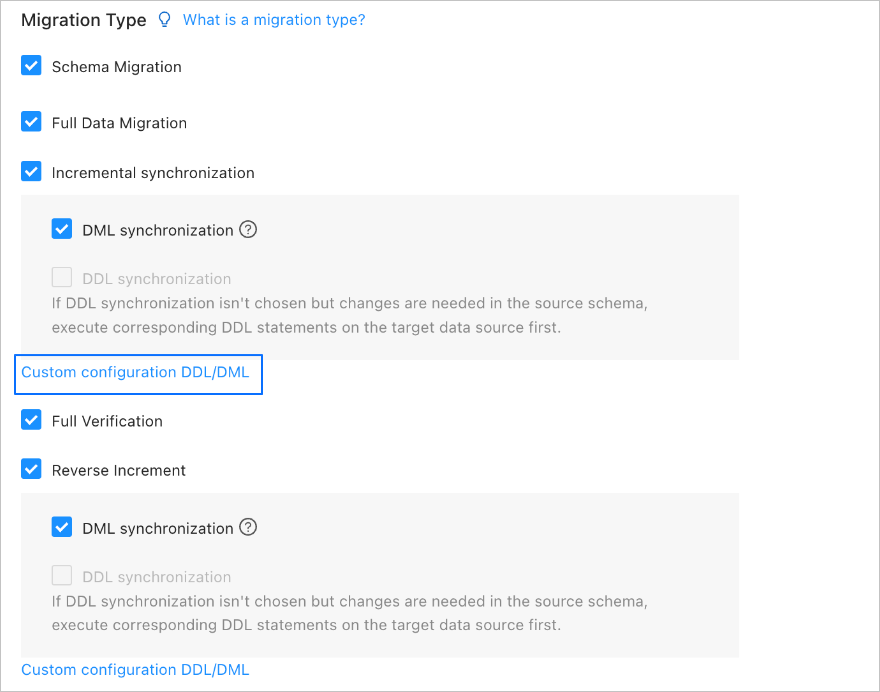
Click Next. On the Select Migration Type page, select the migration types for the task.
The available Migration types are Schema Migration, Full Migration, Incremental Synchronization, Full Verification, and Reverse Incremental Synchronization.
Migration Type
Description
Schema Migration
After the schema migration task starts, Data Transmission Service migrates the definitions of data objects (such as tables, indexes, constraints, comments, and views) from the source database to the destination database, and automatically filters out temporary tables.
Full Migration
After the full migration task starts, Data Transmission Service migrates the existing data from the source tables to the corresponding tables in the destination database.
Incremental Synchronization
After the incremental synchronization task starts, Data Transmission Service synchronizes the changed data (new, modified, or deleted) from the source database to the corresponding tables in the destination database.
Incremental Synchronization supports DML Synchronization. You can configure it as needed. For more information, see Customize DDL/DML configurations.
Full Verification
After full migration is complete and incremental data is almost synchronized, Data Transmission Service automatically starts a full data verification task for the configured source and destination tables.
NoteIf you select Incremental Synchronization but do not select all DML options for DML Synchronization, Data Transmission Service does not support full data verification in this scenario.
Data Transmission Service supports full data verification only for tables with a unique key (a primary key or a non-null unique key).
Reverse Incremental Synchronization
After the reverse incremental synchronization task starts, it can synchronize the data changes generated in the destination database back to the source database in real time after a service switchover.
Reverse incremental synchronization usually reuses the configuration of incremental synchronization. You can also customize the configuration as needed.
Click Next. On the Select Migration Objects page, specify migration objects for the data migration task.
You can select Specify Objects or Match Rules to specify the migration objects. This topic describes how to specify the migration objects by using Specify Objects. For information about matching rules, see Configure and modify matching rules.
ImportantThe names of tables to be migrated, as well as the names of columns in the tables, must not contain Chinese characters.
If a database or table name contains double dollar signs ($$), you cannot create the migration task.
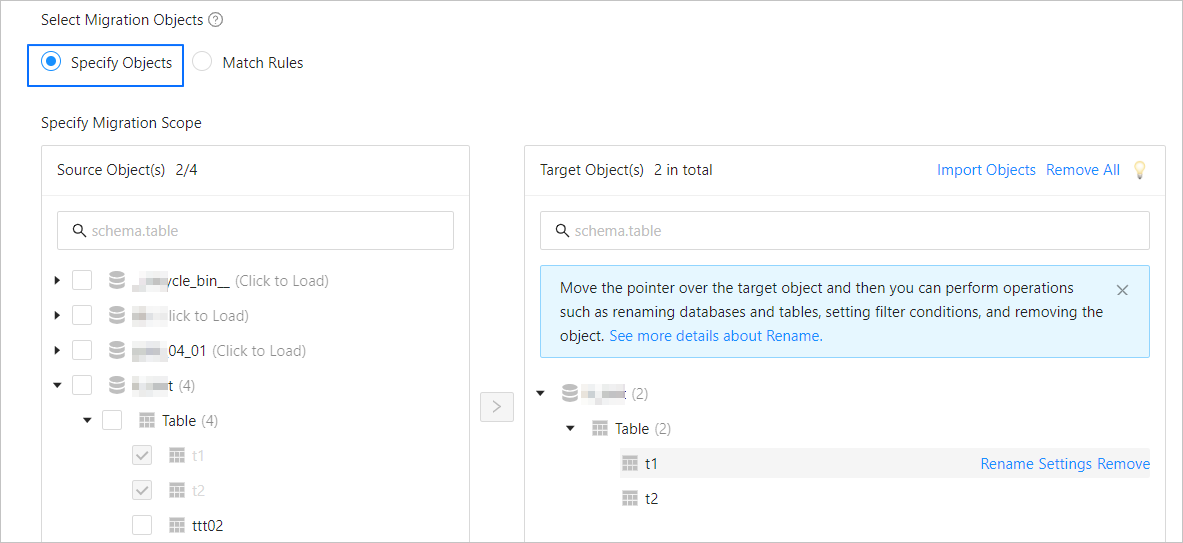
In the Select Migration Objects section, select Specify Objects.
In the Source Object(s) list of the Specify Migration Scope section, select the objects to migrate. You can select tables and views of one or more databases.
Click > to add them to the Target Object(s) list.
Data Transmission Service lets you import objects from text files. It also lets you rename destination objects, set row filters, view column information, and remove a single object or all objects.
NoteWhen you select migration objects using the Matching Rules method, the matching rule syntax overrides the renaming capability, and the Actions section is limited to setting filter conditions. For more information, see Configure and modify matching rules.
Operation
Description
Import Object
In the list on the right of the selection area, click Import Object in the upper-right corner.
In the dialog box that appears, click OK.
ImportantThe import operation overwrites previous selections. Proceed with caution.
In the Import Migration Objects dialog box, import the objects to be migrated.
You can import a CSV file to rename database tables, set row filtering conditions, and perform other operations. For more information, see Download and import migration object configurations.
Click Check Validity.
After you import the migration objects, check their validity first. Column field mapping is not currently supported.
After the check is passed, click OK.
Rename
Data Transmission Service lets you rename migration objects. For more information, see Rename database and table objects.
Settings
Data Transmission Service supports row filtering using
WHEREconditions. For more information, see Filter data with SQL conditions.You can also view the column information of migration objects in the View Columns area.
Remove/Remove All
Data Transmission Service lets you remove one or more objects that have been temporarily selected for the destination during data mapping.
Remove a single migration object
In the list on the right of the selection area, hover over the target object and click the displayed Remove button to remove the migration object.
Remove all migration objects
In the list on the right of the selection area, click Remove All in the upper-right corner. In the dialog box that appears, click OK to remove all migration objects.
Click Next and configure the parameters on the Migration Options page.
Full migration
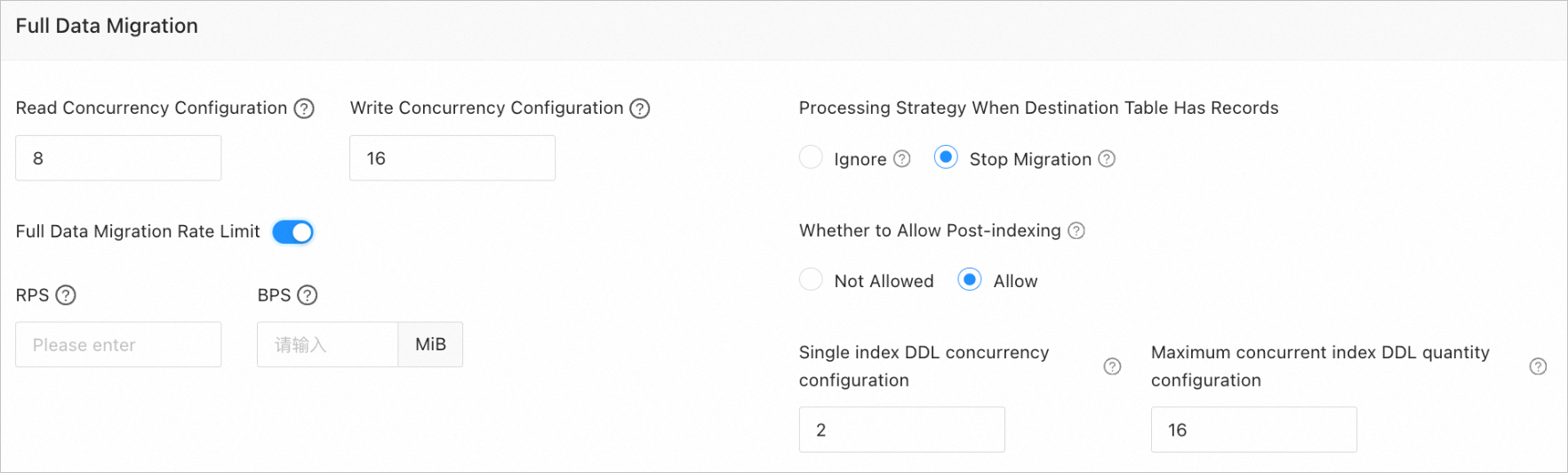
The following parameters are displayed only if you select Full Migration on the Select Migration Types page.
Parameter
Description
Read Concurrency
This parameter specifies the number of concurrent threads for reading data from the source during full migration. The maximum value is 512. A high degree of concurrency may put excessive pressure on the source database and affect your business.
Write Concurrency
This parameter specifies the number of concurrent threads for writing data to the destination during full migration. The maximum value is 512. A high degree of concurrency may put excessive pressure on the destination database and affect your business.
Full Migration Rate Limit
You can enable the full migration rate limit as needed. If you enable it, set the RPS (maximum number of data rows that can be migrated to the destination per second during full migration) and BPS (maximum volume of data that can be migrated to the destination per second during full migration).
NoteThe RPS and BPS settings only serve as throttling limits. The actual performance of full migration is affected by factors such as the source, destination, and instance specifications.
Policy for Existing Records in Destination Table Objects
The policies include Ignore and Stop Migration:
Select Ignore: If data exists in the destination table object and a conflict occurs between the original data and the data to be written, DTS logs the conflicting data and keeps the original data unchanged.
ImportantIf you select Ignore, full verification uses the IN mode to pull data. It cannot verify scenarios where the destination has data that the source does not. The verification performance is also degraded to some extent.
Select the default value Stop Migration: If data exists in the destination table object, full migration reports an error and is not allowed. Handle the data in the destination and then continue the migration.
ImportantIf you click Resume after an error occurs, DTS ignores this setting and continues to migrate table data. Proceed with caution.
Allow index suffixes
You can specify whether to allow index creation after full data migration is complete. This feature can shorten the time required for full migration. For notes on post-migration index creation, see the description below the table.
ImportantThis parameter is displayed only if you select both Schema Migration and Full Migration on the Select Migration Types page.
Only non-unique key indexes support post-migration creation.
When an index is being created, if the destination OceanBase database reports one of the following errors, DTS ignores the error and considers the index successfully created. It will not attempt to create the index again.
The OceanBase database MySQL tenant reports a
Duplicate key nameerror.The OceanBase database Oracle tenant reports a
name is already used by an existing objecterror.
If the destination is an OceanBase database and you select Allow, configure the following parameters:
Concurrency for a single index DDL statement: A higher degree of parallelism consumes more resources and increases the migration speed.
Maximum number of concurrent index DDL statements: The maximum number of post-migration index DDL statements that the system can invoke at the same time.
If you allow post-migration index creation, we recommend that you use a command-line client to adjust the following business tenant parameters based on the hardware and service traffic of the OceanBase database.
// File memory buffer limit
alter system set _temporary_file_io_area_size = '10' tenant = 'xxx';
// V4.x disable throttling
alter system set sys_bkgd_net_percentage = 100;
Incremental synchronization
These parameters are displayed only if you select Incremental Synchronization on the Select Migration Type page.

Parameter
Description
Write Concurrency
This parameter specifies the number of concurrent threads for writing data to the destination during incremental synchronization. The maximum value is 512. A high concurrency may increase the pressure on the destination database and affect your services.
Incremental Synchronization Rate Limit
You can enable a rate limit for incremental synchronization as needed. If you enable it, set the RPS (maximum number of rows per second) and BPS (maximum bytes per second) for the synchronization.
NoteThe RPS and BPS settings only serve as a rate limit. The actual performance of incremental synchronization is affected by factors such as the source, the destination, and instance specifications.
Incremental Synchronization Start Offset
This parameter is displayed only if you do not select Full Migration. However, when the source is PostgreSQL, you cannot set the start offset. The start offset defaults to the time when incremental synchronization starts.
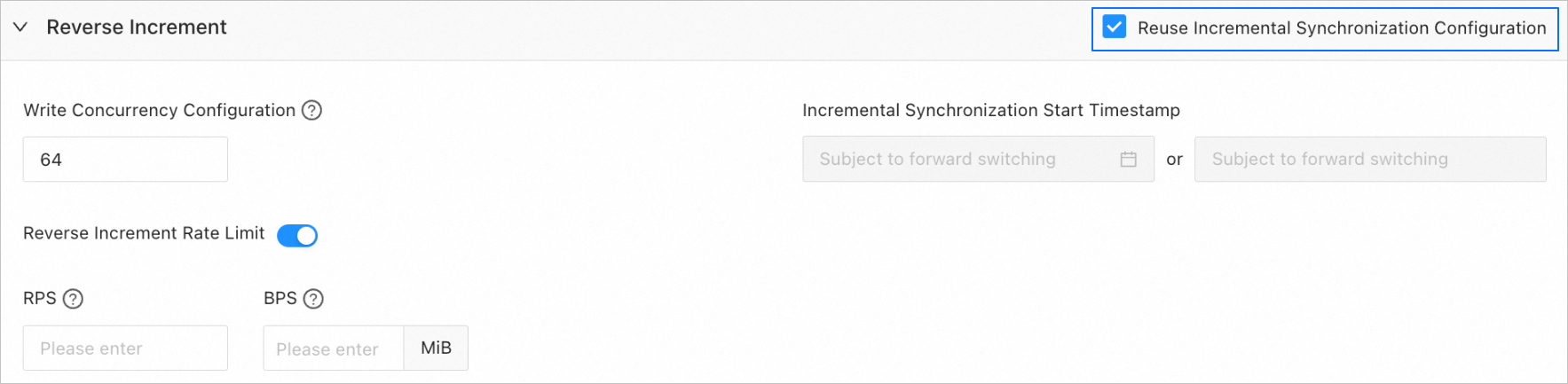
Reverse Incremental
The parameters in this section appear only if you select Reverse Incremental Synchronization on the Select Migration Types page. By default, the Reuse Incremental Synchronization Configuration option is selected.

You can also clear this option and configure the parameters as needed.
Parameter
Description
Write Concurrency
This parameter specifies the number of concurrent threads for writing data to the source during reverse incremental synchronization. The maximum value is 512. A high degree of concurrency may put excessive pressure on the source database and affect your business.
Reverse Incremental Synchronization Rate Limit
You can enable the reverse incremental synchronization rate limit as needed. If you enable it, set the RPS (maximum number of data rows that can be synchronized to the source per second during reverse incremental synchronization) and BPS (maximum volume of data that can be synchronized to the source per second during reverse incremental synchronization).
NoteThe RPS and BPS settings only serve as throttling limits. The actual performance of reverse incremental synchronization is affected by factors such as the source, destination, and instance specifications.
Incremental Synchronization Start Offset
This parameter is not displayed if you select Full Migration as a migration type.
If you do not select Full Migration but select Incremental Synchronization, the start offset is based on the forward switchover (if any) by default and cannot be modified.
Advanced options
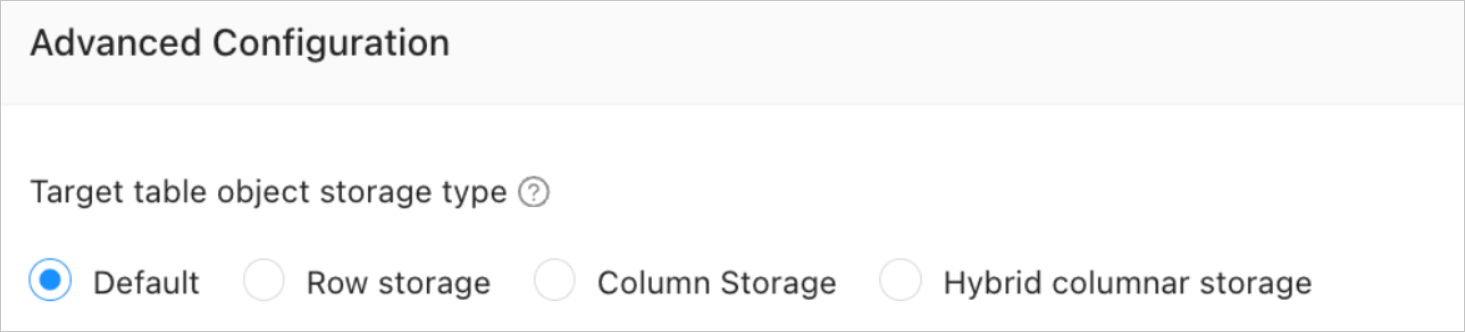
These parameters are displayed only if the Oracle tenant in the destination OceanBase database is V4.3.0 or later and you select Schema Migration on the Select Migration Type page.
The storage class for destination table objects can be Default, Row Store, Column Store, or Hybrid Store. This setting determines the storage class of these objects during schema migration or incremental synchronization. For more information, see default_table_store_format.
NoteThe Default option automatically adjusts based on the destination parameter settings. Table objects from the schema migration are written to the corresponding structure based on the specified storage class.
Click Precheck to precheck the data migration task.
In the Precheck step, Data Transmission Service checks whether items meet the requirements, such as the read and write permissions of the database user and the network connectivity of the database. You can start the data migration task only after all check items pass. If the precheck fails:
You can identify and troubleshoot the problem, and then run the precheck again until it succeeds.
You can also click Skip in the Actions column for a failed precheck item. A dialog box appears that describes the impact of skipping this operation. To proceed, click OK.
After the precheck passes, click Start Task.
If you do not want to start the task immediately, click Save. You can then start the task manually from the Data Migration Task List page or using batch operations. For more information about batch operations, see Batch Operations on Data Migration Tasks.
Data Transmission Service lets you modify migration objects and their row filtering conditions while a data migration task is running. For more information, see View and modify migration objects and their filter conditions. After the data migration task starts, it performs the migration steps sequentially based on the selected migration types. For more information, see View migration details.