Step 3: MIIT text message validation
After you submit an ICP filing order, you will receive a validation text message from the Ministry of Industry and Information Technology (MIIT). You must complete the text message validation within 24 hours. If you fail to do so, your application will be rejected and you must restart the ICP filing process.
Before you begin
After you submit the ICP filing order, you will receive two text messages:
A notification from Alibaba Cloud that your ICP filing order was submitted successfully
A text message with a verification code from MIIT (This message may be delayed. Please wait for it to arrive before performing any other operations.)
If your mobile phone number is correct but you have not received the verification code after a long time, log on to the MIIT ICP Filing Management System to resend the validation text message.
Confirm the validation personnel
You can view the list of personnel who need to complete the validation in the Alibaba Cloud ICP Filing system. All personnel on the list must complete the validation. Ensure that the mobile phone numbers for these personnel are correct and that their phones can receive text messages.
The validation personnel will receive a text message from MIIT (12381 or 106**********12381). They must click the link in the message within 24 hours to complete validation.
If you do not receive the text message after a long time, go to the MIIT ICP Filing Management System to request a resend.
After validation is complete, it takes 30 to 120 minutes for the result to sync to Alibaba Cloud. The result shown on the MIIT page is authoritative.
The personnel required for text message validation can be the entity leader, the website administrator, or both (entity leader + website administrator) for dual validation. MIIT automatically determines the required validation role based on the ICP filing type. The individuals who receive the validation text message are the ones who must complete the validation. For more information about specific requirements, see the Text message validation personnel reference table.
If a mobile phone number has been changed or canceled, or if the validation personnel cannot be contacted, see What do I do if the mobile phone number of the validation personnel is unavailable?
Start the text message validation
Enter validation information
The validation information must be accurate. If the validation fails five consecutive times, the ICP filing application is rejected. After 24 hours, the application is automatically canceled, and you must resubmit it.
After you receive the validation text message from MIIT, click the validation link in the message within 24 hours to open the MIIT ICP Filing Management System.
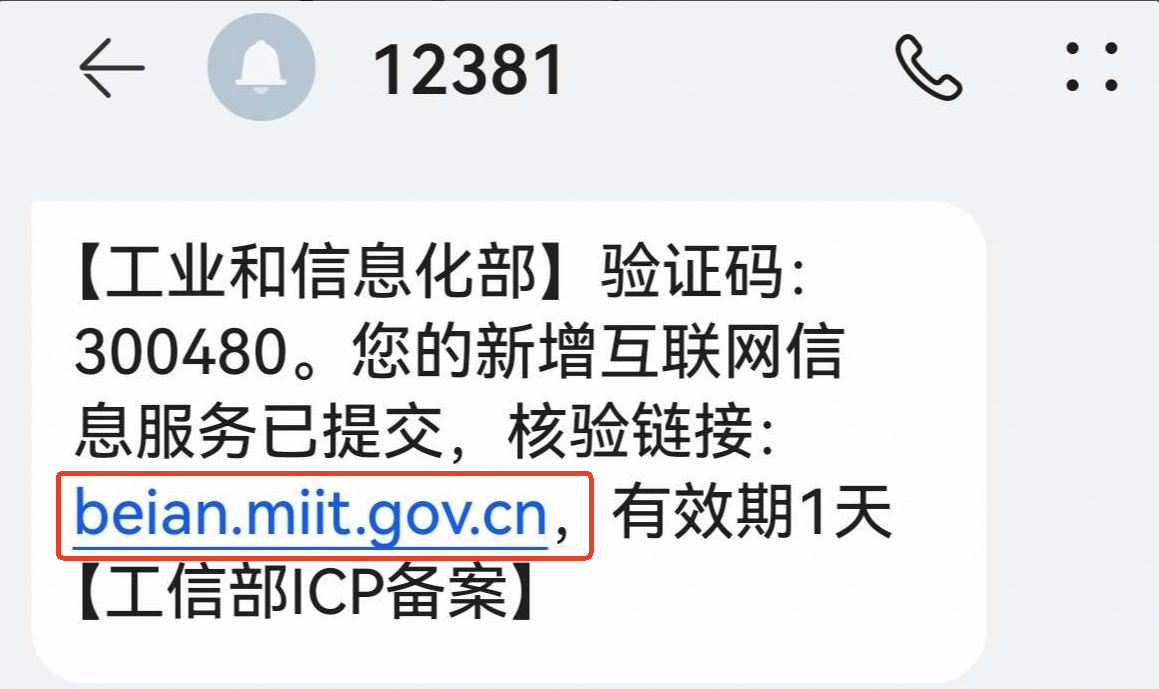
The MIIT text message is sent from 12381 or 106**********12381. The verification code is a six-digit number. The following is an example:
On the Text Message Validation tab, enter the text message verification code, your mobile phone number, and the last six digits of the owner's certificate number (such as an ID card, passport, or Mainland Travel Permit for Hong Kong and Macao Residents). Then, click Submit.
After all required personnel submit their information, if the system displays the message Dear ICP user: Your text message validation is complete. This request will be submitted to the communications administration for review, the validation is successful. Wait for the communications administration to review your application. If the system displays a different message, follow the instructions in Related references.
After the text message validation is successful, you can check the review progress of your ICP filing in the Alibaba Cloud ICP Filing system.
Related references
After you submit the validation information, one of the following system messages may appear. Follow the corresponding instructions.
System message | Validation result | Next step |
| You have completed the text message validation. | The system then submits the ICP filing to the communications administration for review. You must wait for the review result. |
Dear ICP user: Your text message validation is complete. Please wait for other personnel to complete their text message validation. | You have completed the text message validation, but other required personnel still need to complete it. | Contact the other personnel to complete the validation promptly. If the validation is not completed within 24 hours, you must restart the ICP filing process. |
Dear ICP user: Your text message validation failed. Please try again. | Your text message validation failed. | Check that your ICP filing materials meet the requirements. After you confirm that the information is correct, resubmit the ICP filing application. Then, complete the text message validation again after you receive the new text message from MIIT. |
Dear ICP user: The record cannot be found in the validation database or the validation is already complete. | The validation information you entered is incorrect, or the validation result has not been synchronized to Alibaba Cloud. Please wait. | Confirm that you have correctly entered the text message verification code, mobile phone number, and the last six digits of the certificate number.
|
Resend the validation text message
You can resend the validation text message a maximum of two times. If you did not receive the validation text message from MIIT, or if you accidentally deleted it, you can request to resend the message from the MIIT system.
Go to the MIIT ICP Filing Management System and click Resend Text Message.
On the Resend Text Message tab, enter the mobile phone number and the last six digits of the owner's certificate number (such as an ID card, passport, or Mainland Travel Permit for Hong Kong and Macao Residents). Then, click Submit.
Confirm the result of your resend request based on the system message.
System message
Resend result
Next step
Dear ICP user: Your text message verification code has been resent successfully. Please check your mobile phone and complete the text message validation as soon as possible.
The validation text message was resent successfully.
Check your mobile phone and complete the text message validation as soon as possible.
Dear ICP user: You have no pending ICP filing applications that require text message validation. You do not need to resend the text message.
No ICP filing is pending validation.
You have not submitted an ICP filing application, so the system cannot find a matching order that is pending validation.
If you have not submitted an ICP filing application, log on to the Alibaba Cloud ICP Filing system, submit your filing information, and then enter the validation information after you receive the validation text message.
If you have already submitted an ICP filing application, please wait. It can take 30 to 60 minutes for your application to sync with the MIIT system.
The initial text message from MIIT may be delayed. If you do not receive it after a long wait, you can log on to the MIIT ICP Filing Management System to request that the message be resent.
Dear ICP user: The record cannot be found in the validation database.
Failed to resend the validation text message.
The validation information was entered incorrectly, or you have not submitted an ICP filing application. The system cannot find a matching ICP filing order for text message validation.
If you have not submitted an ICP filing application, log on to the Alibaba Cloud ICP Filing system, submit your filing information, and then enter the validation information after you receive the validation text message.
If you have already submitted an ICP filing application, check that you have correctly entered the validation information (mobile phone number and the last six digits of the certificate number).
NoteIf you confirm that the validation information is correct, but the system still displays the message The record cannot be found in the validation database, it may be due to a system issue. Your ICP filing information may have already been submitted to the communications administration for review. Wait patiently for the review result.
FAQ
What do I do if I do not receive the validation text message from MIIT?
The validation text message from MIIT may be delayed. Please wait for it to arrive.
If your mobile phone number is correct but you do not receive the validation text message after a long time, log on to the MIIT ICP Filing Management System to resend the validation text message.
If you cannot retrieve the original number, do not perform any operations. After 24 hours, the ICP filing order is automatically canceled by the system. You can then enter the new mobile phone number and resubmit the application for initial review.
Check if your phone's security application has blocked the message as spam or a nuisance message. Ensure that your phone can receive text messages normally.
Check if your mobile phone account has an overdue payment or if the service is suspended.
What do I do if the mobile phone number of the validation personnel is unavailable?
For most ICP filing scenarios, if the mobile phone number of the validation personnel is unavailable, you must cancel the current ICP filing application, re-enter the filing information with the correct number, and then complete the text message validation.
If the mobile phone number is unavailable during the process to cancel an ICP filing, you can update the number and then complete the text message validation. For more information, see Modify ICP filing information.
Who are the personnel required for text message validation in different ICP filing scenarios?
Your ICP filing scenario | Personnel required for validation | |
Apply for an ICP filing for the first time | Website service | Entity leader + website administrator |
Website and app service | Entity leader | |
App service | Entity leader | |
Add a new service | Website service | Entity leader + website administrator Note If the entity information has not changed, only the website administrator is required to complete the text message validation. The entity leader does not need to complete the validation. |
Website and app service | Entity leader | |
App service | Entity leader | |
Add Alibaba Cloud as a service provider to your ICP filing information | All | Entity leader + website administrator |
Modify ICP filing information | Modify entity information | Entity leader |
Modify service information | Website administrator | |
Modify both entity and service information | Entity leader + website administrator | |
Cancel an ICP filing | Cancel an entity's ICP filing | Entity leader |
Cancel a website's ICP filing | Website administrator | |
Unregister an app | Website administrator | |
Remove Alibaba Cloud from the service provider list | None | None |