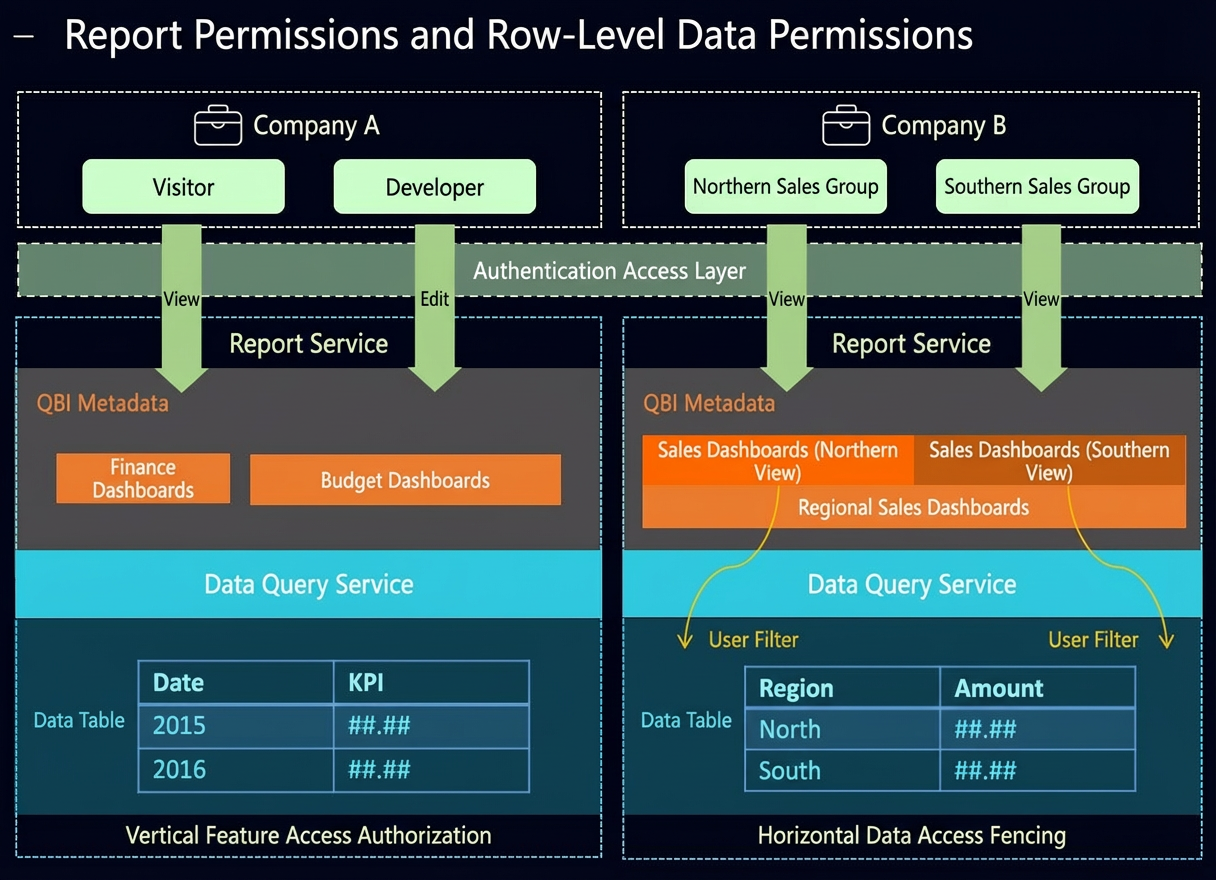
Permission list | Description |
Grant data portal permissions | You can grant permissions to edit a data portal, or to view and export its content. Edit: Grants permission to edit the data portal. Authorized users can collaboratively edit, view, and export the data portal. Export (includes View): Grants permission to export the data portal's content. Authorized users can export and view the data portal's content. View: Grants permission to view the data portal's content. Authorized users can view the data portal's content.
|
Grant data works permissions | Data works include dashboards, spreadsheets, and ad-hoc analysis. Edit: Grants permission to edit the report. Authorized users can collaboratively edit, view, and export the report. Export (includes View): Grants permission to export the report. Authorized users can export and view the report. View: Grants permission to view the report. Authorized users can view the report.
|
Grant self-service data retrieval permissions | You can grant permissions to edit, export, or view a self-service data retrieval task. Edit: Grants permission to edit the self-service data retrieval task. Authorized users can collaboratively edit, view, and export the self-service data retrieval task. Export (includes View): Grants permission to export the self-service data retrieval task. Authorized users can export and view the self-service data retrieval task. View: Grants permission to view the self-service data retrieval task. Authorized users can view the self-service data retrieval task.
|
Grant data entry permissions | You can grant permissions to edit a data entry form, and to manage or submit data. Edit: Grants permission to edit the data entry form. Authorized users can collaboratively edit the data entry form, and can manage and submit data. Manage all data: Grants permission to submit and manage all data in the data entry form. Authorized users can submit data and manage all data in the data entry form. Manage own data: Grants permission to submit and manage their own data in the data entry form. Authorized users can submit data and manage the data they submitted in the data entry form. Submit data: Grants permission to submit data through the data entry form. Authorized users can submit data in the data entry form.
|
Grant dataset permissions | You can grant permissions for collaborative editing of a dataset, as well as column-level and row-level permissions. Collaborative authorization: Allows multiple developers to work on the same dataset. Edit: Grants permission to edit the dataset. Authorized users can collaboratively edit the dataset and use it for data analysis. Use: Grants permission to use the dataset. Authorized users can use the dataset for data analysis.
Column-level permission: Allows you to hide fields or mask field values for specific users to ensure data security. For more information, see column-level permission. Deny View: Controls the visibility of fields in a dataset. Users with this permission cannot view the selected field values. Data masking: Masks the values of specified fields in a dataset. This permission prevents users from viewing complete field values, showing masked values instead.
Row-level permission: Allows you to restrict the range of field values visible to specific users. When querying fields in a dashboard, the user can only see field values that match the defined rule, which ensures data security. For more information, see row-level permission.
|
Grant data source permissions | You can grant permissions to edit or use a data source. Edit: Grants permission to edit the data source. Authorized users can collaboratively edit the data source and use it to create datasets. Use: Grants permission to use the data source. Authorized users can use the data source to create datasets.
|
Centralized authorization | In addition to granting permissions for individual resources, administrators can assign permissions for multiple resources on the Centralized Authorization page. This eliminates the need to set permissions on each resource's authorization page. Workspace-level resource authorization: On the Resource Authorization page, workspace administrators can view all resources within the current workspace and grant permissions as needed. For detailed instructions, see Resource Authorization. Organization-level resource authorization: On the Centralized Authorization page, organization administrators can view all resources within the current organization and assign permissions by resource or by user. For detailed instructions, see Centralized Authorization.
|