Features
CEN transit routers connect VPCs, VBRs, IPsec-VPN connections, and CCN instances to enable cross-VPC, cross-region, and hybrid cloud communication. Transit routers support routing features such as custom route tables, custom route entries, and routing policies. The CEN console provides visualized monitoring and O&M dashboards for tracking network status and improving O&M efficiency.
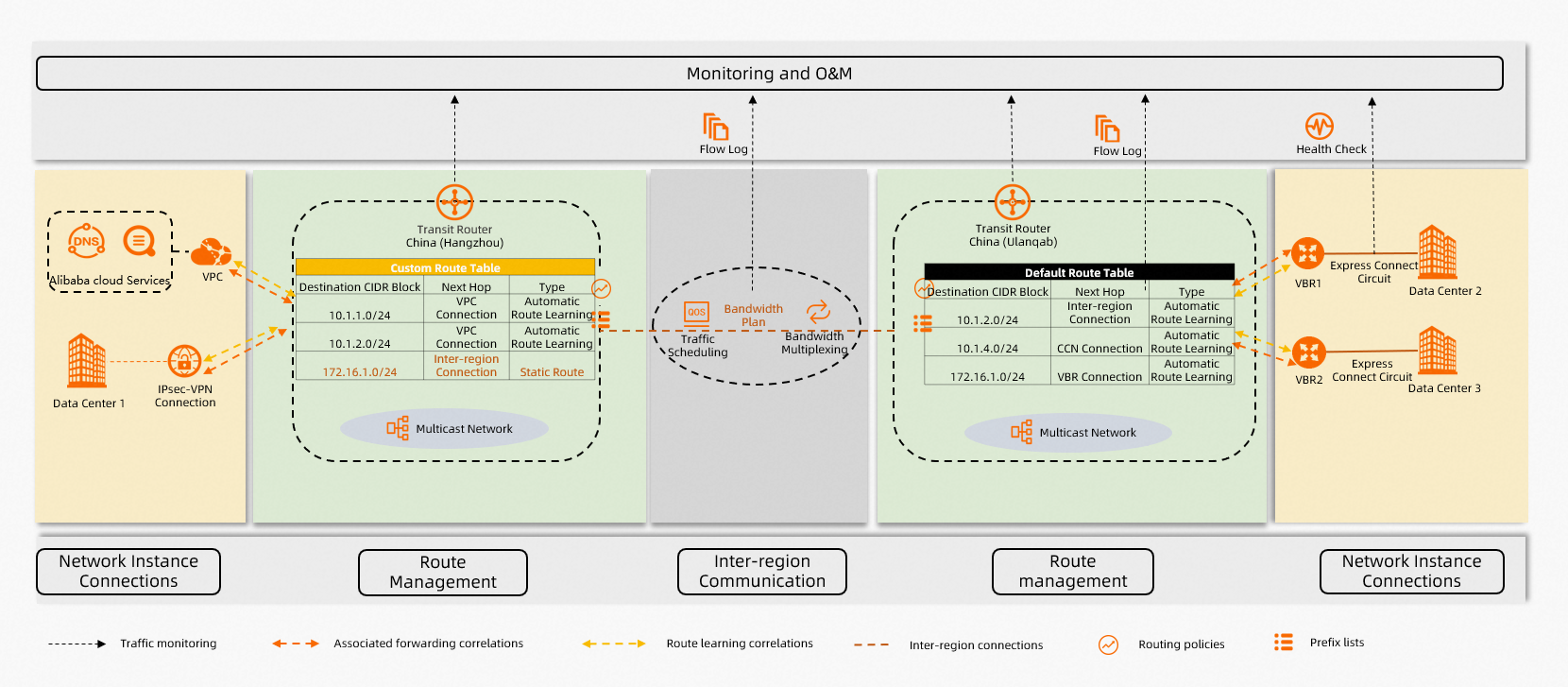
Feature comparison by edition
The following table lists CEN features and their availability by transit router edition.
In the following table,  indicates that the feature is supported, and
  indicates that the feature is not supported.
|
Category |
Feature |
Basic Edition |
Enterprise Edition |
|
VPC connections |
|
|
|
|
VBR connections |
|
|
|
|
CCN connections Note
Regions of CCN support only Basic Edition transit routers. |
|
|
|
|
IPsec-VPN connections |
|
|
|
|
Transit router connections |
|
|
|
|
Bandwidth plans |
|
|
|
|
Inter-region connections |
|
|
|
|
Bandwidth multiplexing |
|
|
|
|
Traffic scheduling |
|
|
|
|
Custom route tables |
|
|
|
|
Custom route entries |
|
|
|
|
Associated forwarding |
|
|
|
|
Route learning |
|
|
|
|
Prefix lists |
|
|
|
|
Route synchronization |
|
|
|
|
Aggregate routes |
|
|
|
|
Routing policies |
|
|
|
|
Multi-region equal-cost multi-path (ECMP) routing for VBRs |
|
|
|
|
Access to cloud services |
|
|
|
|
Access to PrivateZone |
|
|
|
|
Multicast networks |
|
|
|
|
Bandwidth plan monitoring |
|
|
|
|
Inter-region connection monitoring |
|
|
|
|
Express Connect circuit monitoring |
|
|
|
|
Network instance connection monitoring |
|
|
|
|
Health checks |
|
|
|
|
Flow logs |
|
|
|
|
Transit router diagnostics |
|
|
|
|
Reachability analyzer |
|
|
Connect network instances
Connect to VPCs
Connect VPCs to a transit router for private communication. For more information, see Create a VPC connection.
Connect to VBRs
Connect VBRs to a transit router for private communication. For more information, see Connect a VBR to a transit router.
Connect to CCN instances
Connect CCN instances to a transit router for private communication. For more information, see Create a CCN connection.
Connect to IPsec-VPN connections
Connect a data center to a transit router over an IPsec-VPN connection to communicate with other networks. For more information, see Create a VPN connection.
Manage inter-region traffic
Inter-region connections
Inter-region connections link transit routers across regions to enable cross-region communication. For more information, see Inter-region connections.
Bandwidth multiplexing
Bandwidth multiplexing allows a CCN transit router and an Enterprise Edition transit router in the same region to share an inter-region bandwidth plan, which improves bandwidth utilization flexibility. For more information, see CCN bandwidth multiplexing.
Traffic scheduling
Traffic scheduling lets you mark cross-region traffic and apply bandwidth limits by traffic type to ensure service-level bandwidth and improve overall network efficiency. For more information, see Basic rate limiting QoS.
Manage routes
Custom route tables
Custom route tables function like VRF instances, fully isolated from the default route table of an Enterprise Edition transit router. Associate network instances with custom route tables to isolate traffic. For more information, see Custom route tables.
Route learning
Route learning controls route advertisement from network instances. When enabled, routes from a network instance are advertised to the associated Enterprise Edition transit router route table. For more information, see Route propagation.
Associated forwarding
Associated forwarding controls traffic forwarding from network instances. After you associate a network instance connection with a route table of an Enterprise Edition transit router, the transit router looks up routes in that table to forward traffic. For more information, see Associated forwarding.
Custom route entries
Enterprise Edition transit routers support static and blackhole routes. Add custom route entries to control traffic forwarding. For more information, see Custom route entries.
Prefix lists
Associate a prefix list of a VPC with an Enterprise Edition transit router route table to automatically add routes for all CIDR blocks in the prefix list. For more information, see Prefix lists.
Route synchronization
Route synchronization controls how an Enterprise Edition transit router advertises routes to associated network instances. For more information, see Route synchronization.
Aggregate routes
Aggregate routes merge multiple specific routes into a single route. With route synchronization enabled, the system advertises the aggregate route to VPCs by default instead of individual routes. For more information, see Aggregate routes.
Routing policies
Routing policies control route advertisement from transit router route tables to network instances or transit routers in other regions. For more information, see Routing policies.
Multi-region ECMP routing for VBRs
With multi-region ECMP enabled, if an Enterprise Edition transit router learns routes from multiple VBRs with the same destination CIDR block, these routes form an ECMP route for concurrent traffic forwarding. For more information, see Multi-region VBR ECMP routing.
Manage cloud services
PrivateZone
PrivateZone provides private DNS resolution and management in VPC environments. On-premises networks connected through VBRs or CCN instances can access PrivateZone via the transit router. For more information, see Manage access to PrivateZone.
Alibaba Cloud services
On-premises networks connected through VBRs or CCN instances can access Alibaba Cloud services via the transit router. For more information, see Configure access to cloud services.
Manage multicast
Create and manage multicast networks
Connect network instances to an Enterprise Edition transit router to create and manage a multicast network. The transit router acts as a multicast router to forward multicast traffic between connected instances. For more information, see Manage multicast.
Monitoring and O&M
Monitor CEN resources
The CEN console provides unified monitoring charts for transit routers, bandwidth plans, inter-region connections, Express Connect circuits associated with VBRs, and network instance traffic. For more information, see Monitor CEN resources.
Health checks
A VBR connects to a data center through an Express Connect circuit. After you connect the VBR to a transit router, you can use health checks to monitor the connectivity of the Express Connect circuit. For more information, see Configure VBR health checks.
Flow logs
Flow logs capture cross-region and VBR connection traffic data for bandwidth analysis and troubleshooting. For more information, see Flow logs.
Transit router diagnostics
CEN integrates with Network Intelligence Service (NIS) to diagnose transit routers and recommend fixes. For more information, see Diagnose a transit router instance.
Path analysis
CEN is integrated with NIS, which supports path analysis to diagnose network connectivity between resources. For more information, see Use path analysis.