Activate Alibaba Mail
After purchasing Alibaba Mail (Alibaba Mail purchase flow), set the administrator password, assign employee accounts, and configure DNS records.
These settings require a purchased and bound email domain name.
Recommended activation order:

Set the administrator password (If you already set the password during the purchase process, you can skip this step.) —> Assign employee accounts —> Migrate mailboxes(Optional. Migrate emails from your previous mailbox to Alibaba Mail.) —> Add DNS records (If the domain name for Alibaba Mail was previously used with another email provider, you must delete or pause the original DNS records before you add the DNS records for Alibaba Mail.)
If you have already completed DNS resolution, you must still set the administrator password and create employee accounts in sequence before you can use the mailbox.
This section covers Standard Edition. For Group Edition (RAM users and DNS setup), see Create mail domains for Alibaba Mail Group Edition.
1. Set mailbox administrator password
Management operations on the administrator account (postmaster) of Alibaba Mail are performed in the email console and are not part of the Alibaba Cloud identity verification process. The administrator account uses the format postmaster@<email domain name>. To manage the administrator account, log on to the Alibaba Cloud Management Console (console.aliyun.com), in the search bar, search for `邮箱` (Mail), open the email console, and click Manage for your mailbox instance to reset the password or reset the secure phone number.
The administrator password is the password of the administrator email account (postmaster@domain name). It is separate from and independent of your Alibaba Cloud account password. When you log on to Alibaba Mail for the first time, you must set the password for the administrator account. If you already set the password during the purchase process, you can skip this step. To reset the password, log on to the email console, find your instance on the email management list page, and then click Manage > Reset password or Reset secure phone number.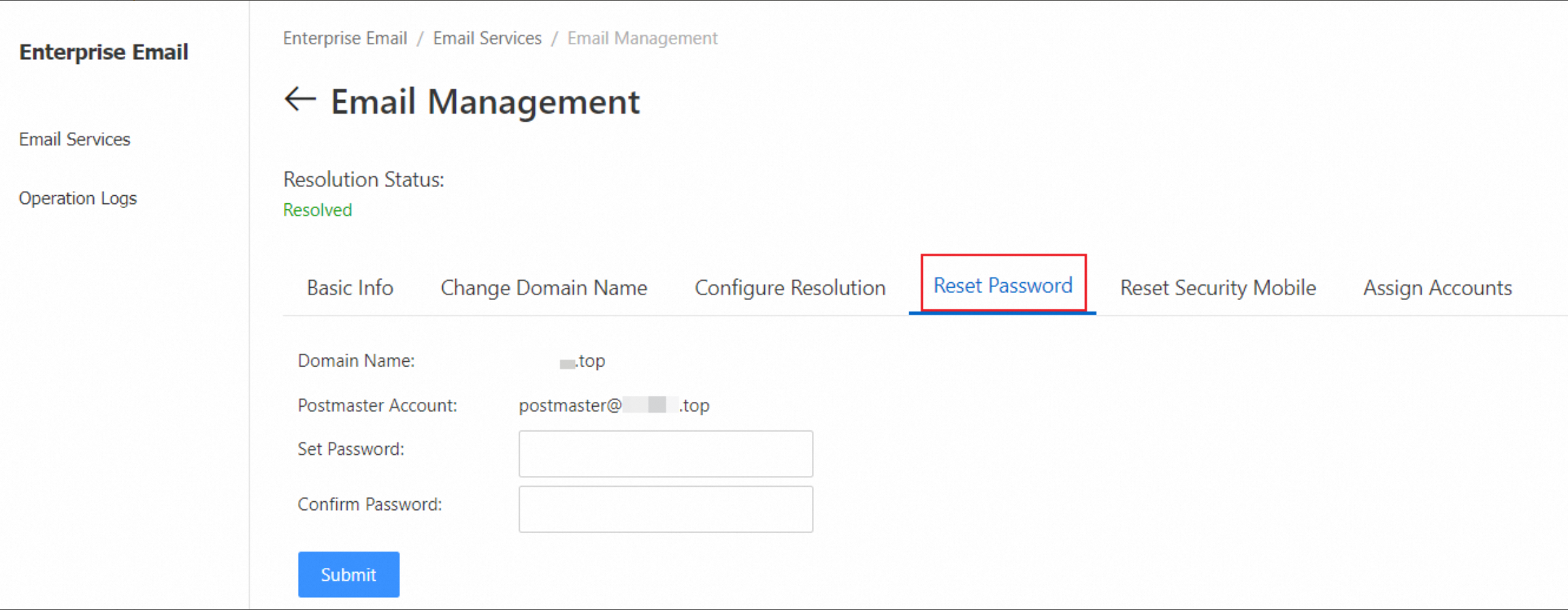
2. Assign employee accounts
-
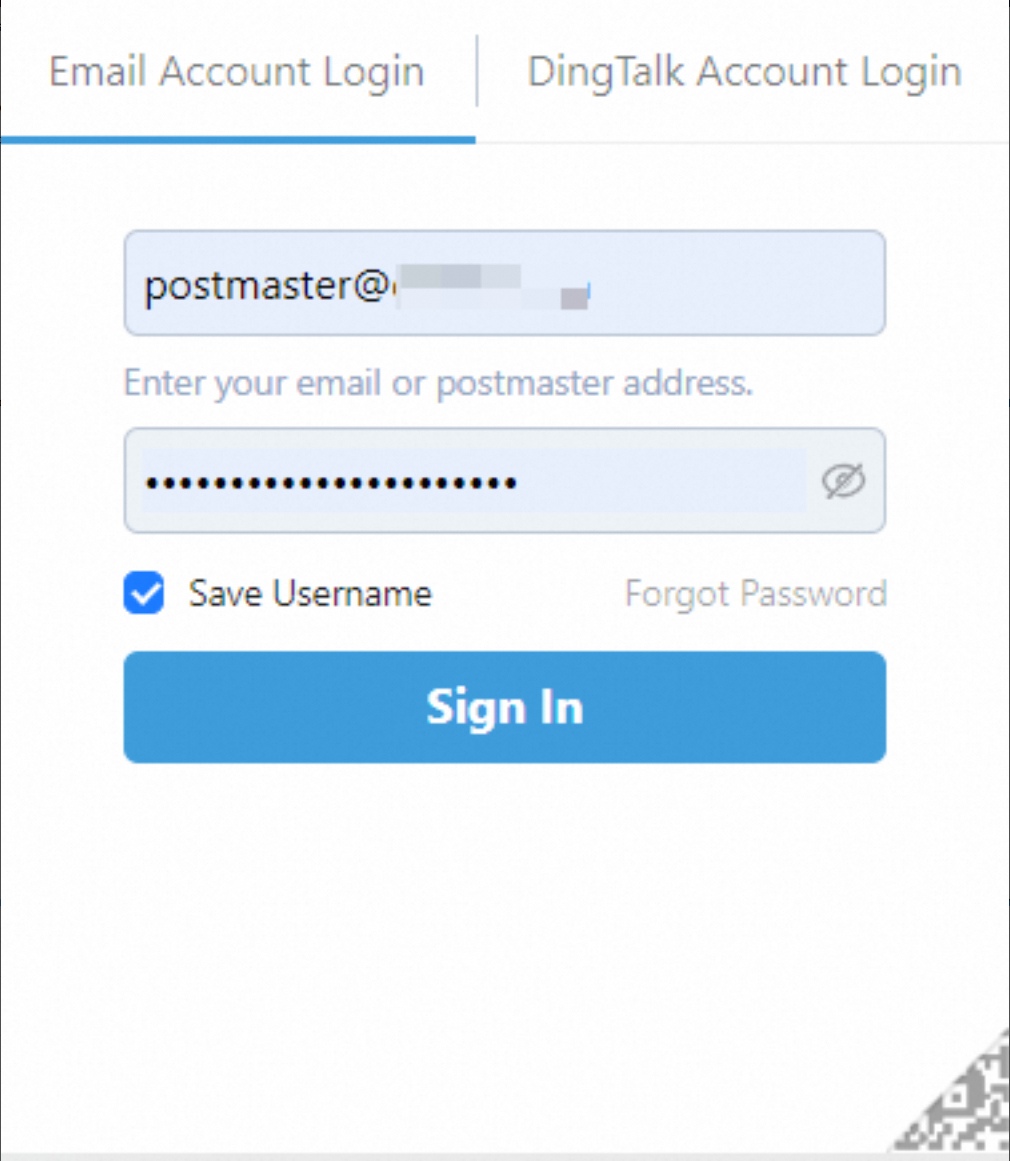
Log on to the Alibaba Mail web client. After the mail DNS record takes effect, you can also access the logon interface using the `mail.YourDomainName` address. Enter the administrator account and password to log on to the mailbox.
-
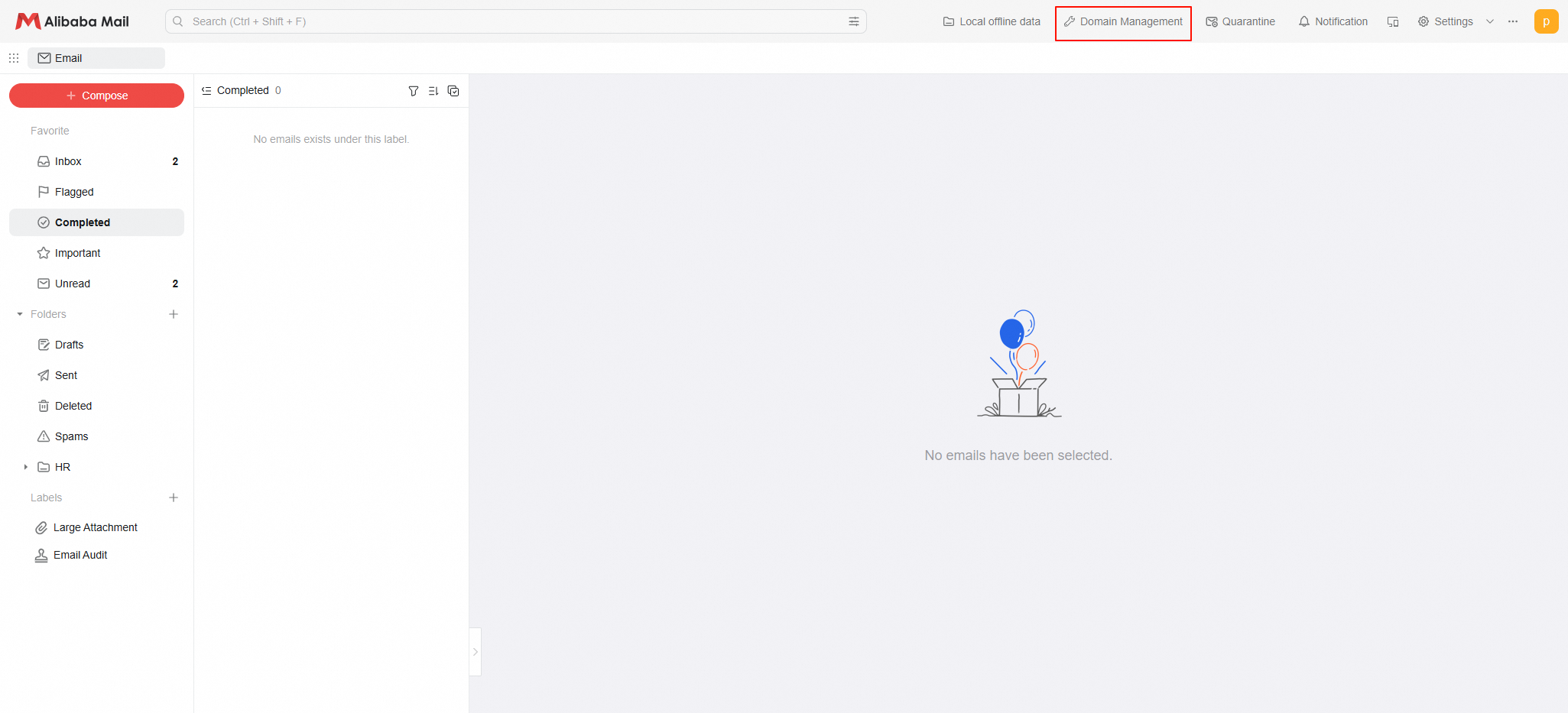
After the administrator logs on, the Alibaba Mail domain management interface is displayed by default. If the Webmail interface is displayed, click the domain management button in the upper-right corner to go to the management interface.
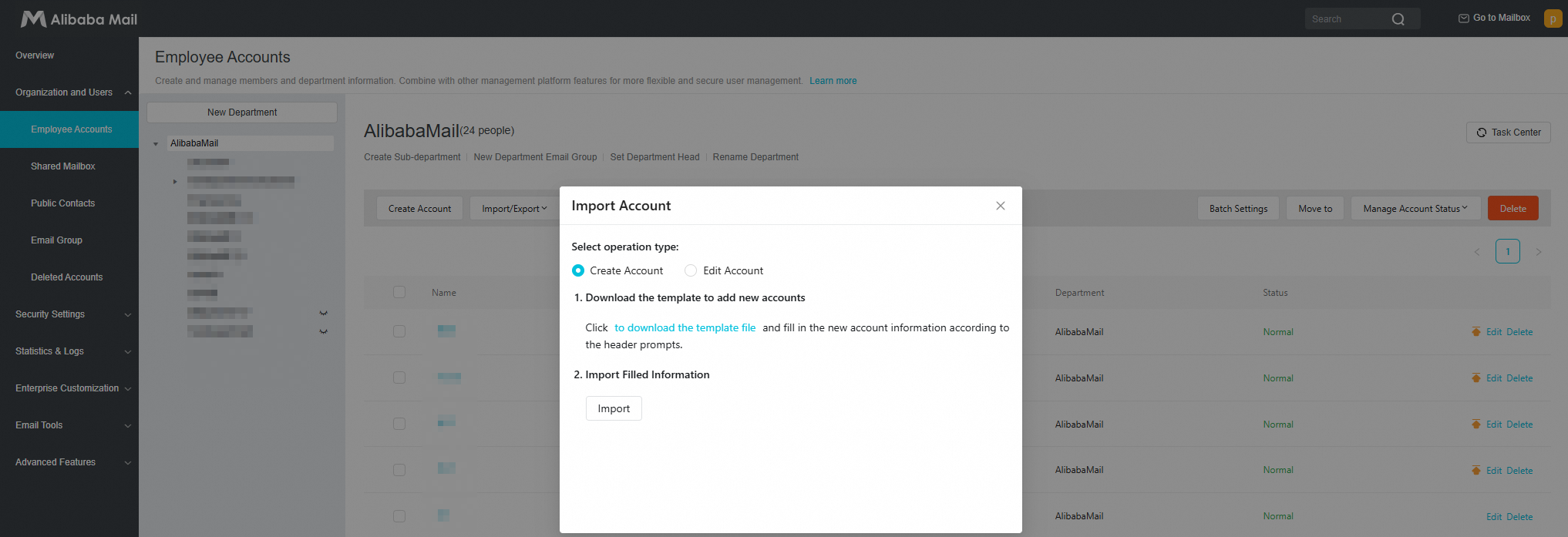
 In the navigation pane on the left, click Mail Management. You can click Create Account to create email accounts one by one, or click Import to create multiple accounts in a batch.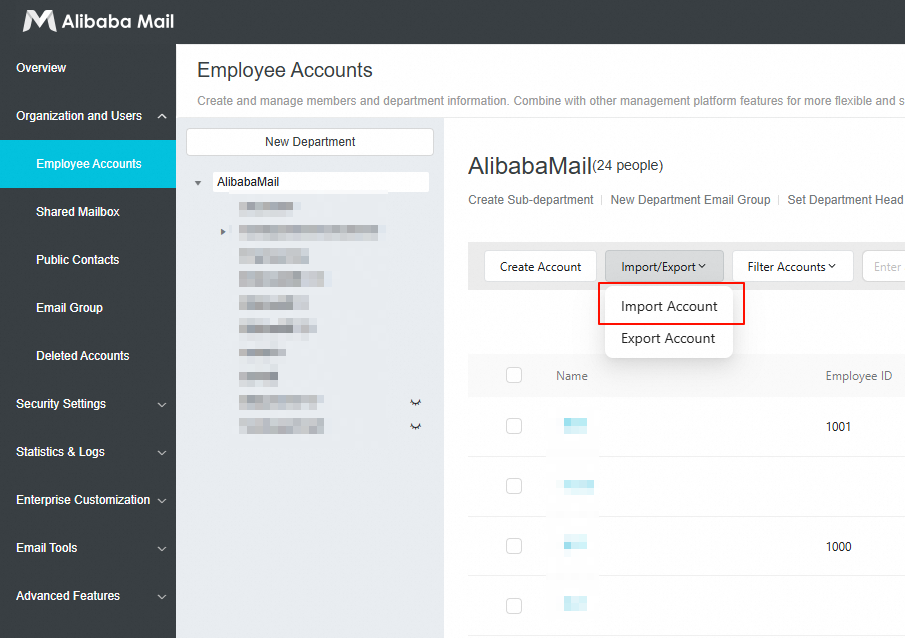
-
Create Account: Click Create Account. Enter the name, email address, and password. Select the option to require a password change on first logon, and then click OK.
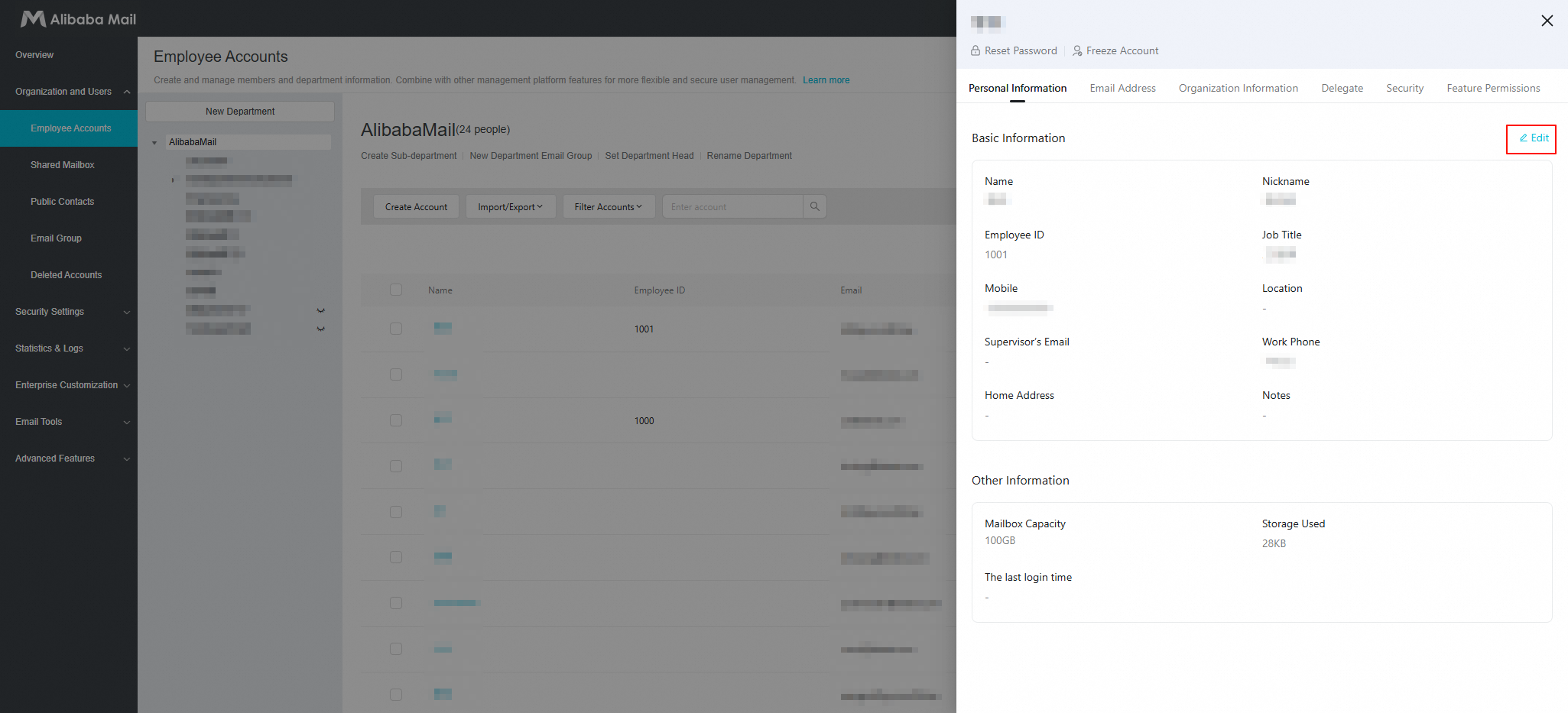
 After the account is created, you can click Edit to enter additional information, such as a secure phone number, and then save the changes.Import: Download the template. Fill in the template based on the specified format, and then upload the file. The accounts are created in a batch.
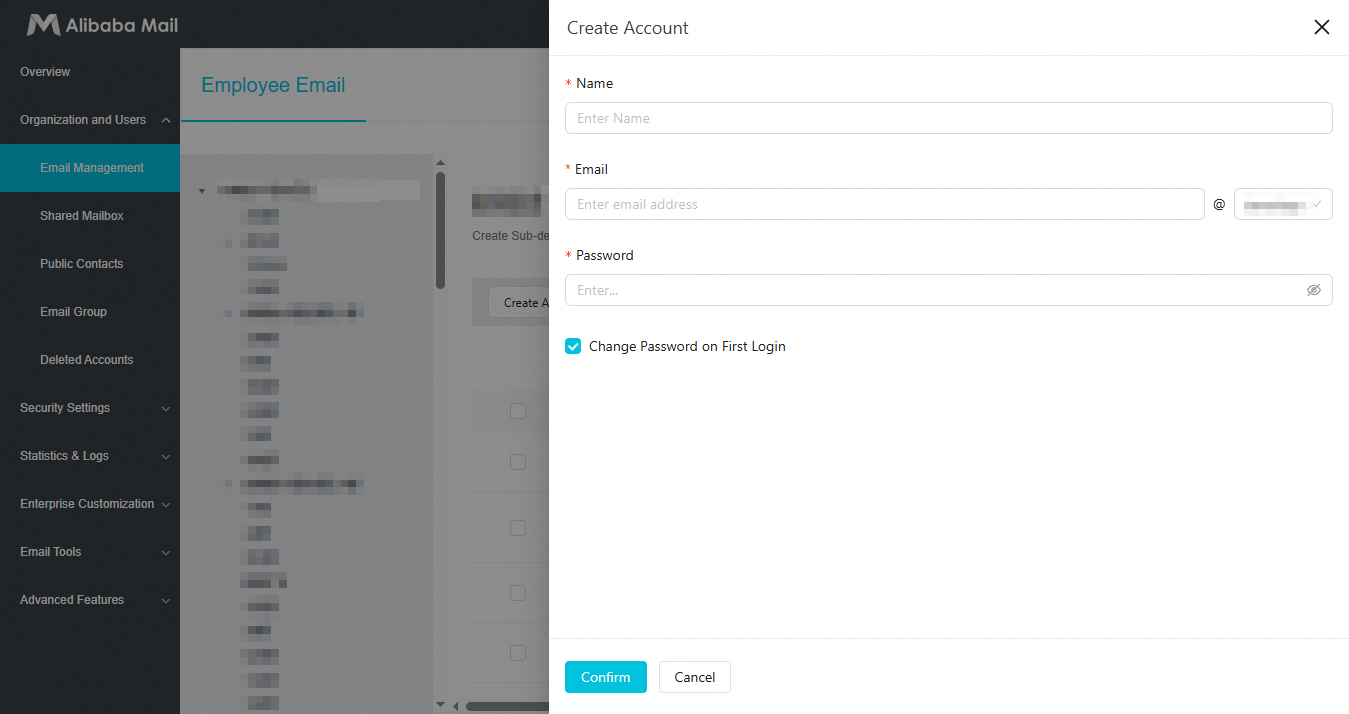 After the account is created, you can click Edit to enter additional information, such as a secure phone number, and then save the changes.
 Import: Download the template. Fill in the template based on the specified format, and then upload the file. The accounts are created in a batch.
3. Mail migration
Migrate emails from your previous mailbox using Mail migration. Skip this step if no migration is needed.
4. Add DNS records
Note: Correct domain name resolution is required for sending and receiving emails.
1. If you purchased both your domain name and Alibaba Mail from Alibaba Cloud, see How to set up DNS records for Alibaba Mail using an Alibaba Cloud (Wanwang) domain name? to automatically add the required DNS records.
2. If your domain name and DNS service are not from Alibaba Cloud, see How to set up DNS records for Alibaba Mail using a non-Alibaba Cloud (Wanwang) domain name? or contact your domain name service provider for assistance.
Web client endpoint: https://qiye.aliyun.com/. Recommended DNS settings:
MX and SPF records are mandatory. Without them, you cannot send or receive emails. We recommend adding all other records. xxxx.
|
Manage domain name resolution |
DNS record type |
Priority |
DNS record value |
|
@ |
MX |
5 |
mx1.qiye.aliyun.com |
|
@ |
MX |
10 |
mx2.qiye.aliyun.com |
|
@ |
MX |
15 |
mx3.qiye.aliyun.com |
|
pop3 |
CNAME |
- |
pop.qiye.aliyun.com |
|
imap |
CNAME |
- |
imap.qiye.aliyun.com |
|
smtp |
CNAME |
- |
smtp.qiye.aliyun.com |
|
|
CNAME |
- |
qiye.aliyun.com |
|
@ |
TXT |
- |
v=spf1 include the following:spf.qiye.aliyun.com -all |
Both the new parameters above and old parameters below are valid. Use either set.
|
Domain name parsing operations |
DNS record type |
Priority |
DNS record value |
|
@ |
MX |
5 |
mxn.mxhichina.com |
|
@ |
MX |
10 |
mxw.mxhichina.com |
|
pop3 |
CNAME |
- |
pop3.mxhichina.com |
|
smtp |
CNAME |
- |
smtp.mxhichina.com |
|
imap |
CNAME |
- |
imap.mxhichina.com |
|
|
CNAME |
- |
mail.mxhichina.com |
|
@ |
TXT |
- |
v=spf1 include the following:spf.qiye.aliyun.com -all |
1. For Alibaba Cloud DNS, settings typically take effect within 10 minutes.
2. Email domain name resolution status descriptions:
|
Status |
Description |
|
Domain name resolution is effective |
You can send and receive emails and manage email services normally. |
|
Domain name resolution is not effective |
Because the DNS record does not correctly point to the mailbox, you cannot use the web client or email client to send and receive emails normally. However, other features, such as account creation and mail migration, are not affected. |
The system periodically refreshes DNS resolution status. You can also refresh manually.
Manually refresh DNS resolution status:
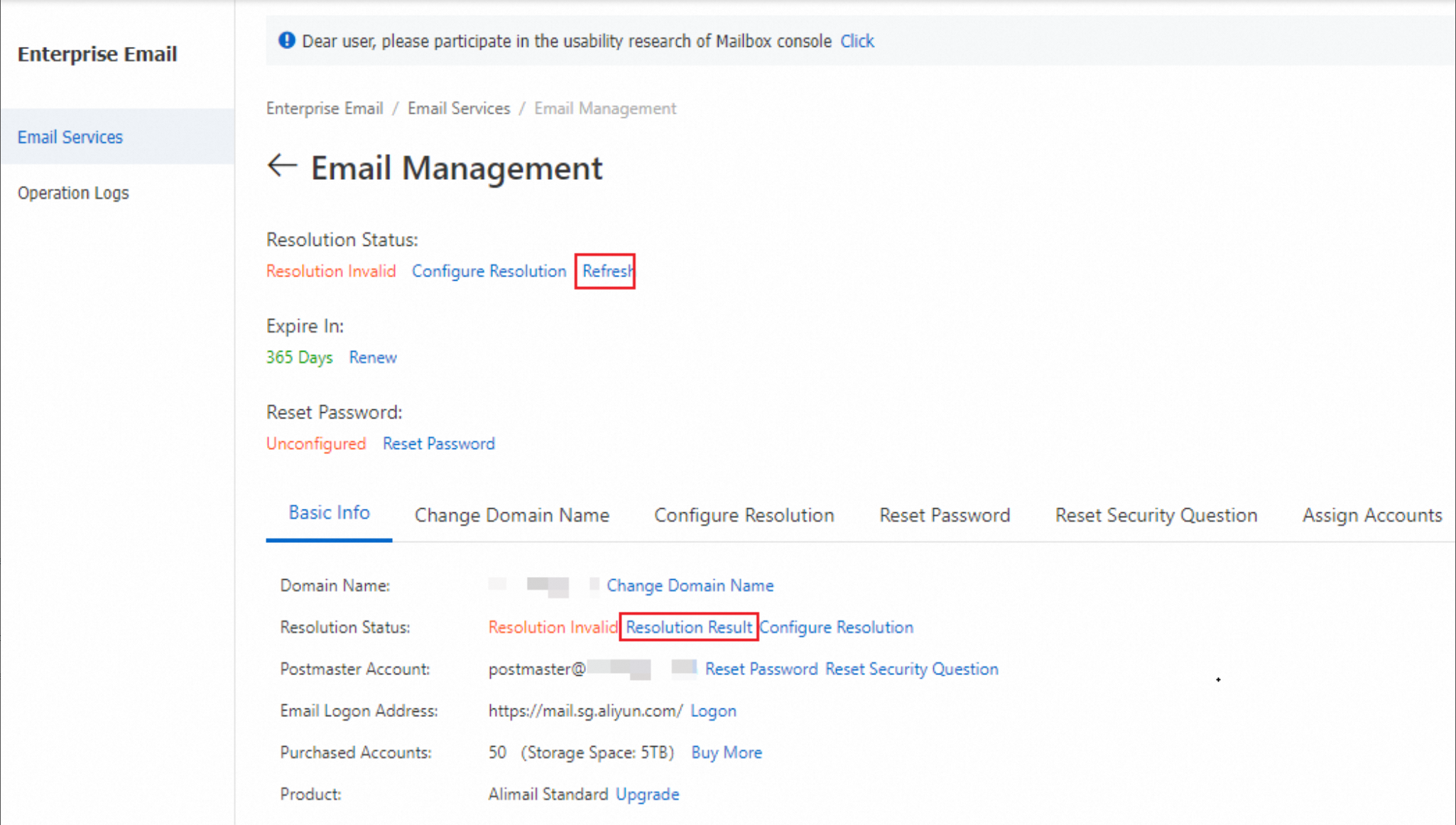
Log on to the Alibaba Mail console to go to the email management list page. On the page, click the Manage button to the right of the email domain name for which you want to set the DNS records.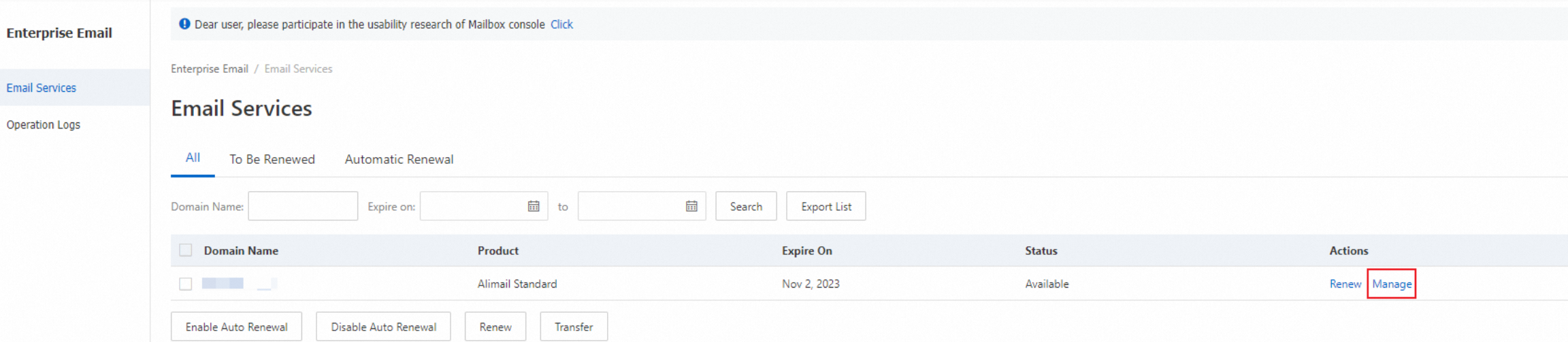
Click Check Domain Name Resolution or Refresh Status. The system automatically checks whether your domain name resolution is effective. If the DNS record is effective, the resolution status is updated to "Domain name resolution is effective". If it is not effective, you must wait for the DNS record to take effect.
Email client setup
Use SSL encryption for enhanced security. Ensure ports 465, 995, and 993 are open on your local network.
The Alibaba Mail client supports all major platforms, requires no manual configuration, and lets you log on with your email address and password. Download the client.
FAQ
How do I check which domain name is bound to my mailbox?
Method 1: Check in the email console
Log on to the email console and go to the email management list page to view the email instances with bound domain names. You can use the domain name search box to filter by domain name.
Method 2: Check in the domain name console
Log on to the domain name console, click Domain Names > Domain List in the left-side navigation pane to view the domain names you purchased. On the overview page, click DNS Management to go to the Alibaba Cloud DNS console, where you can view the MX record and other DNS records to confirm whether the domain name is bound to Alibaba Mail.
How do I log on to Alibaba Mail?
Your Alibaba Mail account is independent of your Alibaba Cloud account.
-
Webmail: Go to https://qiye.aliyun.com/ and log on with your email address and password to send and receive emails.
-
Console: Go to https://alimail.console.aliyun.com/ and log on with your Alibaba Cloud account to manage settings such as DNS records and employee accounts.
If you forget your email password, log on to the console, find your instance on the email management list page, and click Manage > Reset password. Alibaba Mail does not support self-service password reset through the Forgot password link on the logon page. If you are a regular employee user, contact your mailbox administrator to reset your password.
If you have created the accounts and configured domain name resolution, you can click here to log on and start sending and receiving emails.
If you have purchased an Alibaba Mail instance but have not yet configured it, see this topic for configuration instructions.
If the issue persists, click Feedback in the lower-right corner and describe the problem with your email address.