Feature release history
This topic describes the feature release history for the WUYING Workspace Personal Edition client, which includes the desktop client and the mobile client.
Desktop client
The desktop client includes the Windows client and the macOS client.
V8.5 - April 2026
Download Windows client V8.5 |
Text version
Edition | Change type | Change | Description |
Enterprise Edition/Personal Edition | New | The client now supports Traditional Chinese. | The Enterprise Edition and Personal Edition clients now support Traditional Chinese. |
Image version
Elastic Desktop Service Enterprise Edition introduces three new features. On the Policy management > Create Policy page, a new Keyboard shortcut response mode drop-down list is available, with options for Full screen or Window. In the floating ball settings, the cursor capture feature now supports graphics tablets for 3D and gaming applications. Additionally, the client now supports Traditional Chinese.
V8.4 - March 2026
Download Windows client V8.4 | Download macOS client V8.4
Text version
Edition | Change type | Change | Description |
Image version
Elastic Desktop Service Enterprise Edition has released six new features and improvements: 1) Improved file transfer experience with support for custom save directories. 2) Third-party approval for file transfer now integrates with enterprise AD domain accounts, which can be managed on the User center > AD user management page. 3) Provides more granular control over clipboard text copying. 4) Enhanced floating ball management with new options for the message center, pushing real-time messages, power options, and dual-screen functionality. 5) Manage client updates by configuring update settings in the console > Terminal management. 6) Query the assigned user for a cloud desktop on the cloud desktop card at Management > Information.
V8.3 - February 2026
Text version
Edition | Change type | Change | Description |
Personal Edition | New | Introduces Linggou Zone for the Personal Edition. | The Linggou Zone is specifically designed for AI creation and research. The platform integrates high-performance GPU computing power, toolchains, an acceleration engine, a ready-to-use AI environment, and a graphical user interface. This lets you build a dedicated cloud workstation without needing professional AI expertise. Combined with the Linggou content marketplace, it lowers the barrier to AI innovation and improves the efficiency of creation and research. |
Image version
Updates for Elastic Desktop Service: The Enterprise Edition features improved file transfer (UI optimization, batch deletion of history, automatic compression, and admin-authorized full-speed mode) and improved clipboard stability (fixed issues with copying images and rich text). New features include resetting the cloud desktop password from Personal center > Account information, a policy for managing client alerts for CPU, disk, and memory, and improved peripheral support with new image quality settings for cameras. The Personal Edition introduces the Linggou Zone, providing a suite of AI tools for creation and research.
V8.2 - December 2025
Text version
Applicable edition | Change type | Change | Description |
Image version
This release of Elastic Desktop Service (EDS) brings updates to the Enterprise Edition, including improved file transfer, enhanced clipboard stability, a feature for end users to reset cloud desktop passwords (from the Account Information page in the Personal Center), new policy-based controls for client resource alerts (configured in Policy Settings), and an improved peripheral experience; the Personal Edition now includes the Linggou Zone, a collection of AI tools.
V8.1 - November 2025
Text version
Edition | Change type | Change | Description |
Personal Edition | New | New AI Experiment Service | This service integrates select premium courses from Alibaba Cloud Design Innovation and Yungong Kaiwu, allowing you to access them directly without logging in again. |
Personal Edition | New | Workstations upgraded to AI workstations | - Workstations now support deduction by core-hour. - The new Academic Acceleration feature speeds up downloads from specified academic resource platforms. - Workstations now accelerate downloads from the ModelScope community. - Linux workstations now support SSH access configuration. |
Personal Edition | New | New Storage Center service | This service provides a centralized persistent storage solution for long-term data retention. After uploading files, you can mount the storage across different workstations and cloud desktops. Your data remains available in the Storage Center even after your workstation or cloud desktop is released or expires. |
Personal Edition | Improved | Improved mode switching for E-sports Mode | Improves resource scheduling to prevent "Out of Stock" errors, ensuring you can reliably switch to E-sports Mode. |
Infographic version
This release includes six updates for Elastic Desktop Service. For the Enterprise Edition: the client's network access method has been improved. On the login screen, you can now select an access method that prioritizes an internet connection before falling back to a private network. A new External Disk Mapping Policy lets administrators control read/write permissions for external drives and whether files can be copied to the cloud desktop. For the Personal Edition: the new AI Experiment Service offers premium courses like VISION AI design from Alibaba Cloud Design Innovation and Yungong Kaiwu. Workstations are upgraded to AI workstations. They now support deduction by core-hour, Academic Acceleration, faster access to the ModelScope community, and SSH configuration for Linux workstations. Additionally, switching to E-sports Mode is now more reliable, and a new Storage Center service provides 30 GB of complimentary persistent storage that you can enable with one click.
V7.13 - August 2025
Text
Applicable edition | Change type | Change | Description |
personal edition | Improved | Adds a "1 Week" subscription option for workstations. | A new "1 Week" subscription option is now available for workstations. This option does not support auto-renewal. [Purchase a workstation] |
personal edition | Improved | Adds user folder selection for workstation image changes. | When changing the image for a Windows workstation, you can now set a rule to specify which user folder to use: the one from the new image or the existing one on the workstation. [Change an image] |
Infographic
EDS has introduced new features and enhancements. The enterprise edition introduces four new management capabilities: file transfer approval, which lets administrators require approval for data transfers; custom save directories for file transfers and migrations, configurable in the File Transfer > Preferences menu; clipboard control for local disk mapping, letting administrators set read-only or read/write policies; and visibility control for the Metering module on the floating bar, which can be configured with the Metering Information toggle. The personal edition includes two enhancements: improved workstation purchasing with a new one-week subscription option, and an enhanced image change process for workstations that lets you specify which user folder to use.
V7.12 - July 2025
Text
Applicable edition | Change type | Change | Description |
Personal Edition | New | Introduces workstations. | This new workstation for individual users is powered by an enterprise-grade 5880 graphics card. Paired with the Image Community, it enables one-click, rapid deployment of private foundation models, AI applications, and high-performance graphics workstations. [Purchase and renew a workstation] |
Infographic
Wuying Workspace introduces several new features. The Enterprise Edition now supports data transfer auditing for cloud desktops. You can view file transfer records (including operation time, operator, and operation type) in the console under Security and Audit > operation logs > file transfer logs. You can configure the new full-speed transfer mode on the Create Policy page, and a full-speed transfer toggle is available on the client's floating ball. Other updates include immersive mode optimizations and a new workstation specification for the Personal Edition.
V7.11 - May 2025
Text
Edition | Change type | Change | Description |
Personal Edition | Improved | Updated terminology related to core-hour. | core-hour has been renamed to core-hour compute power, and shared core-hour package has been renamed to core-hour compute power package. |
Personal Edition | Improved | Upgraded package core-hours. | The core-hours included in cloud desktop packages have been upgraded to shared core-hours. They are no longer tied to a specific cloud desktop package and can be used to offset costs for any cloud desktop or cloud gaming usage under the same account. [Wuying Lingdou] |
Infographic
New features in Wuying Cloud Desktop: 1. For the Enterprise Edition, the floating ball now includes a shortcut to open the cloud desktop's System Security Center. After an administrator configures the Ctrl+Alt+Del shortcut on the Create Policy page in the console, users can click the Ctrl+Alt+Del button at the bottom of the floating ball menu to send the command. The floating ball's primary menu also includes Wuying Policy, Cloud Desktop Management, Terminal Settings, Performance & Latency, Messages, Status Monitoring, Remote Assistance, Quick Printer, Task Manager, File Transfer, Shared Mapping, and Feedback. 2. For the Personal Edition, "core-hour" has been renamed to core-hour compute power, and the remaining balance is displayed in a banner at the top of the console homepage. 3. For the Personal Edition, core-hours in packages will be upgraded to shared core-hours around May 15. They can then be used to offset costs for any cloud desktop or cloud gaming usage.
V7.10 - April 2025
Edition | Change type | Change | Description |
Personal Edition | Improved | Redesigned product experience. | We have redesigned the user interface for a cleaner, more focused experience. With an improved layout and more intuitive interactions, you can work more efficiently. |
V7.9 - March 2025
Edition | Change type | Change | Description |
Personal Edition | New | The Personal Edition now supports Kylin images. | You can now select a Kylin image when you create a cloud desktop. |
Personal Edition | Improved | Added login history and logged-in device management. | In the Personal Edition's Security Center, you can now view your login history and manage your logged-in devices. |
V7.8 - January 2025
Applicable version | Change type | Change | Description |
General | New | The peripheral connection guide pop-up now supports custom configurations. | You can now configure the peripheral connection guide pop-up with new settings. These include automatically connecting a peripheral to the cloud computer on subsequent connections and an option to save your settings to prevent the pop-up from appearing again. This update also improves the pop-up's default trigger mechanism. |
General | New | The floating ball now displays the local battery level and charging status. | When you run the Wuying client on a laptop, the floating ball displays the laptop's battery level and charging status. |
General | Improved | Improved management for cloud computer restore points. | The display logic for restore points has been improved. You can now view and manage restore points for the system disk and data disk separately. You can also view your restore point recovery history. |
General | Improved | Support for folder uploads in file transfer. | You can now upload entire folders, not just individual files. |
Personal Edition | New | Security Center now includes local disk mapping management. | To mitigate data leakage and intrusion risks, you can prohibit mapping local disks to your cloud computer. |
Personal Edition | New | Introduction of the image community. | The new image community provides a collection of third-party shared images. You can use these images to create a new cloud computer or change the image of an existing one. |
Personal Edition | Improved | The Purchase and Enter Coupon Code entries are now separate. | Click Enter Coupon Code on the main panel to go directly to the coupon code entry page, where you can enter your pickup coupon, redemption code, or Wuying code. |
V7.7 - December 2024
Change type | Change | Description | Related documentation |
New | Adds a hotkey to exit full-screen mode. | On the Windows client, press Note This feature is not available on the macOS client. | |
New | Adds an entry for Wuying Butler to the floating bar. | Wuying Butler helps you manage and configure peripherals, optimize system performance, and troubleshoot common issues. You can launch Wuying Butler from the primary menu of the floating bar. | |
Improved | Improves the connection guide for peripherals. | This update improves the trigger logic for the peripheral connection guide's pop-up window and its auto-connect settings. | None |
Improved | Improves the dual-screen experience. | You can adjust the resolution and DPI of the extended display in a dual-screen setup. | None |
Improved | Redesigns the client interface. | The updated interface is cleaner and simpler, improving the user experience for cloud gaming. | None |
V7.6 - November 2024
Change type | Change | Description | Related documentation |
New | Automatic driver installation for network printers | After you add a network printer, the Install Driver wizard opens automatically to guide you through the configuration. | N/A |
New | Query usage duration details | You can view a record of changes to your usage duration. | |
New | Restore points | The system automatically creates restore points to back up cloud desktop data. | |
Improved | Improved cloud gaming queue | During peak hours with limited resources, the queue now displays your position and how long your spot is reserved once a session becomes available. | |
Improved | Improved image management | When you update a shared image, you can now keep the original image sharing code. | |
Improved | Improved cloud desktop cards | The cloud desktop card now displays plan and network information, and provides a quick upgrade option. | |
Improved | Configure network printers | You can now open Wuying Assistant from the floating button to configure network printers. | N/A |
Improved | Improved inactivity timer | A 180-second countdown notification now appears before an inactivity timer is triggered. | N/A |
Improved | Customizable handling for shortcut and function keys | You can now specify whether system shortcut keys and function keys are handled by the cloud desktop or your local operating system. This preference can be set independently for windowed and full-screen modes. | |
Improved | Improved dual-monitor mode | When your local device is in dual-monitor mode, the cloud desktop's extended display now responds to shortcut keys. | N/A |
V7.5 - September 2024
Change type | Change | Description | Related documents |
New | Marketing campaign messages in the notification center | The notification center now includes a marketing campaign messages category for timely updates on Wuying promotions. | |
Improved | Client login experience | The options to switch between password and SMS login are now clearer, and the login QR code is displayed directly. Switching between the enterprise & commercial editions and the personal edition is also more intuitive. | |
Improved | Cloud desktop floating ball experience | The top-level menu of the cloud desktop floating ball has been redesigned for clarity. Features are now organized into more intuitive categories, making them easier to find. | |
Improved | Self-service maintenance for cloud desktops | When a driver issue occurs on a GPU-accelerated cloud desktop, you can now use a one-click repair option to automatically download and install the correct driver. | None |
Improved | Cloud desktop window behavior | To provide a consistent experience on both the Windows client and macOS client, double-clicking the cloud desktop's title bar now maximizes the window. | None |
Improved | Peripheral device support | The client now supports the OBS virtual camera. | None |
Improved | Dual monitor experience | In a dual monitor setup, the client now preserves the resolution you set for the primary display, and you can also adjust the resolution of the cloud desktop's main screen. | None |
Improved | Shortcut for releasing cursor capture | To improve mouse performance in games and 3D applications, enable cursor capture. For convenience, you can now exit this mode by double-pressing the Esc key. |
V7.3 - July 2024
Change type | Change | Description |
New | Adds the Security Center module | You can use the Security Center to view your account's login history across all Wuying clients, including the local system version, IP address, and login and logout times. |
New | Adds support for clipboard file transfer | You can copy and paste files between your cloud computer and local device through an encrypted channel, with transfer speeds up to 3 MB/s. |
Improved | Automatic shutdown for cloud computers after 15 consecutive days of hibernation | When a cloud computer is in hibernation, you are not billed for compute, but storage fees still apply. The system automatically shuts down cloud computers that have been in hibernation for 15 consecutive days. Please save your data in advance. |
Improved | Enhanced start, reboot, and wake up experience | When you click Start or Wake Up on a cloud computer card, the cloud computer window opens immediately to show the startup or wake-up process, making the experience more like using a local computer. |
Improved | Enhanced connection security | The system routes all connections to your cloud computer through an encrypted channel. |
V7.2 - June 2024
Change type | Change | Description |
New | Plug-and-play guidance for peripheral devices | When you connect a new peripheral device, a wizard now guides you through configuration and connection. |
New | Internet connection check and repair for cloud computers | The client now checks your cloud computer's internet connection when you connect. If an issue is detected, a pop-up window displays the cause and suggests a fix. This check is not performed if internet access is blocked by an administrator policy. |
New | Onboarding guide for new users | A brief onboarding process now guides new users to select the appropriate client version. |
New | QR code login | You can now log in by scanning a QR code with the Alibaba Cloud app. |
Improved | Client update experience | The client now displays update notifications while you are logged in and downloads new versions in the background. |
Improved | Power control experience for cloud computers | After you select Power > Restart from the floating bar menu, the cloud computer now automatically reconnects after restarting. In some scenarios, you can also power on and connect or wake up and connect directly from the cloud computer window. |
Improved | Client security | Security has been enhanced for client updates, login, and cloud computer connections. |
Improved | Mouse experience | (Windows client) The mouse mode for GPU-accelerated cloud computers now uses cursor capture. You can also customize the cursor release hotkey. |
Improved | Power management on cloud computer cards | The cloud computer card now directly displays the Power On button (when shut down), Wake Up button (when in hibernation), and Connect button (when running), without requiring you to hover over the card. |
V7.1 - April 2024
Change type | Change | Description |
New | Added the Wuying AI Assistant | The Wuying AI Assistant is now available. Hover over the floating ball to open it. Powered by the Qwen large model from Alibaba Cloud, the assistant can answer questions about operations, maintenance, and product usage. |
Bug fix | Resolved a known reconnection issue for cloud desktops | The client now continues trying to reconnect to your cloud desktop after the network on your local device is restored. |
Mobile client
The mobile client includes the iOS client and the Android client.
V8.3 - March 2026
Text version
Edition | Change type | Change | Description |
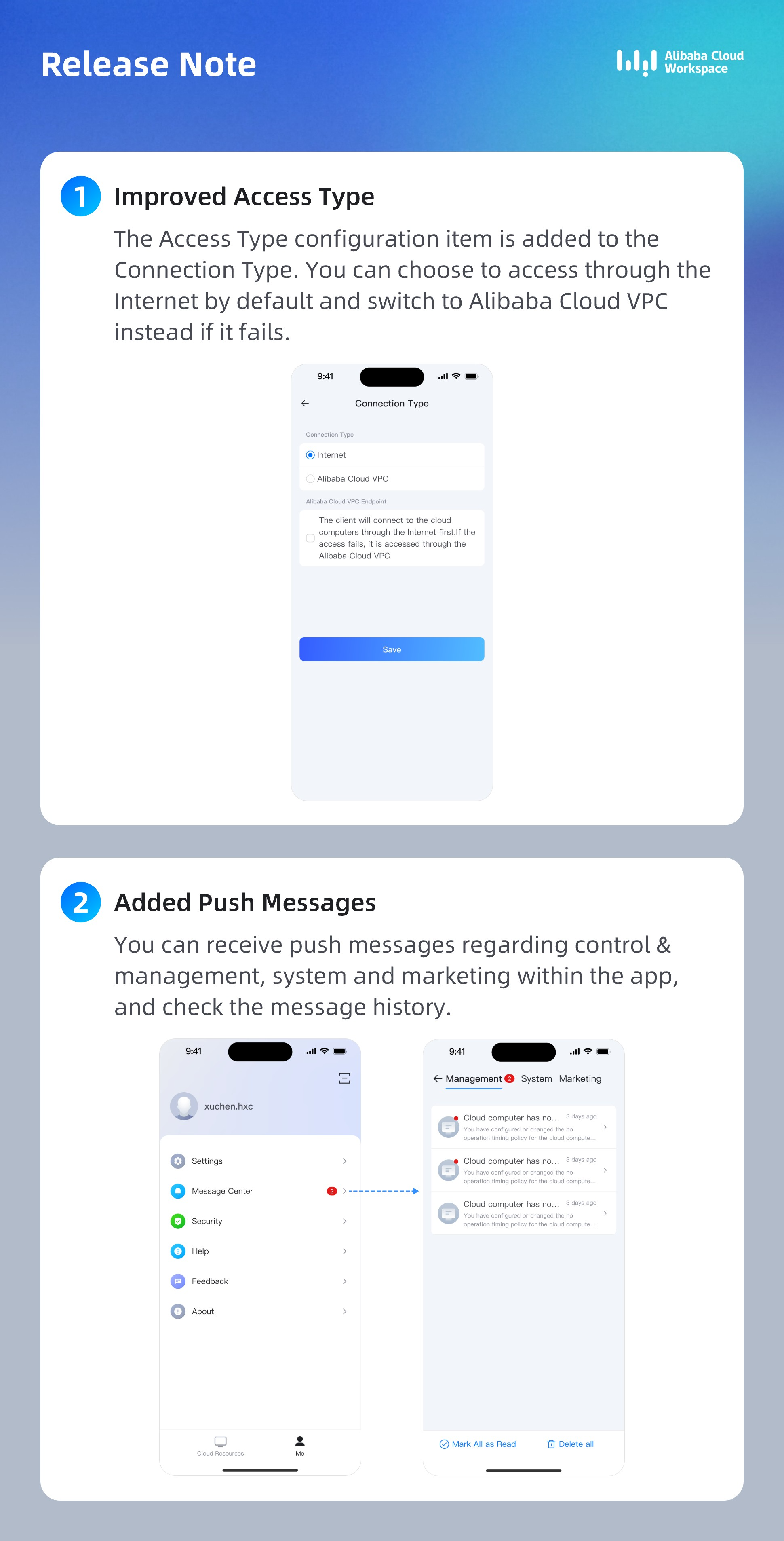
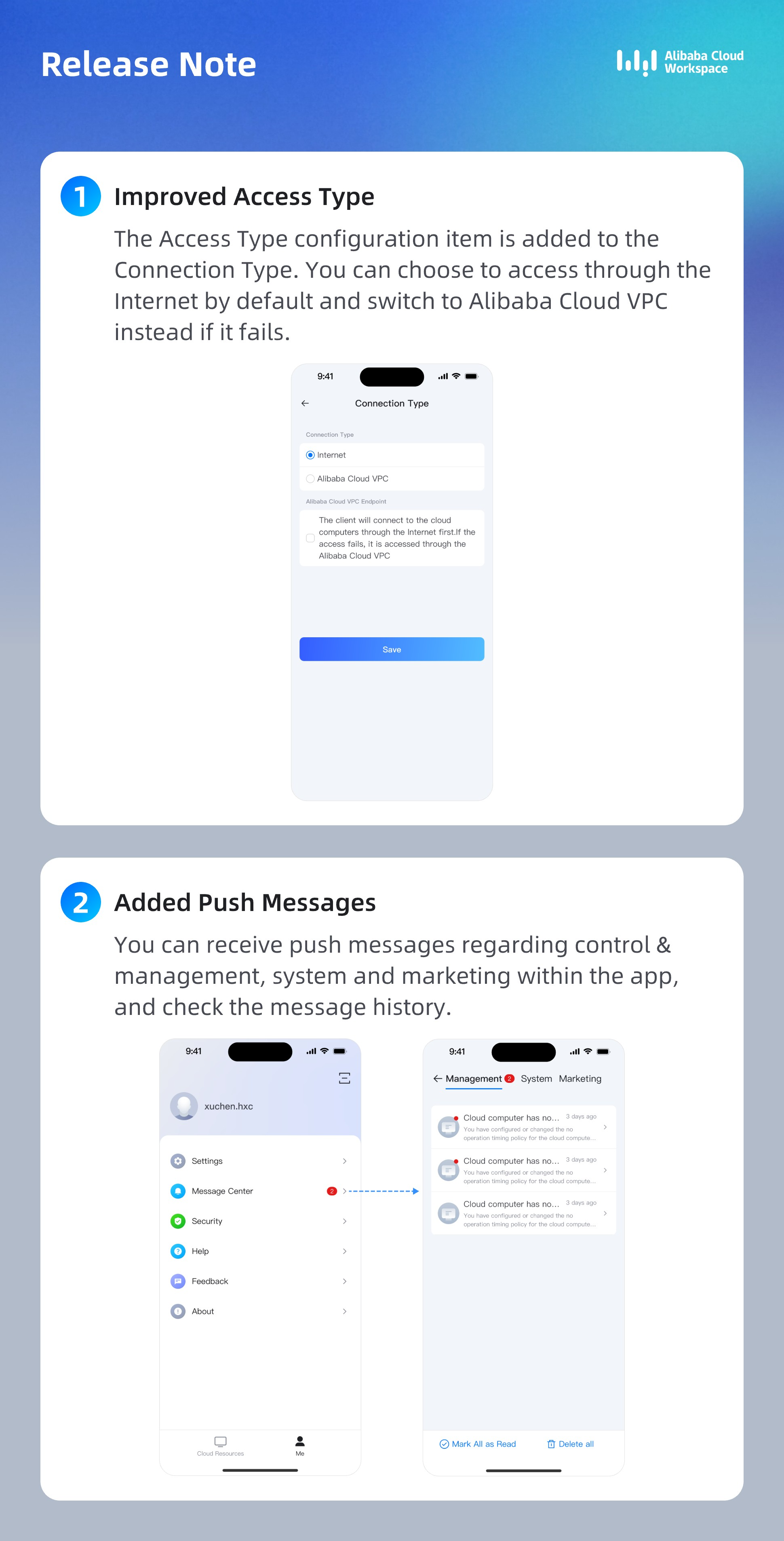
General | Enhancement | Enhanced Peripheral Management | In the floating ball's peripheral management panel, you can now enable the auto-connect switch for supported devices. Once enabled, these devices automatically connect to the cloud computer. |
General | Enhancement | Improved Manual Screen Orientation Experience | The mobile client now remembers the screen orientation for each cloud computer. After you manually switch between landscape and portrait modes, your preference is saved for future connections. |
Enterprise Edition | Enhancement | Enhanced Client Network Access | Client interaction with network access control policies is now optimized. This improves the login experience for users on the internet or an enterprise private network by enhancing connection logic and fallback mechanisms. |
Enterprise Edition | New Feature | Control Over Custom Restore Points | Administrators can now use a control policy to prevent end users from creating custom restore points. When this policy is enabled, the client hides the option to create a custom restore point, located under Cloud Computer Card > Management > Restore Point. |
Image version
Android
iOS
V8.2 - December 2025
Text version
Edition | Change type | Change | Description |
General | Improvement | Improved peripheral management | You can now enable the auto-connect feature for supported devices from the Peripheral Management panel in the |
General | Improvement | Improved manual screen orientation | When you manually switch the screen orientation, the mobile client saves your preference for future connections. |
Enterprise | Improvement | Improved client network access | Optimized the client's connection logic and fallback mechanisms for handling network access control policies. This improves the login experience for users connecting over the internet or an enterprise private network. |
Enterprise | New Feature | Control over custom restore points | Administrators can now use a control policy to prevent end users from creating custom restore points. When this policy is enabled, the option to create a custom restore point is hidden in the client under Cloud Computer Card > Management > Restore Point. |
Image version
Android
iOS
V8.1 - November 2025
Text version
Edition | Change type | Change | Description |
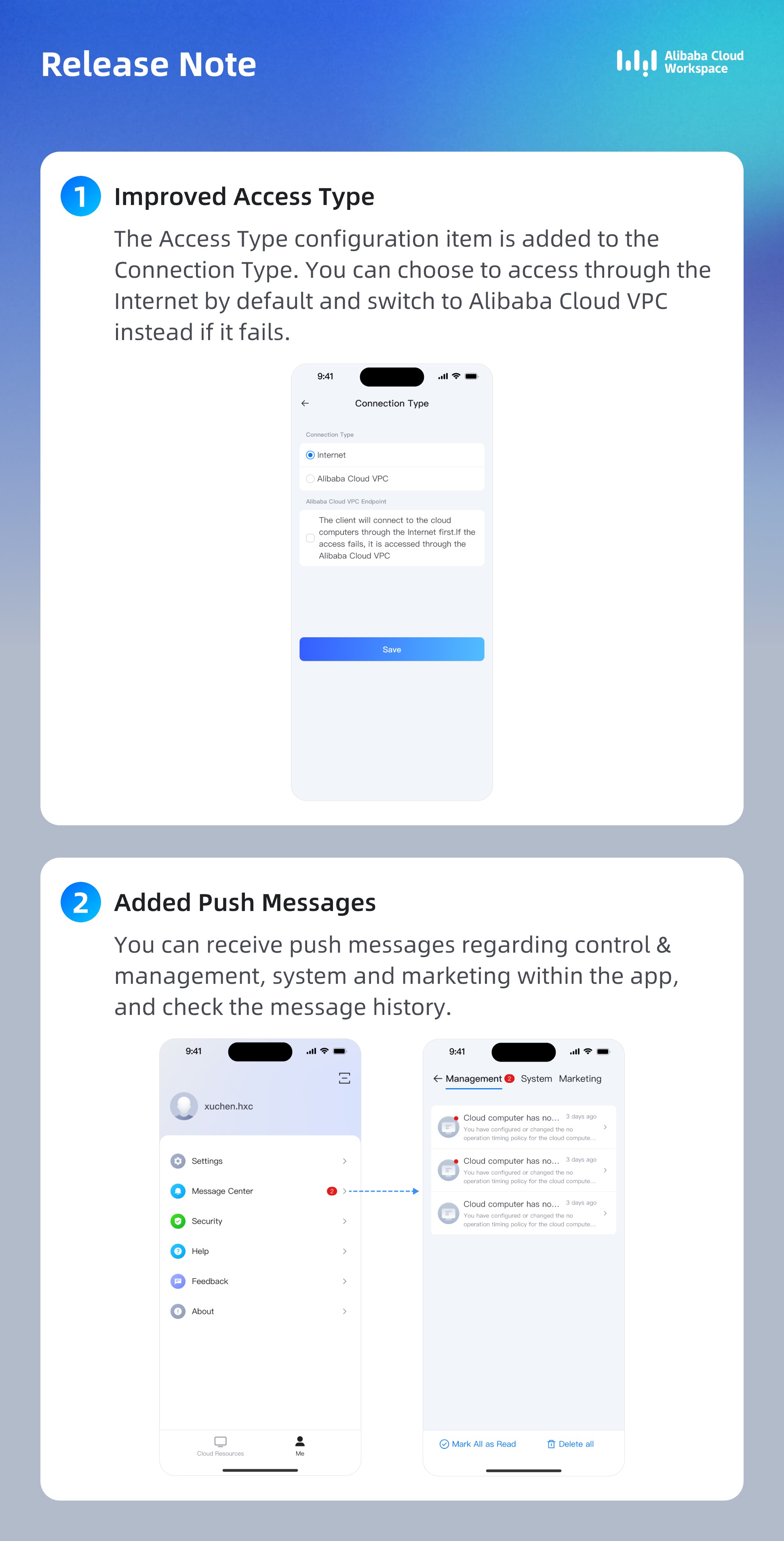
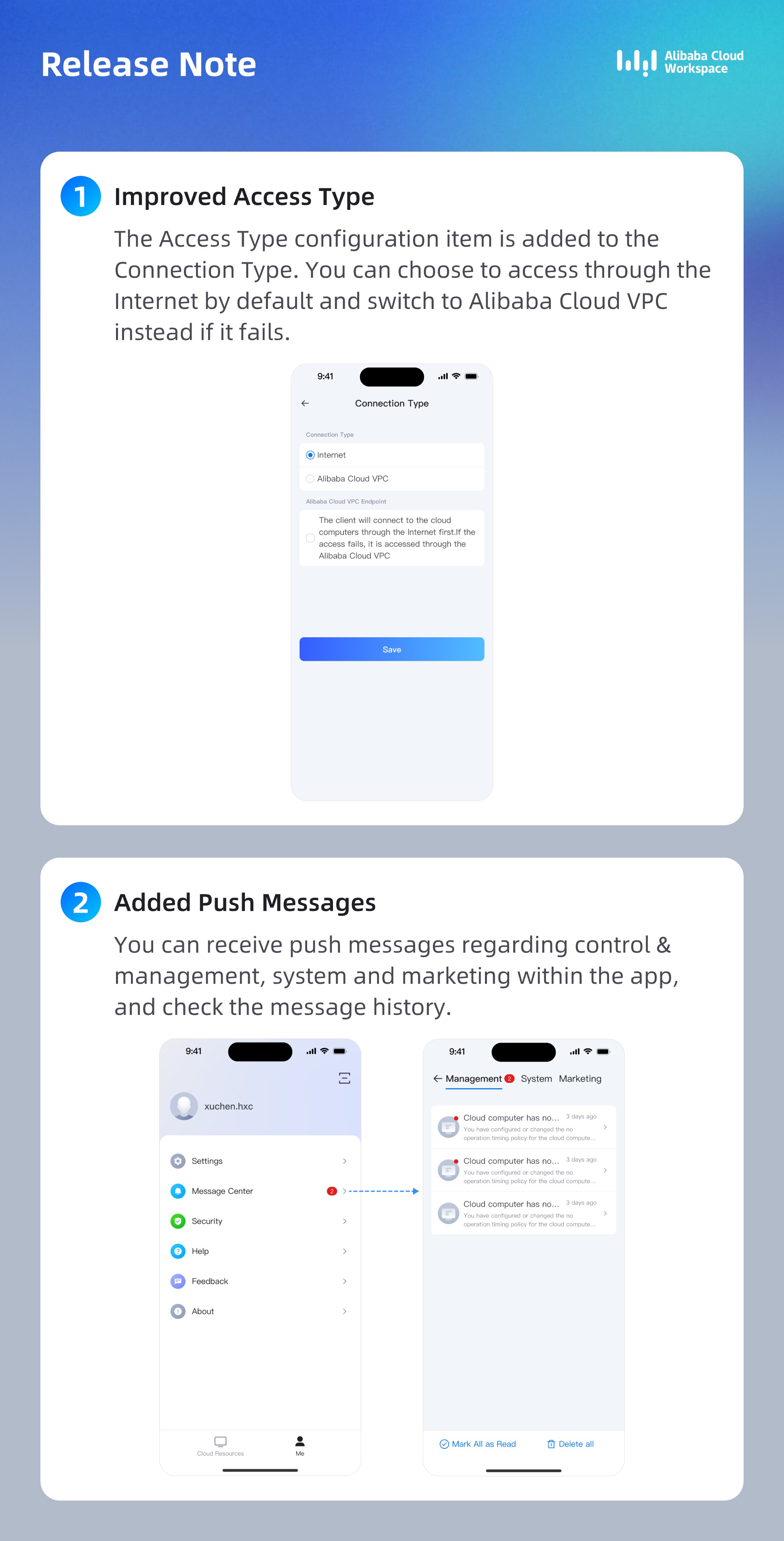
General | Improvement | Improved client network access | You can now configure a new network access option that directs the client to first attempt to connect over the internet and then fall back to an enterprise private network if the initial connection fails. |
General | New Feature | Real-time messages | You can now receive real-time administrative, system, and operational messages within the client and view your message history. |
Image version
Android
iOS
V8.0 - September 2025
Text version
Edition | Change type | Change | Description |
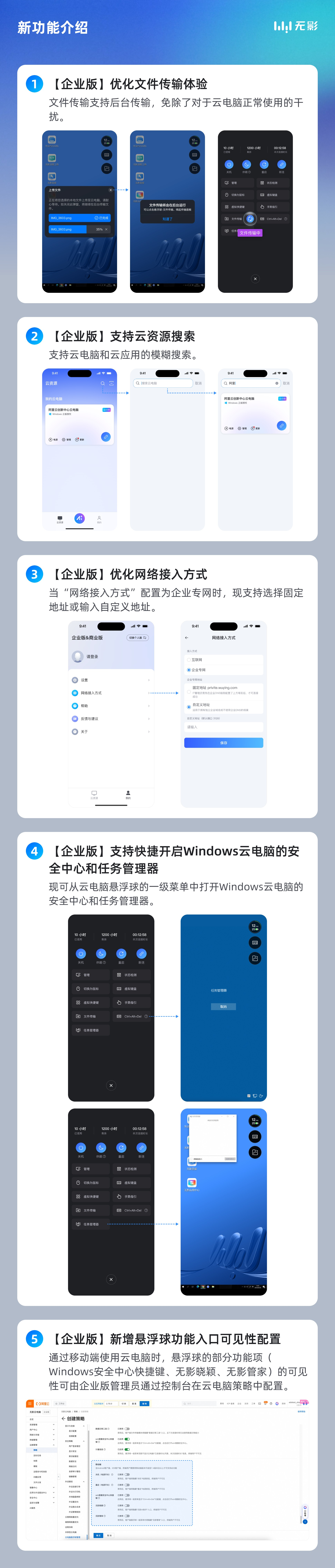
Enterprise | New Feature | Quick access to Windows Security Center and Task Manager | You can now open the Security Center and Task Manager for Windows cloud computers from the top-level menu of the |
Enterprise | New Feature | Cloud resource search | You can now use fuzzy search for cloud computers and cloud applications. [Cloud resource list] |
Enterprise | New Feature | Visibility configuration for DesktopAssistant features | Administrators can now control the visibility of features in the |
Enterprise | Improvement | Improved network access configuration | When the network access mode is set to Enterprise Private Network, you can now select a fixed address or enter a custom address. [Prerequisites] |
Enterprise | Improvement | Improved file transfer experience | File transfers can now run in the background, allowing you to use your cloud computer without interruption. [Background transfer mode] |
Image version
Android
iOS
V7.7 - August 2025
Text version
Edition | Change type | Change | Description |
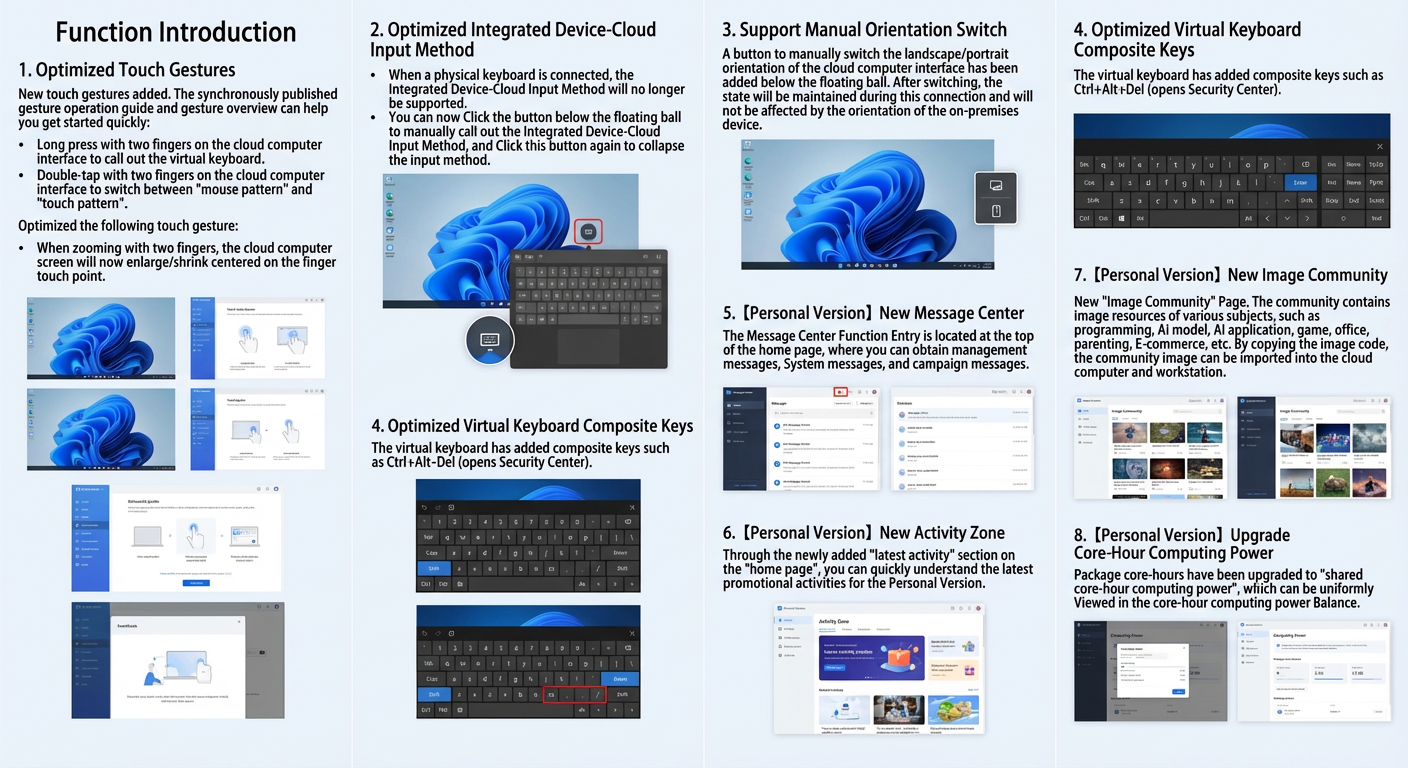
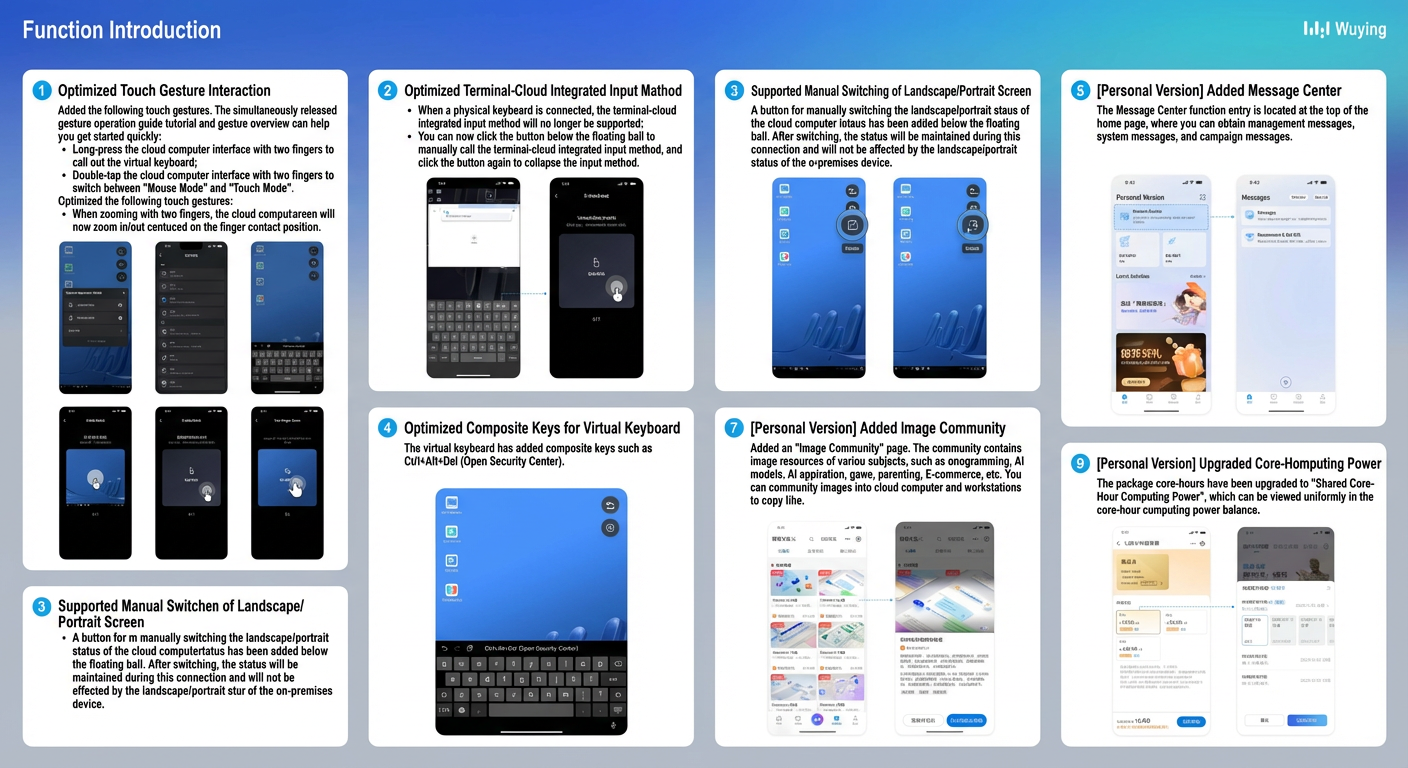
General | New Feature | New two-finger touch gestures | This version introduces new two-finger touch gestures. An in-app guide and gesture overview help you get started quickly. [Use touch gestures]
|
General | Improvement | Improved touch gesture interaction | The pinch-to-zoom gesture is improved. The screen now zooms in and out from the center point between your fingers. [Use touch gestures] |
General | Improvement | Improved device-cloud synergy keyboard |
|
General | Improvement | Manual screen orientation | A new button at the bottom of the |
General | Improvement | Improved virtual keyboard shortcuts | The virtual keyboard now includes common shortcuts, such as Ctrl+Alt+Del, to open the security screen. [Use the virtual keyboard] |
Personal Edition | New Feature | Message Center | The Home page now includes a Message Center where you can receive system messages and marketing campaign information. |
Personal Edition | New Feature | Events Section | The Home page now features a Latest Events section to help you quickly find the latest Personal Edition promotions. |
Personal Edition | New Feature | Image Community | A new Image Community page is available. The community provides image resources for various topics, such as programming, AI models, AI applications, gaming, office, parenting, and e-commerce. You can copy image codes to import community images into your cloud computers and workstations. |
Personal Edition | Improvement | Core-hour quota upgrade | Package core-hours are now "Shared Core-hour Quota" and appear in your core-hour quota balance. |
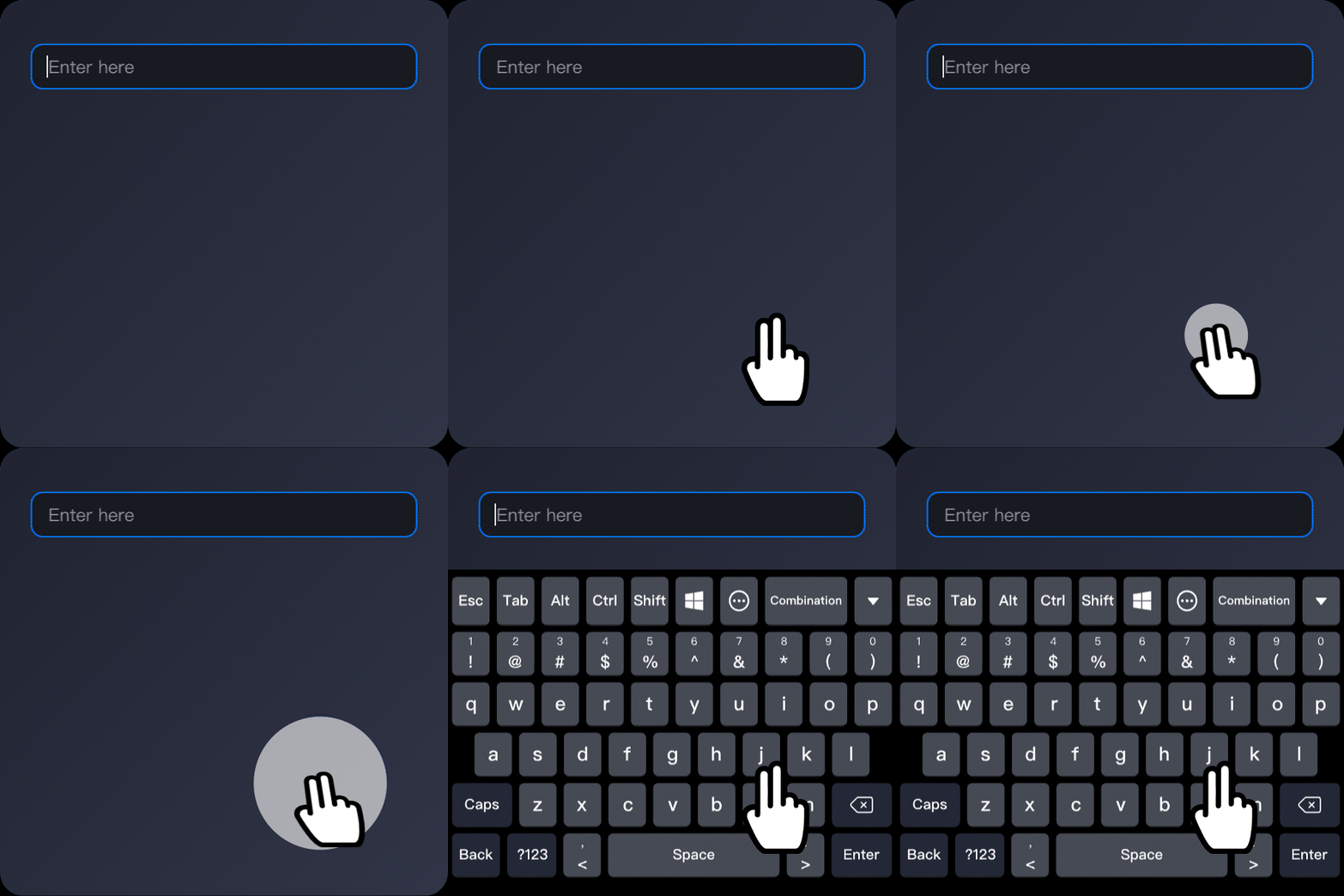
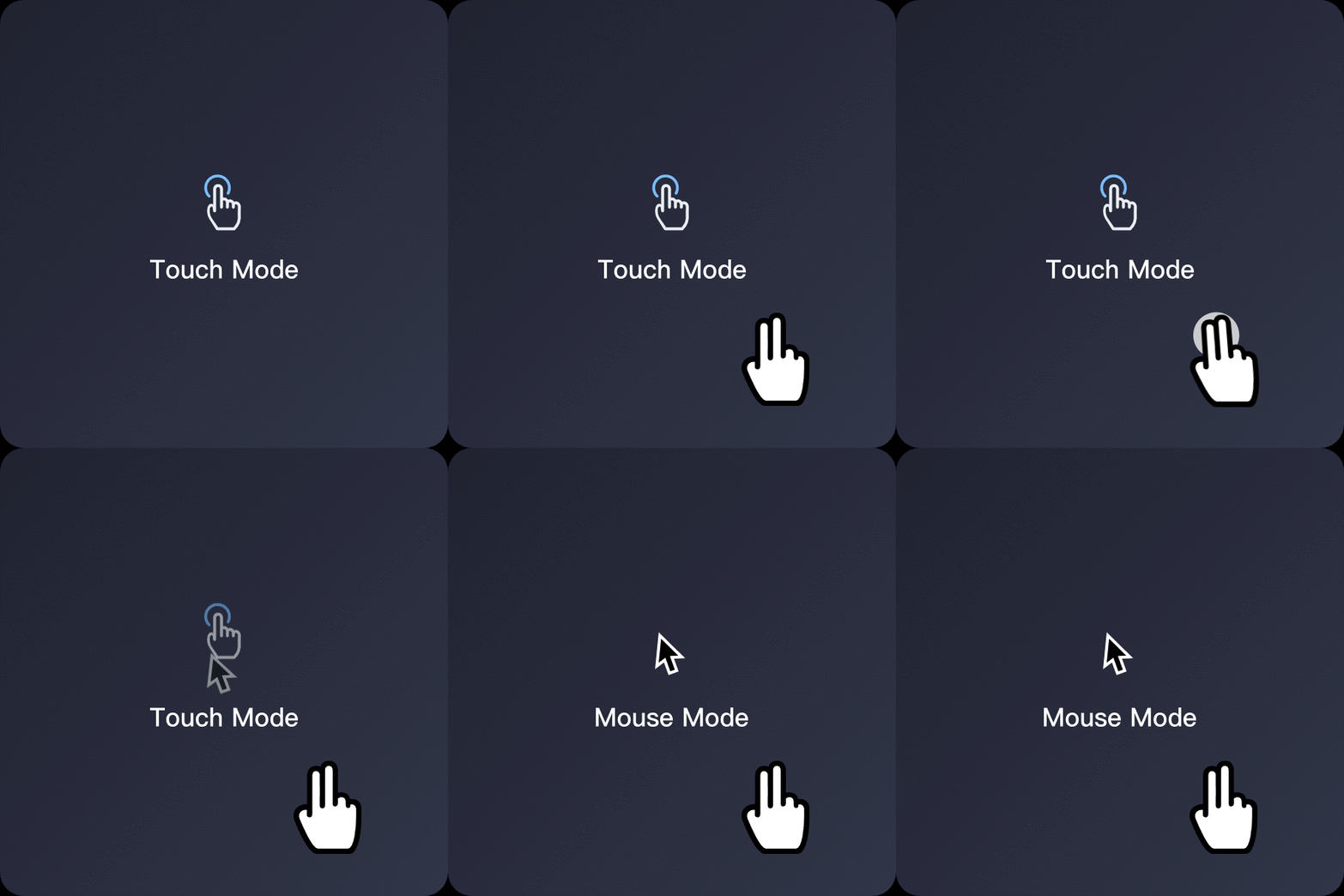
Image version
Android
iOS
V7.5 - May 2025
Text version
Edition | Change type | Change | Description |
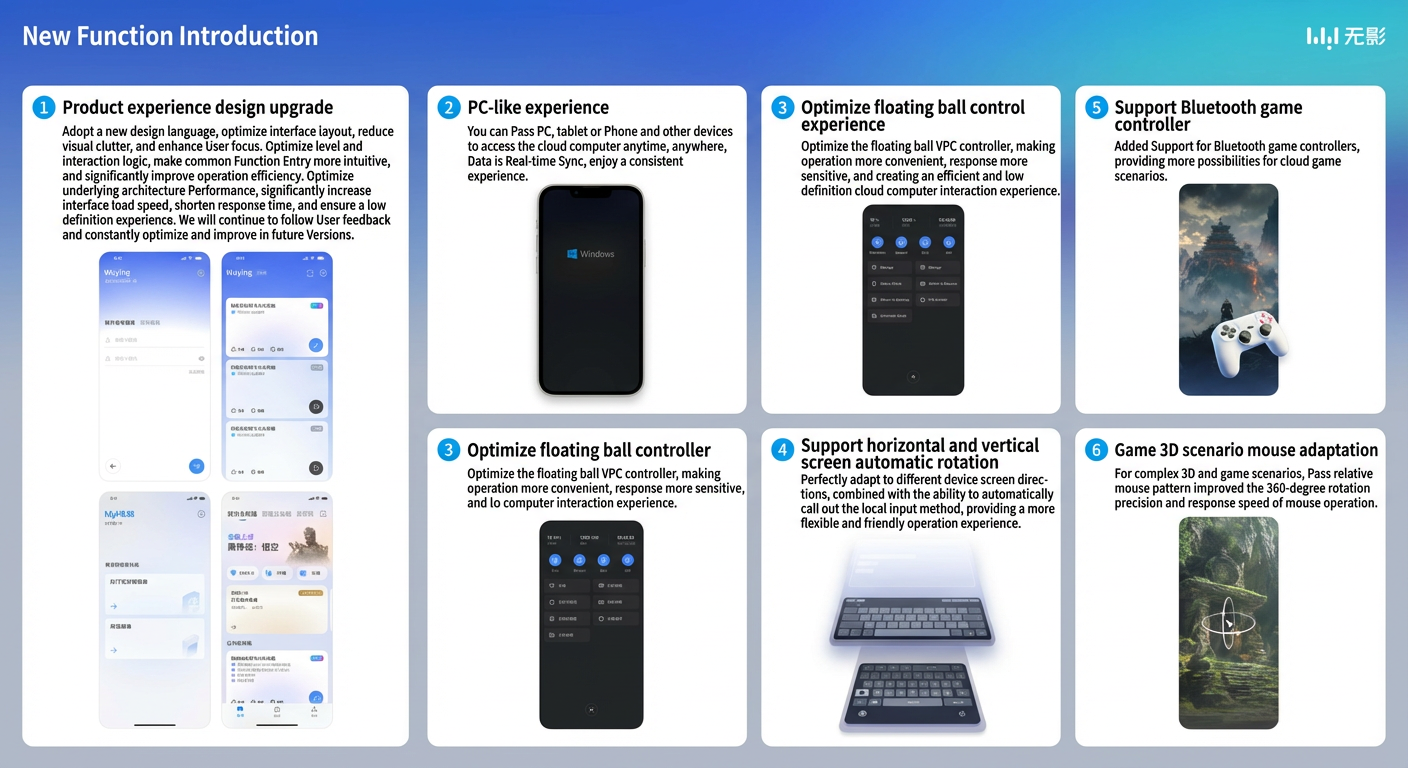
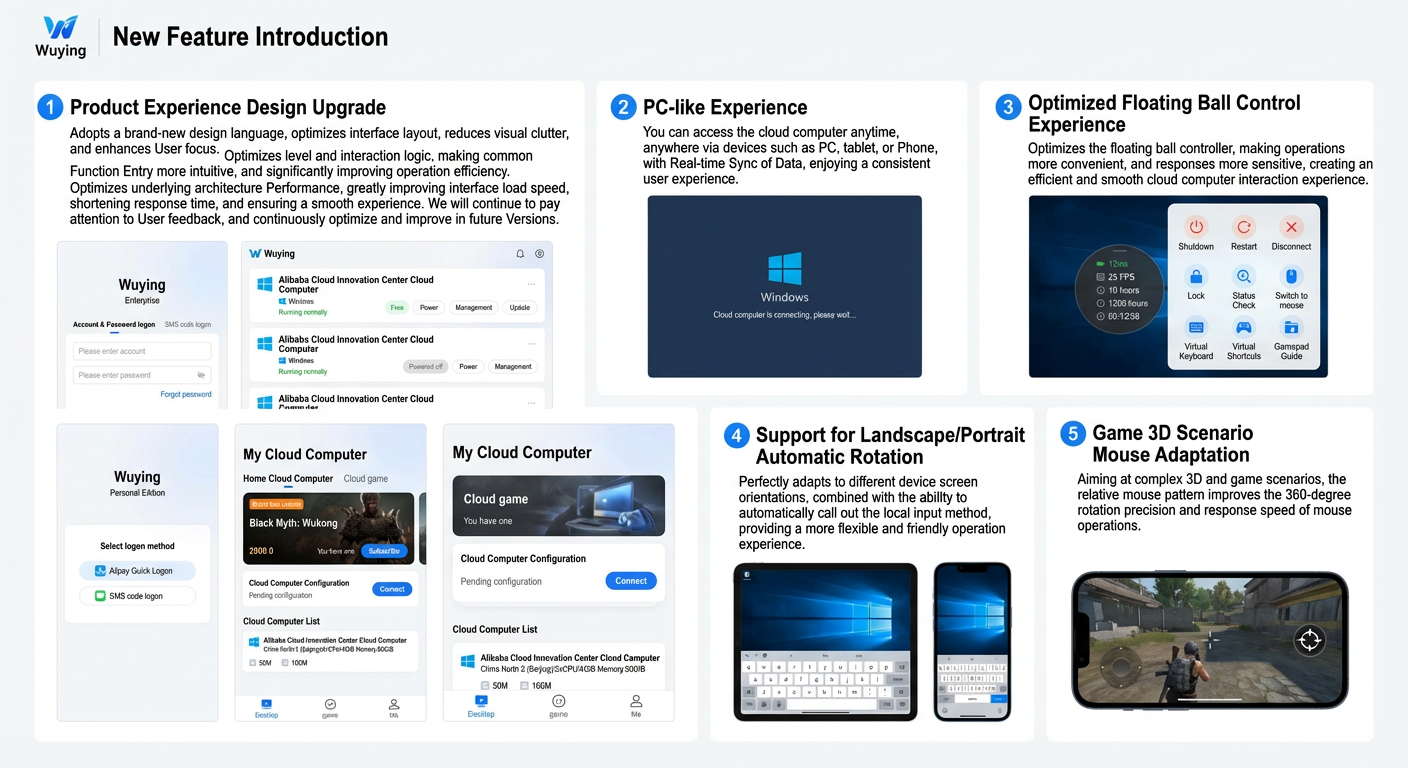
General | New Feature | Adaptive screen orientation | The client now supports adaptive screen orientation and can automatically launch your device's native input method, offering a more flexible and user-friendly experience. [Automatic rotation] |
General | New Feature | Bluetooth gamepad support | This version adds support for bluetooth gamepads, expanding possibilities for cloud gaming scenarios. Note This feature is not available on the iOS client. |
General | New Feature | Mouse support for 3D and gaming scenarios | For complex 3D and gaming scenarios, the new relative mouse mode improves the precision and responsiveness of 360-degree mouse movements. [Use relative mouse mode] |
General | Improvement | Upgraded product experience and design | This release introduces a major UI refresh with a new design language that reduces visual clutter and enhances focus. The navigation and interaction logic have been restructured for more intuitive access to common features, significantly improving operational efficiency. Optimizations to the underlying architecture greatly reduce UI loading times and latency, ensuring a smooth experience. Future versions will incorporate further improvements based on user feedback. [Mobile client] |
General | Improvement | Improved | The |
Image version
Android
iOS
V7.4 - January 2025
Edition | Change type | Change | Description |
General | New Feature | File upload and download | You can now upload files to and download files from your cloud computer through the top-level menu of the |
General | New Feature | Cursor confinement | This version adds a cursor confinement feature to the Note This feature is not available on the iOS client. |
General | New Feature | Auto-invoke local system keyboard | The Auto-invoke device keyboard feature has been added to the |
Personal Edition | New Feature | Cloud games now available | After you install the Wuying Android client on your Android phone or tablet, you can play cloud games without downloading them. You can connect supported gamepads to enhance your gaming experience. Note This feature is not available on the iOS client. |
Personal Edition | New Feature | The iOS client now supports hardware purchases | You can now purchase Wuying hardware terminals in the iOS client. You can then log on to these terminals to use the Personal Edition. |
V7.3 - November 2024
Edition | Change type | Change | Description |
Personal Edition | New Feature | Query credit hour bills | A new entry point lets you query credit hour bills and view a detailed breakdown of credit hour increases and decreases. |
V7.2 - October 2024
Edition | Change type | Change | Description |
General | New Feature | Support portrait and landscape modes for cloud computers | When auto-rotation is enabled on your local operating system, the cloud computer interface automatically adapts to your device's portrait or landscape orientation. |
General | Improvement | Improve the virtual keyboard experience | The virtual keyboard now works in portrait mode, and the cloud computer's display layout is optimized to accommodate the input area. |
General | Improvement | Improve the client UI language policy | The client UI language now defaults to your device's operating system language. If the OS language is set to Chinese or English, the client interface automatically switches to match. |
General | Improvement | Improve the DesktopAssistant interaction | When you drag the DesktopAssistant to the edge of the screen, it automatically collapses into a small tab. Tap the tab to expand the DesktopAssistant again. |
V7.1 - August 2024
Edition | Change type | Change | Description |
General | New Feature | Add Page Forward and Page Back virtual shortcuts | The DesktopAssistant now includes virtual shortcuts for Page Forward and Page Back to improve the user experience on small-screen mobile devices. Note This feature is not available on the iOS client. |
General | New Feature | Add activity cards | New types of activity cards are now available. If your account meets the participation criteria for an activity, you will see the corresponding card and can join. |
Personal Edition | New Feature | Log on with Alipay mini program | You can now log on to the mobile client with Alipay. |
Personal Edition | New Feature | Personal Edition supports starting up with different specifications. | Introduced credit hour-based cloud computers. Each time you start up a cloud computer, you can select from different specification modes, including a gaming mode for running gaming software. The credit hour consumption rate varies by mode. |
Personal Edition | New Feature | Create, share, and replace images | You can now create an image from a cloud computer and share it to quickly replicate its content. After receiving a shared image, you can apply it to a cloud computer to replace its image. |
V7.0 - June 2024
Edition | Change type | Change | Description |
General | New Feature | Diagnose and repair internet connections | When you connect to a cloud computer, the client checks its internet connection. If an issue is detected, a pop-up window displays the cause and suggested solutions. This feature does not apply if internet access is blocked by an administrator-configured policy. |
General | New Feature | Add a logon guide for new users | A new onboarding guide helps first-time users select the appropriate edition when they log on. |
General | Improvement | Improve the client update experience | The client now notifies you of new versions while you are logged on and supports downloading updates in the background. |
General | Improvement | Improve the network printer configuration experience | You can now view network printer configuration history and delete configurations. Note This feature is not available on the iOS client. |
General | Improvement | Improve the local camera experience | If system access permission is required, you can tap Peripheral in the DesktopAssistant menu and then tap Go to authorize. After you grant permission, the cloud computer connects to your device's front-facing camera by default. |
V6.9 - April 2024
Edition | Change type | Change | Description |
General | New Feature | Add a More module to the logon page | The logon page now includes a More module, which provides access to settings such as network access methods and UI language switching. |
General | New Feature | Add a Product Suggestions module to Profile | You can use this module to send feedback about your experience with Elastic Desktop Service. |
General | New Feature | Configure network printers | After you configure a network printer, you can check its connection status in the cloud computer by opening the DesktopAssistant and selecting Manage > Peripheral. |
General | New Feature | Add context-aware smart buttons for virtual shortcuts | The client now intelligently identifies the application you are using and provides virtual shortcuts for frequently used functions. For example, when you select a file or folder in the system file manager, the client displays shortcuts for copy, paste, and delete. |