
本文介绍已接入CDN的网站迁移至Windows实例后,访问该站点提示连接被拒绝问题的问题描述、问题原因和解决方案。
问题描述
已接入CDN的网站迁移至Windows实例之后,该Windows实例上的所有站点均无法正常访问,访问时提示连接被拒绝。
经过排查,发现该场景存在如下特征:
该Windows实例的443端口正常开启,并且该Windows实例的负载和带宽无明显变化。
该Windows实例使用宝塔(BT)面板搭建网站。
说明宝塔(BT)面板默认采用Apache提供Web服务。
Apache的
error_log中存在如下错误信息。Server ran out of threads to serve requests. Consider raising the ThreadsPerChild setting
问题原因
通过Apache的error_log信息可以判断,该Windows实例上没有线程来处理访问请求,导致该问题。
Windows操作系统中Apache程序使用mpm_winnt模块,该模块默认的线程数为64。当Web请求数超过该线程数时,Apache将无法正常提供服务。更多信息,请参见Apache MPM模块。
解决方案
本文操作步骤以Windows Server 2012 R2数据中心版64位中文版为例,实际操作以您实际的操作系统为准。
远程连接Windows实例。
具体操作,请参见连接方式概述。
启用MPM模块配置文件。
重要在默认情况下,MPM模块配置文件并没有启用,您需要执行如下操作进行启用。
打开资源管理器,找到
httpd-mpm.conf配置文件并记录存放位置。在您的
Apace安装目录\conf\extra目录中,可以找到主要用于MPM模块的httpd-mpm.conf配置文件。以该文件存放于C:\Program Files\BtSoft\apache\conf\extra路径为例,示例如下。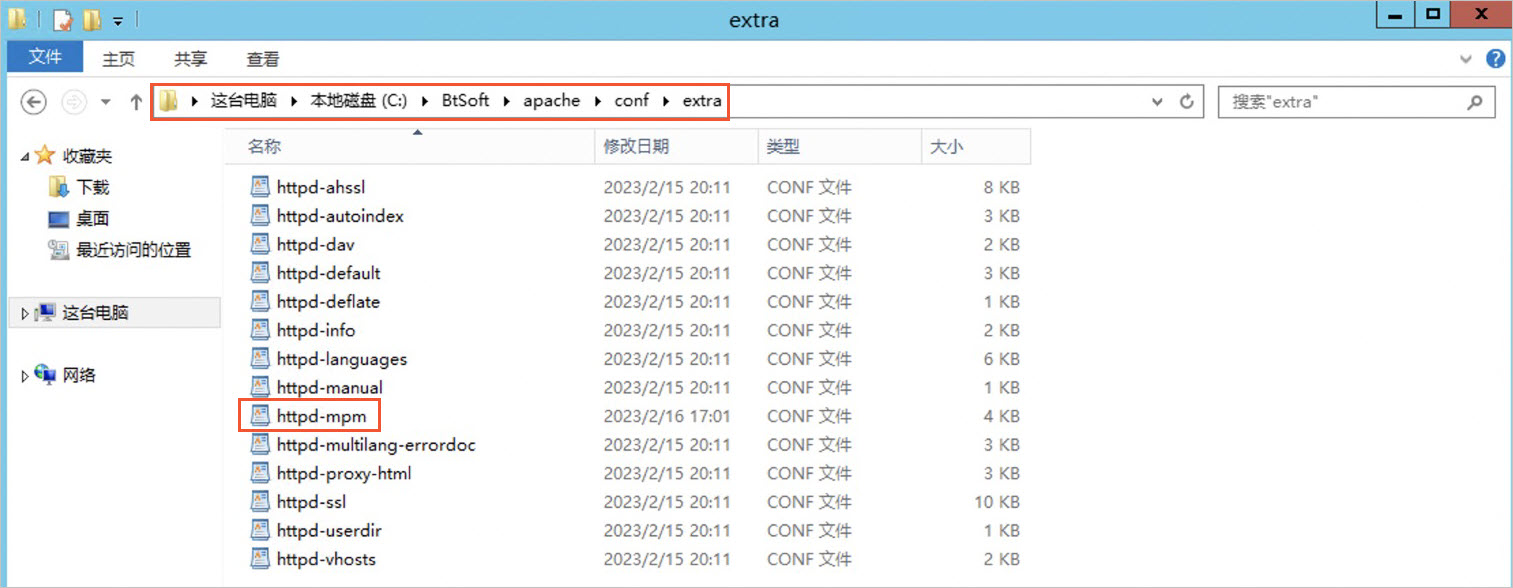
在
httpd.conf主配置文件中,执行如下操作,启用Include conf/extra/httpd-mpm.conf配置。说明httpd.conf主配置文件存放于Apace安装目录\conf目录中,本操作以httpd.conf主配置文件存放于C:\Program Files\BtSoft\apache\conf路径为例。找到待修改的代码,内容如下。
# Server-pool management (MPM specific)
# Include conf/extra/httpd-mpm.conf
删除
# Include conf/extra/httpd-mpm.conf代码中的#来启用Include conf/extra/httpd-mpm.conf配置,修改后的代码如下。# Server-pool management (MPM specific) Include conf/extra/httpd-mpm.conf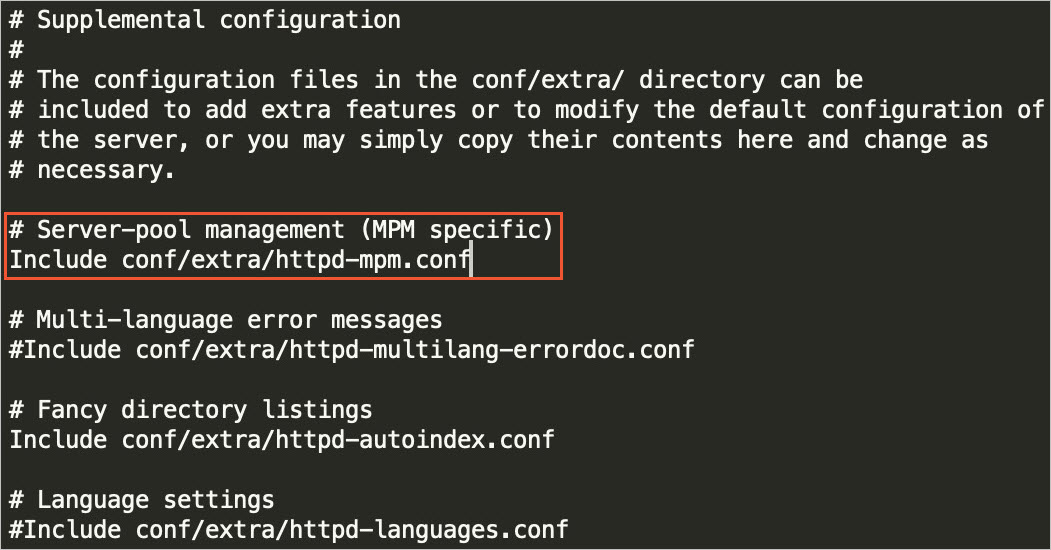
在
conf/extra/httpd-mpm.conf配置文件中,查看ThreadsPerChild参数值是否为64。说明Windows操作系统中Apache的
ThreadsPerChild参数默认值为64。如果
ThreadsPerChild参数值为64,则您需要修改如下代码,将ThreadsPerChild参数值修改为512,然后保存配置。重要512仅为示例值,并非推荐值。您需要根据Windows实例的负载和访问情况进行调整。更多该参数的信息,请参见Apache MPM通用指令。<IfModule mpm_winnt_module> ThreadsPerChild 512 MaxRequestsPerChild 0 </IfModule>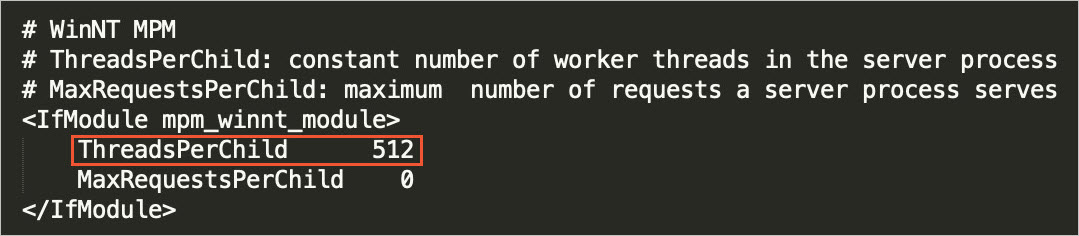
重新启动Apache服务。
在桌面左下角,选择
 > 服务器管理器。
在服务器管理器页面的左侧导航栏中,单击本地服务器。
在服务区域中找到Apache,单击鼠标右键,然后单击重新启动服务。
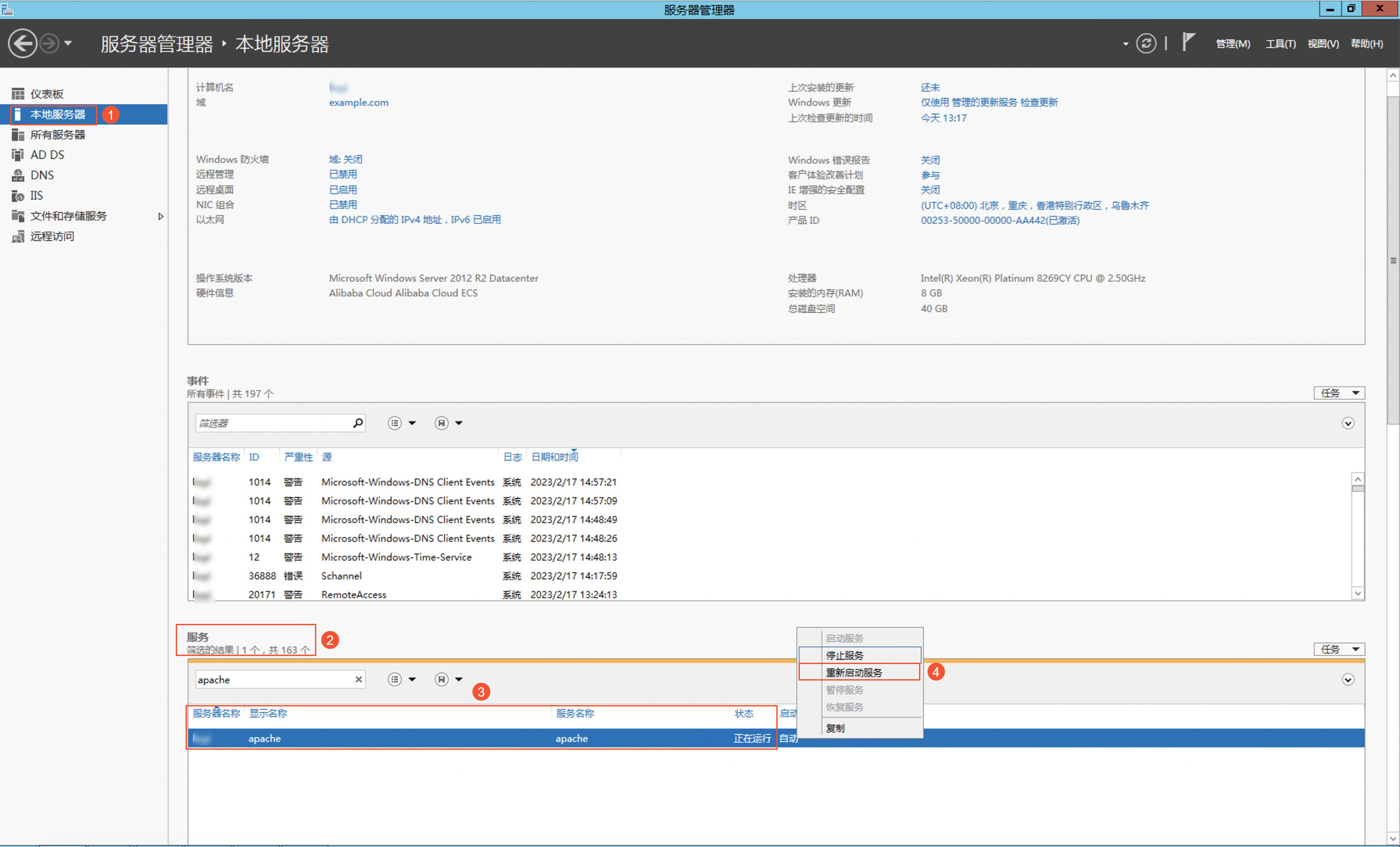
重新访问该网站。
如果成功访问该网站,则问题解决。